
1. Introducció
Gràcies per la compraasing the Levoit Windi Mini White Tower Fan. This manual provides important information regarding the safe operation, maintenance, and troubleshooting of your new fan. Please read all instructions carefully before use and retain this manual for future reference.
2. Informació de seguretat
Per reduir el risc d'incendi, descàrrega elèctrica o lesions, seguiu sempre les precaucions de seguretat bàsiques:
- Assegureu-vos que el ventilador estigui col·locat sobre una superfície estable i anivellada.
- No feu funcionar el ventilador amb un cable o un endoll danyats.
- Keep fingers and other objects away from the fan grilles when operating.
- No utilitzeu el ventilador a prop de l'aigua ni en ambients excessivament humits.
- Desendolleu el ventilador abans de netejar-lo o fer qualsevol manteniment.
- This fan uses an adapter power cord and is not cordless. Always plug it into a suitable power outlet.
3. Producte acabatview
Característiques
- VortexAir Technology: Provides focused, smooth, and high-performance airflow up to 23 ft/s.
- Motor de corrent continu silenciós: Operates at a low noise level of 20-43dB, suitable for bedrooms and offices.
- Disseny portàtil: Compact size (5"D x 5"W x 13"H) with a soft carrying handle for easy relocation.
- Eficient energètic: Consumes a maximum of 7.5 watts.
- Flexible Airflow Control: 5 fan speeds plus a Turbo speed, and multi-angle oscillation (30°, 60°, or 90°).
- Controles convenients: Includes a remote control, touch control panel, 12-hour timer, and sound/display off functions.
Components
The Levoit Windi Mini White Tower Fan consists of the main fan unit, a power adapter, and a remote control.
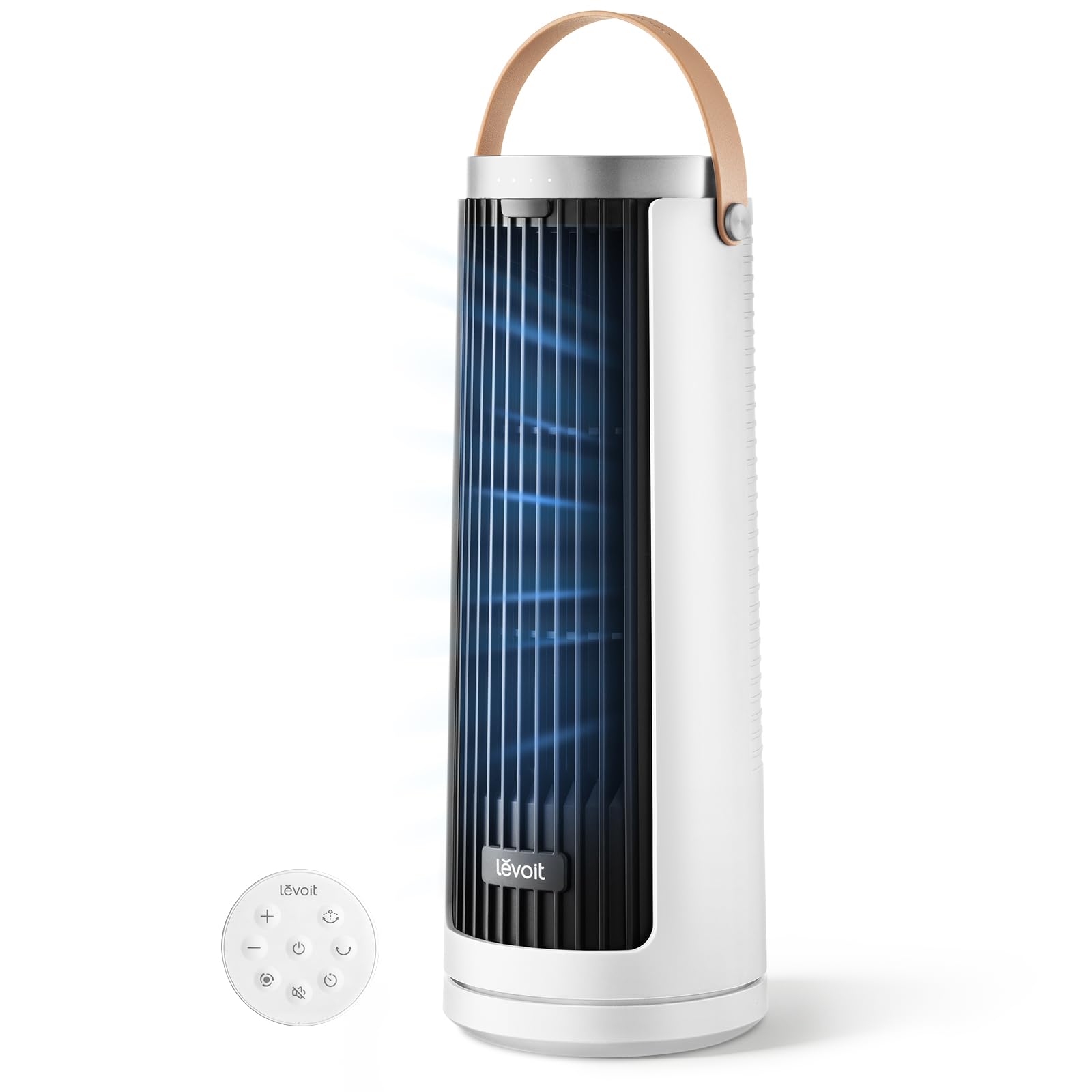
Image: Levoit Windi Mini White Tower Fan, showing its compact tower design.

Image: Top control panel of the Levoit Windi Mini White Tower Fan and its remote control.
4. Configuració
- Desembalatge: Carefully remove the fan and all accessories from the packaging. Ensure all components are present: fan unit, power adapter, and remote control.
- Col·locació: Col·loca el ventilador sobre una superfície ferma i anivellada. Assegura't que hi hagi prou espai al voltant del ventilador per a un flux d'aire i una oscil·lació òptims.
- Connexió d'alimentació: Connect the power adapter to the fan's power input port, then plug the adapter into a standard electrical outlet.

Image: The Levoit Windi Mini White Tower Fan positioned in a bedroom and a home office, demonstrating its versatility.
5. Instruccions de funcionament
Tauler de control i control remot
The fan can be operated using the touch control panel on top of the unit or the included remote control.

Image: Close-up of the fan's control panel illustrating fan speed levels (1-4, Turbo) and oscillation angles (0°, 30°, 60°, 90°).
Funcions
- Encès/apagat: Premeu el botó d'engegada (⏻) per encendre o apagar el ventilador.
- Velocitat del ventilador: Premeu el botó de velocitat del ventilador (☷) repeatedly to cycle through 5 speed settings (1-5) and a Turbo speed.
- Oscil·lació: Premeu el botó d'oscil·lació (↻) to activate or deactivate the oscillation feature. Press again to cycle through 30°, 60°, or 90° oscillation angles.
- Temporitzador: Premeu el botó del temporitzador (⏱) to set the fan to automatically turn off after a set period (up to 12 hours).
- Sound & Display Off: Press the dedicated button on the control panel or remote to turn off the display lights and button sounds for an undisturbed environment.
6. Manteniment
Una neteja regular ajuda a mantenir el rendiment del ventilador i n'allarga la vida útil.
- Abans de la neteja: Desendolleu sempre el ventilador de la presa de corrent.
- Neteja exterior: Netegeu les superfícies exteriors del ventilador amb un drap suau iamp tela. No utilitzeu netejadors abrasius ni dissolvents.
- Entrada/sortida d'aire: Use a vacuum cleaner with a brush attachment to gently remove dust from the air inlet and outlet grilles.
- Emmagatzematge: If storing the fan for an extended period, clean it thoroughly and store it in a cool, dry place, preferably in its original packaging.
7. Solució De Problemes
| Problema | Causa possible | Solució |
|---|---|---|
| El ventilador no s'encén. | Not plugged in; power outlet malfunction; fan malfunction. | Ensure the power adapter is securely plugged into both the fan and a working electrical outlet. Test the outlet with another device. If the issue persists, contact customer support. |
| Flux d'aire feble. | Air inlets/outlets are blocked; fan speed is too low. | Check for any obstructions around the air inlets and outlets. Increase the fan speed setting. |
| El ventilador fa soroll. | El ventilador no està sobre una superfície plana; obstrucció interna. | Ensure the fan is placed on a stable, flat surface. Check for any foreign objects inside the fan grilles (after unplugging). |
| El comandament a distància no funciona. | Batteries are dead; remote not aimed correctly. | Replace the remote control batteries. Ensure the remote is aimed directly at the fan's receiver. |
8. Especificacions
| Característica | Detall |
|---|---|
| Nom del model | Levoit Windi Mini White |
| Número de model | LTF-F132-WUS |
| Marca | Levoit |
| Dimensions (P x A x A) | 5 "P x 5" W x 13" H |
| Font d'alimentació | DC |
| Wattage | Màxim 7.5 watts |
| Nivell de soroll | 20 dB (mínim) |
| Capacitat de cabal d'aire | Fins a 23 peus/s |
| Nombre de velocitats | 5 + Turbo |
| Angles d'oscil·lació | 30°, 60°, 90° |
| Temporitzador | Fins a 12 hores |
| Mètode de control | Tàctil, comandament a distància |
| Material | Plàstic |
| UPC | 810123679034 |
9. Garantia i Suport
Levoit provides a warranty for this product. For detailed warranty information, please refer to the warranty card included with your purchase or visit the official Levoit weblloc.
If you have any questions, concerns, or require assistance with your Levoit Windi Mini White Tower Fan, please contact Levoit Customer Service. Contact information can typically be found on the product packaging, the official Levoit website, or by referring to the "Customer Service" section mentioned in the product description.
També podeu visitar el Levoit Store on Amazon per obtenir més informació sobre el producte i recursos d'assistència.


