
1. Introducció
The realme Watch 5 is a feature-rich smartwatch designed to enhance your daily life with advanced health monitoring, communication, and navigation capabilities. This manual provides essential information for setting up, operating, and maintaining your device.
2. Què hi ha a la caixa
Si us plau, comproveu el contingut del paquet en desempaquetar-lo:
- 1N realme Watch 5 Smartwatch
- 1N Charging Cable
- Manual d'usuari 1N
3. Configuració
3.1 Càrrega del rellotge intel·ligent
Before initial use, fully charge your realme Watch 5. Connect the provided charging cable to the charging port on the back of the watch and to a standard USB power adapter (not included). The watch display will indicate charging status.
3.2 Emparellament amb el telèfon intel·ligent
To unlock all features, pair your realme Watch 5 with the realme Link app on your smartphone.
- Baixeu i instal·leu el Enllaç realme aplicació des de la botiga d'aplicacions del teu telèfon intel·ligent.
- Assegureu-vos que el Bluetooth estigui habilitat al vostre telèfon intel·ligent.
- Open the realme Link app, create an account or log in.
- Follow the in-app instructions to add a new device and select realme Watch 5.
- Confirma la sol·licitud d'emparellament tant al rellotge com al telèfon intel·ligent.
3.3 Configuració inicial
After successful pairing, the app will guide you through initial settings such as personal profile, notification preferences, and watch face selection.
4. Funcionament del rellotge intel·ligent
4.1 Pantalla i navegació
The realme Watch 5 features a 1.97-inch AMOLED touchscreen display. Navigate by swiping across the screen and tapping icons. The physical button on the side typically serves as a home/back button or to access the app list.
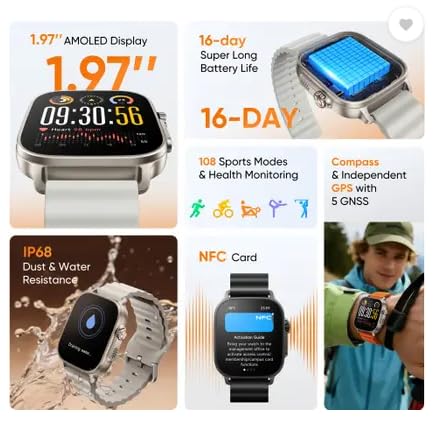
Image: The 1.97-inch AMOLED display provides a clear and vibrant interface for viewing information and interacting with the watch.
4.2 Característiques clau
- Trucades per Bluetooth: Once paired, you can make and receive calls directly from your watch. Access the dialer or call history from the watch interface.

Image: The watch supports high-definition Bluetooth calling and independent Bluetooth intercom for clear communication.
- GPS and Compass: The watch includes independent GPS with 5 GNSS support and a built-in compass for accurate outdoor activity tracking and navigation.
- Vigilància de la salut: Monitor various health metrics including heart rate, sleep patterns, and more. Access these features through the health section of the watch or the realme Link app.

Image: The watch offers sleep monitoring to help users understand and improve their sleep quality.
- Modes esportius: The watch supports numerous sports modes for tracking different physical activities. Select your desired activity to record data such as steps, distance, calories burned, and heart rate during workouts.
- NFC: Utilize NFC for convenient payments or other compatible functions where supported. Refer to the NFC section in the realme Link app for setup.
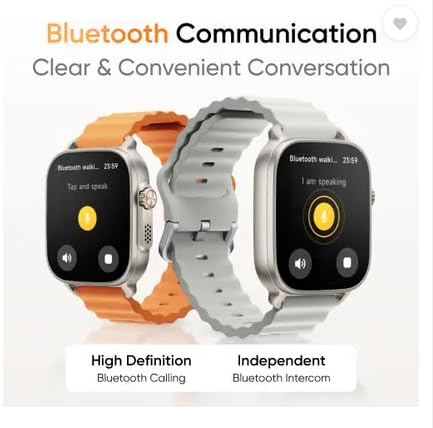
Image: The watch supports NFC card functionality, allowing for various contactless interactions.
- Reproducció de música: Enjoy 200 Mbits of offline music storage or control music playback on your connected smartphone via Bluetooth.
- Game Guardian Mode: This mode is designed to enhance your gaming experience by providing specific functionalities or notifications during gameplay.
5. Manteniment
5.1 Neteja del rellotge intel·ligent
Netegeu el rellotge i la corretja regularment amb un drap suau i sec.amp cloth. Avoid using harsh chemicals or abrasive materials, which can damage the device.
5.2 Resistència a l'aigua i la pols
The realme Watch 5 is IP68 rated for dust and water resistance. This means it can withstand immersion in water up to 1.5 meters for 30 minutes. It is suitable for daily use and light water activities, but not recommended for diving or high-pressure water activities.

Image: The watch is designed with IP68 dust and water resistance, making it suitable for various environments.
5.3 Optimització de la durada de la bateria
To maximize battery life (up to 16 days, 20 days in Light Mode, 6 days with AOD), consider adjusting screen brightness, limiting continuous heart rate monitoring, and disabling unnecessary notifications.
6. Solució De Problemes
- El rellotge no s'encén: Assegura't que el rellotge estigui completament carregat. Connecta'l al carregador durant almenys 30 minuts.
- No es pot emparellar amb el telèfon intel·ligent: Make sure Bluetooth is enabled on your phone and the watch is within range. Restart both devices and try pairing again through the realme Link app.
- Dades de salut inexactes: Assegureu-vos que el rellotge estigui ben ajustat al canell, ni massa ajustat ni massa fluix. Netegeu el sensor de la part posterior del rellotge.
- Notificacions que no apareixen: Check notification settings in the realme Link app and your phone's system settings to ensure permissions are granted.
- Autonomia curta de la bateria: Review battery optimization tips in Section 5.3. Close background apps on the watch if possible.
7. Especificacions
| Número de model | RMW2501 |
| Mostra | 1.97" AMOLED |
| Durada de la bateria | Up to 20 days (Light Mode), 16 days (Typical Use), 6 days (AOD) |
| Connectivitat | Bluetooth |
| GPS | Independent GPS with 5 GNSS |
| Resistència a l'aigua | IP68 |
| Composició de les cèl·lules de la bateria | Ió de liti |
| Pes de l'article | 90 grams |
| Fabricant | OPTIEMUS ELECTRONICS LIMITED |
| País d'origen | Índia |
8. Garantia i Suport
8.1 Informació de la garantia
The realme Watch 5 comes with a 1 anys de garantia on the product from the date of purchase. Please retain your proof of purchase for warranty claims.
8.2 Atenció al client
For technical assistance, warranty claims, or further inquiries, please contact realme customer support or visit the official realme weblloc.