
Introducció
This instruction manual provides detailed guidance for the installation, setup, and operation of your Nivian Smart Home DIN Rail WiFi Switch with Consumption Meter. This device allows you to remotely control your electrical circuits, monitor energy consumption, and implement smart home automations, enhancing both convenience and safety in your home or business. Please read this manual thoroughly before installation and use to ensure proper functioning and to prevent any electrical hazards.
Producte acabatview
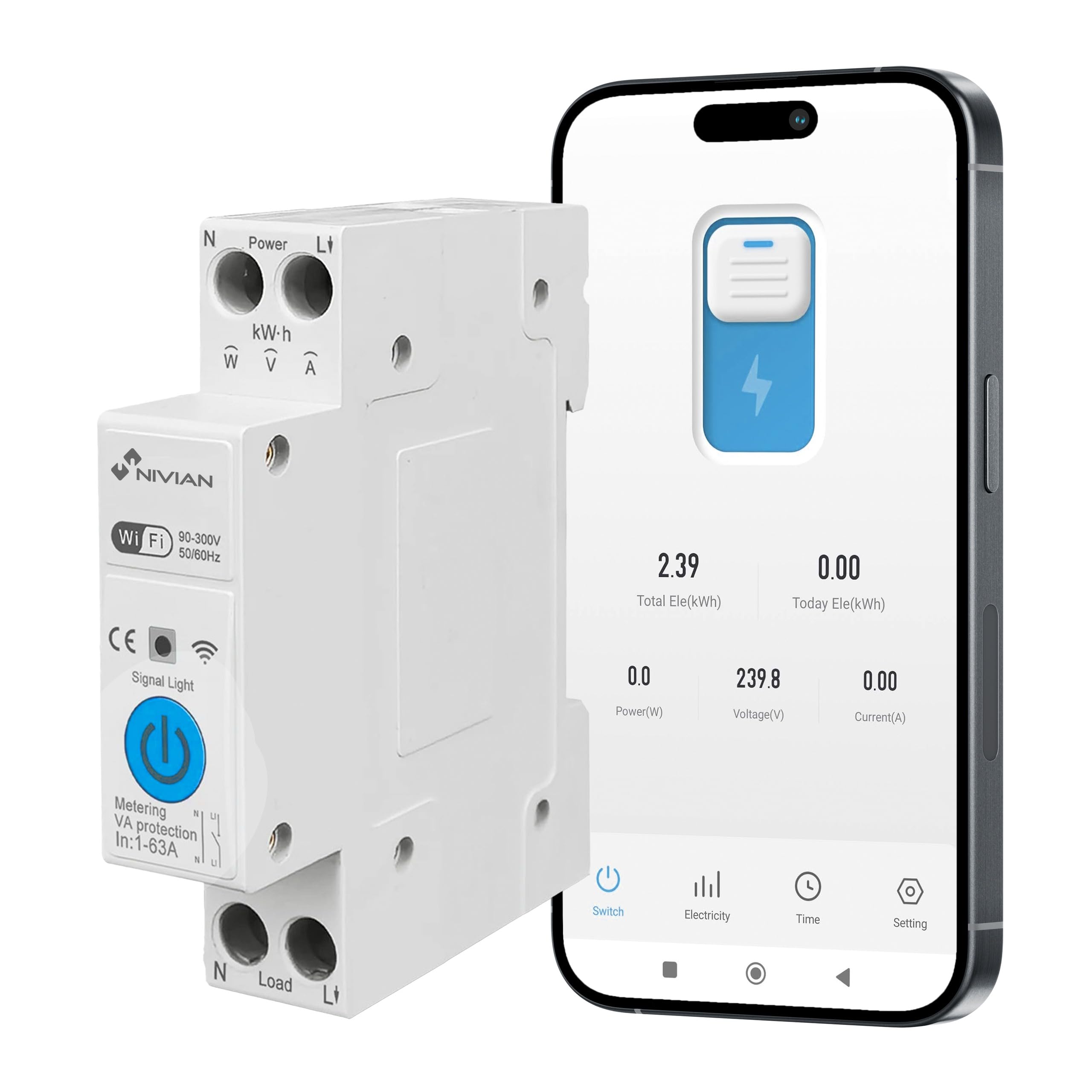
The Nivian Smart Home DIN Rail WiFi Switch is a versatile device designed for intelligent electrical management. It integrates a WiFi-enabled switch with an energy consumption meter, offering comprehensive control and monitoring capabilities.
Característiques principals:
- Comandament a distància: Turn circuits on/off from anywhere via the mobile app.
- Monitorització energètica: Real-time and historical data on electricity consumption.
- Smart Automations: Program schedules, timers, and smart scenes.
- Control de veu: Compatible amb Alexa i l'Assistent de Google.
- Protecció elèctrica: Automatic protection against overload, overvoltage, minvartage, and current limits.
- Instal·lació de carril DIN: Designed for easy integration into electrical panels.
- Fire Retardant Material: V0 grade fire-retardant casing for enhanced safety.
Components inclosos:
- Nivian Consumption Control Device (NVS-ENERGYMETER65DIN-W)

Informació de seguretat
ADVERTIMENT: Electrical installation should only be performed by qualified personnel. Incorrect installation can lead to electric shock, fire, or other hazards.
- Always disconnect power at the main circuit breaker before installing or servicing the device.
- Assegureu-vos que totes les connexions de cablejat siguin segures i que compleixin els codis elèctrics locals.
- No supereu el corrent màxim de 63 A.
- Mantingueu el dispositiu allunyat de l'aigua i d'ambients amb molta humitat.
- No intenteu desmuntar o modificar el dispositiu.
Instal·lació
The Nivian Smart Home DIN Rail WiFi Switch is designed for easy installation on a standard DIN rail within your electrical distribution board.
Passos d'instal·lació:
- Desconnexió d'alimentació: Before starting, ensure the main power supply to the electrical panel is completely disconnected.
- Muntatge: Clip the device onto a standard 35mm DIN rail in your electrical panel. Ensure it is securely fastened.
- Cablejat:
- Connect the incoming Live (L1) and Neutral (N) wires to the "Power" terminals at the top of the device.
- Connect the outgoing Live (L1) and Neutral (N) wires to the "Load" terminals at the bottom of the device, leading to the circuit you wish to control.
- Ensure all connections are tight and correct to prevent loose contacts or short circuits.
- Restauració d'energia: Once wiring is complete and verified, restore power to the electrical panel. The device's signal light should illuminate.

Configuració
To utilize the smart features of your Nivian device, you need to connect it to the Nivian Smart Home app (or a compatible app like Tuya Smart or Smart Life).
App Pairing Steps:
- Descarrega l'aplicació: Download the "Nivian Smart Home" app from your smartphone's app store (available for iOS and Android). Alternatively, you can use the Tuya Smart or Smart Life app.
- Registra't/Iniciar sessió: Obre l'aplicació i registra't per obtenir un compte nou o inicia la sessió amb un compte existent.
- Afegeix un dispositiu: A l'aplicació, toca la icona "+" per afegir un dispositiu nou.
- Emparellament Bluetooth: The device supports quick configuration via Bluetooth. Ensure Bluetooth is enabled on your smartphone. The app should automatically detect the device or guide you through a discovery process.
- Connexió WiFi: Follow the in-app instructions to connect the device to your 2.4GHz WiFi network. Enter your WiFi password when prompted.
- Confirmació: Once successfully paired, the device will appear in your app's device list. You can then rename it for easier identification.

En funcionament
After successful setup, you can control and monitor your electrical circuits using the Nivian Smart Home app or voice commands.
Comandament a distància:
Open the Nivian Smart Home app, select your device, and use the on-screen toggle to switch the connected circuit on or off from anywhere with an internet connection.
Monitorització energètica:
The app provides real-time energy consumption data (kWh, Amps, Volts, Watts). You can view daily, monthly, and yearly statistics, helping you identify energy usage patterns and potential savings.

Smart Automations:
Create custom automation rules within the app:
- Horaris: Set specific times for the circuit to turn on or off (e.g., lights on at sunset).
- Temporitzadors: Set countdown timers for temporary control.
- Escenes intel·ligents: Trigger actions based on conditions like location, weather, or other smart devices (e.g., turn off power when leaving home).
- Presence Simulation: Automate lights or devices to turn on/off randomly to simulate occupancy when you are away.

Control de veu:
Integrate your Nivian device with Amazon Alexa or Google Assistant for hands-free control.
- Enllaça el compte: In the Alexa or Google Home app, enable the "Nivian Smart Home" skill/service and link your Nivian account.
- Descobriu els dispositius: Demana a Alexa o a l'Assistent de Google que descobreixin dispositius nous.
- Comandaments de veu: Fes servir ordres com ara "Alexa, activa [nom del dispositiu]" o "Ei Google, apaga [nom del dispositiu]".
Funcions de protecció
The device includes intelligent electrical protections to safeguard your installation and connected equipment.
- Protecció de sobrecàrrega: Automatically cuts power if the current exceeds a set limit (up to 63A).
- Overvoltage Protecció: Protects against damage from excessively high voltage.
- Undervoltage Protecció: Prevents equipment damage from excessively low voltage.
- Current Limit Protection: Allows setting a maximum current threshold.
- Protecció contra el corrent de fuita: Detects and protects against hazardous leakage currents.
You can configure custom limits and receive alerts via the app if any protection is triggered, enhancing safety and preventing damage.

Manteniment
The Nivian Smart Home DIN Rail WiFi Switch requires minimal maintenance.
- Neteja: Periodically wipe the device with a dry, soft cloth. Do not use abrasive cleaners or solvents.
- Comprovació de la connexió: Occasionally, verify that all electrical connections are secure, especially after initial installation or if the device has been moved.
- Actualitzacions de firmware: Keep the Nivian Smart Home app updated to ensure you receive the latest firmware for your device, which may include performance improvements and new features.
Resolució de problemes
If you encounter issues with your Nivian Smart Home DIN Rail WiFi Switch, refer to the following common problems and solutions:
| Problema | Possible causa/solució |
|---|---|
| Device not connecting to WiFi / App |
|
| Device not responding to app commands |
|
| No energy consumption data |
|
| Cannot connect with Alexa/Google Assistant |
|
| Device trips frequently |
|
Especificacions
| Característica | Detall |
|---|---|
| Número de model | NVS-ENERGYMETER65DIN-W |
| Marca | NIVIAN |
| Dimensions (L x A x A) | 8 x 3 x 2 cm (3.15 x 1.18 x 0.79 polzades) |
| Pes | 110 g (0.24 lliures) |
| Classificació màxima de corrent | 63A |
| Voltage Rang | 90-300V |
| Freqüència | 50/60Hz |
| Tipus de muntatge | Carril DIN |
| Connectivitat | WiFi (2.4GHz), Bluetooth for quick setup |
| Material | V0 Fire Retardant |
| Components inclosos | Nivian Consumption Control Device |
Garantia i Suport
For detailed warranty information, technical support, and additional resources, please visit the official Nivian Home website or their social media channels.
- Oficial Weblloc: Nivian Home
- InstagRAM: @nivianhome_es
- YouTube: Nivian Official Channel
These platforms offer tutorials, tips, and direct support to help you maximize your device's potential.


