
1. Introducció
This manual provides detailed instructions for the installation, operation, and maintenance of your REOLINK Argus MagiCam Wireless Outdoor Security Camera. Please read this manual thoroughly before using the product to ensure proper functionality and safety. Keep this manual for future reference.
2. Què hi ha a la caixa
- 1 x Argus MagiCam Camera
- 1 x suport magnètic
- 1 x Magnetic Mount Pad
- 2 x AA Batteries (Non-rechargeable)
- 1 x manual d'instruccions
3. Producte acabatview
The REOLINK Argus MagiCam is a versatile wireless security camera designed for both indoor and outdoor use. It features 1080p video resolution, dual-band Wi-Fi connectivity, AI person detection, two-way audio, and long battery life.
3.1 Característiques clau
- Muntatge magnètic: Easy installation on metal surfaces or with the included magnetic pad.
- AI Person Detection: Reduces false alarms by accurately identifying human shapes.
- Wi-Fi de doble banda (2.4/5 GHz): Provides stable and flexible wireless connection.
- Resistent a la intempèrie IP67: Dissenyat per suportar diferents condicions meteorològiques.
- Llarga vida útil de la bateria: Up to 9 months of operation on two AA lithium batteries (based on 300 seconds of daily recording).
- Emmagatzematge local: Supports up to 256GB microSD card (not included) for recording without subscription fees.
- Xerrada bidireccional: Communicate with visitors or deter intruders via the Reolink App.
- Visió nocturna: Infrared night vision for clear monitoring in low-light conditions.
- Integració de la llar intel·ligent: Compatible with Amazon Alexa and Google Assistant for voice control.
3.2 Components de la càmera


4. Instruccions de configuració
4.1 Instal·lació de la bateria
The Argus MagiCam operates on two AA lithium batteries. To install:
- Localitza el compartiment de la bateria a la part posterior de la càmera.
- Obriu la coberta del compartiment.
- Insert the two AA lithium batteries, ensuring correct polarity (+/-).
- Tanqueu bé la tapa del compartiment de la bateria.
4.2 Descàrrega de l'aplicació i emparellament de la càmera
To use your Argus MagiCam, you need to download the Reolink App and pair the camera:
- Descarrega't el Aplicació Reolink des de la botiga d'aplicacions del teu telèfon intel·ligent (iOS o Android).
- Obre l'aplicació i crea un compte o inicia la sessió.
- Toqueu la icona "+" per afegir un dispositiu nou.
- Escaneja el codi QR que es troba a la càmera o al seu embalatge.
- Follow the on-screen prompts to connect the camera to your 2.4GHz or 5GHz Wi-Fi network. Ensure your phone is connected to the same Wi-Fi network during setup.
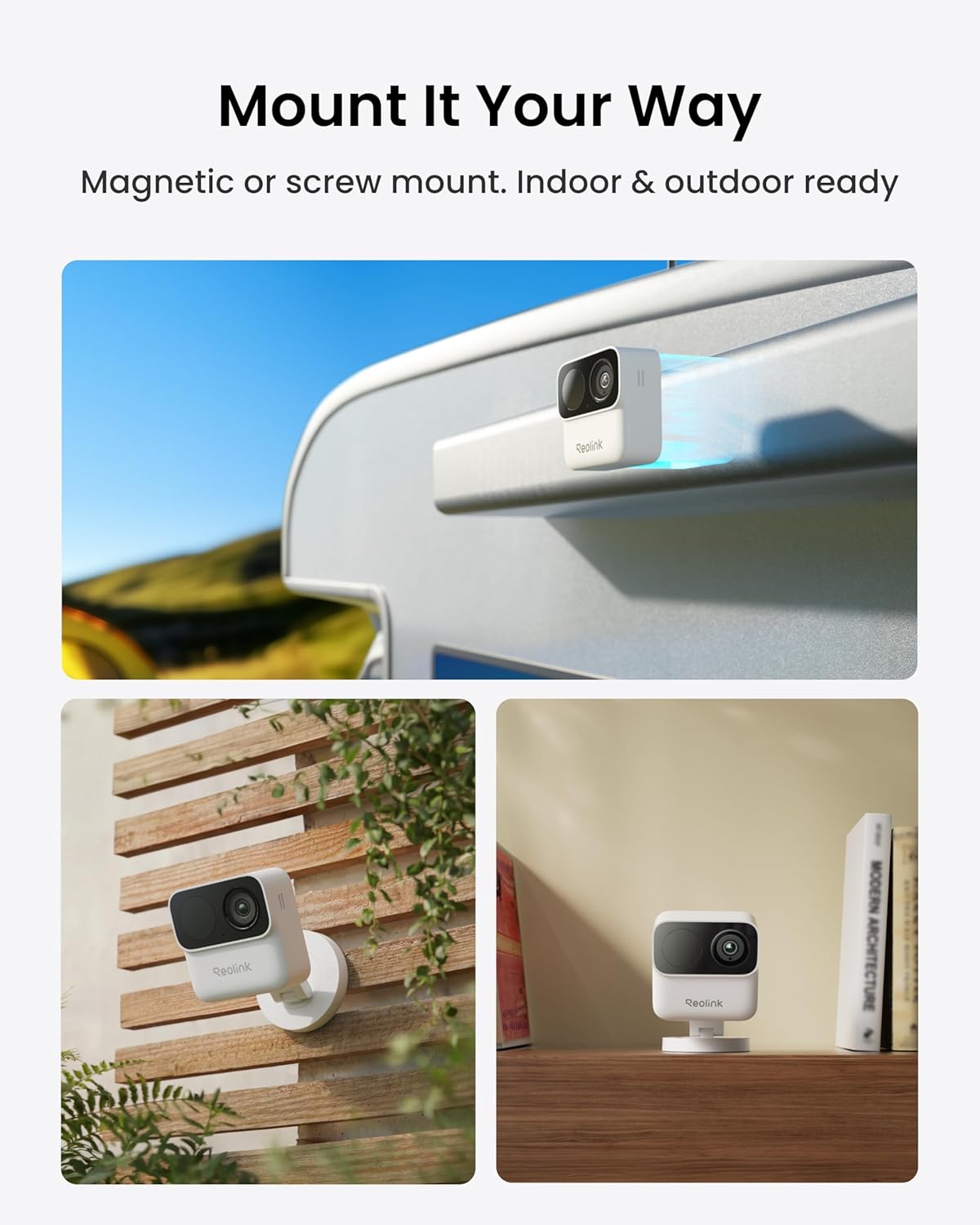
4.3 Muntatge de la càmera
The Argus MagiCam offers flexible mounting options:
- Muntatge magnètic: Attach the camera directly to any metal surface. For non-metal surfaces, use the included magnetic mount pad and secure it with screws.
- Muntatge del suport: Use the magnetic bracket for adjustable viewangles d'ajust.


5. Instruccions de funcionament
5.1 Viu View i la reproducció
Access real-time video and recorded footage through the Reolink App:
- Open the Reolink App and select your Argus MagiCam.
- Toca el directe view per veure menjar en temps realtage.
- Utilitzeu la funció de reproducció per tornarview recorded events stored on the microSD card.
5.2 Àudio bidireccional
The camera supports two-way audio communication:
- En directe view, toca la icona del micròfon per parlar a través de la càmera.
- Toca la icona de l'altaveu per escoltar l'àudio des de la ubicació de la càmera.

5.3 AI Person Detection and Alerts
The camera uses AI to detect people and send alerts:
- Configure detection zones in the app to focus on specific areas.
- Receive push notifications, emails, or siren alerts when a person is detected.


5.4 Opcions d'emmagatzematge
Your Argus MagiCam supports local storage:
- Insert a microSD card (up to 256GB) into the camera's slot for local recording.
- The camera can also integrate with Reolink Home Hub Series for expanded storage and system management.


5.5 Integració de la llar intel·ligent
Control your camera using voice commands with compatible smart home devices:
- Connect your Argus MagiCam to Amazon Alexa or Google Assistant through the Reolink App.
- Utilitzeu ordres de veu per view transmissions en directe en pantalles intel·ligents compatibles.

6. Manteniment
6.1 Substitució de la bateria
When the battery level is low, replace the AA lithium batteries as described in Section 4.1. Using non-lithium AA batteries may result in shorter battery life.
6.2 Neteja de la càmera
Per mantenir un rendiment òptim:
- Netegeu suaument la lent i el cos de la càmera amb un drap suau i sec.
- Eviteu utilitzar productes químics aggressivs o netejadors abrasius.
6.3 actualitzacions de microprogramari
Periodically check the Reolink App for available firmware updates to ensure your camera has the latest features and security enhancements. Follow the in-app instructions for updating firmware.
7. Solució De Problemes
If you encounter issues with your Argus MagiCam, refer to the following common problems and solutions:
| Problema | Causa possible | Solució |
|---|---|---|
| Camera won't connect to Wi-Fi or frequently disconnects. | Weak Wi-Fi signal, incorrect Wi-Fi band, network interference. | Ensure the camera is within range of your router. Try connecting to the 2.4GHz band if experiencing issues with 5GHz. Reduce interference from other devices. |
| False alerts or missed detections. | Improper detection zone settings, environmental factors (e.g., shadows, moving branches). | Adjust detection zones in the app. Fine-tune sensitivity settings. Ensure the camera angle avoids vertical downward views or tree obstructions. |
| Durada de la bateria curta. | Frequent motion detection, high usage, cold temperatures. | Reduce motion detection sensitivity or frequency. Ensure only AA lithium batteries are used. Battery performance can decrease in extreme cold. |
| App issues (e.g., slow loading, incorrect status). | App bug, outdated app version, network issues. | Update the Reolink App to the latest version. Restart the app or your smartphone. Check your internet connection. |
| No animal detection when on battery power. | Feature limitation in battery mode. | Animal detection may be disabled when running on battery power to conserve energy. Consider connecting to a continuous power source (e.g., USB power adapter) for this feature. |
8. Especificacions
| Característica | Detall |
|---|---|
| Nom del model | Argus MagiCam |
| Tecnologia de connectivitat | Sense fil (Wi-Fi) |
| Freqüència Wi-Fi | 2.4GHz / 5GHz Dual-Band |
| Resolució de vídeo | 1080p HD |
| Resolució de fixes efectius | 2 MP |
| Velocitat de fotogrames | 15 fotogrames per segon |
| Viewangle ing | 132 graus |
| Gamma de visió nocturna | 26 peus (8 metres) |
| Font d'alimentació | Battery Powered (2 x AA Lithium) |
| Durada de la bateria | Up to 9 months (based on 300s daily recording) |
| Emmagatzematge local | Micro SD card up to 256 GB (not included) |
| Classificació resistent a la intempèrie | IP67 |
| Temperatura de funcionament | -10 °C a 55 °C (de 14 °F a 131 °F) |
| Dimensions | 2.68 x 1.13 x 2.68 polzades (6.8 x 2.87 x 6.8 cm) |
| Pes | 108 g (3.8 oz) |
| Dispositius compatibles | Smartphone (iOS, Android), Amazon Alexa, Google Assistant |
9. Garantia i Suport
REOLINK provides comprehensive support for its products:
- Garantia de devolució de 30 dies: Si no esteu satisfets amb la vostra compra, podeu retornar-la en un termini de 30 dies per obtenir un reemborsament complet.
- Garantia limitada de 2 anys: Your Argus MagiCam is covered by a 2-year limited warranty against manufacturing defects.
- Assistència en línia 24/7: Access online support resources and contact customer service for assistance at any time.
For further assistance, please visit the official REOLINK weblloc o poseu-vos en contacte amb el seu servei d'atenció al client.


