
Introducció
The Retekess TR642 is a versatile CD player boombox designed for various audio playback options. It features CD, cassette, AM/FM radio, USB, TF card, AUX input, and wireless connectivity. This manual provides detailed instructions for setup, operation, maintenance, and troubleshooting to ensure optimal performance and user experience.

Image: The Retekess TR642 CD Player Boombox, showcasing its compact design with a top-loading CD player, front-loading cassette deck, and an extendable antenna.
Contingut del paquet
Marqueu la casella per als elements següents:
- 1 x Retekess TR642 CD Boombox
- 1 x Comandament a distància (requereix 2 piles AAA, no incloses)
- 1 x cable d'alimentació
- 1 x cable auxiliar
- 1 x manual de producte
Producte acabatview
Controls del tauler superior

Image: Detailed diagram of the Retekess TR642's top panel, highlighting the function buttons, display screen, and media controls.
- Encès/apagat: Premeu per encendre o apagar la unitat.
- Wireless Connection (B): Short press to activate wireless pairing mode.
- Volum +/-: Augmentar o disminuir el volum.
- Repeat/Setting Button (FUNC): Cycles through repeat modes or settings.
- Previous/Next Track, Fast Rewind/Forward: Navigate tracks or fast forward/rewind media.
- Pause/Play/Auto Scan: Play/pause media or initiate auto-scan in radio mode.
- Stop/EQ: Stop playback or cycle through equalizer settings.
- FM/AM: Switch between FM and AM radio bands.
- LED Ambient Light / BASS: Short press to toggle ambient light, long press for bass boost.
Side and Rear Panel Ports

Image: Diagram illustrating the side and rear ports of the Retekess TR642, including the Type-C IN, AUX Interface, and 3.5mm Earphone Jack.
- TIPUS C EN: Power input for charging or continuous operation.
- Interfície AUX: Entrada de 3.5 mm per connectar dispositius d'àudio externs.
- Presa d'auriculars de 3.5 mm: For private listening with headphones.
- Port USB: Per a la reproducció des d'una unitat USB.
- Ranura per a targetes TF: Per a la reproducció amb targeta TF (Micro SD).
Configuració
Alimentació del dispositiu
- Potència de la bateria: The TR642 is equipped with two 5000mAh rechargeable lithium-ion batteries, providing up to 15 hours of continuous playtime. Ensure the batteries are charged before portable use.
- Alimentació CA: Connect the provided power cable to the TYPE-C IN port on the device and plug it into a standard wall outlet for continuous power and battery charging.
Ajust de l'antena
For optimal FM/AM radio reception, extend the telescopic antenna fully and adjust its position until the clearest signal is achieved.
Instruccions de funcionament
Funcionament general
- Encès/apagat: Long press the Power On/Off button on the top panel to turn the unit on or off.
- Selecció del mode: Short press the FUNC button to cycle through available modes: CD, USB, TF, AUX, TAPE, FM/AM.
- Ajust de volum: Use the Volume +/- buttons to adjust the playback volume.
Reproducció de CD

Image: A hand carefully placing a compact disc into the top-loading CD compartment of the boombox.
- Obriu la tapa del compartiment del CD.
- Place a CD (CD, CD-R, CD-RW, MP3, WMA formats supported) onto the spindle with the label side facing up.
- Tanqueu la coberta del compartiment del CD.
- Select CD mode using the FUNC button. The display will show 'CD'.
- Premeu el botó Reproduir per iniciar la reproducció.
- Use Previous/Next Track buttons to skip tracks.
- Press the Repeat button (FUNC) during CD playback to cycle through repeat modes: repeat current track, repeat entire CD, random playback, normal playback.
Reproducció de cassets
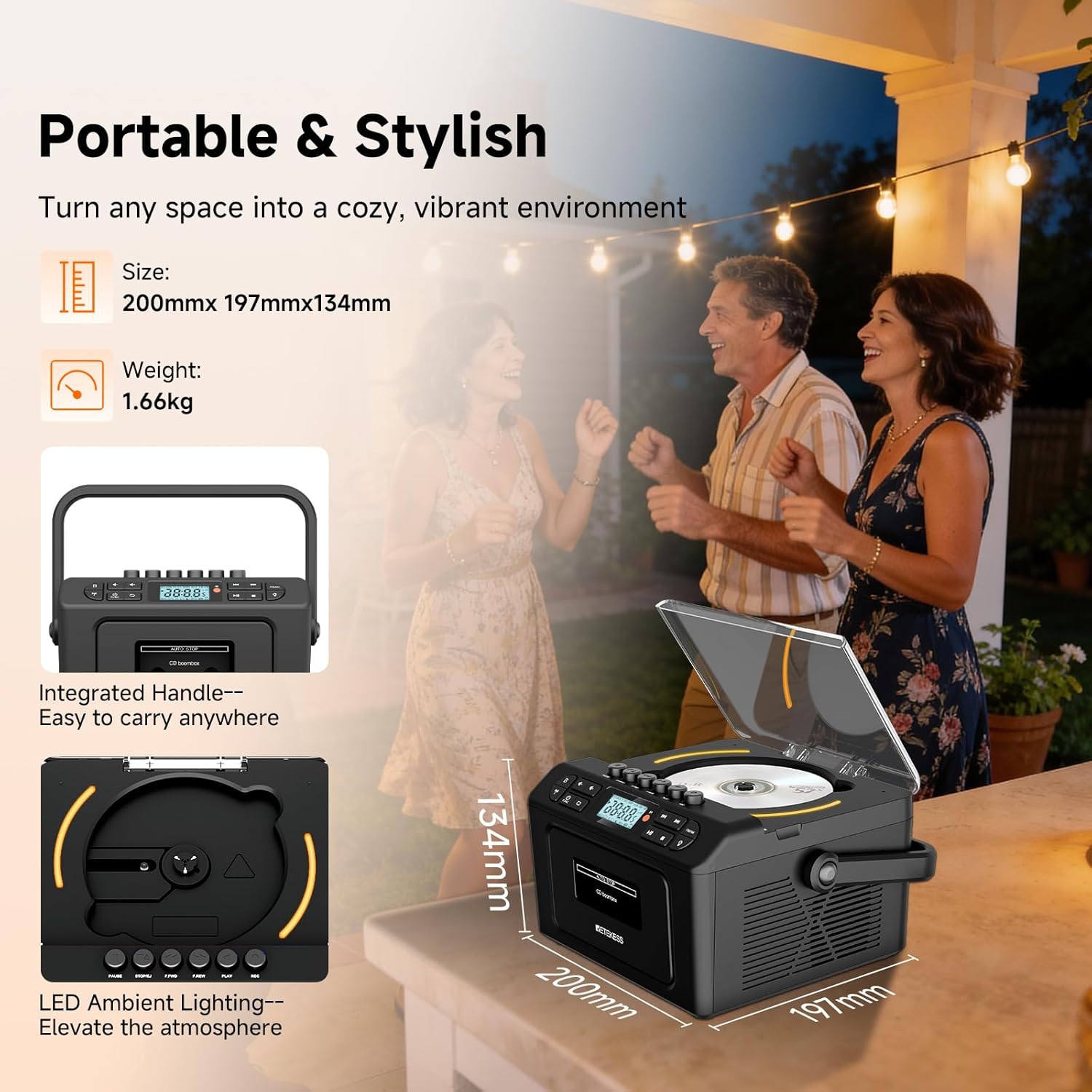
Image: A hand inserting a cassette tape into the front-loading cassette deck of the Retekess TR642 boombox.
- Obriu la porta del compartiment del casset.
- Inseriu una cinta de casset.
- Tanqueu la porta del compartiment del casset.
- Select TAPE mode using the FUNC button. The display will show 'TAPE'.
- Premeu el botó Reproduir per iniciar la reproducció.
- Use F.FWD (Fast Forward) or F.REW (Fast Rewind) buttons to quickly navigate the tape.
- Premeu el botó Atura per aturar la reproducció.
- Press the Eject button (usually the Stop button pressed again or a dedicated button) to remove the cassette.
Funcionament de la ràdio AM/FM
- Select FM/AM mode using the FUNC button. The display will show 'FM' or 'AM'. Press the FM/AM button to switch between bands.
- Sintonització manual: Short press the Previous/Next Track buttons to fine-tune the frequency.
- Escaneig automàtic: Long press the Play/Auto Scan button to automatically search for and save available stations. Up to 30 stations can be saved.
- Stop Auto Scan: Press the Stop button to halt the auto-scan process.
- Listen to Saved Stations: Use the Previous/Next Track buttons to cycle through saved stations.
Wireless (Bluetooth) Connectivity
The TR642 features dual wireless modes for both transmission and reception.
- Wireless Reception (Pairing with Phone/Tablet):
a. Short press the Wireless Connection (B) button. The LED screen will show 'BLUE' flashing, indicating pairing mode.
b. On your external device (e.g., smartphone), enable Bluetooth and search for 'RETEKESS-TR642'.
c. Select 'RETEKESS-TR642' to pair. Once paired, the 'BLUE' indicator will become solid.
d. To disconnect, short press the Wireless Connection (B) button again. - Wireless Transmission (Connecting to Wireless Headphones/Speakers):
a. After powering on, short press the BTL AUNCH key (Wireless Connection button) to automatically switch to wireless transmission mode. The wireless transmission icon will flash.
b. The boombox will automatically connect to nearby wireless devices in pairing mode (Bluetooth mode is unconnected).
c. Once connected successfully, the icon will remain solid. You can now listen to the audio on the receiver.
d. To cancel transmission, short press the BTL AUNCH key again.
Reproducció de targetes USB/TF
- Inseriu una unitat USB al port USB o una targeta TF a la ranura per a targetes TF.
- Select USB or TF mode using the FUNC button. The display will show 'USB' or 'TF'.
- Playback will begin automatically. Use the Previous/Next Track, Play/Pause, and Stop buttons to control playback.
Entrada AUX
Connect external audio devices (e.g., MP3 players, smartphones) to the AUX IN port using the provided 3.5mm AUX cable. Select AUX mode using the FUNC button. Audio from the external device will play through the boombox speakers.
Ús d'auriculars
Plug 3.5mm headphones into the headphone jack. The speakers will automatically mute for private listening.
Il·luminació ambiental LED
Short press the LED Ambient Light / BASS button to turn the ambient lighting on or off. The lights gradually shift through colors (red, blue, green).
Equalizer (EQ) Settings
Short press the Stop/EQ button to cycle through different EQ settings: Normal, Classical, Jazz, Pop, Rock. EQ effects apply to all audio sources, not just FM/AM mode.
Temporitzador de dormir
Press the SLEEP button on the remote control to enter sleep mode. Use the Previous/Next Track buttons to set the shutdown timer (e.g., 10, 20, 30 minutes). The device will automatically power off once the set time is reached. To cancel, select 'OFF'.
Control remot

Image: The remote control for the Retekess TR642, showing buttons for power, volume, mode selection, track navigation, EQ, bass, and sleep timer.
The remote control allows for convenient operation from a distance (up to 10 meters). Functions include power on/off, mode selection, volume adjustment, track navigation, EQ settings, bass control, and sleep timer. Refer to the remote control diagram in the manual for specific button functions.
Video: This video demonstrates how to use the Retekess TR642 remote control, including powering on/off, switching between modes (CD, USB, TF, AUX, TAPE, FM/AM), adjusting volume, and setting repeat functions.
Manteniment
- Neteja: Feu servir un drap suau i sec per netejar l'exterior del boombox. No utilitzeu productes de neteja abrasius ni dissolvents.
- Cura de CD: Handle CDs by the edges. Wipe discs from the center outwards with a soft, lint-free cloth. Store CDs in their cases to prevent scratches.
- Cura del casset: Periodically clean the tape heads and pinch rollers with a cotton swab lightly dampamb alcohol isopropílic.
- Cura de la bateria: For long-term storage, charge the batteries to about 50% and store the unit in a cool, dry place. Recharge periodically to maintain battery health.
Resolució de problemes
| Problema | Causa possible | Solució |
|---|---|---|
| Sense poder | Power cable not connected; batteries drained. | Ensure power cable is securely connected; charge batteries. |
| Sense so | Volume too low; wrong mode selected; headphones connected. | Increase volume; select correct mode; disconnect headphones. |
| CD skips | CD scratched/dirty; unit vibrated. | Clean CD; place unit on a stable surface. |
| Mala recepció de ràdio | Antenna not extended/adjusted; weak signal. | Esteneu i ajusteu l'antena; proveu de moure la unitat a una altra ubicació. |
| Wireless pairing fails | Device not in pairing mode; too far from source. | Ensure boombox is in pairing mode; move devices closer. |
| Operational glitches/display errors | Temporary software issue. | Press the RESET button on the back of the boombox to restore normal function. |
Especificacions
| Característica | Detall |
|---|---|
| Marca | Retekess |
| Número de model | TR642 |
| Tecnologia de connectivitat | Auxiliary, USB, Wireless |
| Color | Negre |
| Tipus d'altaveu | estèreo |
| Dimensions de l'article (L x A x A) | 10.67 x 10.31 x 7.09 polzades |
| Font d'alimentació | Funciona amb bateria |
| Dispositius compatibles | MP3 Player, Personal Computer, Smartphone, Tablet, Television |
| Suport Bluetooth | Sí (versió 5.3) |
| Format d'àudio compatible | CD, CD-R, CD-RW, MP3, WMA |
| Nombre de ponents | 2 |
| Mode de sortida d'àudio | estèreo |
| Configuració del canal de so envoltant | 2.0 |
| Capacitat de la bateria | 2 x 5000mAh de ió de liti |
| Temps de joc continu | Fins a 15 hores |
Garantia i Suport
Retekess provides a 1-year warranty and a 30-day no-reason return policy. Beyond the warranty period, maintenance services are still offered, with buyers responsible for associated costs. For support, contact Retekess on Amazon; they aim to reply within 12 hours.