
1. Introducció
The ATK RS7 Air Esports Hall Effect Keyboard is engineered for competitive gamers requiring rapid response and precise control. This 75% layout keyboard features advanced Hall Effect magnetic switch technology, allowing for an adjustable rapid-trigger range from 0.001 mm to 3.3 mm. This enables users to customize actuation distances to their exact preferences. With an ultra-low 0.08 ms latency, keystrokes are registered quickly and accurately, crucial for high-intensity gaming. Its compact 81-key design optimizes desk space for mouse movement without compromising essential functionality. The keyboard is constructed with an aluminum positioning plate and a mecha-style ABS housing, ensuring structural stability and a consistent typing experience. Frosted translucent Cherry-profile PC keycaps enhance backlight diffusion while providing durability for extended use.

Image 1.1: The ATK RS7 Air Esports Hall Effect Keyboard, showcasing its compact 75% layout and RGB backlighting.
2. Guia de configuració
2.1. Contingut del paquet
Verifiqueu que tots els elements siguin presents al paquet:
- ATK RS7 Air Esports Hall Effect Keyboard
- Cable USB-C a USB-A
- Extractor de tecles
- Tirador de commutació
- Manual d'usuari (aquest document)
2.2. Connexió del teclat
Connect the provided USB-C cable to the keyboard's USB-C port and the other end to an available USB-A port on your computer. The keyboard is plug-and-play and should be recognized automatically by your operating system.
2.3. Software Installation (ATK HUB 3.0)
For full customization options, including rapid trigger adjustment, RGB lighting effects, and key remapping, download and install the ATK HUB 3.0 software from the official ATK website. The software is compatible with Windows 11 and Mac OS 14 Sonoma or newer.

Image 2.1: The ATK HUB 3.0 software interface, showing options for managing ATK devices.
3. Instruccions de funcionament
3.1. Característiques clau
- Interruptors magnètics d'efecte Hall: Offers adjustable actuation points from 0.001 mm to 3.3 mm for personalized responsiveness.
- Disseny compacte al 75%: An 81-key design that saves desk space while retaining essential function keys and arrow keys.
- Latència ultra baixa: Achieves 0.08 ms input latency for immediate in-game response.
- Construcció duradora: Features an aluminum positioning plate and mecha-style ABS housing for enhanced stability.
- Frosted PC Keycaps: Cherry-profile keycaps designed for improved backlight diffusion and long-term durability.

Image 3.1: Visual representation of the keyboard's core performance metrics, including latency, polling rate, and RT precision.

Image 3.2: Illustration of ATK's flagship switches (Ice Blade and Lucid Blade) and the keyboard's 5-layer firm gasket structure.
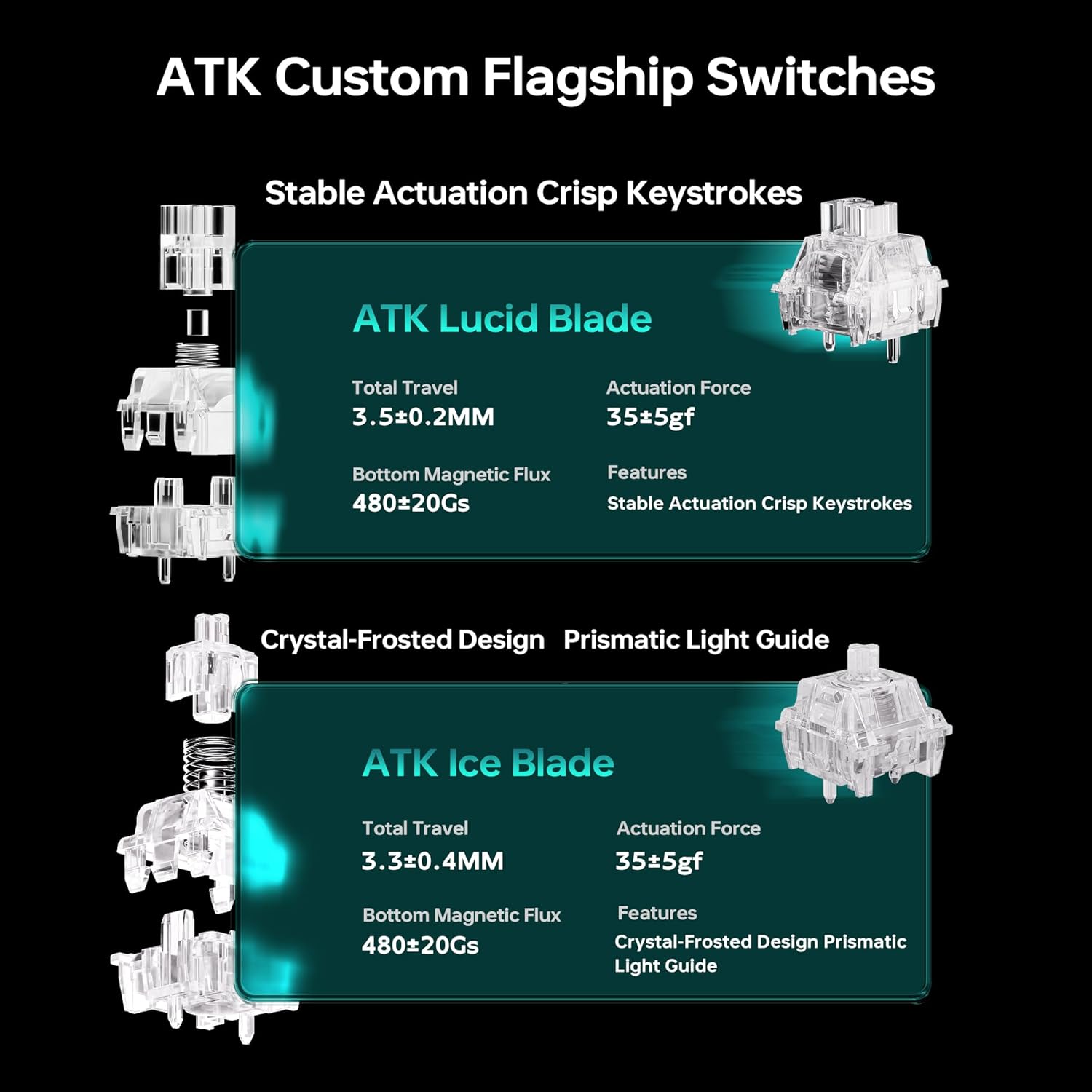
Image 3.3: Detailed specifications for ATK Lucid Blade and Ice Blade switches, including total travel, actuation force, and magnetic flux.
3.2. Personalització
The ATK RS7 Air offers extensive customization through the ATK HUB 3.0 software:
- Ajust ràpid del disparador: Fine-tune the actuation and reset points of each key for competitive advantage.
- Il·luminació RGB: Customize per-key RGB backlighting with various effects and colors.
- Tecles programables: Remap keys, create macros, and assign custom functions to enhance workflow or gaming performance.

Imatge 3.4: Primer pla views of the frosted PC keycaps, dynamic RGB lighting, and the 2-level adjustable ergonomic keyboard stand.
3.3. Ergonomia i disseny
The keyboard features a 2-level adjustable ergonomic stand to provide comfortable typing angles, reducing fatigue during prolonged use. The frosted translucent keycaps not only enhance the aesthetic with improved backlight diffusion but also contribute to a consistent key feel.

Imatge 3.5: Lateral view of the keyboard highlighting the "Mecha Wings" design element, LOGO indicator light, and frosted translucent keycaps.
4. Manteniment
4.1. Neteja del teclat
Per mantenir un rendiment i un aspecte òptims, netegeu el teclat regularment:
- Desconnecteu el teclat de l'ordinador abans de netejar-lo.
- Utilitzeu un drap suau i sense pelusa lleugerament dampRenteu-les amb aigua o una solució netejadora suau per netejar les tecles i el xassís.
- Per a la pols i les restes entre les tecles, feu servir aire comprimit.
- Eviteu utilitzar productes químics o materials abrasius.
4.2. Substitució de la tapa de les tecles i l'interruptor
The ATK RS7 Air features hot-swappable switches, allowing for easy replacement or customization without soldering. Use the provided keycap and switch pullers:
- Gently use the keycap puller to remove keycaps.
- Use the switch puller to carefully extract switches from the PCB.
- Alineeu els nous interruptors amb els endolls i premeu fermament fins que encaixin al seu lloc.
- Reattach keycaps.

Imatge 4.1: Una explosió view illustrating the multi-layer gasket structure and components of the keyboard, indicating ease of access for maintenance.
5. Solució De Problemes
If you encounter issues with your ATK RS7 Air keyboard, refer to the following common solutions:
- El teclat no respon:
- Assegureu-vos que el cable USB-C estigui connectat correctament tant al teclat com a l'ordinador.
- Prova de connectar el teclat a un port USB diferent de l'ordinador.
- Prova el teclat en un altre ordinador per descartar problemes específics del sistema.
- Claus que no es registren:
- Check if the specific keycap or switch is properly seated. Use the switch puller to reseat the switch if necessary.
- Netegeu qualsevol residu que hi hagi al voltant de l'interruptor afectat.
- If using ATK HUB 3.0, ensure no key remapping or macros are interfering with the key's function.
- Problemes d'il·luminació RGB:
- Ensure ATK HUB 3.0 software is running and updated.
- Revisa la configuració de la il·luminació dins del programari.
- Verifiqueu que el firmware del teclat estigui actualitzat.
- El programari no detecta el teclat:
- Restart your computer and the ATK HUB 3.0 software.
- Ensure the keyboard is directly connected to the computer, not through a USB hub.
- Reinstall the ATK HUB 3.0 software.
If these steps do not resolve the issue, please contact ATK customer support for further assistance.
6. Especificacions
| Característica | Detall |
|---|---|
| Marca | ATK |
| Nom del model | RS7 Air |
| Tecnologia de connectivitat | USB-C |
| Descripció del teclat | Jocs |
| Usos recomanats | Jocs |
| Característiques especials | Backlit, Hot-Swappable, Programmable Keys |
| Color | Black/Lucidblade (Note: Other color variants available) |
| Il·luminació del teclat | RGB |
| Material | Polybutylene Terephthalate (Keycaps), Polycarbonate (Housing), Aluminum (Positioning Plate) |
| Font d'alimentació | Alimentat per USB |
| Tipus de canvi | Hall Effect Magnetic (Mechanical) |
| Disposició del teclat | QWERTY (75% Layout) |
| Nombre de claus | 81 |
| Sistemes operatius compatibles | Windows, Mac OS 14 Sonoma or newer |
| Latència | 0.08 ms |
| Rapid Trigger Range | 0.001 mm a 3.3 mm |
7. Garantia i Suport
7.1. Informació de la garantia
The ATK RS7 Air Esports Hall Effect Keyboard comes with a 6 mesos de garantia des de la data de compra. Aquesta garantia cobreix els defectes de fabricació i els mals funcionaments en condicions d'ús normal. No cobreix els danys causats per un mal ús, accidents, modificacions no autoritzades o desgast normal.
Conserveu el vostre comprovant de compra per a reclamacions de garantia.
7.2. Atenció al client
For technical support, warranty claims, or any other inquiries regarding your ATK RS7 Air keyboard, please visit the official ATK website or contact ATK customer service through the contact information provided on their weblloc. També podeu consultar el ATK Store on Amazon per obtenir recursos addicionals.