
1. Introducció
Thank you for choosing the Audizio Arco Active Tower Speaker. This manual provides essential information for the safe and correct operation of your new audio system. Please read it thoroughly before use and retain it for future reference.
2. Instruccions de seguretat
- Font d'alimentació: Assegureu-vos que la font d'alimentació voltage matches the requirements specified on the speaker.
- Ventilació: No bloquegeu cap obertura de ventilació. Instal·leu-ho d'acord amb les instruccions del fabricant.
- Aigua i humitat: No exposeu aquest aparell a la pluja ni a la humitat. No col·loqueu objectes plens de líquids, com ara gerros, sobre l'aparell.
- Fonts de calor: No instal·leu a prop de cap font de calor com ara radiadors, registres de calor, estufes o altres aparells (inclosos amplificadors) que produeixen calor.
- Neteja: Netegeu només amb un drap sec.
- Manteniment: Demaneu tot el servei a personal de servei qualificat. Cal fer servei quan l'aparell s'hagi fet malbé d'alguna manera.
3. Contingut del paquet
Carefully unpack the box and ensure all items are present and in good condition. If any item is missing or damaged, contact your retailer immediately.
- Audizio Arco Active Speaker
- Front Panel (Speaker Grille)
- Suport dels altaveus
- Control remot
- Cable d'alimentació
- Manual d'instruccions (aquest document)
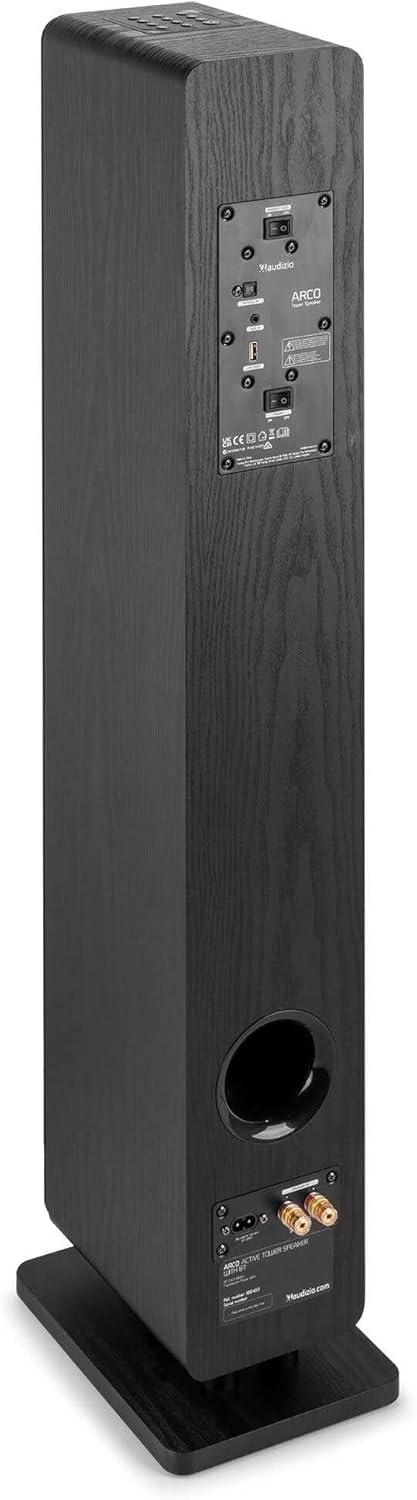
Image: All components included in the Audizio Arco package, including the speaker, remote control, and various connection cables.
4. Producte acabatview
Davant View (with Grille)

Image: The Audizio Arco speaker from the front, with the black fabric grille covering the drivers. The top panel shows control buttons, and the base features subtle LED lighting.
Davant View (without Grille)

Image: The Audizio Arco speaker with the front grille removed, showcasing the tweeter and three 4-inch woofer/subwoofer drivers. The top panel controls and LED-lit base are also visible.
posterior View (Connections and Controls)

Image: The back panel of the Audizio Arco speaker, featuring the power input, optical input, AUX input, USB port, and speaker output terminals for passive speakers. Control switches are also visible.
Control remot

Imatge: Una imatge detallada view of the Audizio Arco remote control, showing buttons for power, mute, Bluetooth, link (TWS), input selection, playback controls, volume adjustment, and bass/treble settings.
Base LED Lighting

Image: A close-up of the speaker's base, illustrating the integrated ambient LED lighting feature that illuminates the area beneath the speaker.
5. Configuració
5.1 Assembling the Speaker
- Carefully remove the speaker and its stand from the packaging.
- Attach the speaker stand to the base of the speaker using the provided screws. Ensure it is securely fastened.
- If desired, attach the front panel (grille) to the front of the speaker. It is held in place magnetically.
5.2 Connexió d'alimentació
- Connect the power cable to the AC IN port on the rear of the speaker.
- Connecteu l'altre extrem del cable d'alimentació a una presa de corrent adequada.
5.3 Col·locació inicial
Place the speaker on a stable, flat surface. For optimal sound, position it in a location where sound can propagate freely without obstruction. Avoid placing it directly against a wall if possible, to allow for better bass response.
6. Instruccions de funcionament
6.1 Encès/Apagat
Premeu el botó Poder button on the top panel of the speaker or on the remote control to turn the speaker on or off.
6.2 Selecció d'entrada
Premeu el botó Entrada button on the top panel or the remote control to cycle through available input sources: Bluetooth, USB, AUX, Optical.
6.3 Connexió Bluetooth
- Seleccioneu Bluetooth as the input source. The speaker will enter pairing mode, indicated by a flashing LED.
- Al dispositiu mòbil (telèfon intel·ligent, tauleta, etc.), activeu el Bluetooth i cerqueu els dispositius disponibles.
- Select "Audizio ARCO" from the list of devices.
- Once paired, the LED indicator will stop flashing and remain solid. You can now stream audio from your device.
Reproducció USB 6.4
- Inseriu una unitat flash USB que contingui àudio files a la USB port a la part posterior de l'altaveu.
- Seleccioneu USB com a font d'entrada.
- L'altaveu començarà a reproduir àudio automàticament files from the USB drive. Use the remote control for playback functions (play/pause, skip track).
6.5 Entrada AUX
- Connect an external audio device (e.g., MP3 player, CD player) to the AUX IN (3.5mm) port on the rear of the speaker using an appropriate audio cable.
- Seleccioneu AUX com a font d'entrada.
- L'àudio del dispositiu connectat ara es reproduirà a través de l'altaveu.
6.6 Entrada òptica
- Connect your TV or other audio source with an optical output to the TPTICA EN (Toslink) port on the rear of the speaker using an optical cable.
- Seleccioneu Òptic com a font d'entrada.
- Ensure your TV's audio output settings are configured for PCM stereo output if you experience no sound.
6.7 Emparellatge estèreo sense fil veritable (TWS)
The Audizio Arco speaker supports TWS functionality, allowing you to pair two Arco speakers wirelessly for a stereo sound experience.
- Ensure both Audizio Arco speakers are powered on and not connected to any Bluetooth device.
- En un altaveu (aquest serà l'altaveu principal), premeu i manteniu premut el botó ENLLAÇ button on the remote control or the TWS button on the top panel until you hear a pairing tone.
- The primary speaker will search for the secondary speaker. Once connected, you will hear a confirmation tone, and the LED indicators on both speakers will synchronize.
- Now, connect your Bluetooth device to the primary speaker as described in section 6.3. Audio will play in stereo through both speakers.
6.8 Control de llum LED
The ambient LED light at the base of the speaker can be controlled via the remote control. Refer to the remote control diagram for the specific button.
6.9 Tone Control (Remote Control)
Utilitza el BASS+ / BASS- i TBL+ / TBL- buttons on the remote control to adjust the bass and treble levels to your preference. The PIS button resets the tone settings to default.
7. Manteniment
7.1 Neteja
- Desendolleu sempre l'altaveu de la presa de corrent abans de netejar-lo.
- Feu servir un drap suau i sec per netejar les superfícies exteriors de l'altaveu.
- Do not use liquid cleaners, aerosols, or abrasive chemicals, as these may damage the finish.
- For the speaker grille, use a soft brush or vacuum cleaner with a brush attachment to gently remove dust.
7.2 Emmagatzematge
Si guardeu l'altaveu durant un període prolongat, desendolleu-lo de la font d'alimentació i guardeu-lo en un lloc fresc i sec, allunyat de la llum solar directa i de temperatures extremes.
8. Solució De Problemes
| Problema | Causa possible | Solució |
|---|---|---|
| Sense poder | Cable d'alimentació no connectat; Presa de corrent no activa. | Ensure power cable is securely connected to speaker and outlet. Test outlet with another device. |
| Sense so | Incorrect input selected; Volume too low; Mute activated; Source device issue. | Select correct input. Increase volume. Deactivate mute. Check audio output of source device. |
| L'aparellament de Bluetooth falla | Speaker not in pairing mode; Device too far; Already paired to another device. | Ensure speaker is in Bluetooth pairing mode. Move device closer. Disconnect from other devices. |
| No sound from Optical input | TV audio output settings incorrect; Optical cable damaged. | Set TV audio output to PCM stereo. Check optical cable for damage and ensure secure connection. |
| L'aparellament de TWS falla | Els altaveus no estan en mode d'emparellament TWS; Massa separats. | Ensure both speakers are in TWS pairing mode (not connected to Bluetooth). Move speakers closer. |
9. Especificacions
| Característica | Especificació |
|---|---|
| Marca | Audizio |
| Nom del model | ARCO Active Tower |
| Tipus d'altaveu | Active Hi-Fi Speaker (Floor-standing) |
| Potència de sortida màxima | 160 watts |
| Tecnologia de connectivitat | Bluetooth 5.4, Optical (Toslink), USB, AUX (3.5mm) |
| Mode de sortida d'àudio | estèreo |
| Resposta de freqüència | 20000 Hz (Upper limit, typical for full-range speakers) |
| Woofer Driver Size | 3 x 4 polzades |
| Entrada Voltage | 230 Volts |
| Mètode de control | Control remot, botons del dispositiu |
| Característiques especials | Ambient LED light, TWS (True Wireless Stereo) function |
| Dimensions (P x A x A) | 24 cm x 17 cm x 95.5 cm |
| Pes de l'article | 9.85 quilos |
| Dispositius compatibles | Smartphones, Televisions, Tablets |
10. Garantia i assistència
10.1 Informació de la garantia
Audizio products are manufactured to high quality standards. This product is covered by a manufacturer's warranty, the terms of which may vary by region. Please refer to your purchase documentation or contact your local retailer for specific warranty details.
10.2 Atenció al client
Should you require technical assistance or have questions regarding your Audizio Arco speaker, please contact your retailer or visit the official Audizio weblloc web per a recursos de suport i informació de contacte.

