
1. Introducció
Thank you for choosing the AIYIMA S4000 Active Bookshelf Speakers. These speakers are designed to deliver high-fidelity audio with versatile connectivity options, suitable for various applications including home entertainment, PC audio, and professional studio monitoring. Please read this manual thoroughly before use to ensure proper setup and operation.
2. Instruccions de seguretat
To prevent fire, electric shock, or product damage, please observe the following safety guidelines:
- No exposeu aquest aparell a la pluja o la humitat.
- No col·loqueu objectes plens de líquids, com ara gerros, sobre l'aparell.
- Assegureu-vos que hi hagi una ventilació adequada. No bloquegeu cap obertura de ventilació.
- No instal·leu a prop de cap font de calor com ara radiadors, registres de calor, estufes o altres aparells (inclosos amplificadors) que produeixen calor.
- Protegiu el cable d’alimentació perquè no es pugui caminar ni pessigar, sobretot als endolls, endolls i el punt on surten de l’aparell.
- Utilitzeu només accessoris/accessoris especificats pel fabricant.
- Desendolleu aquest aparell durant les tempestes llamps o quan no l'utilitzeu durant llargs períodes.
- Demaneu tot el servei a personal de servei qualificat. Cal fer servei quan l'aparell s'hagi fet malbé d'alguna manera.
3. Contingut del paquet
Si us plau, comproveu que tots els elements siguin presents a la caixa:
- AIYIMA S4000 Studio Monitors (2 units)
- Cable d'àudio RCA
- XLR Audio Cable
- Manual d'usuari (aquest document)
- Magnetic Grilles (2 units)
- Rubber Feet (8 units)
- Cable d'alimentació
- Wireless IR Remote Control
4. Producte acabatview
4.1 Tauler frontal
The front panel features the horn-loaded tweeter and the 4-inch woofer, along with a multi-function rotary control for volume and input selection.

Imatge: Davant i darrere view of the AIYIMA S4000 speakers. The front shows the tweeter and woofer, while the rear displays all input/output ports and controls.
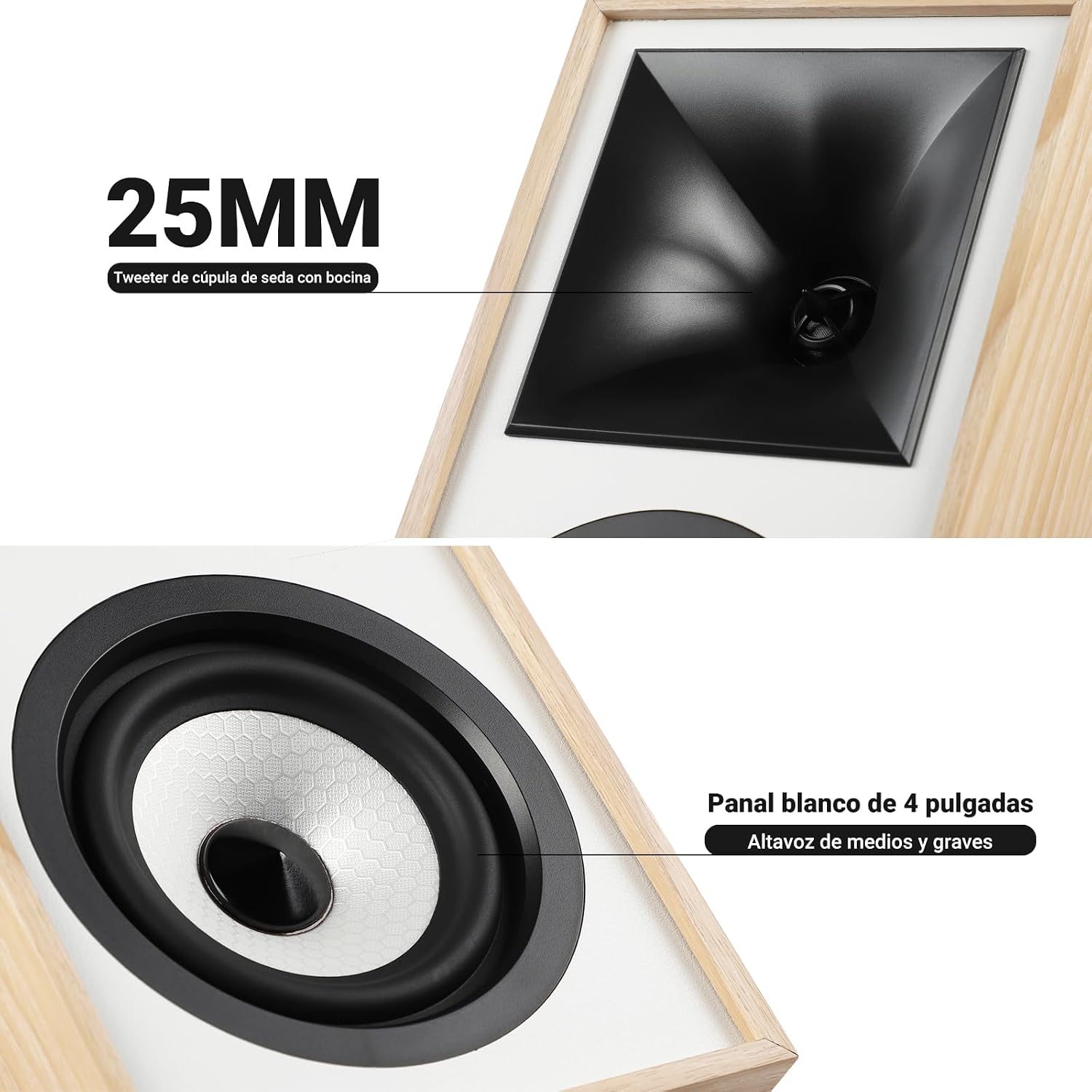
Imatge: Primer pla view of the 25mm horn-loaded silk dome tweeter and the 4-inch white cone woofer on the AIYIMA S4000 speaker.
The S4000 incorporates a 1.25-inch horn-loaded tweeter for enhanced vocal clarity and a 4-inch woofer for deep bass. The cabinet is constructed from 15mm high-density MDF to reduce resonance and distortion.
4.2 Panell posterior
The rear panel houses all connectivity ports and additional controls.
Imatge: Detallada view of the rear panel of the AIYIMA S4000 speaker, showing the volume, treble, and bass knobs, RCA and XLR inputs, SUB OUT, power switch, and power input.
- Volume/Input Selector: Rotary knob for volume adjustment and input source selection (Bluetooth, RCA, XLR).
- Control dels aguts: Knob to adjust high frequencies.
- Control de baix: Knob to adjust low frequencies.
- Entrada RCA: For connecting devices via RCA cables.
- Entrada XLR: Professional balanced input for mixers, audio interfaces, etc.
- SORTIDA SUB: Output for connecting an external active subwoofer.
- Interruptor d'alimentació: To turn the speakers on or off.
- Entrada d'alimentació de CA: For connecting the power cable (AC 100V-240V).
- SPK-L OUT: Output to connect the passive left speaker.
5. Configuració
5.1 Col·locació dels altaveus
For optimal sound quality, place the speakers on a stable surface, such as a bookshelf or speaker stands. Position them at ear level and equidistant from your listening position. Ensure there is adequate space behind the speakers for the L-shaped bass reflex port to function effectively.

Image: AIYIMA S4000 speakers positioned on a wooden cabinet, demonstrating a typical home setup with a turntable.
5.2 Connexió de fonts d'àudio
The S4000 offers multiple input options:
- Entrada RCA: Connect your audio source (e.g., CD player, TV, PC) to the RCA ports on the rear panel using the provided RCA cable.
- Entrada XLR: For professional audio equipment like mixers or audio interfaces, use XLR cables to connect to the balanced XLR inputs. This input is resistant to interference.
- Bluetooth 5.0: For wireless connection, refer to section 6.4 for Bluetooth pairing instructions.

Image: AIYIMA S4000 speaker shown connected to a laptop and electronic keyboard, highlighting the professional balanced input capabilities.
5.3 Connecting an External Subwoofer (SUB OUT)
To enhance bass performance, you can connect an active subwoofer to the SUB OUT port on the rear panel. The system will automatically adjust the crossover frequency, converting your setup into a 2.1 audio system.

Image: AIYIMA S4000 speakers set up with a television and an external subwoofer, illustrating the SUB OUT functionality for a 2.1 home cinema experience.
5.4 Connexió d'alimentació
Connect the provided power cable to the AC Power Input on the rear panel of the active speaker, then plug it into a wall outlet (AC 100V-240V). Connect the active speaker to the passive speaker using the SPK-L OUT port.
6. Instruccions de funcionament
6.1 Encès/Apagat
Flip the Power Switch on the rear panel to the "ON" position to turn on the speakers. Flip it to "OFF" to power them down.
6.2 Volume Control and Input Selection
The multi-function rotary control on the front panel adjusts the volume. Press the knob to cycle through input sources: Bluetooth (BT), RCA, and XLR. The current input will be indicated by an LED.
6.3 Ajust de greus i aguts
Use the independent Bass and Treble knobs on the rear panel to fine-tune the sound according to your preference and audio source. Adjustments range from -6dB to +6dB.
6.4 Vinculació Bluetooth
- Turn on the speakers and select Bluetooth input using the front panel knob or remote control. The Bluetooth indicator light will flash.
- On your device (smartphone, tablet, computer), enable Bluetooth and search for "AIYIMA S4000".
- Select "AIYIMA S4000" to pair. Once connected, the Bluetooth indicator light will stop flashing and remain solid.
- Ara pots reproduir àudio sense fil des del teu dispositiu.

Image: AIYIMA S4000 speaker in a room setting, illustrating its Bluetooth 5.0 connectivity for wireless audio streaming.
6.5 Ús del control remot
The included wireless IR remote control allows you to adjust volume, select input modes, and control playback (play/pause, next/previous track for Bluetooth) from up to 20 meters away without requiring line-of-sight.

Image: Composite image showing the AIYIMA S4000 speakers, a close-up of the 15mm MDF cabinet construction, an internal view of the L-shaped bass reflex port, and the wireless remote control.
7. Manteniment
- Neteja: Feu servir un drap suau i sec per netejar les caixes dels altaveus. No utilitzeu netejadors líquids ni materials abrasius.
- Emmagatzematge: Si guardeu els altaveus durant un període prolongat, desconnecteu-los de l'alimentació i guardeu-los en un lloc fresc i sec, preferiblement en el seu embalatge original.
- Grilles: The magnetic grilles can be removed for cleaning or for a different aesthetic. Handle them gently to avoid damage.
8. Solució De Problemes
| Problema | Causa possible | Solució |
|---|---|---|
| Sense so |
|
|
| So distorsionat |
|
|
| Problemes de connexió Bluetooth |
|
|
| El comandament a distància no funciona |
|
|
If the problem persists, please contact AIYIMA customer support.
9. Especificacions

Image: Diagram showing the dimensions of the AIYIMA S4000 speakers: 280mm (11.02 inches) height, 185mm (7.28 inches) depth, and 145mm (5.70 inches) width.
| Característica | Especificació |
|---|---|
| Nom del model | S4000 |
| Marca | AIYIMA |
| Tipus d'altaveu | Bookshelf, Active, 2-way, Surround Sound |
| Canals d’àudio | 2.1 (with SUB OUT) |
| Potència de sortida màxima | 80 Watts RMS (2x40W RMS: 2x25W Bass/Mid, 2x15W Treble) |
| Resposta de freqüència | 45 Hz - 20 kHz |
| Diàmetre del woofer | 4 polzades |
| Tipus de Tweeter | 1.25-inch Horn-loaded Silk Dome |
| Tecnologia de connectivitat | Bluetooth 5.0, RCA, XLR |
| Interval Bluetooth | Up to 20 meters (wireless remote also 20m) |
| Mètode de control | Touch (front knob), Remote Control |
| Material de l'armari | 15mm High-density MDF |
| Font d'alimentació | AC 100V-240V (Power Cable) |
| Dimensions del producte (P x A x A) | 18.5 x 14.5 x 28 cm (7.28 x 5.70 x 11.02 polzades) |
| Pes del producte | 6.9 kg (parells) |
| Color | Brown (wood finish) |
| Usos recomanats | Home Entertainment, PC Audio, Recording Studios, Home Cinema |
10. Garantia i Suport
AIYIMA products come with a standard manufacturer's warranty. For detailed warranty information, please refer to the warranty card included in your package or visit the official AIYIMA weblloc.
For technical support, troubleshooting assistance, or service inquiries, please contact AIYIMA customer support through their official channels. Please have your product model number (S4000) and purchase information ready when contacting support.
Fabricant: AIYIMA