
Introducció
This manual provides detailed instructions for the installation, operation, and maintenance of your Meross MST200 Smart Wi-Fi 2-Zone Sprinkler Timer. This device allows for automatic and remote control of your watering system, helping you maintain a healthy garden while conserving water.
The Meross MST200 features two independently programmable outlets, smart rain delay functionality, and precise water consumption tracking. It is compatible with popular smart home platforms including Apple Home, Amazon Alexa, and Google Home.
Contingut del paquet
Upon unboxing your Meross MST200, please verify that all the following items are included:
- Meross MST200 Smart Sprinkler Timer
- Manual d'usuari
- Cinta de PTFE
- Smart Hub (included only with the kit version)
Note: 4x 1.5V AA alkaline batteries are required and are not included in the package. Please purchase them separately.
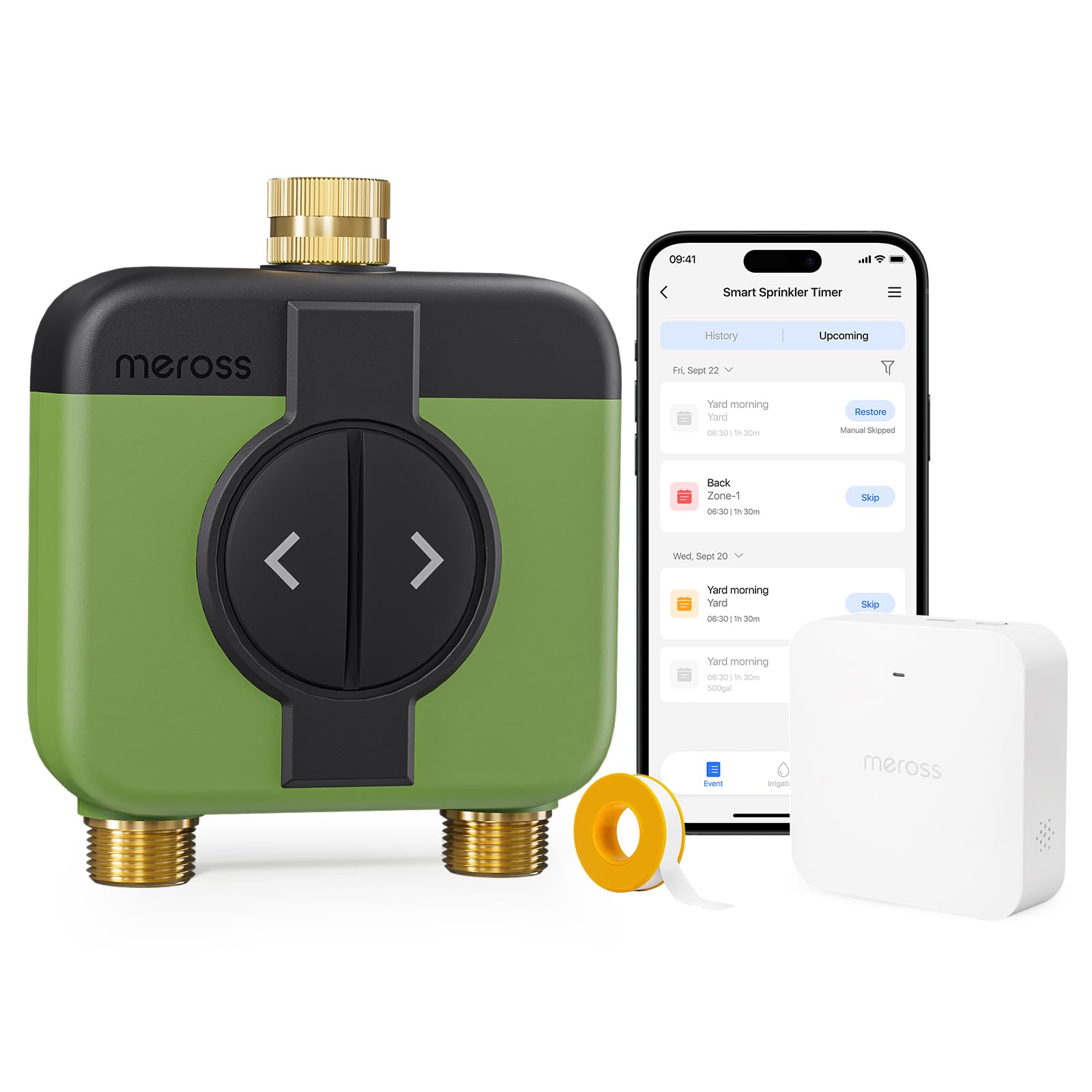
Image: Meross MST200 Smart Sprinkler Timer and Smart Hub in packaging.
Guia de configuració
Follow these steps to set up your Meross MST200 Smart Sprinkler Timer:
1. Hub Placement
Choose a suitable indoor location for your Smart Hub. Ensure it has a strong 2.4GHz Wi-Fi signal and is relatively close to where you intend to install the sprinkler timer, with minimal physical obstacles between them for optimal communication.
2. Power On the Smart Hub
Plug the Smart Hub into a power outlet. The LED indicator on the hub will flash amber and green slowly, indicating it is ready for setup.
Video: Meross MST200 Smart Sprinkler Timer Installation and Pairing Guide.
3. Connect Smartphone to 2.4GHz Wi-Fi
Ensure your smartphone is connected to your home's 2.4GHz Wi-Fi network. The Meross app requires this for initial setup.
4. Meross App Setup (Smart Hub)
- Download and open the Meross app from your app store.
- Tap the '+' icon in the top right corner to add a new device.
- Seleccioneu "Smart Hub" de la llista de dispositius.
- Choose your specific Smart Hub model (e.g., MSH400 or MSH450).
- Follow the on-screen instructions to pair the Smart Hub with your Meross account and Wi-Fi network. If using Apple HomeKit, scan the HomeKit code on the hub or packaging.
5. Install Batteries in Sprinkler Timer
The battery compartment of the MST200 is designed to be waterproof and may be tight. If you have difficulty opening it, gently pry it open with a flat screwdriver.
- Open the battery compartment cover on the back of the sprinkler timer.
- Insert four 1.5V AA alkaline batteries, ensuring correct polarity.
- Securely close the battery compartment cover. The timer will power on.

Image: Meross MST200 featuring 100% brass inlet and outlets, IP66 waterproof rating, UV-resistant casing, integrated filter, and sealed battery compartment.
6. Meross App Setup (Sprinkler Timer)
- In the Meross app, tap the '+' icon again.
- Select 'Smart Sprinkler Timer' from the device list.
- Follow the app's instructions to pair the sprinkler timer with your Smart Hub. This typically involves pressing a button on the timer to enter pairing mode.
7. Instal·lació física
- Connect the Meross MST200 to a standard 3/4 inch (26.5 mm) outdoor faucet. Ensure a tight connection, using the provided PTFE tape if necessary, to prevent leaks.
- Attach your garden hoses to the two independent outlets on the bottom of the sprinkler timer.

Image: Diagram illustrating the connection of the Meross MST200 to an outdoor faucet and garden hoses.
8. Smart Home Integration (Optional)
For integration with Apple Home, Alexa, or Google Home:
- Apple Home: If you used an iPhone for setup, the device should automatically be added to the Apple Home app.
- Alexa i Google Home: Navigate to the 'User' page in the Meross app, then select 'Integration' to link your Meross account with Amazon Alexa or Google Assistant.
Instruccions de funcionament
The Meross MST200 offers various ways to manage your watering needs:
Independent 2-Zone Control
The MST200 features two independently programmable outlets. You can set different watering schedules and durations for each zone, allowing for customized irrigation of your lawn, garden beds, or other areas without interference.

Image: The Meross MST200 managing two distinct watering zones with separate schedules.
Automatic Watering Programs
Create up to 20 personalized watering programs per outlet using the Meross app. Define specific days, times, and durations for each zone. This is ideal for various applications such as drip irrigation, filling pools, or maintaining fountains.
Smart Rain Delay
The MST200 synchronizes with the nearest weather station via the Meross app. Before each scheduled irrigation cycle, it automatically checks the latest weather forecast. If the total predicted rainfall for the current and next day meets or exceeds your predefined threshold in the app (e.g., 8.9 mm), the irrigation program will be intelligently skipped to prevent overwatering and conserve water.

Image: The Meross MST200 utilizing smart rain delay based on local weather data.
Water Consumption Tracking
The integrated water flow meter allows you to precisely track water consumption for each zone and the total output for daily, weekly, and monthly periods. This data helps you optimize your irrigation schedule, ensure plant health, and reduce water bills.

Image: Meross app interface showing detailed water consumption tracking for different periods.
Control remot
Control your MST200 from anywhere in the world using your smartphone. Whether you are on vacation or at work, you can manage your garden's watering via the Meross app or through integrated platforms like Apple Home, Alexa, or Google Home.

Image: Remote control of the Meross MST200 via the smartphone app, showing a user managing watering while away.
Control manual
In addition to app control, the MST200 features physical buttons on the device for manual operation. This allows for quick and easy watering without needing your smartphone.

Image: The Meross MST200 with its manual control buttons for direct operation.
Manteniment
Canvi de bateria
The MST200 requires four 1.5V AA alkaline batteries. When the batteries are low, you may receive a notification in the Meross app. Replace all four batteries simultaneously to ensure optimal performance.
Cleaning the Integrated Filter
The MST200 has an integrated filter to prevent impurities from entering the system. Periodically check and clean this filter to ensure proper water flow and prevent blockages.
Hivernització
Before freezing temperatures arrive, disconnect the sprinkler timer from the faucet and hoses. Drain any remaining water from the device and store it in a dry, frost-free location to prevent damage.
Resolució de problemes
If you encounter issues with your Meross MST200, refer to the following common solutions:
- Problemes de connectivitat: Ensure your Smart Hub is within range of your 2.4GHz Wi-Fi router and the sprinkler timer is within range of the Smart Hub. Minimize obstacles between devices.
- Error de vinculació: If the LED on the Smart Hub or Sprinkler Timer does not blink as expected during pairing, try double-pressing the power button on the hub or any button on the timer to re-enter pairing mode.
- Fuga d'aigua: Check that all connections to the faucet and hoses are tight. Use the provided PTFE tape on threaded connections to ensure a watertight seal.
- Sense flux d'aigua: Verify that the water supply is turned on and the integrated filter is clean and free of debris. Check battery levels in the sprinkler timer.
- L'aplicació no respon: Ensure your smartphone has an active internet connection. Try restarting the Meross app or your smartphone.
For further assistance, please contact Meross customer support.
Especificacions
| Número de model | MST200 |
| Marca | meros |
| Entrada | 6V DC (4 x 1.5V AA Batteries) |
| Material | Acrylonitrile Butadiene Styrene, Brass, Polycarbonate |
| Product Dimensions (P x L x H) | 5P x 14L x 17H centímetres |
| Classificació IP | IP66 (impermeable) |
| Number of Settings (Programs) | 20 |
| Connectivitat | 2.4GHz Wi-Fi (via Smart Hub) |
| Compatibilitat | Apple Home, Amazon Alexa, Google Home |
Garantia i Suport
Meross products are designed for reliability and performance. For warranty information, technical support, or any questions regarding your MST200 Smart Sprinkler Timer, please visit the official Meross weblloc web o contacteu directament amb el servei d'atenció al client. Conserveu el rebut de compra per a reclamacions de garantia.