
1. Introducció
The iCarsoft CR MAX P is a high-performance bidirectional diagnostic scan tool designed for comprehensive vehicle diagnostics. It features a 10-inch touchscreen, Android 8.1 operating system, and supports a wide range of diagnostic functions including full-system scanning, up to 51 maintenance services, over 4000 bidirectional tests, and complete OBD2 functions. This tool is compatible with most vehicles manufactured after 1996 and supports advanced protocols like CAN FD and DoIP.
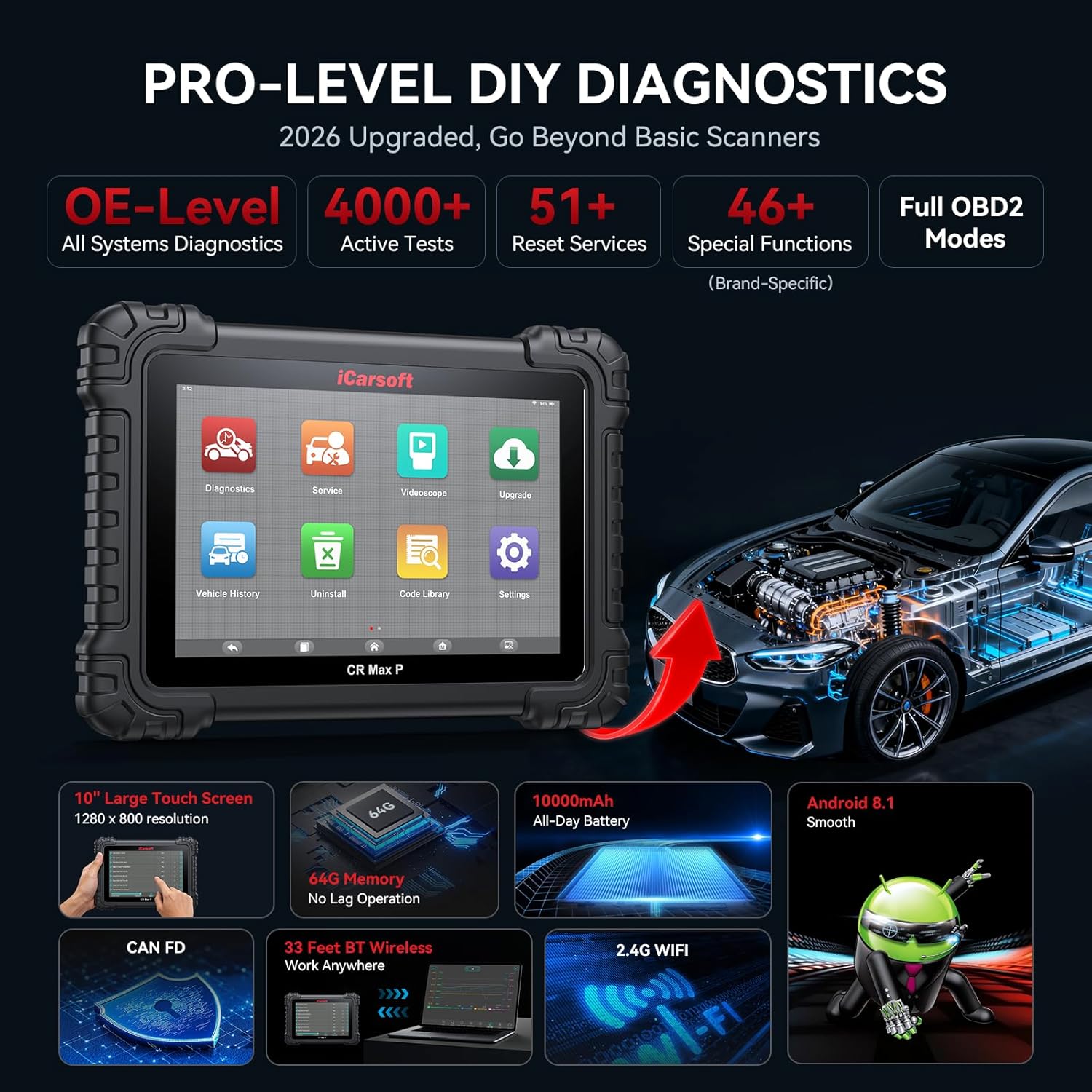
Image: The iCarsoft CR MAX P device showcasing its key features and capabilities.
2. Què hi ha a la caixa
En obrir el paquet, comproveu que hi hagi tots els components:
- iCarsoft CR MAX P Diagnostic Tool
- Manual d'usuari
- VCI Adapter Holder
- VCI Adapter
- Cable USB
- USB to Ethernet Adapter Cable
- Adaptador d'alimentació
- OBDII Connector F-Chassis
- RJ45 Network Cable, 1.2 M
- Drap de neteja

Image: All items included in the iCarsoft CR MAX P product package, including the main unit, cables, and accessories.
3. Configuració
3.1 Engegada i càrrega inicials
Before first use, ensure the device is fully charged using the provided power adapter. Connect the power adapter to the device's charging port and plug it into a standard electrical outlet. The device features a 10,000mAh battery for extended operation.
3.2 Connexió al vehicle
Locate your vehicle's OBD2 diagnostic port, typically found under the dashboard on the driver's side. Connect the 16-pin OBD2 diagnostic adapter (or appropriate adapter for non-16pin sockets) to the vehicle's port, then connect the other end to the iCarsoft CR MAX P device.
3.3 Wireless Connection (Bluetooth & Wi-Fi)
The CR MAX P supports wireless diagnostics via Bluetooth and Wi-Fi. This allows for flexible operation up to 33 feet away from the vehicle. To establish a connection:
- Power on the CR MAX P device.
- Navigate to the 'Settings' menu on the device.
- Enable Bluetooth and Wi-Fi.
- For Bluetooth, select the VCI adapter from the list of available devices to pair.
- For Wi-Fi, select your network and enter the password if required.

Image: The iCarsoft CR MAX P device connected wirelessly to a vehicle, demonstrating its 33ft Bluetooth range.
3.4 Actualitzacions de programari
Regular software updates are provided to ensure compatibility with new vehicle models and to enhance functionality. Connect the device to a Wi-Fi network and navigate to the 'Upgrade' section on the main menu to check for and install available updates.
4. Instruccions de funcionament
4.1 Diagnòstic complet del sistema
The CR MAX P can perform a deep scan of all vehicle modules to identify diagnostic trouble codes (DTCs) and monitor system status. This includes engine, transmission, ABS, airbag, and more.
- Read & Clear Codes: Retrieve and erase DTCs from all accessible control units.
- Dades en directe: View real-time data streams from various sensors and components. Data can be displayed in analog, text, graphing, or progress bar formats.
- Congelar fotograma: Captura una instantània de l'estat del vehicle en el moment en què es va activar un codi d'error.
- Informació del vehicle: Access vehicle identification number (VIN), calibration IDs, and calibration verification numbers.
- Monitor Test: Comproveu l'estat de diversos monitors relacionats amb les emissions.
- Prova del sensor d'O2: Retrieve O2 sensor monitoring test results.
- Preparació I/M: Check the readiness status of the emission-related monitoring systems.

Image: The iCarsoft CR MAX P displaying full system diagnostic capabilities, including reading codes, live data, and ECU information across various vehicle systems.
4.2 Control bidireccional (proves actives)
This function allows the diagnostic tool to send commands to vehicle components to test their functionality directly. This helps in pinpointing faults and verifying repairs.
Examples of actuation tests include:
- Injector Test
- Prova de la bomba de combustible
- Idle Air Control Valve Test
- Ignition Coil Test
- Prova del motor de la bomba ABS
- EV-AP Valve Test
- Throttle Position Actuator Test
- Cooling Fan Test
- HVAC Test
- A/C Compressor Test
- Window, Headlight, Wiper, Door Lock, Horn tests

Image: The iCarsoft CR MAX P demonstrating bidirectional control, sending commands to various vehicle components for active testing.
4.3 Reset and Maintenance Services
The CR MAX P offers up to 51 maintenance and reset services to restore vehicle systems to optimal status after repair or replacement. The availability of specific functions depends on the vehicle model and its systems.
Els serveis clau inclouen:
- Restabliment d’oli
- Restabliment del fre d'estacionament electrònic (EPB)
- Restabliment del sensor d'angle de direcció (SAS)
- Reaprenentatge de l'accelerador
- Regeneració del filtre de partícules dièsel (DPF)
- Restabliment del sistema de gestió de bateries (BMS)
- Anti-lock Braking System (ABS) Bleeding
- Codificació d'injectors
- Restabliment del sistema de control de la pressió dels pneumàtics (TPMS)
- Calibratge de la suspensió
- Air Conditioning (AC) System Reset
- Cap Lamp Ajust
- Body Stability System Reset
- Engine, Transmission, Airbag System Resets
- Seat, Door-Window-Roof System Resets
- Fuel Pump Activation
- Exhaust Gas Recirculation (EGR) Adaptation
- Restabliment d'AdBlue
- Clutch Adaptation
- Crankshaft Position Sensor Learning
- Vol. Alttage Diagnòstic de la bateria
- Cruise Control System Adaptation
- Reinicialització del sensor de NOx
- Rain Sensor Calibration
- Stop And Start System Reset
- Turbocharger Calibration
- Head Up Display Calibration
- Radar Camera Calibration
- Configuració del vehicle
- Comprovació de fallades del cilindre
- Assistència al límit de velocitat
- Reinici de la unitat de control
- Calibració del sensor d'oxigen
- Seatbelt Warning Reset
- VIN Verification (New Service)
- Mileage Verification (New Service)

Image: A comprehensive display of the 51 maintenance and reset services available on the iCarsoft CR MAX P.
4.4 Codificació de la ECU
The ECU Coding function allows for advanced vehicle customization and component adaptation, primarily for V.A.G (Volkswagen, Audi, Skoda, SEAT), BMW, MINI, Bentley, Lamborghini, and Ducati vehicles. This includes:
- Unlocking Hidden Features: Enable manufacturer-equipped functions that are not active by default (e.g., auto door lock, coming home/leaving home lights, blind spot monitoring, instrument cluster coding).
- Disabling Annoying Features: Customize vehicle behavior by deactivating certain functions.
- Codificació de components adaptats: Adapt new components to the vehicle's existing systems.

Image: The iCarsoft CR MAX P demonstrating its advanced ECU coding capabilities to unlock vehicle potential.
4.5 One-Click Auto VIN & Auto Scan
For efficient and comprehensive diagnostics, the device supports automatic VIN detection and a one-click auto scan function that quickly scans all accessible modules for fault codes.

Image: The iCarsoft CR MAX P displaying its one-click auto VIN and auto scan feature for quick vehicle identification and diagnostic overview.
5. Manteniment
- Neteja: Utilitzeu un suau, damp cloth to clean the device's screen and exterior. Avoid abrasive cleaners or solvents.
- Actualitzacions de programari: Regularly check for and install software updates to ensure optimal performance and compatibility with the latest vehicle models.
- Emmagatzematge: Store the device in a cool, dry place, away from direct sunlight and extreme temperatures. Use the provided carrying case for protection during transport.
- Cura de la bateria: Per allargar la durada de la bateria, eviteu descarregar-la completament amb freqüència. Carregueu el dispositiu regularment, sobretot si l'emmagatzemareu durant un període prolongat.
6. Solució De Problemes
| Problema | Causa possible | Solució |
|---|---|---|
| El dispositiu no s'encén. | Low battery; faulty power adapter; device malfunction. | Charge the device for at least 30 minutes. Ensure the power adapter is working correctly. If the issue persists, contact support. |
| No es pot connectar al vehicle. | Loose OBD2 connection; incorrect adapter; vehicle ignition off; incompatible vehicle. | Ensure the OBD2 connector is securely plugged into the vehicle's port. Turn the vehicle ignition to the ON position (engine off). Verify vehicle compatibility with the manufacturer. |
| Wireless connection (Bluetooth/Wi-Fi) issues. | Out of range; interference; incorrect settings. | Ensure the device is within 33 feet of the VCI adapter. Check Bluetooth and Wi-Fi settings on the device. Restart both the device and the VCI adapter. |
| Diagnostic functions not working for specific vehicle. | Software not updated; vehicle not supported; specific function not available for that model. | Perform a software update. Contact iCarsoft support with your vehicle's VIN to confirm compatibility for specific functions. |
7. Especificacions
| Característica | Detall |
|---|---|
| Marca | iCarsoft |
| Número de model | CR MAX P |
| Font d'alimentació | Funciona amb bateria |
| Sistema operatiu | Android 8.1 |
| Mida de la pantalla | 10 polzades |
| Memòria | Emmagatzematge de 64 GB |
| Capacitat de la bateria | 10,000 mAh |
| abast sense fils | 33ft (Bluetooth/Wi-Fi) |
| Protocols compatibles | ISO9141-2, ISO14230-2, ISO15765, K/L-Line, Flashing Code, SAE-J1850 VPW, SAE-J1850 PWM, ISO11898, SAE J2610, GM UART, UART Echo Byte Protocol, Honda Diag-H Protocol, TP2.0, TP1.6, CAN FD, DoIP |
| Tipus d'ajust d'automòbil | Ajuste universal |

Image: Visual representation of the iCarsoft CR MAX P's enhanced hardware, including screen size, memory, battery, and operating system.
8. Informació de la garantia
The iCarsoft CR MAX P comes with a Garantia del fabricant de 1 anys. This warranty covers defects in materials and workmanship under normal use. Please retain your proof of purchase for warranty claims. For detailed terms and conditions, refer to the official iCarsoft weblloc o contacteu amb el servei d'atenció al client.
9. Atenció al client
For technical assistance, compatibility inquiries, or any other support needs, please contact iCarsoft customer service. When contacting support, it is helpful to have your device's serial number and your vehicle's VIN (Vehicle Identification Number) ready, especially for compatibility checks regarding specific functions.
You can often find support contact information on the iCarsoft official website or within the device's 'About' or 'Settings' menu.