
1. Introducció
This manual provides detailed instructions for the setup, operation, maintenance, and troubleshooting of your Aigo AG98 Wireless Mechanical Keyboard. Please read this manual thoroughly before using the product to ensure optimal performance and longevity.
2. Informació de seguretat
- No exposeu el teclat a líquids ni a una humitat excessiva.
- Eviteu temperatures extremes.
- Do not attempt to disassemble or repair the keyboard yourself. This may void the warranty and cause damage.
- Feu servir només el cable USB tipus C proporcionat per carregar.
- Mantenir fora de l'abast dels nens.
3. Contingut del paquet
Verifiqueu que tots els elements siguin presents al vostre paquet:
- Aigo AG98 Wireless Mechanical Keyboard
- Cable USB-Type C
- Manual d'usuari
4. Producte acabatview
The Aigo AG98 is a versatile 98-key mechanical keyboard featuring triple-mode connectivity (Bluetooth, 2.4G Wireless, USB Type-C Wired), RGB backlighting, and hot-swappable switches. Its compact design and durable ABS construction make it suitable for both gaming and daily use across various devices.

Figure 1: Aigo AG98 keyboard demonstrating its triple-mode connectivity with various devices.
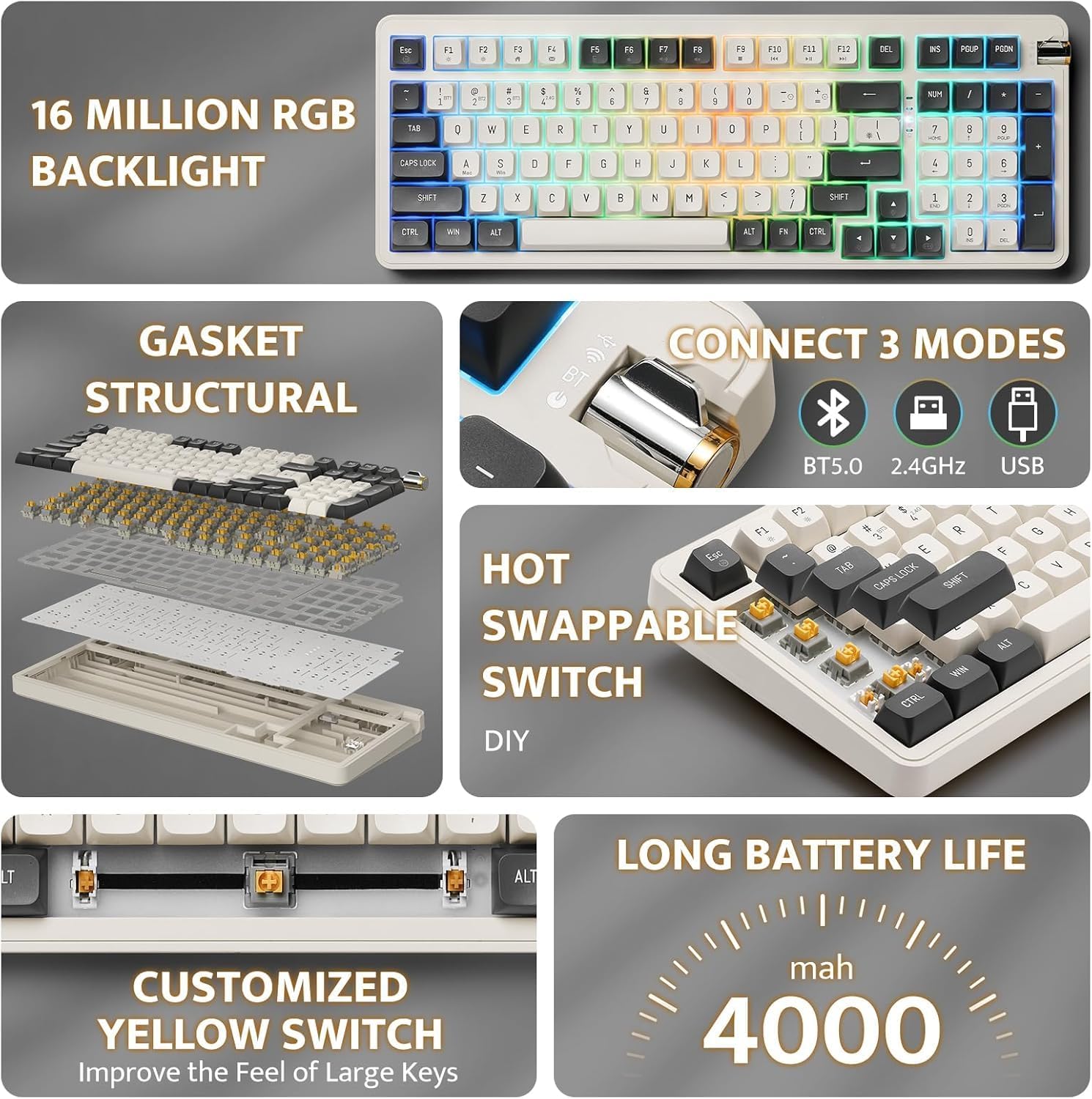
Figure 2: Key features of the Aigo AG98, including structural design, connectivity options, and battery capacity.
5. Configuració
5.1. Càrrega del teclat
Before initial use, fully charge the keyboard using the provided USB Type-C cable. Connect the cable to the keyboard's USB-C port and the other end to a powered USB port (e.g., computer, wall adapter).

Figure 3: USB-C port and mode switch location.
5.2. Modes de connexió
The Aigo AG98 supports three connection modes: Bluetooth, 2.4G Wireless, and USB Type-C Wired. Use the switch on the side of the keyboard to select your desired mode.
5.2.1. USB Type-C Wired Connection
- Ensure the mode switch on the keyboard is set to the wired (USB) position.
- Connecteu el cable USB tipus C al teclat i a l'ordinador.
- El sistema operatiu reconeixerà automàticament el teclat.
5.2.2. Connexió sense fil 2.4G
- Ensure the mode switch on the keyboard is set to the 2.4G wireless position.
- Plug the 2.4G USB receiver into an available USB port on your device.
- The keyboard should connect automatically. If not, press and hold the Fn + 4 key combination to initiate pairing.
5.2.3. Connexió Bluetooth
- Ensure the mode switch on the keyboard is set to the Bluetooth (BT) position.
- Al dispositiu (PC, tauleta, telèfon intel·ligent), activeu el Bluetooth i cerqueu dispositius nous.
- On the keyboard, press and hold Fn + 1, Fn + 2, or Fn + 3 to enter pairing mode for BT1, BT2, or BT3 respectively. The indicator light will flash.
- Select "Aigo AG98" from the list of available devices on your screen.
- Un cop emparellat, l'indicador lluminós deixarà de parpellejar.
6. Instruccions de funcionament
6.1. Control de retroiluminació RGB
The Aigo AG98 features customizable RGB backlighting. Use the following key combinations to control the lighting effects:
- Fn + \|: Change backlight mode.
- Fn + ↑: Augmenta la brillantor de la retroiluminació.
- Fn + ↓: Redueix la brillantor de la retroiluminació.
- Fn + ←: Slow down backlight effect speed.
- Fn + →: Speed up backlight effect speed.

Figure 4: Aigo AG98 with RGB backlighting activated.
6.2. Commutadors intercanviables en calent
The Aigo AG98 keyboard features hot-swappable switches, allowing you to change mechanical switches without soldering. This enables customization of typing feel and sound.

Figure 5: Hot-swappable yellow switches with details on pre-lubrication and stable shaft design.
Per substituir un interruptor:
- Apagueu el teclat o desconnecteu-lo del dispositiu.
- Use a switch puller tool (not included) to carefully grip the switch and pull it straight up.
- Align the pins of the new switch with the holes on the PCB and press it gently until it clicks into place. Ensure the pins are not bent.
7. Manteniment
7.1. Neteja
- Desconnecteu el teclat abans de netejar-lo.
- Feu servir un drap suau i sec per netejar la superfície del teclat.
- For deeper cleaning, use a keycap puller (not included) to remove keycaps and clean dust or debris with compressed air or a small brush.
- No utilitzeu productes químics o materials abrasius.
7.2. Cura de la bateria
- Eviteu descarregar completament la bateria amb freqüència.
- Charge the keyboard regularly, even if not in use, to maintain battery health.
- Guardeu el teclat en un lloc fresc i sec si no l'utilitzeu durant períodes prolongats.
8. Solució De Problemes
| Problema | Causa possible | Solució |
|---|---|---|
| El teclat no respon (sense fil) | Low battery, incorrect mode, pairing issue, receiver not connected. | Charge the keyboard. Ensure correct mode is selected. Re-pair the keyboard (Fn + 1/2/3 for BT, Fn + 4 for 2.4G). Check USB receiver connection. |
| El teclat no respon (amb cable) | Cable issue, incorrect mode. | Ensure cable is securely connected. Try a different USB port or cable. Ensure wired mode is selected. |
| La retroiluminació RGB no funciona | Backlight turned off, brightness set to minimum. | Press Fn + \| to cycle modes. Increase brightness with Fn + ↑. |
| Specific key not working | Interruptor defectuós, deixalles sota la tapa de la tecla. | Remove keycap and clean. If issue persists, replace the hot-swappable switch. |
| End key not working (Windows) | Mouse Keys enabled in OS accessibility settings. | Disable "Mouse Keys" in your operating system's accessibility settings. |
9. Especificacions
- Model: AG98
- Marca: Aigo
- Connectivitat: Bluetooth 5.0, 2.4G Wireless, USB Type-C Wired
- Nombre de claus: 98
- Disseny: QWERTY (anglès)
- Tipus d'interruptor: Mechanical (Linear Yellow Switches)
- Característiques especials: Hot-swappable switches, RGB Backlighting, Ergonomic Design
- Material: Acrilonitril butadiè estirè (ABS)
- Bateria: Bateria de liti recarregable de 1200 mAh
- Sistema operatiu compatible: Windows 10+, Android, iOS, Mac, Linux
- Dispositius compatibles: PC, portàtil, tauleta, telèfon intel·ligent
- Pes de l'article: 425 grams
10. Informació de la garantia
The Aigo AG98 keyboard comes with a 14-day warranty from the date of purchase. This warranty covers manufacturing defects. It does not cover damage caused by misuse, accidents, unauthorized modifications, or normal wear and tear. Please retain your proof of purchase for warranty claims.
11. Suport
For further assistance or technical support, please refer to the contact information provided with your purchase or visit the official Aigo weblloc.