
Introducció
The MageGee Moon98 is a versatile low-profile wireless mechanical keyboard designed for enhanced productivity and gaming. It offers triple-mode connectivity (Bluetooth 5.0, 2.4GHz wireless, and USB-C wired), vibrant RGB backlighting, and a high-capacity 8000mAh battery. This manual provides detailed instructions for setting up, operating, and maintaining your keyboard.
Contingut del paquet
Si us plau, comproveu el paquet per veure si hi ha els elements següents:
- MageGee Moon98 Mechanical Keyboard x 1
- Funda antipols x 1
- 1.8m Type-C Cable x 1
- Manual d'usuari x 1

Image: Contents of the MageGee Moon98 package.
Producte acabatview
The Moon98 keyboard features a compact 98-key layout, providing essential functionality while saving desk space. Its low-profile mechanical switches offer a shorter actuation distance for faster response times compared to traditional mechanical keyboards.
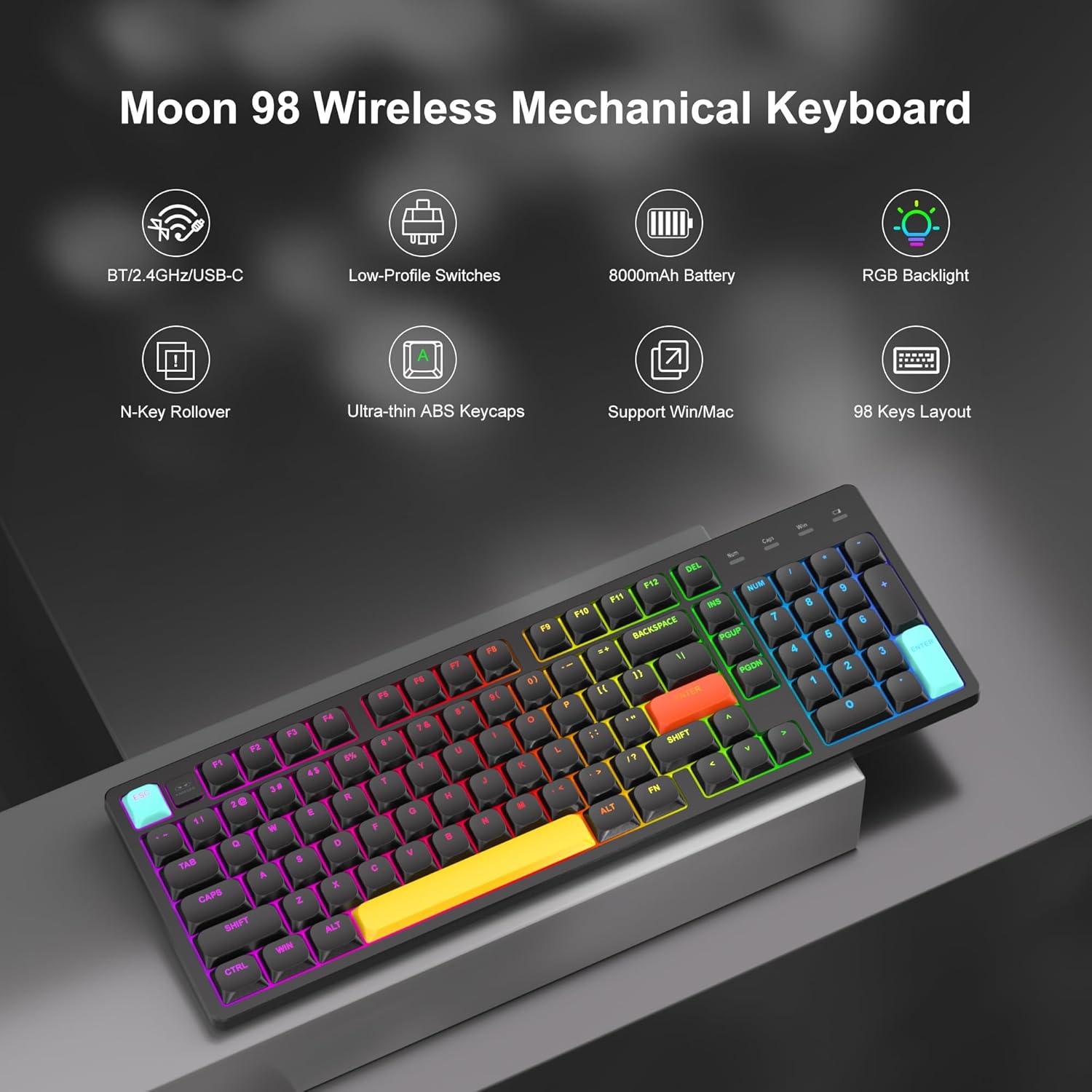
Imatge: Més deview of the MageGee Moon98 keyboard and its main features.

Image: Detailed comparison of low-profile and regular mechanical switches.

Image: Physical dimensions of the 98-key keyboard layout.
Configuració i connectivitat
The Moon98 keyboard supports three connection modes: USB-C wired, 2.4GHz wireless, and Bluetooth 5.0. Use the switch on the back of the keyboard to select your desired mode.

Image: Keyboard ports and switches for connectivity and system selection.
1. USB-C Wired Mode
- Connecteu el cable USB-C proporcionat al teclat i a l'ordinador.
- Ensure the mode switch on the back of the keyboard is set to the wired (USB-C) position.
- The keyboard will be recognized automatically as a plug-and-play device.
2. Mode sense fil de 2.4 GHz
- Locate the 2.4GHz USB receiver, typically stored in a slot on the keyboard.
- Connecteu el receptor USB a un port USB disponible de l'ordinador.
- Set the mode switch on the back of the keyboard to the 2.4G position.
- El teclat s'hauria de connectar automàticament.
3. Mode Bluetooth 5.0
- Set the mode switch on the back of the keyboard to the BT position.
- Mantén premut Fn + Q, Fn + W, o Fn + E for 3-5 seconds to enter pairing mode for Bluetooth device 1, 2, or 3 respectively. The corresponding key (Q, W, or E) will flash.
- On your device (computer, laptop, tablet, or phone), search for Bluetooth devices and select "MageGee Moon98" to pair.
- Once connected, the indicator light will stop flashing. You can switch between paired Bluetooth devices by pressing Fn + Q/W/E.

Image: Illustration of the keyboard's triple-mode connectivity.
Instruccions de funcionament
Control de retroiluminació RGB
The Moon98 keyboard features customizable RGB backlighting with multiple effects and colors.
- Fn + Supr: Cycle through 18 different light effects.
- Fn + INS: Cycle through 8 different light colors.
- Fn + ↑ (Up Arrow): Increase backlight brightness.
- Fn + ↓ (Down Arrow): Decrease backlight brightness.
- Fn + ← (Left Arrow): Decrease light effect speed.
- Fn + → (Right Arrow): Increase light effect speed.

Image: RGB backlight control functions.
System Compatibility Switch
The keyboard includes a switch on the back to toggle between Windows and Mac operating system layouts, ensuring full compatibility and correct key functions for your chosen system.
Càrrega i bateria
The Moon98 keyboard is equipped with an 8000mAh high-capacity battery for extended use.
- Durada de la bateria: Approximately 48 hours with backlight on, and up to 250 hours with backlight off.
- Càrrega: Connect the keyboard to a power source using the provided USB-C cable. The charging indicator light will show the charging status.

Image: Battery capacity and estimated usage times.
Manteniment
To ensure the longevity and optimal performance of your MageGee Moon98 keyboard, follow these maintenance guidelines:
- Neteja de les tecles: The ultra-thin ABS double-color injection keycaps are designed to be durable and fade-resistant. Use a soft, damp cloth to wipe the keycaps. For deeper cleaning, you may carefully remove keycaps using a keycap puller (not included) and clean them with mild soap and water. Ensure they are completely dry before reattaching.
- Eliminació de pols: Feu servir aire comprimit per eliminar la pols i les restes que hi ha entre les tecles i els interruptors.
- Emmagatzematge: When not in use, especially for extended periods, use the provided dust cover to protect the keyboard from dust and spills. Store in a cool, dry place.
- Eviteu líquids: Do not expose the keyboard to excessive moisture or liquids. In case of a spill, immediately disconnect the keyboard and allow it to dry completely before use.

Image: Ultra-thin ABS double-color injection keycaps.
Resolució de problemes
If you encounter issues with your MageGee Moon98 keyboard, refer to the following common solutions:
- El teclat no respon:
- Assegureu-vos que el teclat estigui carregat.
- Check the mode switch (USB-C, 2.4G, BT) is set correctly for your connection type.
- Per a 2.4 GHz, assegureu-vos que el receptor USB estigui ben connectat.
- For Bluetooth, ensure the keyboard is paired correctly (Fn+Q/W/E) and your device's Bluetooth is enabled. Try re-pairing.
- Prova de connectar-te mitjançant un cable USB-C per descartar problemes sense fil.
- La retroiluminació no funciona/és incorrecta:
- Ensure the backlight is not turned off (check brightness settings with Fn+↑/↓).
- Cycle through effects and colors using Fn+DEL and Fn+INS.
- Claus que no es registren:
- Check for physical obstructions under the keycaps.
- Assegureu-vos que el teclat estigui net i lliure de brutícia.
- Lag or Disconnection in Wireless Mode:
- Acosteu el teclat al receptor/dispositiu.
- Eviteu interferències d'altres dispositius sense fil (per exemple, encaminadors Wi-Fi, altres dispositius Bluetooth).
- Assegureu-vos que la bateria del teclat estigui prou carregada.
Especificacions
| Característica | Detall |
|---|---|
| Marca | MageGee |
| Nom del model | Moon98 |
| Descripció del teclat | Mecànic, Low-Profile |
| Tipus de canvi | Mechanical (Linear Red Switch) |
| Tecnologia de connectivitat | Bluetooth 5.0, sense fil de 2.4 GHz, USB-C amb cable |
| Dispositius compatibles | Consola de jocs, ordinador portàtil, PC |
| Sistema operatiu compatible | Windows, Mac |
| Característica especial | Ergonomic, RGB Backlit |
| Capacitat de la bateria | 8000 mAh |
| Font d'alimentació | Battery Powered with Wired Option |
| Material | Plastic (ABS Keycaps) |
| Color | Negre |
| Disposició del teclat | QWERTY, 98 Keys |
Garantia i Suport
The MageGee Moon98 Low-Profile Wireless Mechanical Keyboard comes with a 1 any de garantia des de la data de compra.
For technical support, warranty claims, or any questions regarding your product, please contact MageGee customer service through the retailer where you purchased the product or visit the official MageGee weblloc per obtenir informació de contacte.
Si us plau, conserveu el comprovant de compra per al servei de garantia.