
1. Introducció
This manual provides essential information for setting up, operating, maintaining, and troubleshooting your vivo V70 5G smartphone. Please read this guide thoroughly to ensure optimal performance and longevity of your device.
2. Què hi ha a la caixa
Verifiqueu que tots els elements estiguin presents a l'embalatge del producte:
- vivo V70 5G Smartphone
- Cable USB
- Adaptador d'alimentació
- Expulsor de la safata SIM
- Funda de telèfon
- Protector de pantalla (preaplicat o en caixa)
3. Disseny del dispositiu
Familiarize yourself with the physical components of your vivo V70 5G.

Imatge: Davant i darrere view of the vivo V70 5G smartphone, highlighting the display and camera module.
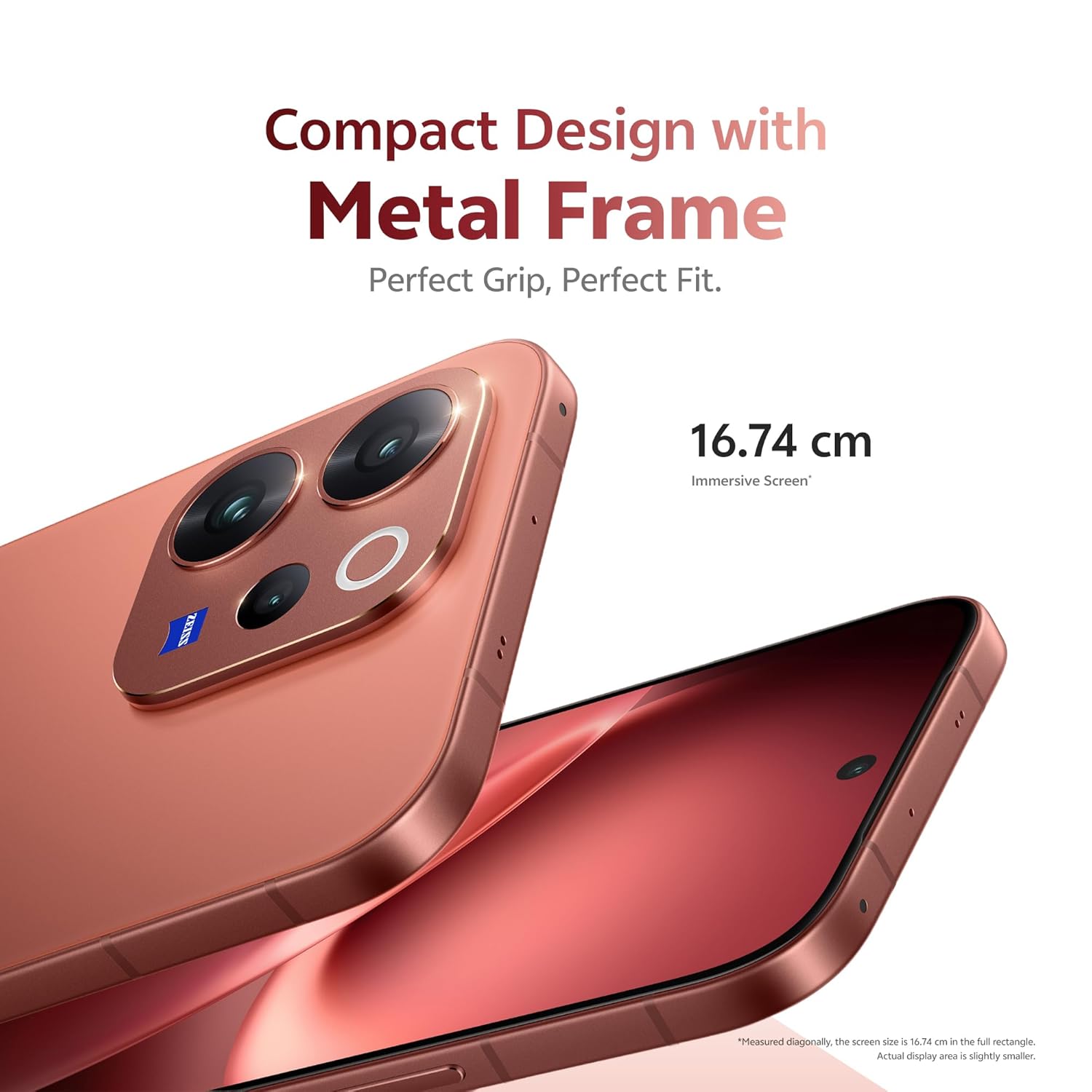
Imatge: lateral view of the vivo V70 5G, showing the power button and volume rocker.

Imatge: A baix view of the vivo V70 5G, displaying the USB Type-C port, speaker grille, and SIM tray slot.
4. Configuració
4.1. Inserció de la targeta SIM
- Localitza la safata de la targeta SIM al lateral del dispositiu.
- Introduïu l'eina d'expulsió de la safata de la SIM al forat petit que hi ha al costat de la safata i premeu fermament fins que la safata surti.
- Place your Nano-SIM card(s) into the tray with the gold contacts facing down. Ensure proper orientation. The device supports Dual SIM.
- Torneu a inserir amb cura la safata de la targeta SIM al telèfon.
4.2. Engegada i configuració inicials
- Premeu i manteniu premut el botó d'engegada fins que aparegui el logotip de Vivo.
- Segueix les instruccions que apareixen a la pantalla per seleccionar l'idioma, connectar-te a la Wi-Fi i configurar el teu compte de Google.
- Configure security features such as fingerprint unlock (3D Ultrasonic Fingerprint 2.0) and screen lock.
5. Funcionament del vostre dispositiu
5.1. Característiques de la pantalla
The vivo V70 5G features a 16.74 cm (6.59 inches) 1.5K Ultra Clear OLED Display, offering vibrant visuals and smooth interactions.
- Resolució: 2750 × 1260 píxels
- Freqüència d'actualització: 120Hz for fluid scrolling and gaming.
- Densitat de píxels: 459 PPI for unmatched clarity.
- Brillantor: Up to 5000 nits local peak brightness for excellent outdoor visibility.

Imatge: Visual representation of the 1.5K Ultra Clear OLED Display, highlighting 459 PPI, 1.07 billion colors, 120 Hz refresh rate, and 5000 nits brightness.
5.2. Sistema de càmeres
The device features a ZEISS Professional Portrait Camera system, designed for high-quality photography.
- Càmera posterior: 50MP ZEISS OIS Main Camera (Sony IMX766), 50 MP ZEISS Super Telephoto Camera (up to 100x zoom), and an 8MP Ultra Wide-Angle lens.
- Càmera frontal: 50 MP ZEISS Group Selfie Camera with AF, f/2.0, and 92° FOV.
- ZEISS Multifocal Portraits: Capture cinematic portraits with five classic focal lengths (23mm to 100mm) and iconic ZEISS bokeh styles.

Imatge: Diagram illustrating the ZEISS Professional Portrait Camera setup, including the 50 MP ZEISS Group Selfie Camera, 50 MP ZEISS OIS Main Camera, ZEISS Ultra Wide-Angle Camera, and 50 MP ZEISS Night Telephoto Camera.

Imatge: Example of the 10X Zoom-In Portrait feature, showing a couple on a beach with a zoomed-in effect.
5.3. Rendiment
The vivo V70 5G is powered by the Next-Gen Snapdragon 7 Gen 4 processor, built on a 4nm process, ensuring efficient and powerful performance.
- Rendiment de la CPU: 27% increase compared to the previous generation.
- GPU Performance: 30% better for graphics-intensive tasks.
- Memòria i emmagatzematge: Equipped with LPDDR5X RAM and UFS 4.1 Storage for faster operating speeds and data transfer.

Imatge: Graphic detailing the Snapdragon 7 Gen 4 processor, highlighting its 4nm flagship chip process, 30% GPU performance increase, and 27% CPU performance increase.

Imatge: Visual representation of LPDDR5X High-Performance Memory and UFS 4.1 Storage chips.
5.4. Bateria i càrrega
The device is equipped with a large 6500mAh BlueVolt Battery and supports 90W FlashCharge technology.
- Capacitat de la bateria: 6500 milionsamp Hores (mAh).
- Càrrega ràpida: 90W FlashCharge for rapid recharging.

Imatge: Graphic showing the 6500mAh BlueVolt Battery and 90W FlashCharge, with estimated usage times for navigation, gaming, and 4K video recording.
5.5. Seguretat
Unlock your phone quickly and securely with the 3D Ultrasonic Fingerprint 2.0 sensor, which functions even with wet or sweaty fingers.
5.6. Durabilitat
The vivo V70 5G is built with IP68 & IP69 durability ratings, providing resistance against dust and water. It can be submerged in fresh water up to 1.5 meters for 30 minutes.
5.7. Característiques de la IA
Explore unique AI-powered features for enhanced photography and user experience.
- AI Holi Portrait: Automatically adds vibrant, culturally celebratory elements to your photos.
- AI Floral Blessing: Integrates floral elements into images.
- AI Magic Weather: Transforms weather conditions in photos.

Imatge: Before and after comparison demonstrating the AI Holi Portrait feature, adding festive colors to a photo of a couple.

Imatge: Before and after comparison showing the AI Floral Blessing feature, adding floral elements to a photo of a couple on a beach.

Imatge: Examples of the AI Magic Weather feature, transforming a single image into clear sky, morning glow, evening glow, and twilight scenes.
6. Manteniment
6.1. Neteja del dispositiu
- Feu servir un drap suau i sense borrissol per netejar la pantalla i la carcassa.
- Eviteu l'ús de productes químics agressius, materials abrasius o aerosols.
- Per a taques persistents, lleugerament dampNetegeu el drap amb aigua o un netejador de pantalles dissenyat per a electrònica.
6.2. Actualitzacions de programari
Regular software updates are provided to enhance security, improve performance, and introduce new features. Your vivo V70 5G is designed to receive 6 years of security updates.
- Ensure your device is connected to Wi-Fi and has sufficient battery charge before initiating an update.
- Navega a Configuració > Sistema > Actualització del sistema per comprovar i instal·lar les actualitzacions disponibles.

Imatge: Graphic indicating "6 Years of Security Updates" for the device, emphasizing long-term security and performance.
6.3. Cura de la bateria
- Eviteu les temperatures extremes, que poden reduir la durada de la bateria.
- Use only the official vivo charger and cable for optimal charging and safety.
- For long-term storage, charge the battery to around 50% and power off the device.
7. Solució De Problemes
This section addresses common issues you might encounter with your vivo V70 5G.
7.1. El dispositiu no s'encén
- Assegureu-vos que la bateria estigui carregada. Connecteu el dispositiu al carregador i espereu uns minuts abans d'intentar engegar-lo.
- Mantingueu premut el botó d'engegada durant almenys 10-15 segons per forçar un reinici.
7.2. Problemes de càrrega
- Verify that the charging cable and power adapter are securely connected to both the device and the power outlet.
- Try using a different power outlet or a different compatible charger and cable.
- Inspect the USB Type-C port on your phone for any debris or damage.
7.3. Camera Not Functioning
- Reinicieu l'aplicació de la càmera.
- Clear the cache and data of the camera app via Configuració > Aplicacions > Càmera > Emmagatzematge.
- Ensure no physical obstruction is covering the camera lenses.
- Reinicieu el telèfon.
7.4. Problemes de connectivitat de xarxa
- Comproveu si el mode avió està activat. Desactiveu-lo si ho està.
- Reinicieu el telèfon.
- Reinsert your SIM card to ensure it is properly seated.
- Reset network settings via Configuració > Sistema > Opcions de restabliment > Restablir Wi-Fi, mòbil i Bluetooth.
If issues persist, please refer to the Support section for further assistance.
8. Especificacions
| Característica | Detall |
|---|---|
| Marca | viu |
| Model | V70 5G |
| Sistema operatiu | OriginOS 6 |
| Mida instal·lada de la memòria RAM | 12 GB |
| Capacitat d'emmagatzematge de memòria | 256 GB |
| Mida de la pantalla | 6.59 polzades |
| Color | Vermell Passió |
| Nombre de ranures per a targetes SIM | Doble SIM |
| Tipus de connector | USB tipus C |
| Nivell de resistència a l'aigua | Waterproof (IP68 & IP69) |
| Front Photo Sensor Resolution | 50 MP |
| Rear Facing Camera Photo Sensor Resolution | 50 MP (Main) |
| Capacitat de la bateria | 6500 milionsamp Hores |
| Pes de l'article | 194 grams |
| Dimensions de l'article | 15.8 x 7.4 x 0.8 centímetres |
| Resolució de visualització màxima | 2750 × 1260 píxels |
| Freqüència d'actualització | 120 Hz |
| Tipus de visualització | AMOLED |
| Tecnologia cel·lular | 5G |
| Any model | 2026 |
| País d'origen | Índia |
9. Garantia i Suport
9.1. Informació de la garantia
Your vivo V70 5G comes with a 1 any de garantia del fabricant for the device and 6 mesos de garantia for in-box accessories from the date of purchase.
Conserveu el vostre comprovant de compra per a reclamacions de garantia.
9.2. Contacte amb el fabricant
For technical support, service, or warranty inquiries, please contact vivo Mobile India Pvt Ltd.
- Fabricant: vivo Mobile India Pvt Ltd
- Adreça: Plot No 08, Sector 24, Yamuna Expressway Area, Gautam Buddha Nagar, Uttar Pradesh, 201310
Visit the official vivo website for the most up-to-date support contact information and service center locations.