
1. Introducció
Thank you for choosing the JESIMAIK R18 Lite Motorcycle Bluetooth Headset. This device is designed to provide clear and reliable communication, music playback, and FM radio functionality for motorcycle riders. Featuring advanced Bluetooth 5.1 technology, 2-way intercom, CVC8.0 noise cancellation, and IP67 waterproof rating, the R18 Lite enhances your riding experience.
Please read this manual carefully before use to ensure proper installation and operation. Keep this manual for future reference.

Image: JESIMAIK R18 Lite Motorcycle Bluetooth Headset mounted on a helmet, showcasing its design and key features like Bluetooth 5.1, IP67, noise cancellation, and music sharing.
2. Contingut del paquet
Verifiqueu que tots els elements que s'enumeren a continuació s'inclouen al vostre paquet:
- Unitat principal x 1
- Boom Microphone (for Open-face Helmet) x 1
- Button Microphone (for Full-face Helmet) x 1
- Adhesive Mount x 1
- Clip-on Mount x 1
- Speaker x 1 (pair)
- Adhesive Tape for Speaker Fixing x 2
- Adhesive Tape for Fixing Boom Microphone x 1
- Adhesive Tape for Fixing Button Microphone x 1
- Manual d'usuari x 1
- Type-C Charging Cord x 1
- Quick Start Card x 1

Image: All components of the JESIMAIK R18 Lite Motorcycle Bluetooth Headset package, including the main unit, microphones, speakers, mounting options, and cables.
3. Producte acabatview i Controls
Familiarize yourself with the main unit and its control buttons:

Imatge: Detallada view of the JESIMAIK R18 Lite main unit, indicating the Volume +, Volume -, Power Button/Call Button, Intercom Button, Charging Port, and Headphone Port.
- Volum + / Volum -: Ajusta el volum de l'àudio.
- Power Button / Call Button: Powers the device on/off, answers/ends calls.
- Botó d'intercomunicació: Initiates or ends intercom communication.
- Port de càrrega: Port USB-C per carregar el dispositiu.
- Port dels auriculars: Connects the speaker and microphone assembly.
4. Instal·lació
Una instal·lació correcta garanteix un rendiment i una comoditat òptims.
4.1 Muntatge de la unitat principal
Choose between the adhesive mount or the clip-on mount based on your helmet type and preference.
- Muntatge adhesiu: Peel the backing from the adhesive pad and firmly press the mount onto a clean, flat surface on the side of your helmet. Hold for 30 seconds.
- Suport amb clip: Feu lliscar el clip entre la carcassa del casc i l'encoixinat interior. Assegureu-vos que estigui ben fixat.
Once the mount is secured, slide the main unit onto the mount until it clicks into place.
4.2 Instal·lació d'altaveus i micròfons
The R18 Lite includes two types of microphones for different helmet styles:
- Micròfon de braç: Recommended for open-face helmets. Attach it to the inside of the helmet near your mouth using the adhesive tape.
- Micròfon de botó: Recommended for full-face helmets. Attach it to the inside of the chin bar, ensuring it is close to your mouth.
Place the ultra-thin speakers inside the helmet's ear pockets. Use the provided adhesive tape for speaker fixing to secure them. Ensure the speakers are positioned directly over your ears for the best audio quality.

Image: A JESIMAIK R18 Lite headset properly installed on the side of a motorcycle helmet, demonstrating its low-profile disseny.
4.3 Speaker Connection Caution
To ensure waterproof function and proper sound, the speaker connector must be fully inserted into the main unit. Improper insertion may result in no sound or distorted audio.

Image: Visual guide showing the correct and incorrect way to connect the speaker to the main unit, highlighting the importance of a firm, complete insertion.
4.4 Passos de desmuntatge
To remove the main unit from its mount, press the plastic part below the [+] button with your right hand, then grip the main unit with your left hand and push in the arrow direction. Improper disassembly may cause the clips to break.

Image: Step-by-step visual instructions for safely detaching the JESIMAIK R18 Lite main unit from its helmet mount.
5. Instruccions de funcionament
5.1 Encès/Apagat
- Encès: Press and hold the Power Button for approximately 3 seconds until the indicator light turns blue and you hear a voice prompt.
- Apagar: Press and hold the Power Button for approximately 3 seconds until the indicator light turns red and you hear a voice prompt.
5.2 Bluetooth Pairing with Mobile Device
The R18 Lite uses advanced Bluetooth 5.1 for stable connections.
- With the device powered off, press and hold the Power Button for about 5-7 seconds until the indicator light flashes red and blue alternately, indicating pairing mode.
- On your mobile phone, enable Bluetooth and search for "JESIMAIK R18 Lite".
- Select the device to connect. Once paired, the indicator light will flash blue slowly.

Image: Visual representation of the Qualcomm Bluetooth 5.1 chip, highlighting its role in providing strong signal transmission, reduced latency, and stable connectivity.
5.3 Comunicació per intercomunicador
The R18 Lite supports 2-way intercom and can connect up to 6 devices for group riding.
- Inicia l'intercomunicació: Press the Intercom Button once to start a 2-way intercom with a paired device.
- Switch Intercom Partner: If multiple devices are paired, press the Intercom Button repeatedly to cycle through connected partners.
- Finalitzar l'intercomunicador: Press the Intercom Button again to end the intercom conversation.

Image: Two motorcyclists riding, illustrating the simultaneous two-person communication capability of the JESIMAIK R18 Lite intercom system.
5.4 Music Playback and Sharing
- Reproduir/pausa: Press the Power Button once to play or pause music.
- Pista següent: Press the Volume + button twice.
- Pista anterior: Press the Volume - button twice.
- Compartir música: While music is playing, press and hold the Intercom Button for 2 seconds to share music with a connected rider. (Note: Intercom and music cannot be used simultaneously.)

Image: A couple riding a motorcycle, enjoying music together through the headset's music sharing feature.
Funció de ràdio FM 5.5
- Activar/desactivar la ràdio FM: Press the Intercom Button twice quickly.
- Escaneja canals: While FM radio is on, press the Volume + or Volume - button once to scan for the next/previous station.
5.6 Assistent de veu
Activate your phone's voice assistant (e.g., Siri, Google Assistant) directly from the headset.
- Activa l'Assistent de veu: Press the Power Button three times quickly.

Image: A split image demonstrating the voice assistant feature (e.g., "Hey Siri, call Mr. Smith") and automatic telephone connection for incoming calls.
5.7 Trucades telefòniques
- Respon a la trucada: Premeu el botó d'engegada una vegada.
- Finalitzar la trucada: Premeu el botó d'engegada una vegada durant una trucada.
- Rebutja la trucada: Manteniu premut el botó d'engegada durant 2 segons.
- Torna a marcar l'últim número: Press the Power Button twice quickly.
5.8 Vídeo oficial del producte
Video: Official product video demonstrating features and usage of the JESIMAIK R18 Lite Motorcycle Bluetooth Headset.
6. Funcions d'àudio
6.1 Hi-Fi Premium Sound with 40mm Dynamic Drivers
The R18 Lite is equipped with 40mm dynamic drivers and 7mm ultra-thin speakers, providing balanced sound from deep bass to smooth treble for an immersive stereo experience. The ultra-thin design reduces helmet internal pressure and ear fatigue during long rides.

Image: A visual comparison highlighting the slim profile of the 7mm ultra-thin speakers compared to standard 11mm speakers, emphasizing reduced pressure and increased comfort.
6.2 5-Layer Noise Cancellation
Experience ultra-clear voice communication with the R18 Lite's 5-layer noise reduction technology, which includes ENC2.0, DSP, CVC8.0 noise reduction, a hardware filter, and high-density anti-pop mic foam. This system effectively cancels up to 90% of wind noise, engine roar, echo, and ambient interference.
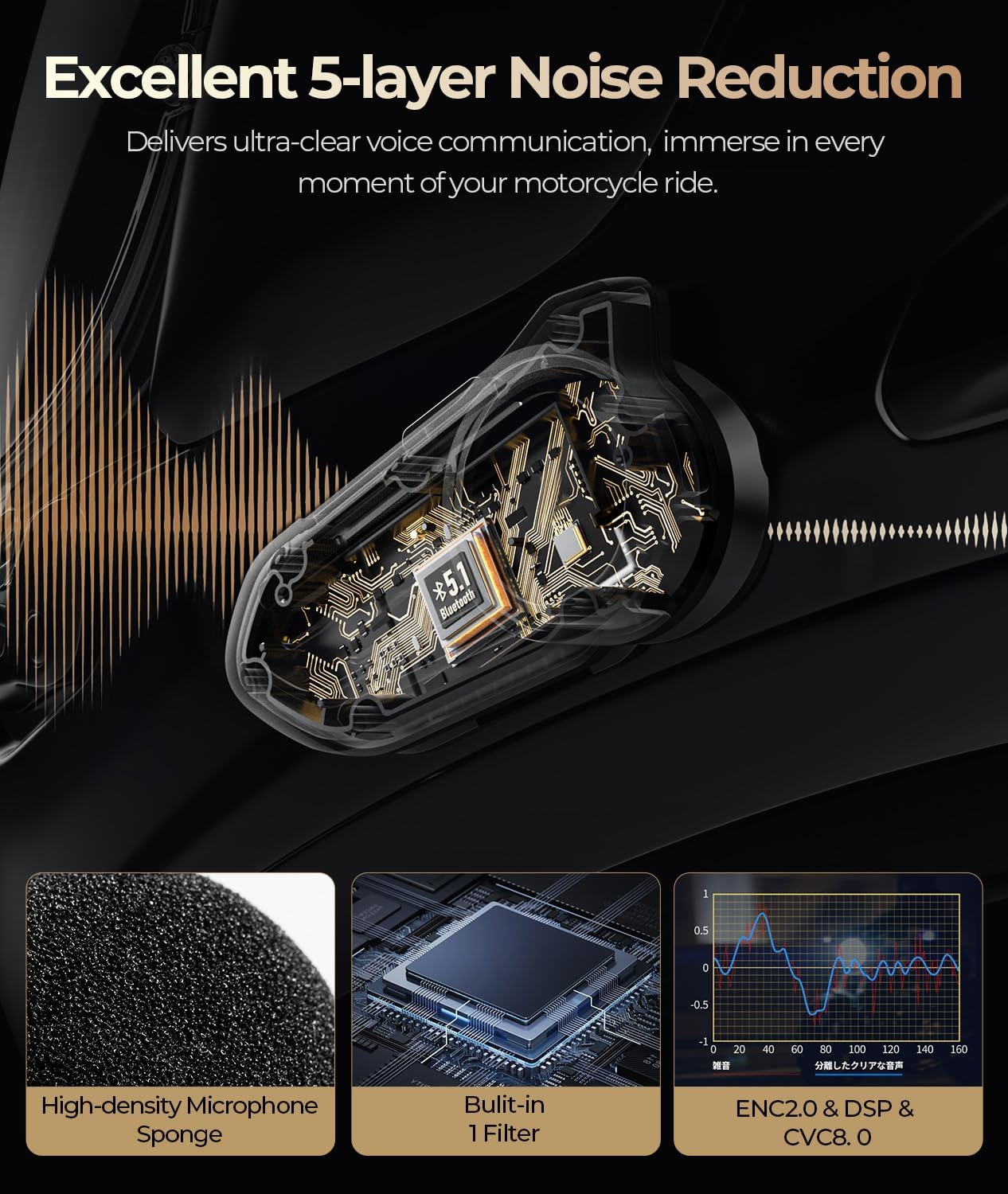
Image: An animated diagram showing how the 5-layer noise reduction technology, including ENC2.0, DSP, and CVC8.0, works to filter out environmental noise for clear audio.
6.3 4 Adjustable Sound Effects
Customize your audio experience with four adjustable sound effects: Standard, Bass, Rock, and Pop. While the device is powered on, press and hold both the Volume [+] and Power buttons simultaneously for 2 seconds to switch between effects.

Image: A graphic displaying the four distinct music effects (Default, Bass, Rock, Pop) available on the JESIMAIK R18 Lite, allowing users to tailor their listening experience.
7. Potència i càrrega
The R18 Lite features an 800mAh high-capacity battery for extended use.
- Capacitat de la bateria: 800 mAh
- Temps de càrrega: Approximately 1.5 hours (USB-C fast charging)
- Reproducció de música: Fins a 30 hores
- Intercom Use: Fins a 25 hores
- Temps d'espera: Fins a 400 hores
The device provides clear battery level alerts and supports power check on Android phones.

Image: Charging instructions for the JESIMAIK R18 Lite, showing the Type-C charging cable connection and indicator light states (red for charging, green for completed).
8. Durability and Compatibility
8.1 IP67 Waterproof and Dustproof
The R18 Lite features a premium sealed construction with 3-proof coating technology and molded waterproof rubber, providing IP67 waterproof and dustproof protection. This ensures effective defense against rain, dust, and splashes for safe all-weather riding.

Imatge: Una explosió view of the JESIMAIK R18 Lite headset, highlighting its internal waterproof components, 3-proof coating technology, and molded waterproof rubber for IP67 protection.
8.2 Compatibilitat universal
This motorcycle helmet Bluetooth headset supports wireless pairing with most mainstream helmet intercoms, allowing seamless connection with third-party brands for flexible cross-brand riding communication. It is compatible with smartphones, navigation systems, and other Bluetooth devices.

Image: A graphic illustrating the universal compatibility of the JESIMAIK R18 Lite with smartphones, navigation devices, and other Bluetooth intercom systems.
9. Solució De Problemes
If you encounter issues with your JESIMAIK R18 Lite, please refer to the following common solutions:
- Sense energia: Ensure the device is fully charged. Connect it to a power source using the provided USB-C cable.
- No es pot emparellar: Make sure the device is in pairing mode (red and blue flashing indicator). Ensure Bluetooth is enabled on your phone and other devices are disconnected. Try restarting both the headset and your phone.
- No Sound/Distorted Sound: Check that the speaker connector is fully and correctly inserted into the main unit. Verify volume levels on both the headset and your connected device.
- Problemes amb l'intercomunicador: Ensure both intercom units are within range and properly paired. Re-initiate the intercom connection.
- Wind Noise/Poor Audio Quality: Confirm the microphone is correctly positioned close to your mouth and that the noise cancellation features are active.
Per a més ajuda, poseu-vos en contacte amb l'atenció al client.
10. Especificacions
| Característica | Especificació |
|---|---|
| Marca | JESIMAIK |
| Número de model | R18 Lite |
| Versió Bluetooth | 5.1 |
| Control de soroll | Environmental Noise Cancellation (ENC2.0, DSP, CVC8.0) |
| Nivell de resistència a l'aigua | IP67 |
| Capacitat de la bateria | 800 mAh |
| Temps de càrrega de la bateria | 1.5 hores |
| Temps de reproducció de música | 30 hores |
| Intercom Use Time | 25 hores |
| Temps d'espera | 400 hores |
| Mida del controlador d'àudio | 40 millimeters (7mm ultra-thin speakers) |
| Tecnologia de connectivitat | Sense fil |
| Tipus de control | Control de botons |
| Dispositius compatibles | Motorcycle Helmet Intercoms, Smartphones, Other Bluetooth Devices |
11. Garantia i Suport
The JESIMAIK R18 Lite Motorcycle Bluetooth Headset comes with a 2 any de garantia des de la data de compra. Aquesta garantia cobreix defectes de fabricació i avaries en condicions d'ús normal.
For warranty claims, technical support, or any questions regarding your product, please contact JESIMAIK customer service through the retailer where you purchased the product or visit the official JESIMAIK weblloc per obtenir informació de contacte.
Si us plau, conserveu el comprovant de compra per al servei de garantia.