
1. Producte acabatview
The UNIONE UC-500M is a desktop scientific calculator designed for clarity and ease of use. It features a large 2-line display and 240 functions, making it suitable for various academic and professional applications, including general math, pre-algebra, algebra 1 and 2, geometry, trigonometry, statistics, science, biology, and finance.
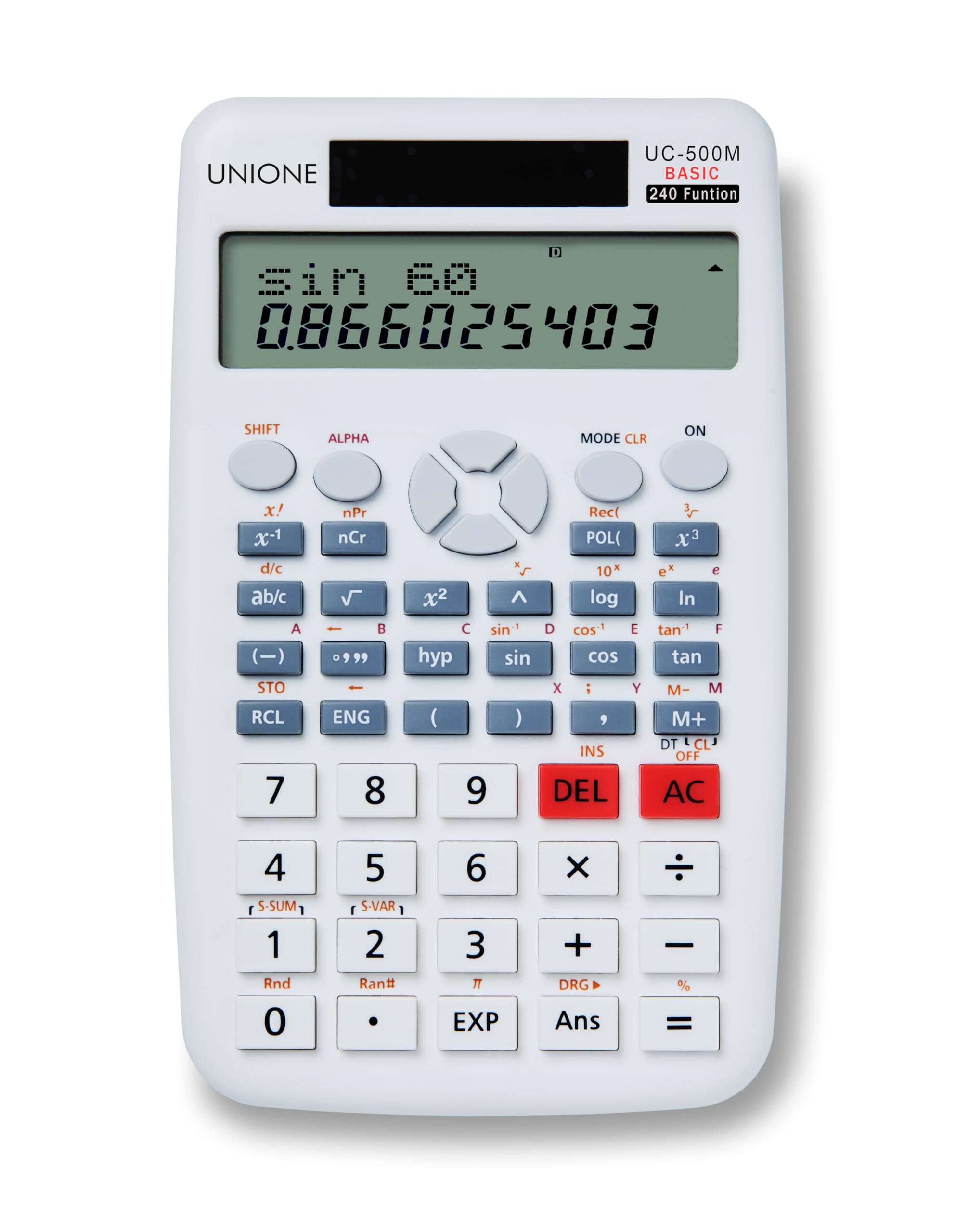
Image: The UNIONE UC-500M scientific calculator, showcasing its large display and key layout.
Característiques principals:
- Pantalla de 2 línies: Permet la simultaneïtat viewing of expressions and results.
- 240 Funcions: Comprehensive set of scientific functions for diverse calculations.
- Teclat gran: Designed for comfortable and accurate input, reducing typos.
- Disseny ergonòmic: Features a 15-degree tilt for improved readability and reduced wrist strain during extended use.
- Doble potència: Operates on both solar power and a single AAA battery (included).
- Dimensions: Approximately 110 x 180 x 35mm (4.3 x 7 x 1.3 inches).
2. Configuració
Instal·lació de la bateria:
The UNIONE UC-500M calculator requires one AAA battery, which is included. The calculator also features solar power for extended battery life.
- Localitzeu la tapa del compartiment de la bateria a la part posterior de la calculadora.
- Feu lliscar la tapa en la direcció indicada per la fletxa.
- Insert one AAA battery, ensuring the positive (+) and negative (-) terminals are correctly aligned as shown inside the compartment.
- Torneu a col·locar la tapa del compartiment de la bateria fent-la lliscar fins que faci clic de manera segura.

Imatge: View of the battery compartment on the back of the calculator, showing where to insert the AAA battery.
Encès/apagat:
- Per engegar la calculadora, premeu la tecla [ACTIVAT] botó.
- The calculator will automatically turn off after a period of inactivity to conserve power.
3. Instruccions de funcionament
Càlculs bàsics:
Enter numbers and operations using the numeric keypad and function keys. The 2-line display shows the input expression on the top line and the result on the bottom line.
- Suma, resta, multiplicació, divisió: Utilitza el [+], [-], [×], [÷] claus.
- És igual a: Premeu [=] per mostrar el resultat.
- Esborrar entrada/Esborrar tot: Premeu [DEL] to delete the last entry. Press [AC] to clear all entries and reset the calculation.

Image: The calculator's 2-line display showing a trigonometric calculation (sin 60) and its numerical result.
Funcions científiques:
The UC-500M includes 240 diverse functions. Many functions are accessed by pressing the [MAJÚS] key followed by the desired function key.
- Fraccions: Utilitza el [d/c] or [ab/c] key for easy entry and conversion of fractions and mixed numbers.
- Funcions trigonomètriques: [sin], [cos], [tan] i les seves funcions inverses ([MAJÚS] + function key).
- Funcions logarítmiques: [log], [ln].
- Potències i arrels: [x²], [√], [x³], [³√].
- Parèntesis: Ús [(] i [)] for complex expressions.

Imatge: Una imatge detallada view of the calculator's keypad, highlighting the scientific function keys like sin, cos, tan, log, and fraction buttons.
Canvi de mode:
The calculator offers 6 representative modes for quick switching between calculation functions. Press the [MODE] key to cycle through available modes.
- COMP (Compute): Standard calculation mode.
- SD (Standard Deviation): Single-variable statistics.
- REG (Regression): Two-variable statistics.
To change angle units (Degrees, Radians, Grads), double-click the [MODE] key and select the desired unit.
4. Manteniment
Atenció general:
- Keep the calculator clean by wiping it with a soft, dry cloth. Avoid using abrasive cleaners or solvents.
- Do not expose the calculator to extreme temperatures, humidity, or direct sunlight for prolonged periods.
- Eviteu deixar caure la calculadora o sotmetre-la a impactes forts.
Substitució de la bateria:
When the display becomes dim or unresponsive, it may be time to replace the AAA battery. Follow the battery installation steps outlined in Section 2. Ensure proper disposal of old batteries according to local regulations.
5. Solució De Problemes
Problemes comuns i solucions:
- La pantalla està en blanc o té poca llum:
- Check if the calculator is turned on by pressing [ACTIVAT].
- Ensure sufficient light for solar panel operation, or replace the AAA battery if necessary. - Resultats de càlcul incorrectes:
- Verify the input expression on the top line of the display.
- Ensure the calculator is in the correct mode (e.g., COMP for standard calculations, correct angle unit for trigonometric functions).
- Clear previous calculations by pressing [AC] and re-enter the calculation. - Les tecles no responen:
- Clean the keypad area to remove any debris.
- If the issue persists, try removing and reinserting the battery to perform a soft reset.
Restablir la calculadora:
If the calculator behaves erratically, a full reset may resolve the issue. To perform a reset, turn off the calculator, then remove the AAA battery. Wait for approximately 30 seconds before reinserting the battery and turning the calculator back on. Note that this will clear any stored memory or settings.
6. Especificacions
| Marca | UNIÓ |
| Model | UC-500M |
| Tipus de calculadora | Científic |
| Tipus de visualització | LCD de 2 línies |
| Nombre de funcions | 240 |
| Font d'alimentació | Solar Powered, 1 AAA Battery (included) |
| Dimensions de l'article (L x A x A) | 180 x 110 x 35mm (7 x 4.3 x 1.3 polzades) |
| Mida de la pantalla | 9 centímetres |
| Fabricant | UNIONE COMMERCE |

Image: The UNIONE UC-500M calculator displayed alongside a table of its key product specifications.
7. Garantia i Suport
Informació de la garantia:
The UNIONE UC-500M Scientific Calculator comes with a 2 any de garantia des de la data de compra. Aquesta garantia cobreix defectes de fabricació i avaries en condicions d'ús normal. Conserveu el comprovant de compra per a reclamacions de garantia.
Atenció al client:
For technical assistance, troubleshooting, or warranty inquiries, please contact UNIONE customer support through the retailer where the product was purchased or refer to the official UNIONE weblloc per obtenir informació de contacte.