
Introducció
The Havit KB11L-PB Mechanical Keyboard is a compact and durable peripheral designed for efficient typing and gaming. It features 63 keys, Red mechanical switches, customizable RGB lighting, and an ABNT2 layout. Connectivity is provided via a detachable USB-C cable, and the keyboard supports anti-ghosting for precise input.
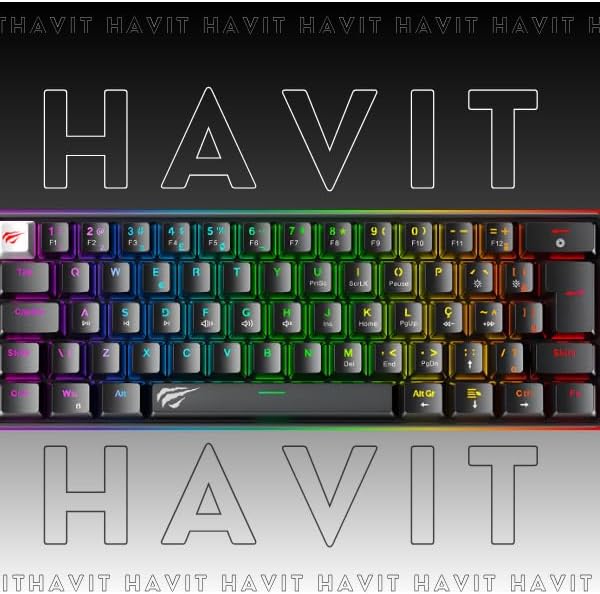
Imatge: Frontal view of the Havit KB11L-PB Mechanical Keyboard, showcasing its compact design and RGB backlighting.
Configuració
To set up your Havit KB11L-PB Mechanical Keyboard, follow these steps:
- Connect the USB-C end of the provided cable to the USB-C port located on the keyboard.
- Connecteu l'extrem USB-A del cable a un port USB disponible de l'ordinador.
- The keyboard is plug-and-play and should be recognized automatically by your operating system without requiring additional drivers.

Imatge: Lateral view of the Havit KB11L-PB Mechanical Keyboard, highlighting the USB-C connection port.
Instruccions de funcionament
The Havit KB11L-PB keyboard features an ABNT2 layout, which includes specific keys for Portuguese language characters. The keyboard's RGB lighting can be adjusted using specific key combinations, typically involving the 'Fn' key and other designated keys. Refer to the keyboard's keycap legends for specific lighting control functions, such as changing modes, brightness, or speed. The anti-ghosting feature ensures that multiple simultaneous key presses are registered accurately, which is beneficial for fast-paced typing and gaming.

Imatge: Anglesa view of the Havit KB11L-PB Mechanical Keyboard, emphasizing its compact and durable build with RGB illumination and ABNT2 layout.
Manteniment
To ensure the longevity and optimal performance of your Havit KB11L-PB Mechanical Keyboard, regular maintenance is recommended:
- Neteja: Regularly clean the keycaps and chassis. Use a soft, dry cloth to wipe dust and debris. For deeper cleaning, you may carefully remove keycaps using a keycap puller (if available) and clean underneath with compressed air or a soft brush.
- Eviteu líquids: No vessiu líquids sobre el teclat. Si es produeix un vessament, desconnecteu immediatament el teclat de l'ordinador i deixeu-lo assecar completament abans de tornar-lo a connectar.
- Emmagatzematge: Store the keyboard in a dry environment away from extreme temperatures and direct sunlight.
- Productes químics: Avoid using harsh chemicals or abrasive materials for cleaning, as these can damage the keyboard's finish or keycap legends.
Resolució de problemes
If you encounter issues with your Havit KB11L-PB Mechanical Keyboard, refer to the following common troubleshooting steps:
- El teclat no respon: Ensure the USB-C cable is securely connected to both the keyboard and your computer. Try connecting the keyboard to a different USB port on your computer.
- Tecles específiques que no funcionen: Inspect for any physical obstructions or debris beneath the non-functioning keycap. Carefully remove the keycap and clean the switch area.
- La il·luminació RGB no funciona: Verify that you are using the correct key combinations (e.g., Fn + specific keys) to cycle through lighting modes, adjust brightness, or change effects. Ensure the lighting has not been accidentally turned off.
- Input Lag or Ghosting: While the keyboard features anti-ghosting, ensure your computer's drivers are up to date and there are no conflicting software applications running in the background.
Especificacions
| Model | KB11L-PB |
| Marca | Havit |
| Quantitat clau | 63 claus |
| Tipus de canvi | Interruptors mecànics vermells |
| Disseny | ABNT2 |
| Il·luminació | RGB |
| Connectivitat | USB-C |
| Longitud del cable | 1.5 metres |
| Vida útil | Fins a 50 milions de clics |
| Anti-fantasma | Sí |
| Pes del producte | Aproximadament 800 g |
| GTIN | 6939119045401 |

Imatge: Anglesa view of the Havit KB11L-PB Mechanical Keyboard, showcasinels seus efectes d'il·luminació RGB.
Garantia i Suport
This Havit KB11L-PB Mechanical Keyboard comes with a 3-month manufacturer's warranty from the date of purchase. For technical support, warranty claims, or further assistance, please contact your retailer or refer to the official Havit support channels. Keep your proof of purchase for warranty validation.