
1. Introducció
Thank you for choosing the HLDIRECT 55 Inch Gaming Desk. This desk is designed to enhance your gaming and work experience with its versatile features, including a built-in power outlet, LED lighting, ample storage, and a foldable tabletop. This manual provides detailed instructions for assembly, operation, and maintenance to ensure safe and optimal use of your new desk.
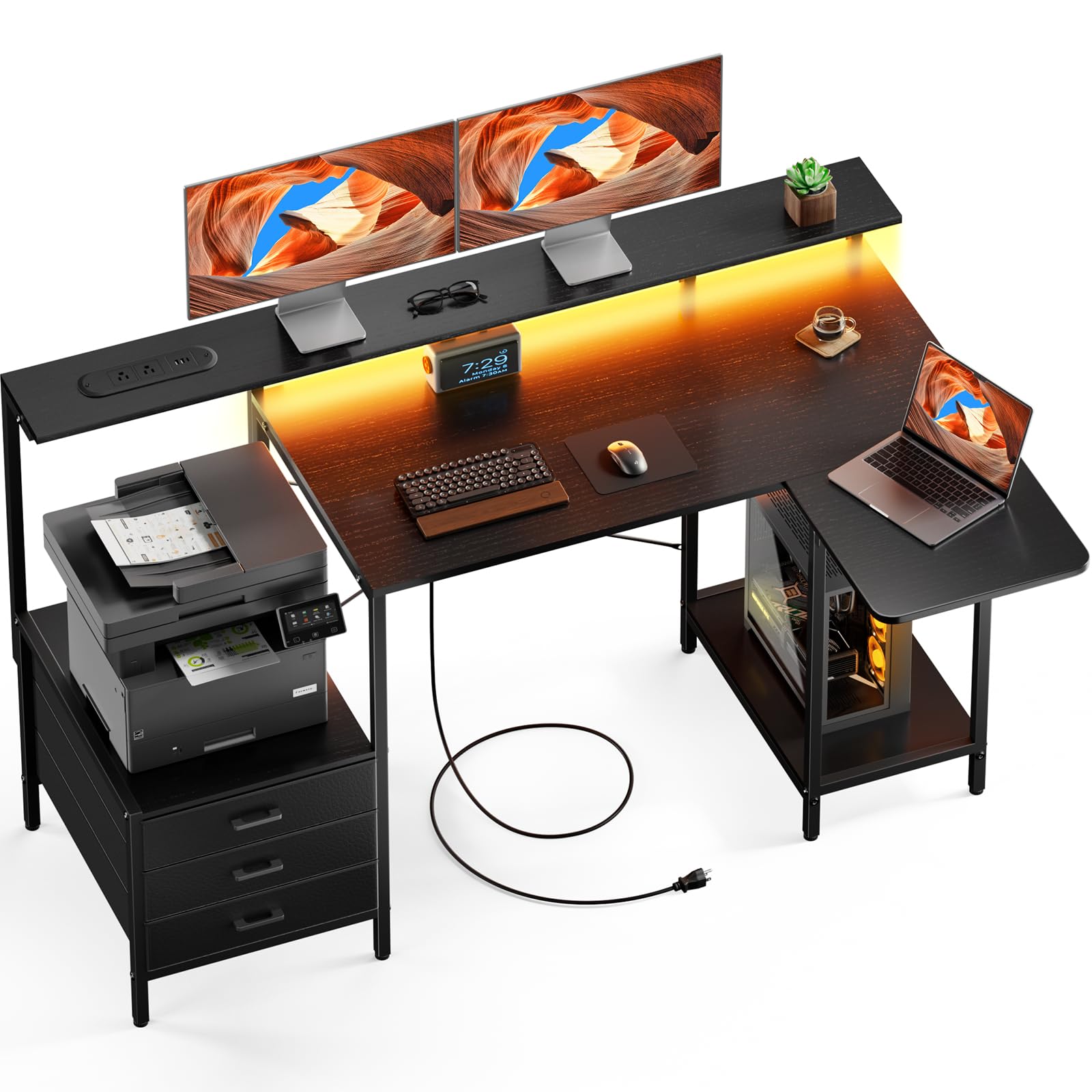
Figure 1: HLDIRECT 55 Inch Gaming Desk (Black)
2. Informació de seguretat
Si us plau, llegiu i comprengui totes les instruccions de seguretat abans del muntatge i l'ús. Si no segueix aquestes instruccions, pot patir lesions o danys al producte.
- Always assemble the desk on a stable, flat, and clean surface to prevent scratching or damage.
- Do not use the foldable tabletop in its extended position unless properly secured. Ensure all locking mechanisms are engaged.
- This desk is heavy (approximately 20 pounds). Exercise caution during assembly and moving. It may tip over if not used or assembled correctly.
- Do not exceed the maximum weight recommendation of 22 pounds for the monitor stand or any individual shelf.
- Mantingueu els nens i les mascotes allunyats durant el muntatge. Les peces petites poden ser un perill d'asfíxia.
- Assegureu-vos que tots els cargols i elements de fixació estiguin ben ajustats abans d'utilitzar-los. Comproveu-los periòdicament i torneu-los a apretar segons calgui.
- No col·loqueu objectes calents directament sobre la superfície de l'escriptori sense protecció.
- Keep liquids away from electrical components (power outlets, LED lights).
3. Muntatge i muntatge
The HLDIRECT Gaming Desk requires assembly. All necessary components and a detailed instruction manual are included. Follow the steps carefully.
3.1 Contingut del paquet
Before starting, verify that all parts are present and undamaged. Refer to the included parts list in your physical manual. If any parts are missing or damaged, please contact customer support.

Figure 2: Desk Dimensions and Key Components
- Desk panels (main desktop, monitor stand, foldable tabletop, shelves)
- Metal frame components (legs, support bars)
- 3 calaixos de tela
- Power outlet unit with USB and Type-C ports
- Tira de llum LED
- Peus ajustables
- Maquinari de muntatge (cargols, perns, clau Allen)
- Manual d'instruccions
3.2 Passos de muntatge
- Col·loca les cames: Securely attach the desk legs to the main frame components using the provided screws. Tighten using the included tool.
- Connecta l'escriptori: Fasten the main desktop panel to the assembled frame using bolts.
- Instal·leu les guies del calaix: Insert the drawer slides into the designated side panels for the fabric drawers.
- Muntar els prestatges d'emmagatzematge: Construct and attach the storage shelves according to the diagrams in the manual.
- Instal·leu el suport del monitor: Secure the monitor stand to the main desktop.
- Integrar presa de corrent: Connect the power outlet unit and LED light strip following the provided wiring diagram. Ensure all connections are firm.
- Attach Foldable Tabletop: Mount the foldable tabletop to the main desk structure, ensuring the locking mechanism operates smoothly.
- Ajustar els peus: Level the desk on any surface using the adjustable feet to ensure stability.
Note: All components are clearly labeled. Refer to the step-by-step guide in your physical instruction manual for detailed diagrams.
4. Instruccions de funcionament
Your HLDIRECT Gaming Desk offers several features designed for convenience and functionality.
Presa de corrent integrada 4.1

Figure 3: Built-in Power Outlet
The desk is equipped with a power strip featuring:
- 2 preses de corrent altern (120V/12A)
- 2 ports USB-A (5 V/2 A)
- 1 USB-C Port (5V/2A)
To use, plug the desk's main power cord (59 inches long) into a wall outlet. You can then charge multiple devices simultaneously. Ensure devices are compatible with the provided voltage i corrent.
4.2 Tira de llum LED

Figure 4: LED Light Strip in Operation
The integrated RGB LED light strip offers multiple lighting effects to create an immersive atmosphere. Connect the LED strip to the power outlet unit as per assembly instructions. Control the lighting effects, colors, and dynamic modes using the dedicated controller or a compatible smartphone application (if applicable, refer to the LED light strip's specific instructions for app details).
4.3 Foldable Tabletop

Figure 5: Foldable Tabletop Extended

Figure 6: Foldable Tabletop Mechanism
The foldable tabletop allows the desk to switch between L-shape and straight configurations. To extend the tabletop, lift the panel until it locks into place. To fold it back, press the release button (as shown in Figure 6) and gently lower the panel. Ensure the tabletop is securely locked in either position before placing items on it.
4.4 Funcions d'emmagatzematge

Figura 7: Ampl Espai d'emmagatzematge
The desk provides extensive storage options:
- Suport de monitor: An ergonomically designed stand to reduce eye strain and neck/shoulder pressure.
- Prestatgeria d'emmagatzematge: Ideal for printers, books, Bluetooth speakers, or other essentials.
- PC Tower Storage: A dedicated load-bearing base to securely store your computer tower.
- 3 Calaixos de tela: For organizing smaller items and keeping your workspace tidy.
5. Manteniment
Proper maintenance will extend the life of your HLDIRECT Gaming Desk.
- Neteja: Netegeu la superfície de l'escriptori amb un damp drap. Eviteu productes químics agressius o netejadors abrasius que puguin danyar l'acabat.
- Pols: Regularly dust the desk and its components to prevent buildup, especially around electrical ports and LED lights.
- Elements de fixació: Reviseu periòdicament tots els cargols i perns per assegurar-vos que romanen ajustats. Torneu a apretar-los si cal per mantenir l'estabilitat.
- Peus ajustables: Assegureu-vos que els peus ajustables estiguin correctament col·locats per mantenir l'escriptori anivellat i evitar que es mogui.
- Components elèctrics: Keep the power outlet and LED light strip free from dust and moisture. Do not attempt to repair electrical components yourself.
6. Solució De Problemes
Si teniu problemes amb el vostre escriptori, consulteu els problemes i solucions més comuns següents.
- L'escriptori està inestable:
- Ensure all assembly screws are tightened. Adjust the leveling feet on the bottom of the desk legs to compensate for uneven floors.
- Power outlets are not working:
- Check if the desk's main power cord is securely plugged into a functional wall outlet. Verify that the wall outlet itself is receiving power. Ensure all internal connections for the power strip are secure.
- LED lights are not turning on:
- Confirm the LED light strip is properly connected to the power outlet unit. Check the power supply to the desk. If using an app, ensure Bluetooth/Wi-Fi connection is active and the app is functioning correctly.
- Foldable tabletop does not lock or fold smoothly:
- Inspect the locking mechanism for any obstructions or damage. Ensure it is properly aligned. Apply a small amount of silicone lubricant if movement is stiff.
Si aquestes solucions no resolen el problema, poseu-vos en contacte amb l'atenció al client.
7. Especificacions
| Marca | HLDIRECT |
| Número de model | 120414 |
| Overall Dimensions (L-shape) | Approx. 55"L x 19.7"D x 34"H |
| Main Desktop Height | 29.1" d'alçada |
| Color | Negre |
| Material | Metal (frame), High-density Particleboard (top) |
| Nombre de calaixos | 3 (fabric) |
| Endoll | 2 AC Outlets (120V/12A), 2 USB-A Ports (5V/2A), 1 USB-C Port (5V/2A) |
| Longitud del cable d'alimentació | 59 polzades |
| Característiques especials | Foldable Tabletop, LED Lights, Monitor Stand, Storage Shelves, PC Tower Storage |
| Pes de l'article | 20 lliures |
| Recomanació de pes màxim | 22 Pounds (for monitor stand/shelves) |
| Muntatge obligatori | Sí |
8. Garantia i Suport
Your HLDIRECT Gaming Desk comes with a garantia d'un any des de la data de compra, cobrint defectes de fabricació.
If you receive a damaged product, encounter any missing parts, or experience issues not covered in the troubleshooting section, please do not hesitate to contact HLDIRECT customer support at any time. We are committed to providing assistance and ensuring your satisfaction.
For warranty claims or support, please refer to the contact information provided in your product packaging or visit the official HLDIRECT weblloc.