
Introducció
The Havit H2015PRO is a versatile gaming headset designed for multi-platform compatibility and immersive audio experiences. Featuring five distinct connection modes, this headset offers flexibility for various gaming setups and entertainment needs. It delivers high-fidelity sound with 360° spatial audio and low latency, ensuring a competitive edge in gaming. This manual provides essential information for setting up, operating, maintaining, and troubleshooting your Havit H2015PRO headset.
Producte acabatview
The Havit H2015PRO headset includes the following components:
- Havit H2015PRO Gaming Headset
- Micròfon desmuntable
- 2.4 GHz USB Wireless Dongle
- Cable de càrrega USB-C
- Cable d'àudio de 3.5 mm
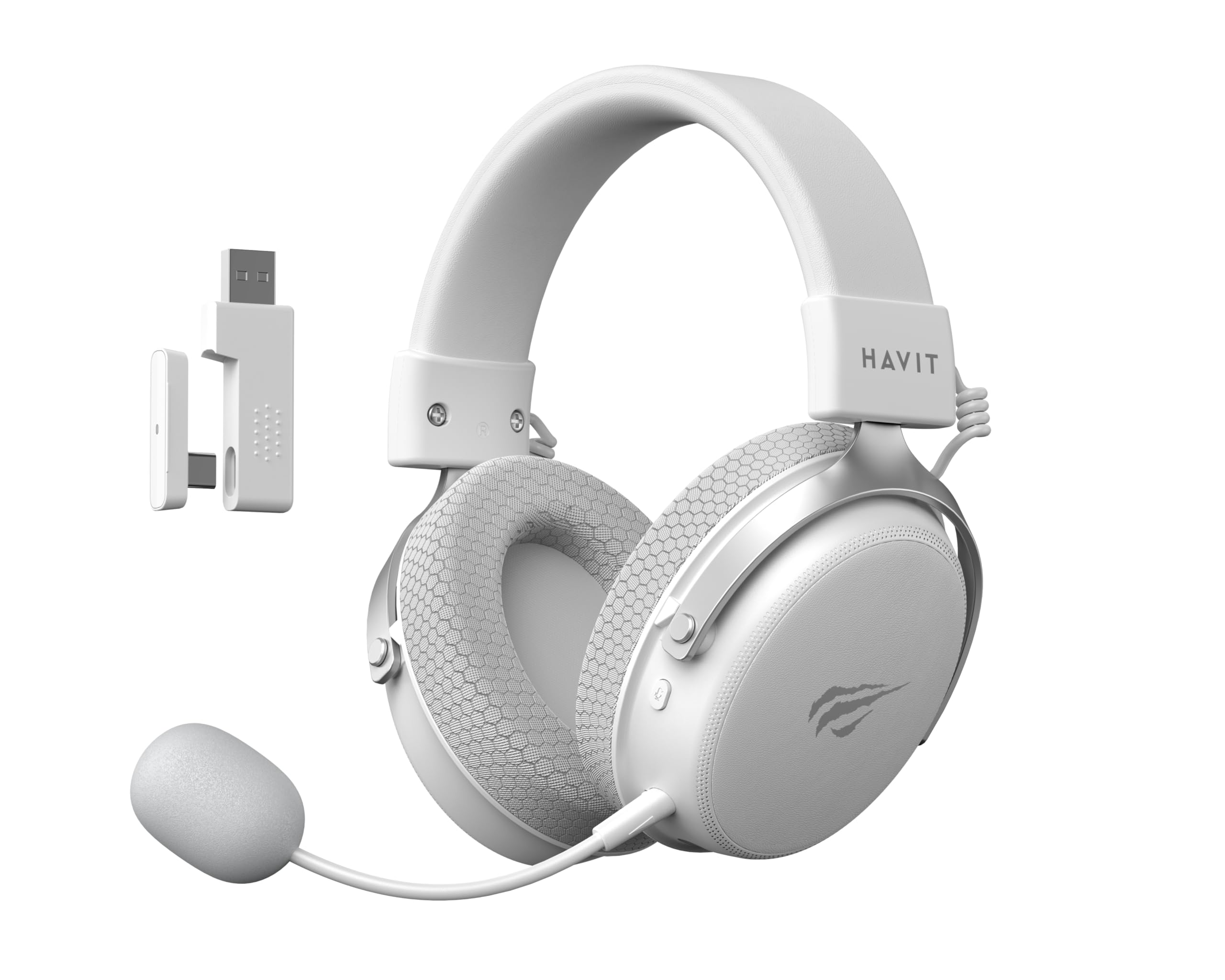
Image: The Havit H2015PRO headset in white, showcasing the main unit, detachable microphone, and the 2.4 GHz USB wireless dongle. This image provides a clear view of the primary components included with the product.
Configuració
The Havit H2015PRO offers five connectivity options to suit various devices and preferences.
1. 2.4 GHz Wireless Connection (USB Dongle)
- Insert the 2.4 GHz USB wireless dongle into an available USB port on your PC, PlayStation, or Nintendo Switch (in docked mode).
- Power on the headset. The headset should automatically connect to the dongle.
- Assegureu-vos que els auriculars estiguin seleccionats com a dispositiu d'entrada i sortida d'àudio a la configuració del sistema.
2. Connexió Bluetooth
- Power on the headset and switch it to Bluetooth mode (refer to the headset controls for mode selection).
- On your device (smartphone, tablet, PC with Bluetooth), go to Bluetooth settings and enable Bluetooth.
- Select "Havit H2015PRO" from the list of available devices to pair.
3. Connexió amb cable (cable d'àudio de 3.5 mm)
- Connecteu un extrem del cable d'àudio de 3.5 mm al port de 3.5 mm dels auriculars.
- Connect the other end to the 3.5mm audio jack on your PC, console controller, or mobile device.
- This mode does not require the headset to be powered on.
4. Wired Connection (USB-C Cable)
- Connect the USB-C cable to the headset's USB-C port.
- Connect the other end to a compatible USB-C port on your PC or device.
- This connection can be used for both audio and charging.

Imatge: Un angle view of the Havit H2015PRO headset, highlighting the earcups, headband, and visible controls on the side. This perspective helps in identifying connection ports and buttons.
Instruccions de funcionament
Encès/Apagat
- Per engegar-lo, premeu i manteniu premut el botó d'engegada fins que l'indicador lluminós s'il·lumini.
- Per apagar-lo, premeu i manteniu premut el botó d'engegada fins que l'indicador lluminós s'apagui.
Control de volum
- Use the volume roller or buttons located on the earcup to adjust the audio level.
Ús del micròfon
- Attach the detachable microphone to the designated port on the headset.
- Adjust the microphone's flexible arm for optimal voice pickup.
- Use the microphone mute button (if available) on the headset to toggle mute on/off.
Càrrega dels auriculars
- Connect the USB-C charging cable to the headset's USB-C port and the other end to a USB power source.
- The indicator light will show charging status (e.g., red for charging, off or green for fully charged).
- Una càrrega completa sol trigar aproximadament 2-3 hores.
Manteniment
Proper care ensures the longevity and performance of your Havit H2015PRO headset.
- Neteja: Use a soft, dry cloth to wipe the headset. For earcups, a slightly damp Es pot fer servir un drap amb sabó suau, però assegureu-vos que no entri humitat a les reixetes dels altaveus.
- Emmagatzematge: Guardeu els auriculars en un lloc fresc i sec, allunyat de la llum solar directa i de temperatures extremes.
- Cura de la bateria: Per allargar la durada de la bateria, eviteu descarregar completament els auriculars amb freqüència. Carregueu-los regularment, fins i tot si no els feu servir durant períodes prolongats.
- Eviteu líquids: Do not expose the headset to water or other liquids, as it is not water-resistant.
Resolució de problemes
If you encounter issues with your Havit H2015PRO headset, refer to the following common solutions:
| Problema | Solució |
|---|---|
| No hi ha so dels auriculars |
|
| El micròfon no funciona |
|
| Els auriculars no es connecten sense fil |
|
| Problemes de càrrega |
|
Especificacions
Detailed technical specifications for the Havit H2015PRO headset:
- Nom del model: HAVIT H2015PRO
- Tecnologia de connectivitat: Hybrid (2.4 GHz Wireless, Bluetooth, 3.5mm Jack, USB-C)
- Mida del controlador: 53 mm
- Impedància: 64 ohms
- Resposta de freqüència: 20.2 Hz (Specific value provided, typical range is 20Hz-20kHz)
- Capacitat de la bateria: 1500 mAh
- Latència baixa: 24 ms
- Característiques d'àudio: 360° Spatial Audio, Virtual 7.1 Surround Sound
- Micròfon: Extraïble i ajustable
- Tipus de control: Integrated (Touch controls)
- Material: Plàstic
- Pes del producte: 500 grams
- Compatibilitat: Desktops, PC, PlayStation, Xbox, Nintendo Switch, Mobile Devices
- Nivell de resistència a l'aigua: No resistent a l'aigua

Imatge: Una cara frontal view of the Havit H2015PRO headset, clearly showing the earcups, headband, and the attached microphone. This view emphasizes the ergonomic design and microphone placement.
Garantia i Suport
Informació de la garantia
The Havit H2015PRO headset comes with a 1 any de garantia del fabricantAquesta garantia cobreix els defectes de materials i de fabricació en condicions d'ús normal. Si us plau, conserveu el comprovant de compra per a reclamacions de garantia.
Atenció al client
For technical assistance, warranty claims, or further inquiries, please contact Havit customer support through their official website or the retailer where the product was purchased. Provide your product model number (H2015PRO) and proof of purchase when seeking support.


