
1. Introducció
This manual provides essential information for setting up, operating, and maintaining your iFFALCON 50U95A 50-inch 4K QD-Mini LED Smart Google TV. Please read it thoroughly before using the product to ensure safe and optimal performance. Keep this manual for future reference.
The iFFALCON 50U95A combines advanced QD-Mini LED display technology with a 144Hz native refresh rate, HDR 1000nit peak brightness, and an ONKYO 2.1 Hi-Fi audio system to deliver an immersive viewing and listening experience. Powered by Google TV, it offers a wide range of smart features and content.
2. Informació important de seguretat
Seguiu sempre les precaucions de seguretat bàsiques quan utilitzeu aquest televisor per reduir el risc d'incendi, descàrrega elèctrica i lesions.
- No exposeu el televisor a la pluja o la humitat.
- No obriu l'armari; encarregueu tot el manteniment a personal qualificat.
- Assegureu-vos que la ventilació sigui adequada i no obstruïu les obertures de ventilació.
- Use only the power adapter and cable supplied with the unit.
- Position the TV on a stable, level surface to prevent it from falling.
- Mantingueu el televisor allunyat de la llum solar directa, de fonts de calor i de temperatures extremes.
- Desendolleu el televisor durant tempestes o quan no l'utilitzeu durant períodes prolongats.
3. Què s'inclou
Verifiqueu que tots els components siguin presents a l'embalatge:
- iFFALCON 50U95A 50-inch 4K QD-Mini LED Smart Google TV
- Adaptador d'alimentació
- Cable d'alimentació
- Control remot
- Moble per a TV (2 peces)
- Manual d'usuari (aquest document)

Imatge: Frontal view of the iFFALCON 50U95A 50-inch TV. This image shows the television from the front, highlighting its slim bezels and stand.
4. Configuració
4.1 Col·locació del suport
- Col·loqueu amb cura el televisor cara avall sobre una superfície suau i plana per evitar que es facin malbé la pantalla.
- Alineeu les peces del suport amb els forats dels cargols de la part inferior del televisor.
- Fixeu els suports amb els cargols proporcionats. Assegureu-vos que estiguin ben fixats.

Imatge: Lateral view of the iFFALCON 50U95A TV with stand. This image illustrates the television's profile and how the stand supports it.
4.2 Connexió de perifèrics
El televisor ofereix diverses opcions de connectivitat:
- Ports HDMI (x4): Connect Blu-ray players, gaming consoles, and other HDMI-enabled devices.
- Port USB (x1): Connecteu dispositius d'emmagatzematge USB per a la reproducció de contingut multimèdia.
- Wi-Fi i Bluetooth: For wireless network and accessory connections.
Imatge: Part posterior view of the iFFALCON 50U95A TV showing ports. This image displays the back panel of the television, indicating the location of various input and output ports.
4.3 Encès
- Connecteu el cable d'alimentació al televisor i després a una presa de corrent.
- Premeu el botó d'engegada del comandament a distància o del televisor mateix.
- Follow the on-screen instructions for initial setup, including network connection and Google TV account login.
5. Instruccions de funcionament
5.1 Funcions de control remot
The remote control allows you to navigate the TV's interface, adjust settings, and access smart features. Refer to the remote control diagram in the separate quick start guide for button layout.
5.2 Interfície de Google TV
Your iFFALCON TV runs on Google TV, providing a personalized experience with content recommendations, access to streaming apps, and Google Assistant voice control.
- Pantalla d'inici: Access your favorite apps, movies, and shows.
- Assistent de Google: Press the Google Assistant button on your remote to use voice commands for searching content, controlling smart home devices, and more.
- Aplicacions: Baixeu i gestioneu aplicacions des de Google Play Store.
5.3 Configuració d'imatge i so
Accediu al menú de configuració per personalitzar el vostre viewexperiència d'escolta i escolta:
- Modes d'imatge: Choose from various presets (e.g., Standard, Vivid, Movie, Game) or customize brightness, contrast, color, and sharpness.
- Modes de so: Select audio presets (e.g., Standard, Music, Movie) or adjust equalizer settings.
- Configuració HDR: The TV supports HDR10, HDR10+, Dolby Vision, and HLG. Ensure your content source is HDR compatible for optimal performance.
- Mestre del joc: Activate Game Master mode for reduced input lag and optimized gaming performance.
6. Característiques clau
6.1 QD-Mini LED Display Technology
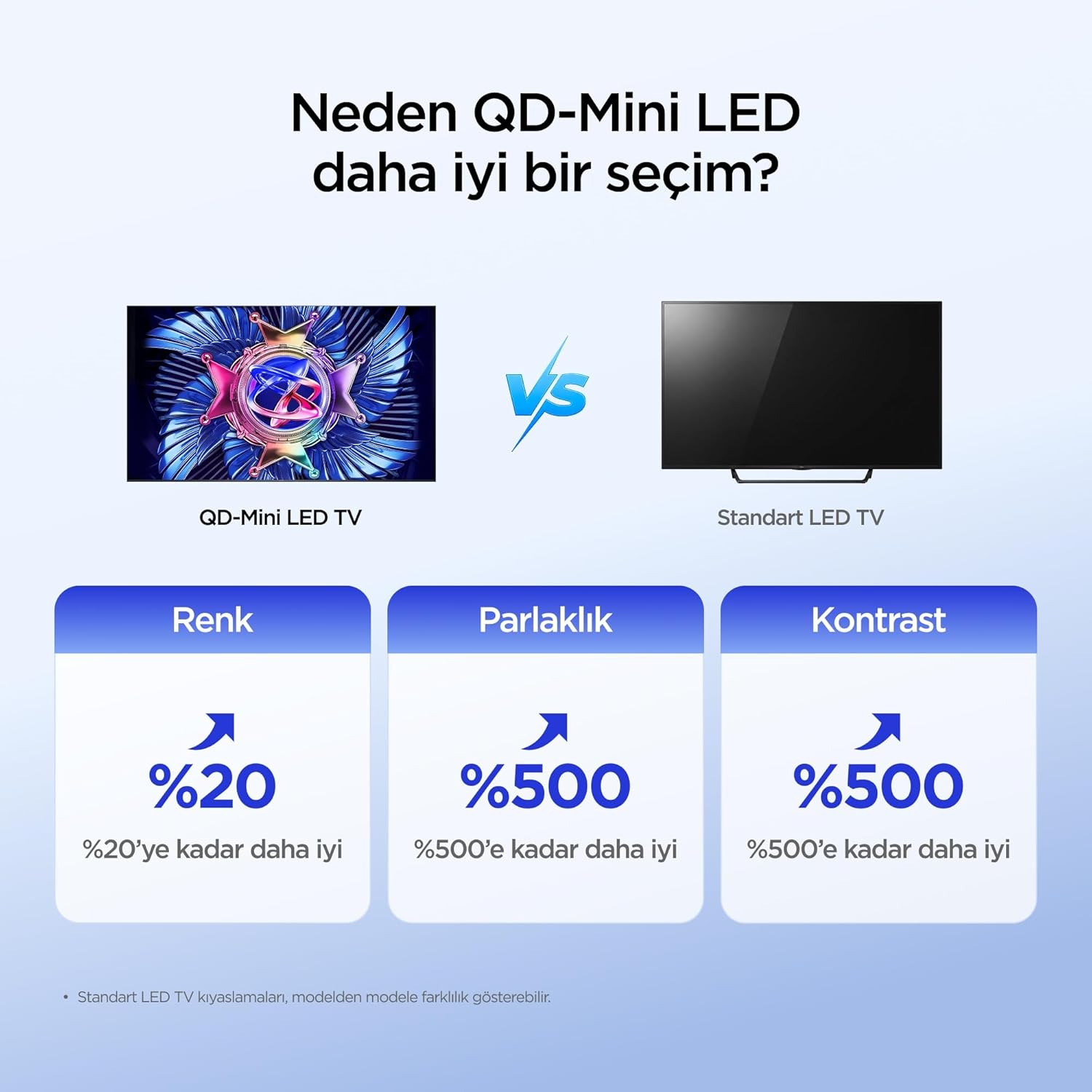
The iFFALCON 50U95A utilizes QD-Mini LED technology, combining Quantum Dot color with Mini LED backlighting. This results in superior brightness, contrast, and color accuracy compared to traditional LED TVs.

Image: Comparison illustrating the benefits of QD-Mini LED over standard LED TVs in terms of color, brightness, and contrast.
With over 500 local dimming zones, the TV provides precise light control at a pixel level, enhancing detail in both bright and dark scenes. It achieves a peak brightness of 1000 nits, ensuring vibrant images even in well-lit environments.

Image: A vibrant image demonstrating the 1000 nits peak brightness capability of the TV.
6.2 144Hz Native Refresh Rate
Experience smoother motion and clearer images with the 144Hz native refresh rate. This is particularly beneficial for fast-paced action movies and gaming, reducing motion blur and ghosting.

Image: A dynamic image of a race car, illustrating the smooth motion provided by the 144Hz native refresh rate.
6.3 ONKYO 2.1 Hi-Fi Audio System with Dolby Atmos
The integrated ONKYO 2.1 channel speaker system delivers rich, immersive stereo sound with deep bass. Combined with Dolby Atmos, it creates a cinematic audio experience, bringing sound to life with incredible clarity and depth.

Image: A living room scene depicting sound waves emanating from the TV, illustrating the immersive audio experience of the 2.1 speaker system.
6.4 AI PQ Pro Processor
The AI PQ Pro Processor intelligently analyzes and optimizes content pixel by pixel. This advanced processor enhances picture quality, delivering sharper details, improved contrast, and more vibrant colors for an overall superior viewexperiència.

Image: A visual representation of the AI PQ Pro Processor chip, highlighting its role in optimizing image quality.
6.5 Matte HVA Panel & Ultra Slim Design
The Matte HVA Panel reduces glare and reflections, providing a comfortable viewing experience even in bright rooms. Its ultra-slim design allows for seamless integration into any living space, whether on a stand or wall-mounted.

Image: A comparison showing the reduced reflections and improved viewing experience of a Matte HVA Panel compared to a standard panel.

Image: A visual representation of the TV's ultra-slim design, highlighting its sleek profile.
7. Manteniment
7.1 Neteja de la pantalla
- Turn off the TV and unplug the power cord.
- Netegeu suaument la pantalla amb un drap suau i sense pelusa.
- Per a marques difícils, esbandiu lleugeramentampNetegeu el drap amb aigua o un netejador de pantalles especialitzat (no ruixeu directament sobre la pantalla).
- Eviteu utilitzar productes químics agressius, abrasius o netejadors amb base d'alcohol.
7.2 Neteja de l'armari
- Netegeu l'armari amb un drap suau i sec.
- Do not use liquid or aerosol cleaners directly on the cabinet.
8. Solució De Problemes
| Problema | Causa possible | Solució |
|---|---|---|
| Sense poder | Cable d'alimentació no connectat; presa de corrent no funciona. | Assegureu-vos que el cable d'alimentació estigui ben connectat. Proveu la presa de corrent amb un altre dispositiu. |
| No hi ha imatge, però hi ha so | Incorrect input source selected; backlight off. | Press the "Input" button on the remote to select the correct source. Check picture settings. |
| No hi ha so, però hi ha imatge | Volum silenciat o massa baix; sortida d'àudio incorrecta seleccionada. | Unmute volume or increase level. Check audio output settings (e.g., TV speakers, external soundbar). |
| El comandament a distància no funciona | Les piles estan gastades o mal col·locades; obstrucció entre el comandament a distància i el televisor. | Canvieu les piles. Assegureu-vos que el receptor d'infrarojos del televisor estigui en una línia de visió clara. |
| Problemes de connexió Wi-Fi | Contrasenya incorrecta; problemes amb el router; televisor massa lluny del router. | Re-enter Wi-Fi password. Restart router. Move TV closer to router or use a Wi-Fi extender. |
If the problem persists after trying these solutions, please contact iFFALCON customer support.
9. Especificacions
| Característica | Detall |
|---|---|
| Model | 50U95A |
| Mida de la pantalla | 50 polzades |
| Tecnologia de visualització | QD-Mini LED |
| Resolució | 4K (3840 x 2160) |
| Freqüència d'actualització | 144 Hz (Natiu) |
| Lluminositat màxima | 1000 nits |
| Suport HDR | HDR10, HDR10+, Dolby Vision, HLG |
| Sistema d'àudio | ONKYO 2.1 Channel Speakers, Dolby Atmos, DTS Virtual:X |
| Sistema operatiu | Google TV |
| Processador | AI PQ Pro Processor |
| Connectivitat | 4x HDMI, 1x USB, Wi-Fi, Bluetooth |
| Dimensions (P x A x A) | 6.9 de profunditat x 111.1 d'amplada x 64.6 d'alçada cm |
| Pes | 13 kg |
10. Garantia i Suport
Your iFFALCON 50U95A TV comes with a Garantia del fabricant de 2 anys. This warranty covers defects in materials and workmanship under normal use. For warranty claims or technical support, please contact iFFALCON customer service through their official weblloc web o la informació de contacte que es proporciona a la documentació del producte.
For the latest support information, FAQs, and software updates, visit the official iFFALCON support weblloc: www.iffalcon.com