
1. Introducció
The Zoom V3 Vocal Processor is a versatile device designed for singers, livestreamers, and performers. It provides a wide range of vocal effects, harmony generation, and pitch correction in a compact and portable format. This manual will guide you through the setup, operation, and maintenance of your Zoom V3 to help you achieve optimal performance.
Key features include 16 studio-grade vocal effects, 3-part harmony creation, dedicated controls for compression, reverb, and delay, an XLR microphone input with phantom power, and a 2-in/2-out USB audio interface for recording and streaming.
2. Contingut del paquet
Si us plau, comproveu que tots els elements següents estiguin inclosos al vostre paquet:
- Zoom V3 Vocal Processor
- AA Rechargeable Batteries (x4)
- Carregador de bateria
- Cable XLR
- XLR to 1/4 inch Cable
- 1/4 inch TRS Balanced Interconnect Cable (15 ft)
- Tela de neteja de microfibra
- Hook and Loop Velcro Straps (6 pack)
3. Producte acabatview
3.1 Controls del panell frontal
The front panel of the Zoom V3 features various buttons and knobs for effect selection and parameter adjustment.

Imatge 3.1: Davant view of the Zoom V3 Vocal Processor, showing effect buttons, key selector, and control knobs.
- Botons d'efecte: Select from 16 vocal effects including Harmony, Vocoder, Talk Box, Pitch Correct, Octave, Unison, Whistle, Beat Box, Chorus, Distortion, Telephone, Robot, Child, Formant Character, Deep, and Effect Off.
- Botó de teclat: Used to select the musical key for harmony and pitch correction effects.
- EFFECT ADJUST Knob: Adjusts the intensity or specific parameters of the selected effect.
- COMP (Compression) Knob: Controls the amount of compression applied to the vocal signal.
- DELAY Knob: Controls the amount of delay effect.
- Mando REVERB: Controls the amount of reverb effect.
- Botó MILLORA: Improves vocal clarity and presence.
- CLIP Indicator: Lights up when the input signal is too high, indicating potential clipping.
3.2 Connexions del panell posterior
The rear panel provides all necessary input and output connections for the device.

Imatge 3.2: posterior view of the Zoom V3 Vocal Processor, showing all input and output ports.
- ENTRADA DE MICRÒFON (XLR): Connects a microphone. Supports both dynamic and condenser microphones.
- PHANTOM Switch: Activa l'alimentació phantom de 48 V per a micròfons de condensador.
- AUX IN (3.5mm stereo): Connects external audio sources like smartphones or music players for backing tracks.
- OUTPUT L/R (1/4 inch TRS): Stereo line outputs for connecting to a PA system, mixer, or audio interface.
- PHONES (3.5mm stereo): Headphone output with independent volume control.
- USB Port (Type-C): Connects to a computer or mobile device for use as an audio interface and for power.
- Entrada de CC (9 V): Connects an optional AC adapter (Zoom AD-16 recommended) for power.
- Interruptor d'alimentació: Encén o apaga la unitat.
- CONTROL IN (1/4 inch TRS): For connecting an optional footswitch or expression pedal.
4. Configuració
4.1 Powering the V3
The Zoom V3 can be powered in three ways:
- Piles AA: Insert four AA batteries into the battery compartment on the bottom of the unit. Ensure correct polarity. The V3 can operate for up to 3.5 hours on batteries.
- Potència USB: Connect the V3 to a computer or a USB power adapter using a USB cable.
- Adaptador de CA: Connect an optional Zoom AD-16 AC adapter to the DC IN port.

Imatge 4.1: Underside of the Zoom V3 showing the battery compartment with four AA batteries installed.
After connecting power, slide the PODER canvieu a la posició ON.
4.2 Connexió d’un micròfon
- Connecteu el vostre micròfon al MIC IN XLR port on the rear panel.
- If using a condenser microphone, slide the FANTASMA switch to the ON position to provide 48V phantom power. For dynamic microphones, ensure the PHANTOM switch is OFF.
- Ajusteu el MIC EN VOLUM knob to set the input level. Monitor the CLIP indicator on the front panel; it should only flash occasionally on the loudest parts of your vocal.

Imatge 4.2: Zoom V3 mounted on a microphone stand, demonstrating a typical setup with a connected microphone.
4.3 Connecting to an Output Device
- PA System/Mixer: Connecteu el SORTIDA L / R 1/4 inch TRS jacks to your PA system or mixer's inputs.
- Auriculars: Connecteu els auriculars al TELÈFONS 3.5mm stereo jack. Adjust the VOLUM DELS TELÈFONS knob for comfortable listening.
- Interfície d'àudio USB: Connect the USB port to your computer or mobile device. The V3 will function as a 2-in/2-out audio interface, allowing you to record your vocals and effects directly.
5. Operating the V3
5.1 Selecting Vocal Effects
The Zoom V3 offers 16 distinct vocal effects. To select an effect, simply press the corresponding illuminated button on the front panel. Only one main vocal effect can be active at a time (excluding compression, delay, and reverb).
- Harmonia: Adds up to two additional voices to create 3-part harmonies.
- Vocoder: Creates robotic or synthesized vocal sounds.
- Caixa de conversa: Emulates the classic talk box sound.
- Pitch Correct (Key): Corrects pitch to the selected musical key.
- Pitch Correct (Chromatic): Corrects pitch to the nearest semitone.
- Octava: Adds voices an octave above or below.
- Unison: Thickens the vocal sound by adding slightly detuned copies.
- Xiulet: Creates a high-pitched whistling effect.
- Beat Box: Processes vocals for beatboxing sounds.
- Cor: Adds a swirling, thickening effect.
- Distorsió: Adds grit and saturation to the vocal.
- Telèfon: Simulates a telephone vocal sound.
- Robot: Creates a classic robotic vocal effect.
- Nen: Shifts vocal pitch upwards for a "child-like" sound.
- Formant Character: Modifies the vocal's resonant frequencies.
- Profund: Shifts vocal pitch downwards for a "deep" sound.
- Effect Off: Disables all main vocal effects.
5.2 Adjusting Effect Parameters
Utilitza el AJUSTE DE L'EFECTE knob to fine-tune the parameters of the currently selected vocal effect. The specific parameter controlled by this knob varies depending on the effect.
5.3 Using Harmony and Pitch Correction
For Harmony and Pitch Correct (Key) effects, rotate the CLAU knob to select the desired musical key (e.g., C, Dm, G). The V3 will generate harmonies or correct pitch according to the chosen key. For general pitch correction without a specific key, select Pitch Correct (Chromatic).
5.4 Applying Compression, Delay, and Reverb
El COMP, RETARD, i REVERB knobs provide independent control over these essential vocal processing effects. Turn the knobs clockwise to increase the effect intensity. These effects can be used in conjunction with any of the 16 main vocal effects.
5.5 Enhancing Vocal Clarity
Premeu el botó MILLORAR button to activate a function that improves the clarity and presence of your vocal signal, making it cut through a mix more effectively.
5.6 Using as a USB Audio Interface
When connected to a computer or mobile device via USB, the Zoom V3 functions as a 2-in/2-out audio interface. This allows you to:
- Record your processed vocals directly into a Digital Audio Workstation (DAW).
- Stream your vocals with effects to live streaming platforms.
- Play back audio from your computer through the V3's outputs.
No special drivers are typically required for most operating systems.
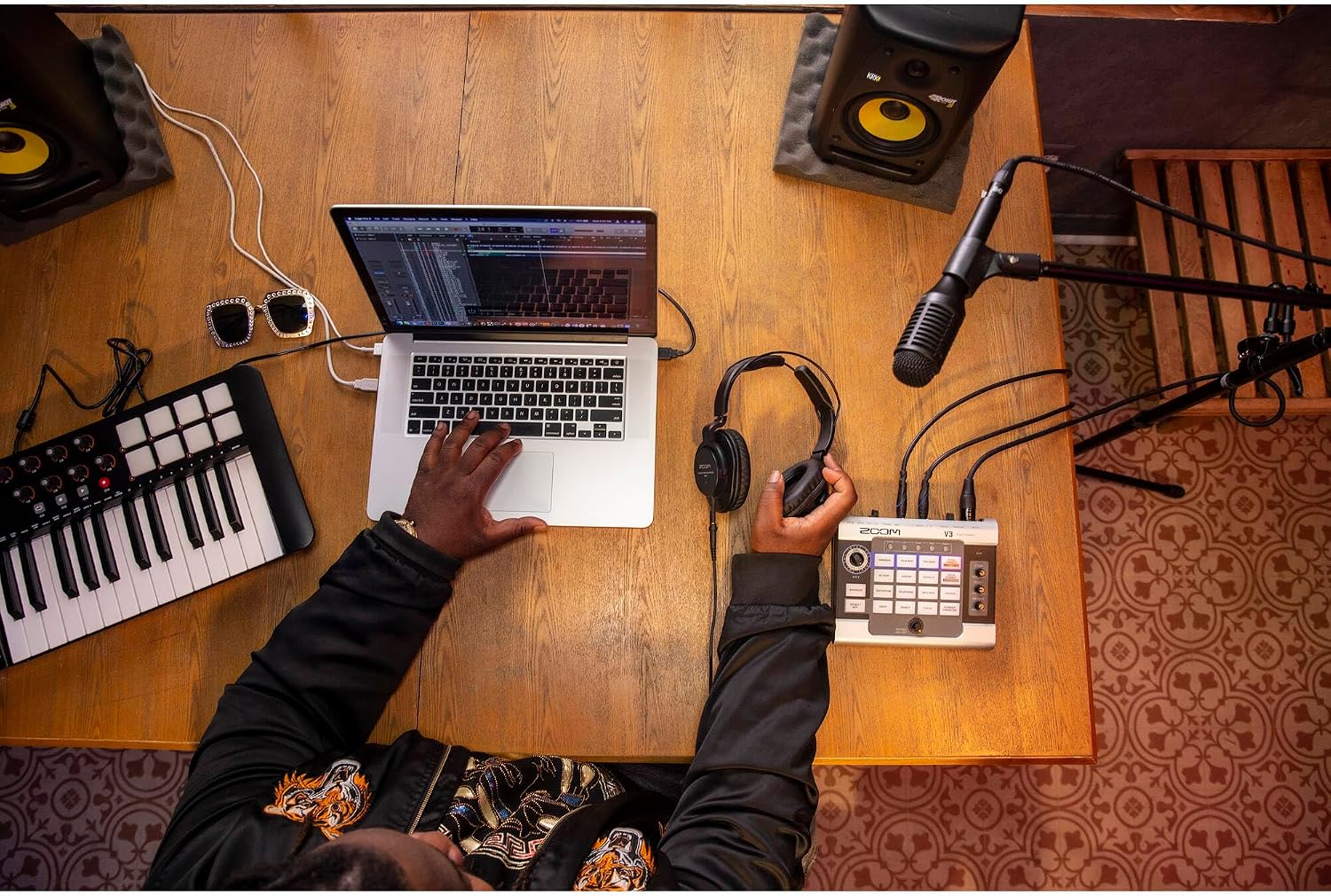
Imatge 5.1: Zoom V3 in a studio setup, connected to a laptop for recording or streaming.
6. Manteniment
- Neteja: Feu servir un drap suau i sec per netejar l'exterior de la unitat. No utilitzeu productes de neteja abrasius, ceres ni dissolvents.
- Emmagatzematge: Store the V3 in a cool, dry place away from direct sunlight and extreme temperatures.
- Cura de la bateria: If not using the unit for an extended period, remove the AA batteries to prevent leakage.
- Manipulació: Eviteu deixar caure la unitat o sotmetre-la a impactes forts.
7. Solució De Problemes
- Sense energia:
- Ensure batteries are correctly inserted and charged, or that the AC adapter/USB cable is securely connected.
- Check the POWER switch is in the ON position.
- Sense sortida de so:
- Verify microphone is connected and MIC IN VOLUME is adjusted.
- Check PHANTOM power switch if using a condenser microphone.
- Ensure output cables are correctly connected to your PA system/mixer/headphones.
- Adjust PHONES VOLUME if using headphones.
- Check the volume levels on your connected PA system or mixer.
- Distorted Sound (CLIP indicator lights frequently):
- Reduce the MIC IN VOLUME.
- Ensure your microphone is not too close to your mouth or that you are not singing too loudly into it.
- Efectes que no funcionen:
- Ensure an effect button is pressed and not "Effect Off".
- Adjust the EFFECT ADJUST knob to ensure the effect intensity is not set to minimum.
8. Especificacions
| Nom del model | Zoom V3 |
| Número de model | ZV3-AG2-3 |
| Dimensions (L x A x A) | 6.5" x 11" x 2.25" (16.5 cm x 27.9 cm x 5.7 cm) |
| Pes | 3.64 lliures (1.65 kg) |
| Efectes vocals | 16 (Harmony, Vocoder, Talk Box, Pitch Correct Key/Chromatic, Octave, Unison, Whistle, Beat Box, Chorus, Distortion, Telephone, Robot, Child, Formant Character, Deep) |
| Efectes simultanis | 1 main effect + Compression, Delay, Reverb |
| Entrades | XLR (Mic In), 3.5mm Stereo (Aux In), 1/4 inch TRS (Control In) |
| Sortides | 1/4 inch TRS L/R (Output), 3.5mm Stereo (Phones) |
| Poder fantasma | +48V (canviable) |
| Interfície d'àudio USB | 2-in/2-out, up to 32-bit/44.1 kHz |
| Fonts d'alimentació | 4x AA Batteries, USB Bus Power, Zoom AD-16 AC Adapter (optional) |
| Durada de la bateria | Approx. 3.5 hours (with alkaline batteries) |
9. Garantia i Suport
Warranty information for the Zoom V3 Vocal Processor is not provided in this document. For detailed warranty terms, service, and technical support, please refer to the official Zoom website or contact your local Zoom distributor.
You can often find additional resources, FAQs, and software updates on the manufacturer's support pages.


