
FUNYET NY-01
FUNYET 2026 14.1-inch Laptop User Manual
Model: NY-01
Introducció
This manual provides essential information for setting up, operating, maintaining, and troubleshooting your FUNYET 2026 14.1-inch Laptop. Please read this manual thoroughly before using your device to ensure proper function and longevity.
Què hi ha a la caixa
Verifiqueu que tots els elements siguin presents al paquet:
- FUNYET 2026 14.1-inch Laptop
- Power Adapter (12V2A DC)
- Manual d'instruccions (aquest document)
- Targeta de garantia
Producte acabatview
The FUNYET 2026 laptop is designed for productivity and entertainment, featuring a powerful processor and versatile connectivity.
Característiques clau
- Sistema operatiu: Pre-installed Windows 11 Pro for enhanced multitasking and security.
- Processador: Intel Celeron N5095 (4 cores, 4 threads, up to 2.9 GHz) for smooth performance.
- Memòria i emmagatzematge: 16GB LPDDR4 RAM and 512GB M.2 SSD, with support for up to 1TB TF Card expansion.
- Visualització: 14.1-inch IPS Full HD (1920x1080) screen, offering clear and vibrant visuals, with a 180° foldable hinge for flexible viewing.
- Connectivitat: Dual-band 5G Wi-Fi and Bluetooth 5.0 for fast and stable wireless connections.
- Ports: Includes 2x USB 3.0, 1x 3.5mm Headphone Jack, 1x 3.5mm DC Adapter port, 1x Mini-HDMI, and 1x TF Card slot.
- Bateria: Integrated 5000mAh battery providing 4-5 hours of normal use and over 50 hours of standby time.
- Càmera i àudio: Built-in 0.3-megapixel front camera and dual microphones for video calls and online meetings.
Identificació de components
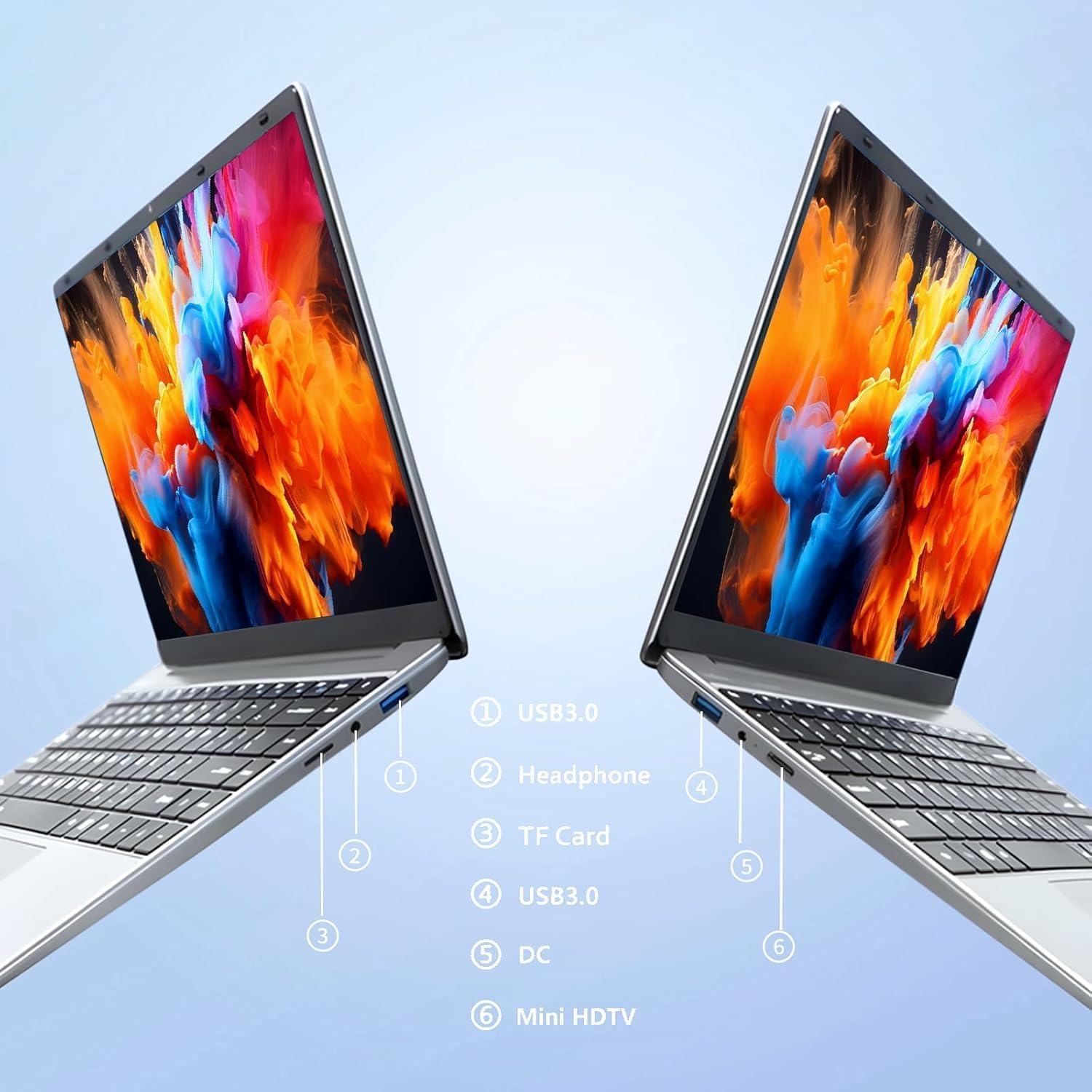
Imatge: lateral view of the laptop highlighting port locations.
This image illustrates the various ports available on the FUNYET 2026 laptop. On one side, you will find a USB 3.0 port, a 3.5mm headphone jack, and a TF Card slot. On the opposite side, there is another USB 3.0 port, the DC power input, and a Mini-HDMI port.

Imatge: Laptop screen displaying its 14-inch Full HD IPS features.
The laptop features a 14-inch Full HD (1920x1080) IPS display with a 16:9 aspect ratio and ultra-narrow bezels, providing a wide perspective and vivid images.

Imatge: Laptop demonstrating its 180-degree foldable hinge.
The laptop's hinge allows the screen to fold back 180 degrees, offering versatile viewing angles and usage modes.
Guia de configuració
1. Càrrega inicial
- Desembaleu el portàtil i l'adaptador de corrent de la caixa.
- Connect the power adapter to the DC input port on the side of the laptop.
- Connecteu l'adaptador de corrent a una presa de corrent.
- Allow the laptop to charge for at least 30 minutes before first use, or until the battery indicator shows a sufficient charge.
2. Primera encesa
- Obriu la tapa de l'ordinador portàtil.
- Press the power button, usually located on the keyboard deck or side.
- Follow the on-screen instructions to complete the Windows 11 Pro setup process, including language selection, network connection, and user account creation.
3. Connexió a Wi-Fi
- During the initial Windows setup, you will be prompted to connect to a Wi-Fi network. Select your network from the list and enter the password.
- If setting up later, click the Wi-Fi icon in the taskbar, select your network, and click "Connect".
Instruccions de funcionament
Gestió d'energia
- Encès: Premeu el botó d'encesa.
- Mode de repòs: Tanqueu la tapa o premeu breument el botó d'engegada.
- Apagar: Feu clic al botó Inici, després a Engegada i, a continuació, a Apagar.
- Reinicia: Feu clic al botó Inici, després a Engegar i, a continuació, a Reiniciar.
Using the Touchpad and Touchscreen
- Touchpad: Use gestures for navigation. Single tap for left-click, two-finger tap for right-click, two-finger scroll for scrolling.
- Pantalla tàctil: Tap to select, pinch to zoom, swipe to scroll.
Connexió de pantalla externa
To connect an external monitor or projector:
- Connect a Mini-HDMI cable from the laptop's Mini-HDMI port to the external display's HDMI input.
- If necessary, use a Mini-HDMI to HDMI adapter (not included).
- Premeu Tecla Windows + P to open the Project menu and select your desired display mode (Duplicate, Extend, Second screen only).
Using TF Card Expansion
Insert a TF card into the designated slot for additional storage. The laptop supports up to 1TB TF card expansion.
Cura i Manteniment
- Neteja: Feu servir un drap suau i sense borrissol per netejar la pantalla i el xassís. Per a marques difícils, netegeu lleugerament.ampNetegeu el drap amb aigua o un netejador de pantalles. Eviteu productes químics agressius.
- Cura de la bateria: Per allargar la durada de la bateria, eviteu descarregar-la completament amb freqüència. Guardeu el portàtil en un lloc fresc i sec si no l'utilitzeu durant períodes prolongats.
- Temperatura: Operate the laptop within a temperature range of 5°C to 35°C (41°F to 95°F). Avoid direct sunlight or extreme heat/cold.
- Ventilació: Ensure the ventilation openings are not blocked to prevent overheating. Do not place the laptop on soft surfaces like beds or sofas during operation.
- Actualitzacions de programari: Actualitzeu Windows i els controladors regularment per garantir un rendiment i una seguretat òptims.
Resolució de problemes
Problemes comuns i solucions
| Problema | Possible solució |
|---|---|
| El portàtil no s'encén. | Ensure the power adapter is securely connected and plugged into a working outlet. Check if the battery is charged. Try holding the power button for 10-15 seconds for a hard reset. |
| Problemes de connexió Wi-Fi. | Check if Wi-Fi is enabled in Windows settings. Restart your router and the laptop. Ensure you are within range of the Wi-Fi signal. Verify the Wi-Fi password. |
| Rendiment lent. | Close unnecessary applications. Check for background processes in Task Manager. Ensure Windows is updated. Consider running a disk cleanup. |
| No s'ha detectat la pantalla externa. | Ensure the Mini-HDMI cable is connected correctly. Check the input source on your external display. Press Tecla Windows + P per anar ciclant pels modes de visualització. |
| La bateria s'esgota ràpidament. | Adjust screen brightness. Close power-intensive applications. Check power settings in Windows and select a power-saving plan. Disconnect external peripherals when not in use. |
Especificacions tècniques
| Marca | FUNYET |
| Nom del model | NY-01 |
| Mida de la pantalla | 14.1 polzades |
| Resolució | 1920 x 1080 (Full HD) |
| Tecnologia de pantalla | LCD IPS |
| Processador | Intel Celeron N5095 (up to 2.9 GHz) |
| RAM | 16 GB de LPDDR4 (2400 MHz) |
| Emmagatzematge | 512 GB M.2 SSD (expandable via TF Card up to 1TB) |
| Sistema operatiu | Windows 11 Pro |
| Gràfics | Gràfics Intel integrats |
| Connectivitat sense fil | 5G Wi-Fi (2.4 GHz, 5.8 GHz), Bluetooth 5.0 |
| Ports | 2x USB 3.0, 1x 3.5mm Headphone, 1x 3.5mm DC Adapter, 1x Mini-HDMI, 1x TF Card Slot |
| Weblleva | 0.3 Megapixel Front Camera |
| Capacitat de la bateria | 5000 mAh / 38.5 Wh |
| Dimensions (L x A x A) | 32.2 x 21 x 2.1 cm (12.68 x 8.27 x 0.83 polzades) |
| Pes | 1.4 KG (3.09 lliures) |
| Característica especial | 180° Foldable Hinge |
Garantia i Suport
Informació de la garantia
Your FUNYET 2026 laptop comes with a 2 any de garantia from the date of purchase. Please retain your proof of purchase for warranty claims. The warranty covers manufacturing defects and malfunctions under normal use. It does not cover damage caused by misuse, accidents, unauthorized repairs, or normal wear and tear.
Addicionalment, a 6-month free exchange/return policy may apply, subject to the terms and conditions of your purchase platform.
Atenció al client
For any issues, questions, or technical assistance, please contact FUNYET customer support:
- Assistència en línia: Available 24/7. You can typically find support by logging into your Amazon account, navigating to "Your Account" -> "Your orders", and selecting "Ask Product Question" for your FUNYET laptop.
- Correu electrònic: funyestore@outlook.com
- Telèfon: +49 800-000-7147 (Please note operating hours may vary)

Imatge: Customer service contact details and warranty information.
This image provides a visual summary of the support options, including the 2-year warranty, 6-month exchange/return policy, and contact information for phone and email support.
Ask a question about this manual
Ask about setup, troubleshooting, compatibility, parts, safety, or missing instructions. Manuals+ will review the question and use this page’s manual context to help answer it.