
1. Producte acabatview
The G-Shock Casio GD010 digital watch is engineered for durability and functionality, designed to withstand demanding conditions while providing essential timekeeping features. This timepiece incorporates bio-based resin components and a CORDURA re/cor band, reflecting a commitment to environmental considerations.
This manual provides detailed instructions for setting up, operating, maintaining, and troubleshooting your GD010 watch.
Característiques clau
- Shock Resistant Construction: Designed to endure impacts and vibrations.
- Carbon Core Guard Structure: Enhances durability and protection for the internal module.
- Resistència a l'aigua de 200 metres: Apte per a nedar, fer snorkel i bussejar (no SCUBA).
- Llarga vida útil de la bateria: Approximately 10 years on a CR2025 battery.
- Bio-based Resin Components: Case and bezel made with environmentally conscious materials.
- CORDURA re/cor Band: Durable strap made from recycled PET plastic fiber.
- Pantalla digital: Clear and easy-to-read time and function information.
- Funcions múltiples: Includes alarm, chronograph (stopwatch), and timer.

Image 1.1: The G-Shock GD010 watch, showcasing its core features including shock resistance, Carbon Core Guard structure, and a 10-year battery life.
2. Introducció: Configuració
Funcions del botó
Your GD010 watch features several buttons for navigation and function control. Familiarize yourself with their locations and primary roles.

Imatge 2.1: Lateral view of the G-Shock GD010, illustrating the location of the control buttons.
- ADJUST (Top Left): S'utilitza per entrar i sortir dels modes de configuració i per confirmar la configuració.
- MODE (Part inferior esquerra): Cycles through the watch's various modes (Timekeeping, Stopwatch, Timer, Alarm).
- REVERSE (Top Right): Used to decrease values or move backward through options during setting.
- FORWARD / START (Bottom Right): Used to increase values or move forward through options during setting. Also used to start/stop stopwatch or timer.
- LIGHT (Center Bottom): Activates the backlight for illumination.
Configuració inicial de la data i l'hora
- En el mode de mesura del temps, premeu i manteniu premut el botó AJUSTAR button until the city code starts to flash, indicating the setting mode.
- Utilitza el INVERSA i AVANT buttons to select your desired Home City Code. This will automatically set the correct time zone.
- Premeu el botó MODE button to cycle through the settings: DST (Daylight Saving Time) → 12/24-hour format → Seconds → Hour → Minute → Year → Month → Day.
- For each setting, use the INVERSA i AVANT botons per canviar el valor.
- Once all settings are configured, press the AJUSTAR botó per sortir del mode de configuració.
3. Funcionament del rellotge
The GD010 offers various modes for different functions. Press the MODE botó per anar-hi ciclant.
Mode de cronometratge
This is the default mode, displaying the current time, day of the week, and date.
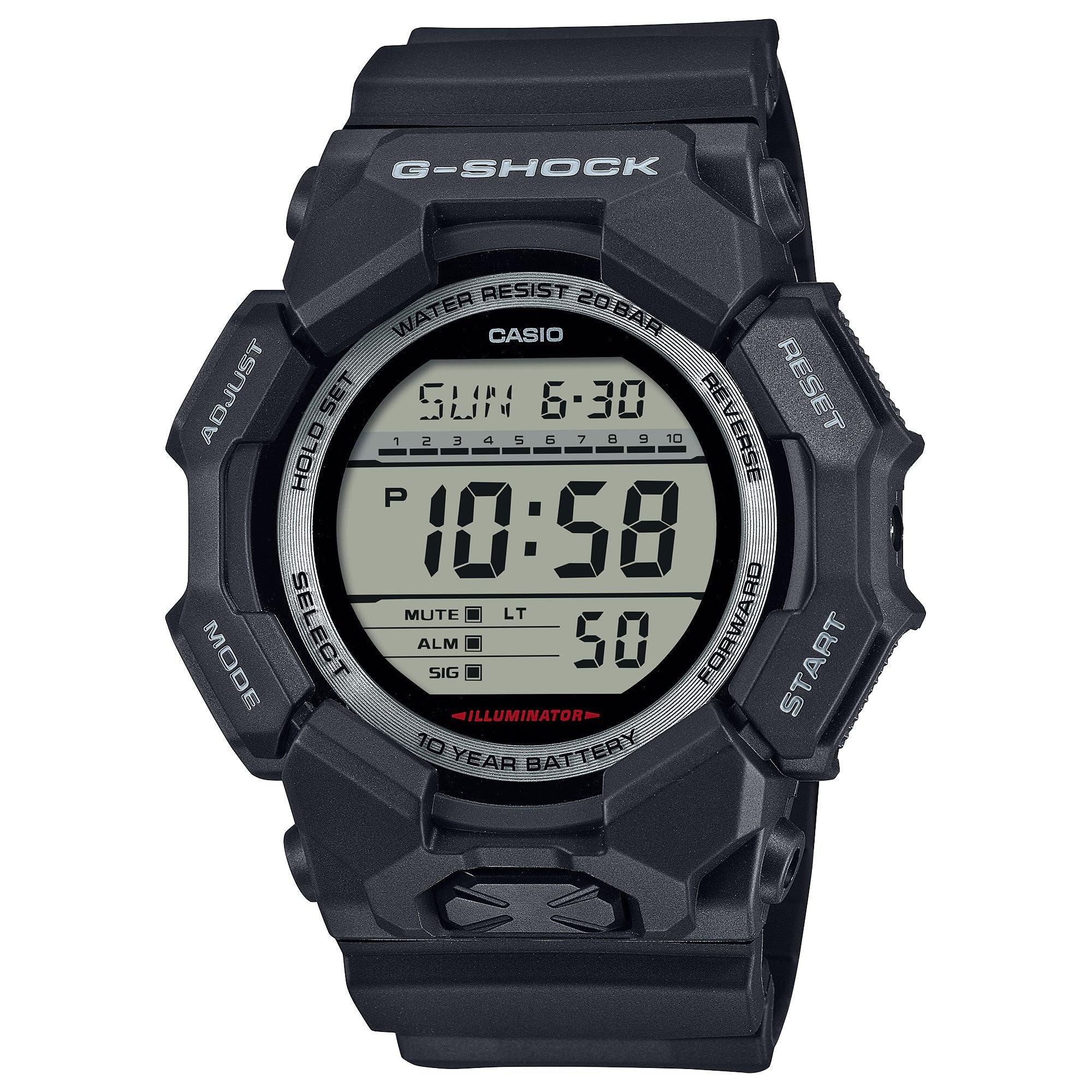
Image 3.1: The G-Shock GD010 watch face in Timekeeping Mode.
Using the Stopwatch (Chronograph)
- Des del mode de mesura del temps, premeu la tecla MODE button until "STW" or "STOPWATCH" appears on the display.
- Premeu el botó FORWARD / START botó per iniciar el cronòmetre.
- Premeu el botó FORWARD / START de nou per aturar el cronòmetre.
- Per posar el cronòmetre a zero, premeu la tecla INVERSA botó mentre el cronòmetre està aturat.
Configuració del temporitzador de compte enrere
- Des del mode de mesura del temps, premeu la tecla MODE button until "TMR" or "TIMER" appears.
- Manteniu premut el botó AJUSTAR button until the current timer setting starts to flash.
- Utilitza el MODE button to select the hour or minute setting.
- Utilitza el INVERSA i AVANT botons per configurar el temps de compte enrere desitjat.
- Premeu el botó AJUSTAR botó per sortir del mode de configuració.
- Premeu el botó FORWARD / START button to start the countdown. An alarm will sound when the timer reaches zero.
Funcions d'alarma
- Des del mode de mesura del temps, premeu la tecla MODE button until "ALM" or "ALARM" appears.
- Manteniu premut el botó AJUSTAR fins que l'hora de l'alarma comenci a parpellejar.
- Utilitza el MODE button to select the hour or minute setting.
- Utilitza el INVERSA i AVANT botons per configurar l'hora d'alarma desitjada.
- Premeu el botó AJUSTAR botó per sortir del mode de configuració.
- Per activar/desactivar l'alarma, premeu el botó FORWARD / START button while in Alarm Mode (without holding ADJUST).
Pautes de resistència a l'aigua
Your GD010 watch is rated for 200-meter water resistance. This means it is suitable for recreational diving (excluding saturation diving), swimming, snorkeling, and water sports.
- Do not operate buttons while the watch is submerged in water or wet.
- Avoid exposing the watch to hot water, steam, or extreme temperature changes, as this can compromise water resistance.
- After exposure to saltwater, rinse the watch thoroughly with fresh water and wipe it dry.
4. Cura i Manteniment
Atenció General
- Netegeu el rellotge regularment amb un drap suau i sec per eliminar la brutícia i la humitat.
- Avoid exposing the watch to strong chemicals, solvents, or detergents, as these can damage the resin materials.
- Guardeu el rellotge en un lloc fresc i sec, allunyat de la llum solar directa i de temperatures extremes quan no l'utilitzeu.
- The watch's resin components and band are designed for durability, but prolonged exposure to UV light may cause discoloration over time.
Canvi de bateria
The GD010 watch is equipped with a CR2025 battery, providing an approximate battery life of 10 years. When the display becomes dim or functions become erratic, it may be time for a battery replacement.
Battery replacement should ideally be performed by a qualified watch technician to ensure proper sealing and maintain water resistance. Attempting to replace the battery yourself may void the warranty and compromise the watch's water resistance.
Neteja
To clean your watch, use a soft cloth dampened with mild soap and water. Gently wipe the case and band. For stubborn dirt, a soft brush can be used. Rinse thoroughly with fresh water and dry completely with a soft cloth.
5. Guia de resolució de problemes
If you encounter issues with your GD010 watch, refer to the following common problems and their solutions.
| Problema | Causa possible | Solució |
|---|---|---|
| La pantalla està en blanc o tènue. | Bateria baixa. | Canvieu la pila (CR2025). Consulteu un tècnic de rellotges professional. |
| L'hora és incorrecta. | Fus horari incorrecte o error de configuració manual. | Re-adjust the time and date settings as described in Section 2. |
| Els botons no responen. | Watch is wet, or internal module error. | Ensure the watch is dry. If the problem persists, a reset may be required (consult support), or professional service. |
| L'alarma no sona. | Alarm is turned off or volume is too low (if adjustable). | Verify the alarm is set to ON in Alarm Mode. Check watch settings for alarm volume if applicable. |
If the problem persists after attempting these solutions, please contact G-Shock customer support for further assistance.
6. Especificacions del producte
| Nom del model | GD010 |
| Número de model | GD010-1 |
| Case Size (L× W× H) | 54.9 × 51.9 × 16.1 mm |
| Pes | 73 g (approximately 2.57 oz) |
| Case and Bezel Material | Bio-based Carbon / Bio-based Resin |
| Tipus de material de la banda | Resin (CORDURA re/cor) |
| Construcció | Shock Resistant, Carbon Core Guard structure |
| Resistència a l'aigua | Resistència a l'aigua de 200 metres |
| Font d'alimentació | CR2025 (1 Lithium Metal battery, included) |
| Durada aproximada de la bateria | 10 anys |
| Cristall | Vidre mineral |
| Tipus de visualització | Digital |
| Tipus de moviment | Quars japonès |
| Característiques addicionals | Alarm, Chronograph, Timer |
| Tipus de tancament | Sivella |
| Color de banda | Negre |
| Color del dial | Negre |
7. Garantia i atenció al client
Informació de la garantia
Your G-Shock GD010 watch comes with a Garantia limitada. The terms and conditions of this warranty cover manufacturing defects under normal use. Please refer to the warranty card included with your purchase for specific details regarding coverage duration, exclusions, and how to make a claim. Keep your proof of purchase for warranty validation.
Contactant amb el servei d'atenció al client
For technical assistance, warranty service, or any other inquiries regarding your G-Shock GD010 watch, please contact G-Shock customer support.
- Visit the official G-Shock website for support contact information, FAQs, and service center locations.
- Have your watch model number (GD010-1) and proof of purchase ready when contacting support.


