
1. Introducció
Welcome to the user manual for your MEIZE D116 Android 14 Tablet. This guide provides essential information on setting up, operating, maintaining, and troubleshooting your device. Please read this manual thoroughly to ensure optimal performance and longevity of your tablet.
2. Què s'inclou
Your MEIZE D116 Tablet package includes the following items:
- Tauleta de 10 polzades
- Funda protectora
- Teclat Bluetooth
- Ratolí sense fil
- Cable tipus C
- Protector de pantalla
- Adaptador Carregador
- Ejection Pin (for SIM/MicroSD tray)
- Manual d'usuari (aquest document)

Image: The MEIZE D116 Tablet displayed with its included accessories: a protective case, Bluetooth keyboard, wireless mouse, Type-C cable, charger, and stylus.
3. Guia de configuració
3.1 Càrrega inicial i engegada
- Connect the provided Type-C cable to the tablet's charging port and the adapter charger to a power outlet.
- Deixeu que la tauleta es carregui completament abans del primer ús. L'indicador de bateria a la pantalla mostrarà l'estat de càrrega.
- To power on, press and hold the power button located on the side of the tablet until the MEIZE logo appears.
- To power off, press and hold the power button, then select "Power off" from the options.
3.2 Connecting the Bluetooth Keyboard
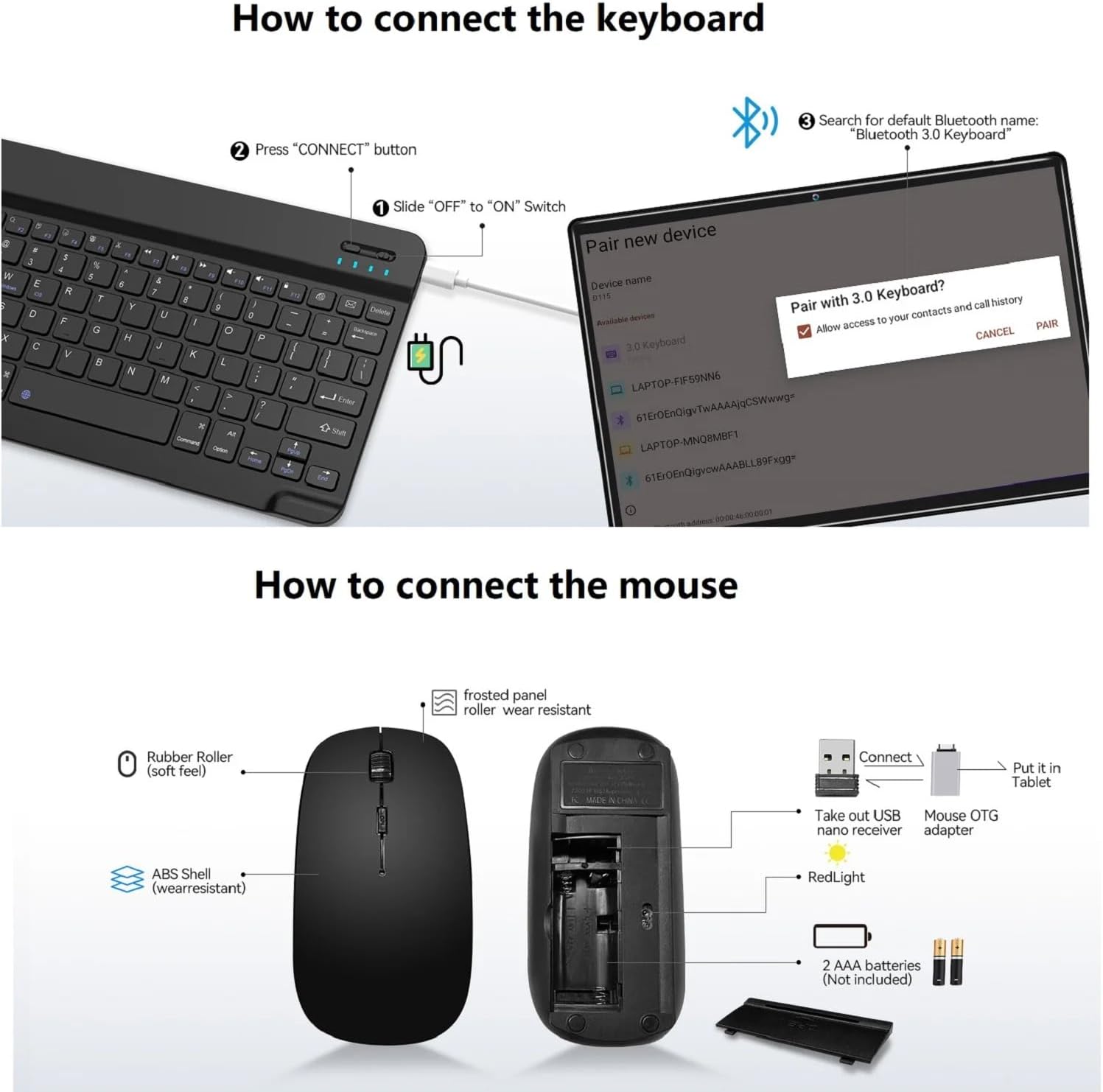
Image: A diagram illustrating the steps to connect the Bluetooth keyboard. It shows sliding the power switch to ON, pressing the CONNECT button, and then pairing via the tablet's Bluetooth settings.
- Assegureu-vos que el teclat Bluetooth estigui carregat.
- Slide the "OFF" to "ON" switch on the keyboard.
- Press the "CONNECT" button on the keyboard. The Bluetooth indicator light will flash.
- On your MEIZE D116 tablet, go to Configuració > Dispositius connectats > Bluetooth.
- Activa el Bluetooth i busca els dispositius disponibles.
- Select "Bluetooth 3.0 Keyboard" (or similar name) from the list to pair.
3.3 Connexió del ratolí sense fil
Image: A diagram showing the components of the wireless mouse, including the USB nano receiver, battery compartment, and how to connect it to the tablet using an OTG adapter.
- Open the battery compartment of the wireless mouse and insert 2 AAA batteries (not included).
- Take out the USB nano receiver from the mouse's compartment.
- Connect the USB nano receiver to the provided OTG adapter.
- Plug the OTG adapter with the receiver into the tablet's Type-C port. The mouse should connect automatically.
3.4 Connexió Wi-Fi
- Vés a Configuració > Xarxa i Internet > Wi-Fi.
- Turn on Wi-Fi. The tablet will scan for available networks.
- Select your desired 2.4GHz or 5GHz network and enter the password if prompted.

Image: The MEIZE D116 Tablet showcasing its key features, including support for 2.4GHz/5GHz dual-band Wi-Fi for stable network connections.
3.5 Instal·lació de la targeta SIM i la targeta MicroSD

Image: A close-up of the MEIZE D116 Tablet's side, revealing the tray for SIM cards and a MicroSD card, indicating its expandability and cellular capabilities.
- Localitza la safata de la targeta SIM/MicroSD al lateral de la tauleta.
- Introduïu el passador d'expulsió al petit forat que hi ha al costat de la safata per obrir-la.
- Place your SIM card(s) and/or MicroSD card into the designated slots on the tray. Ensure correct orientation.
- Empenyeu suaument la safata cap a dins de la tauleta fins que encaixi al seu lloc.
4. Com utilitzar la tauleta
4.1 Navegació bàsica (Android 14)
- Pantalla d'inici: Swipe left or right to access different home screens. Tap app icons to open them.
- Notificacions: Feu lliscar el dit cap avall des de la part superior de la pantalla fins a view notificacions i configuracions ràpides.
- Calaix d'aplicacions: Llisca cap amunt des de la part inferior de la pantalla per accedir a totes les aplicacions instal·lades.
- Multitasca: Llisca cap amunt des de la part inferior i mantén premut per veure les aplicacions utilitzades recentment.
4.2 Característiques de visualització
The MEIZE D116 features a 10.1-inch 1920x1200 IPS FHD display.
- Mode de protecció ocular: Reduces blue light emission to minimize eye strain, especially during prolonged use. Activate this feature in Configuració > Mostra.
- Mode fosc: Changes the system's color scheme to a darker palette, which can be more comfortable in low-light environments and save battery on some displays. Activate in Configuració > Mostra.
4.3 Ús de la càmera
Your tablet is equipped with an 8MP front camera and a 13MP rear camera.

Image: The MEIZE D116 Tablet highlighting its 8MP front and 13MP rear cameras, suitable for video calls and capturing photos.
- Obriu el Càmera aplicació des de la pantalla d'inici o el calaix d'aplicacions.
- Toqueu la icona de la càmera per canviar entre la càmera frontal i la posterior.
- Toqueu el botó de l'obturador per fer una foto o iniciar/aturar la gravació de vídeo.
4.4 Gestió d'emmagatzematge
The tablet comes with 128GB of internal storage (ROM) and 16GB (8+8 virtual) of RAM. Storage can be expanded up to 1TB using a MicroSD card.
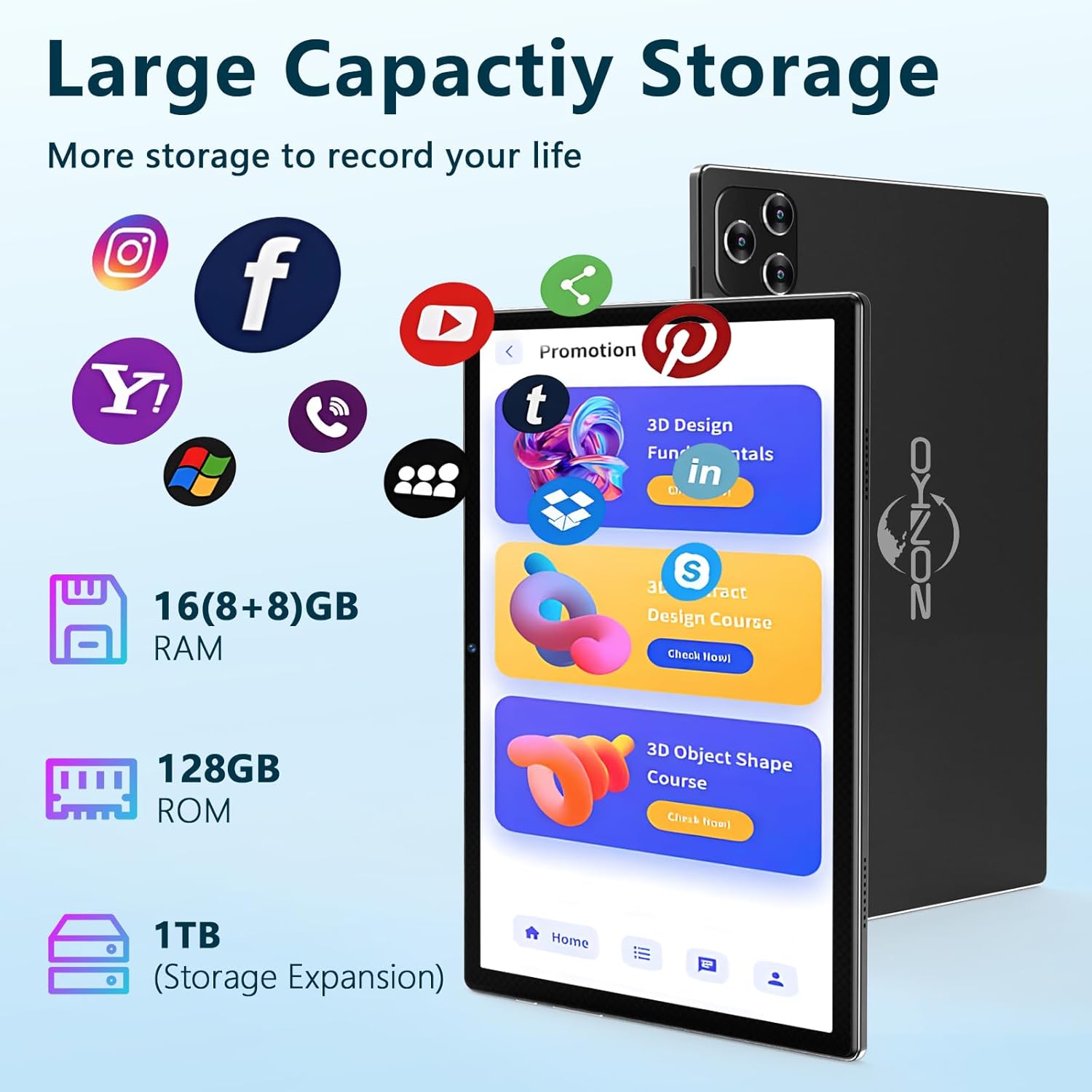
Image: The MEIZE D116 Tablet illustrating its large storage capacity, including 16GB RAM, 128GB ROM, and the ability to expand storage up to 1TB with a MicroSD card.
- Comprova l'emmagatzematge: Vés a Configuració > Emmagatzematge a view internal and external storage usage.
- Mou-te Files: You can move photos, videos, and other files to the MicroSD card to free up internal space.
- Gestió d'aplicacions: Uninstall unused apps or clear their cache in Configuració > Aplicacions.
4.5 Gestió de la bateria
The tablet is equipped with an 8000mAh battery, providing extended usage time.

Image: The MEIZE D116 Tablet emphasizing its 8000mAh long-lasting battery, designed to meet various entertainment and work needs.
- Estalvi de bateria: Activate Battery Saver mode in Configuració > Bateria per allargar la vida de la bateria.
- Optimize Usage: Reduce screen brightness, turn off Wi-Fi/Bluetooth when not in use, and close background apps to conserve power.
- Càrrega: Use the provided charger for optimal charging speed and battery health.
4.6 General Usage Scenarios

Image: A collage showing the MEIZE D116 Tablet being used in various scenarios: for work with a keyboard, for learning, for reading, and for playing games, demonstrating its versatility.
The MEIZE D116 Tablet is designed for versatile use, including:
- Treballant: Utilize the Bluetooth keyboard and mouse for productivity tasks.
- Aprenentatge: Access educational apps and online resources.
- Lectura: Enjoy e-books and articles with the eye-protection mode.
- Jugant: Experience games and multimedia content on the HD display.
5. Manteniment
5.1 Neteja de la tauleta
- Feu servir un drap suau i sense borrissol per netejar la pantalla i el cos de la tauleta.
- Per a taques persistents, lleugerament dampNetegeu el drap amb aigua o un netejador de pantalles dissenyat per a electrònica.
- Eviteu l'ús de productes químics agressius, materials abrasius o humitat excessiva.
5.2 Actualitzacions de programari
Comproveu i instal·leu regularment si hi ha actualitzacions de programari per assegurar-vos que la tauleta tingui les darreres funcions, pegats de seguretat i millores de rendiment.
- Vés a Configuració > Sistema > Actualització del sistema.
- Follow the on-screen instructions to download and install any available updates. Ensure your tablet is sufficiently charged or connected to power during updates.
5.3 Storage Optimization
- Periòdicament review your installed applications and uninstall those you no longer use.
- Clear cache data for apps that consume a lot of space (Configuració > Aplicacions > Selecciona l'aplicació > Emmagatzematge i memòria cau > Esborra la memòria cau).
- Transfer large media files (photos, videos) to a MicroSD card or cloud storage.
6. Solució De Problemes
6.1 Problemes comuns i solucions
| Problema | Possible solució |
|---|---|
| La tauleta no s'encén. | Ensure the tablet is charged. Connect to the charger for at least 30 minutes, then try powering on again. |
| Problemes de connexió Wi-Fi. | Restart your Wi-Fi router. On the tablet, turn Wi-Fi off and on again. Forget the network and reconnect. |
| Bluetooth accessory not connecting. | Ensure the accessory is in pairing mode and fully charged. Restart Bluetooth on the tablet. Try re-pairing the device. |
| La tauleta va lenta o no respon. | Close unused background apps. Clear app caches. Restart the tablet. Check for available software updates. |
| Les aplicacions s'estan bloquejant. | Clear the cache and data for the problematic app (Configuració > Aplicacions). Reinstall the app if the issue persists. |
7. Especificacions
Below are the technical specifications for the MEIZE D116 Android 14 Tablet:
| Característica | Detall |
|---|---|
| Marca | MEIZE |
| Nom del model | D116 |
| Sistema operatiu | Android 14.0 |
| Processador | Octa-Core Processor, 2 GHz |
| Memòria RAM | 16 GB (8 GB físic + 8 GB virtual) |
| Emmagatzematge intern (ROM) | 128 GB |
| Emmagatzematge ampliable | Fins a 1 TB mitjançant targeta MicroSD |
| Mida de la pantalla | 10.1 polzades |
| Resolució de visualització | 1920 x 1200 IPS FHD |
| Càmera frontal | 8MP |
| Càmera posterior | 13MP |
| Capacitat de la bateria | Polímer de liti de 8000 mAh |
| Connectivitat Wi-Fi | IEEE 802.11a/ac/b/g/n, Dual band (2.4GHz/5GHz) |
| Bluetooth | Bluetooth 5.0 |
| Tecnologia cel·lular | 4G (if SIM card installed) |
| Sensors | G-Sensor, GPS, FM, OTG, MIC, Vibration |
| Ports | 1 x Micro OTG / USB Port, 1 x 3.5mm stereo headphone jack |
| Dimensions del producte | 9.65 x 6 x 0.36 polzades |
| UPC | 646051391546 |
Imatge: Un cop mésview of the MEIZE D116 Tablet's key specifications, including Android 14, 10-inch display, 16GB RAM, 128GB ROM, 2.4GHz/5GHz Wi-Fi, Bluetooth 5.0, 8000mAh battery, and 13MP+8MP cameras.
8. Informació de la garantia
The MEIZE D116 Tablet comes with a 1 anys de garantia des de la data de compra. Aquesta garantia cobreix els defectes de fabricació i la mà d'obra en condicions d'ús normal.
The warranty does not cover damage caused by misuse, accidents, unauthorized modifications, or natural disasters. Please retain your proof of purchase for warranty claims.
9. Atenció al client
If you encounter any issues not covered in this manual or require further assistance, please contact MEIZE customer support.
- For support, please refer to the contact information provided on the MEIZE official weblloc web o la vostra plataforma de compra.
- When contacting support, please have your tablet's model number (D116) and proof of purchase ready.