
Introducció
Gràcies per la compraasing the Aiwa 14-inch Portable Media Player Travel Kit. This device is designed to provide versatile entertainment on the go, allowing you to enjoy DVDs, CDs, and other media without relying on internet connectivity. This manual provides essential information for setting up, operating, and maintaining your portable media player.
Informació de seguretat
Si us plau, llegiu atentament totes les instruccions de seguretat abans d'utilitzar aquest producte. Conserveu aquest manual per a futures consultes.
- No exposeu el dispositiu a la pluja, la humitat ni a temperatures extremes.
- Eviteu col·locar el dispositiu a prop de fonts de calor o sota la llum solar directa.
- Use only the provided power adapters (AC/DC and car adapter) to charge the device.
- No intenteu desmuntar ni modificar el dispositiu. Encarregueu tot el manteniment a personal qualificat.
- Handle discs carefully to prevent scratches or damage.
- Assegureu-vos que hi hagi una ventilació adequada quan feu servir el dispositiu.
Contingut del paquet
Verifiqueu que tots els elements siguin presents al vostre paquet:
- Aiwa 14-inch Portable Media Player (Main Unit)
- Control remot
- Auriculars amb cable
- Bossa de transport protectora
- Adaptador d'alimentació AC/DC
- Adaptador de corrent per a cotxe (12V)
- Manual d'usuari
Producte acabatview
Familiarize yourself with the components and controls of your portable media player.
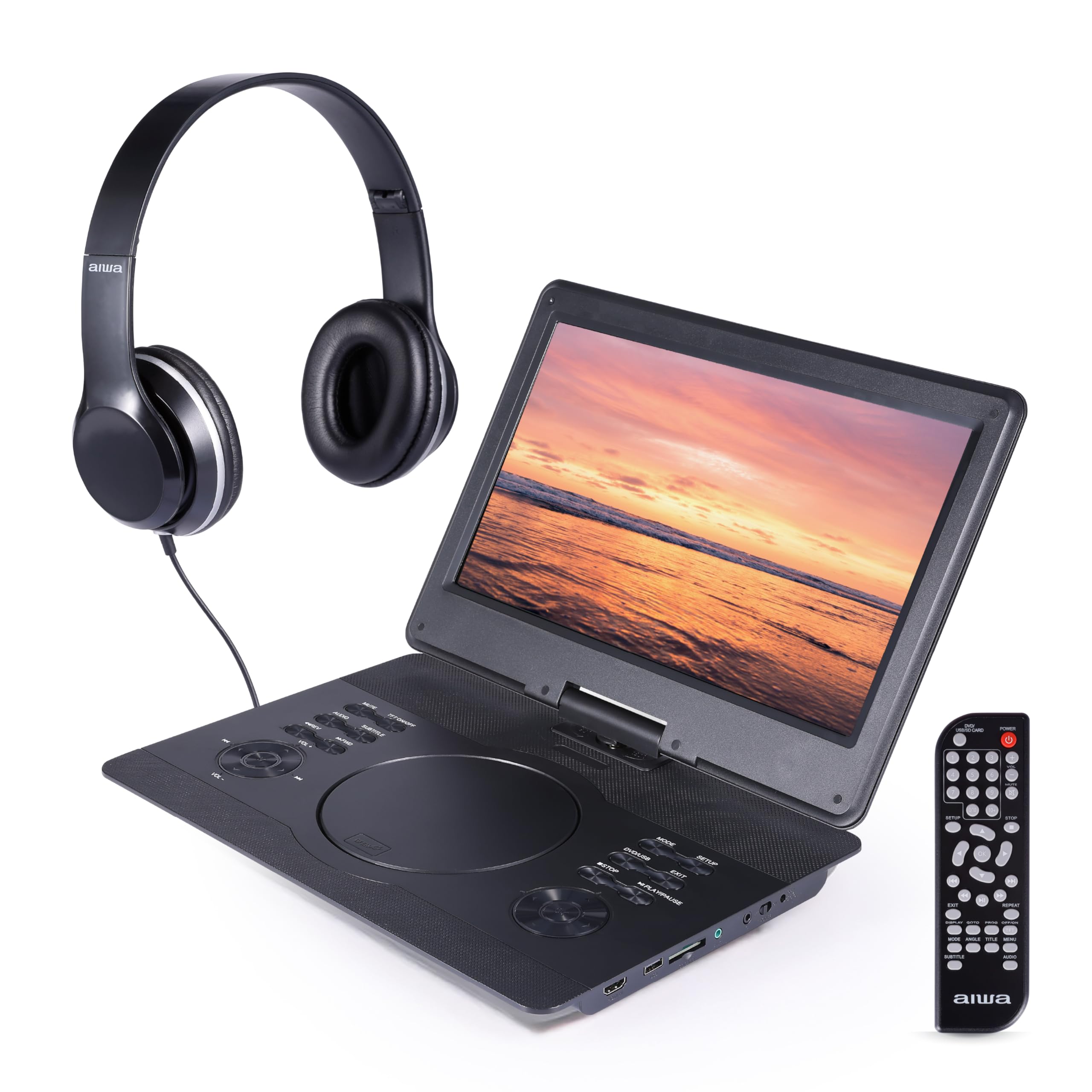
Figura 1: Davant view of the Aiwa Portable Media Player with included remote control.

Figura 2: lateral view showing the open disc tray and headphone connection.
Característiques de la unitat principal:
- 14-inch Swiveling LCD Screen: Proporciona flexibilitat viewing angles and can fold flat.
- Safata de disc: Per inserir DVD i CD.
- Botons de control: Play/Pause, Stop, Skip, Volume, Menu, Setup, Mode, etc.
- Altaveus estèreo integrats: Per a la reproducció d'àudio sense auriculars.
- Entrada HDMI: Connect external devices like gaming consoles or streaming sticks.
- Port USB: For playing media from USB flash drives.
- Ranura per a targeta SD: For playing media from SD memory cards.
- Auriculars Jack: Per a una escolta privada.
- Entrada d'alimentació: For connecting AC/DC or car adapters.

Figura 3: The screen can swivel and fold flat for compact use.
Configuració
1. Carregant la bateria
- Connect the AC/DC power adapter to the DC IN port on the player and then to a wall outlet.
- L'indicador lluminós de càrrega s'il·luminarà. Una càrrega completa sol trigar entre 2 i 3 hores.
- Alternatively, use the car power adapter to charge the device in a vehicle.
2. Encès / apagat
- Per encendre, premeu i manteniu premut PODER botó de la unitat o del comandament a distància.
- Per apagar-lo, manteniu premut el botó PODER botó de nou.
3. Connexió d'auriculars
- Plug the included wired headphones into the AURICULAR jack on the side of the player.
- The built-in speakers will automatically mute when headphones are connected.
4. Using the Carrying Bag

Figura 4: The included carrying bag for transport and protection.
- Place the media player and its accessories into the protective carrying bag for safe transport.
En funcionament
1. Reproducció de discs (DVD/CD)
- Obriu la coberta de la safata del disc.
- Col·loqueu amb cura un DVD o CD a l'eix amb l'etiqueta cap amunt.
- Close the disc tray cover firmly.
- El reproductor detectarà automàticament el disc i començarà la reproducció o mostrarà el menú del disc.
- Use the control buttons on the unit or remote (Play/Pause, Stop, Skip, Menu, etc.) to navigate and control playback.
2. Reproducció des de targeta USB/SD
- Inseriu una unitat flaix USB al port USB o una targeta SD a la ranura per a targetes SD.
- Premeu el botó MODE button on the unit or remote to select USB or SD mode.
- Navega pel teu files using the directional buttons and press REPRODUIR/ENTRAR to select and play media.
3. Entrada HDMI
- Connect an external device (e.g., gaming console, streaming stick) to the Entrada HDMI port on the player using an HDMI cable (not included).
- Premeu el botó MODE button on the unit or remote to select HDMI input.
- The player's screen will display the content from the connected HDMI device.
4. Ajust de la pantalla

Figura 5: The screen can be swiveled and tilted for optimal viewing.
- The screen can swivel up to 180 degrees and tilt for various viewangles d'ajust.
- It can also be folded flat against the base unit, transforming the device into a tablet-like form factor.
5. Control de volum
- Ajusteu el volum amb el botó VOL+ i VOL- buttons on the unit or the remote control.
Manteniment
Neteja del dispositiu
- Netegeu la pantalla i les superfícies exteriors amb un drap suau, sec i sense borrissol.
- Per a marques difícils, lleugerament dampal drap amb aigua o un netejador suau i no abrasiu.
- No utilitzeu productes químics agressius ni materials abrasius, ja que poden danyar l'acabat.
- Keep the disc tray and ports free of dust and debris.
Emmagatzematge
- When not in use, store the player in its protective carrying bag in a cool, dry place.
- Avoid storing in areas with extreme temperatures or high humidity.
Resolució de problemes
Si teniu problemes, consulteu els següents problemes i solucions habituals:
| Problema | Causa possible | Solució |
|---|---|---|
| Sense poder | Battery depleted; Power adapter not connected or faulty. | Charge the battery using the AC/DC or car adapter. Ensure connections are secure. |
| El disc no es reprodueix / Error "No hi ha disc" | Disc inserit incorrectament; Disc brut o ratllat; Format de disc incompatible. | Ensure disc is inserted label-side up. Clean the disc. Try a different disc. Verify disc is DVD/CD/VCD format. |
| Sense so | Volum massa baix; Auriculars connectats; Funció de silenci activada. | Increase volume. Disconnect headphones if using speakers. Check if mute is active on remote. |
| Poca qualitat d'imatge | Disc quality; Screen viewing angle; Low resolution content. | Ensure disc is clean and undamaged. Adjust screen angle. Note that native resolution is 800x480. |
| El comandament a distància no funciona | Batteries depleted; Obstruction between remote and player; Remote sensor blocked. | Canvieu les piles del comandament a distància. Assegureu-vos que el sensor d'infrarojos del reproductor estigui en una línia de visió clara. |
Especificacions
| Característica | Detall |
|---|---|
| Marca | No |
| Número de model | AI7017-BLK-T37-6 |
| Mida de la pantalla | 14 polzades |
| Tipus de visualització | LCD |
| Resolució nativa | 800 x 480 |
| Compatibilitat amb tipus de suport | DVD, CD, CD-R, DVD-R, VCD, USB, SD Card |
| Connectivitat | HDMI Input, USB Port, SD Card Slot, Headphone Jack |
| Àudio | Built-in Stereo Speakers, Headphone Output |
| Font d'alimentació | Rechargeable Battery, AC/DC Adapter, Car Adapter (12V) |
| UPC | 021331134455 |
Informació de la garantia
This product is covered by a limited manufacturer's warranty. Please refer to the warranty card included in your package or contact customer support for details regarding warranty terms and conditions.
Atenció al client
For technical assistance, troubleshooting, or warranty inquiries, please contact Aiwa customer support. Contact information can typically be found on the product packaging or the official Aiwa weblloc.