
1. Introducció
This manual provides essential instructions for setting up, operating, and maintaining your Nothing Phone (4a) Pro. Please read this guide thoroughly to ensure proper use and to maximize the performance of your device.
2. Configuració inicial
2.1. Desembalatge i components
En obrir el paquet, comproveu que hi hagi tots els components:
- Nothing Phone (4a) Pro device
- Auriculars
Note: A USB Type-C cable and SIM ejector tool may be sold separately or included depending on region. A power adapter is typically sold separately.
2.2. Inserció de la targeta SIM
- Localitza la safata de la targeta SIM al lateral del telèfon.
- Insert a SIM ejector tool (not always included) into the small hole next to the tray and press gently until the tray pops out.
- Col·loqueu la targeta o targetes nano-SIM a la safata amb els contactes daurats cap avall.
- Torneu a inserir la safata amb cura al telèfon fins que encaixi al seu lloc.
2.3. Engegada i configuració inicial
- Press and hold the Power button until the Nothing logo appears.
- Segueix les instruccions que apareixen a la pantalla per seleccionar l'idioma, connectar-te a una xarxa Wi-Fi i iniciar la sessió amb el teu compte de Google.
- Complete the setup process, including data transfer (if applicable) and security settings.
3. Com utilitzar el telèfon
3.1. Pantalla i interfície d'usuari
The Nothing Phone (4a) Pro features a 6.83-inch 1.5K Flexible AMOLED Display amb a Freqüència de refresc de 144 Hz, providing vibrant colors and smooth scrolling. Navigate the interface using touch gestures.
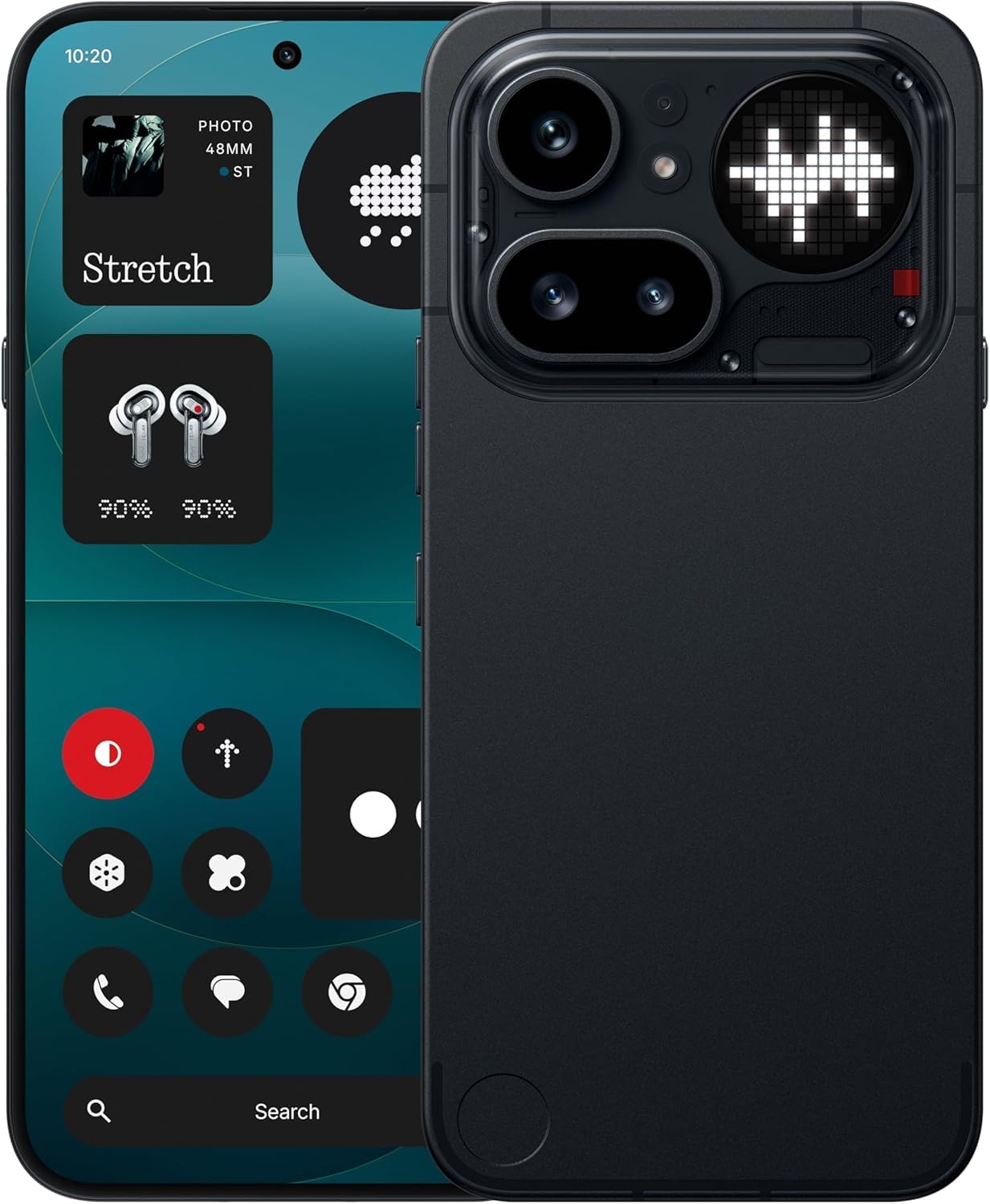
Image: The Nothing Phone (4a) Pro showcasing its flexible AMOLED display and sleek design.
3.2. Sistema de càmeres
Your device is equipped with a Triple Camera System, allowing for versatile photography. The camera supports up to 140x ultra zoom for capturing distant subjects.
Image: Detail of the triple camera module and a screen showing 140x zoom capability.
3.3. Rendiment
The Nothing Phone (4a) Pro is powered by the Snapdragon 7 Gen 4 processor, ensuring smooth multitasking and efficient performance for demanding applications and games. It comes with 12 GB de RAM for enhanced responsiveness.
Image: A visual representation of the Snapdragon 7 Gen 4 processor, highlighting the device's core performance component.
3.4. Bateria i càrrega
El dispositiu inclou a Bateria de 5080 mAh, proporcionant temps d'ús ampliats. Admet Càrrega ràpida de 50 W technology, allowing for quick recharging.
Imatge: Una imatge interna view of the phone, showing the battery component with its specifications.
3.5. Software and AI Features
Your Nothing Phone (4a) Pro runs on Nothing OS, basat en Android 14, offering a clean and intuitive user experience. It integrates Essential AI tools i característiques Google Gemini + ChatGPT Integration for advanced assistance and productivity.
Image: Screenshots depicting the Nothing OS home screen, an AI tools interface, and the Google Gemini + ChatGPT integration menu.
3.6. Connectivitat
El dispositiu admet 5G cellular technology for high-speed internet access. It uses a USB tipus C (USB 2.0) connector for charging and data transfer.
4. Manteniment
4.1. Neteja del dispositiu
Per netejar el telèfon, feu servir un drap suau i sense borrissol. Eviteu materials abrasius o productes químics agressius. Per a taques difícils, fregueu-lo lleugerament.ampNetegeu el drap amb aigua o un netejador de pantalles dissenyat per a electrònica.
4.2. Actualitzacions de programari
Comproveu i instal·leu regularment si hi ha actualitzacions de programari per assegurar-vos que el dispositiu tingui les darreres funcions, pegats de seguretat i millores de rendiment. Aneu a Configuració > Sistema > Actualització de programari per comprovar si hi ha actualitzacions disponibles.
4.3. Cura de la bateria
To prolong battery life, avoid exposing your phone to extreme temperatures. It is recommended to keep the battery charge between 20% and 80% for optimal long-term health.
5. Solució De Problemes
5.1. Problemes comuns i solucions
- El dispositiu no s'encén: Assegureu-vos que la bateria estigui carregada. Connecteu-la a un carregador durant almenys 15 minuts i, a continuació, torneu-la a engegar.
- Les aplicacions es bloquegen: Clear the cache of the problematic app (Settings > Apps > [App Name] > Storage & cache > Clear cache). If the issue persists, reinstall the app.
- Senyal de xarxa deficient: Check if your SIM card is properly inserted. Try restarting the phone or toggling Airplane Mode on and off.
- La bateria s'esgota ràpidament: Redueix la brillantor de la pantalla, desactiva les aplicacions en segon pla innecessàries i limita els serveis de localització.
5.2. Restabliment de fàbrica
Si teniu problemes de programari persistents, un restabliment de fàbrica els pot resoldre. Avís: Això esborrarà totes les dades del telèfon. Fes una còpia de seguretat de les dades importants abans de continuar. Vés a Configuració > Sistema > Opcions de restabliment > Esborra totes les dades (restabliment de fàbrica).
6. Especificacions
| Característica | Detall |
|---|---|
| Model | Nothing Phone (4a) Pro |
| Sistema operatiu | Android 14 (Nothing OS) |
| Processador | Snapdragon 7 Gen 4, 2.5 GHz |
| RAM | 12 GB |
| Emmagatzematge intern | 256 GB |
| Mostra | 6.83" 1.5K Flexible AMOLED, 144Hz refresh rate |
| Capacitat de la bateria | 5080 mAh de ions de liti |
| Carregant | 50W Fast Charge, USB Type-C (USB 2.0) |
| Càmera | Triple Camera System, up to 140x ultra zoom |
| Connectivitat | 5G, GSM, LTE |
| Dimensions | 16.4 x 7.8 x 0.8 centímetres |
| Pes | 250 grams |
| Contingut de la caixa | Auriculars |
7. Garantia i Suport
7.1. Garantia del producte
The Nothing Phone (4a) Pro comes with a Garantia del fabricant de 1 anys from the date of purchase. This warranty covers manufacturing defects and workmanship under normal use. It does not cover damage caused by accidents, misuse, unauthorized modifications, or normal wear and tear.
7.2. Atenció al client
For technical assistance, warranty claims, or service inquiries, please contact Nothing customer support. Refer to the official Nothing weblloc web per obtenir la informació de contacte més actualitzada.
Manufacturer: Nothing
Packer/Importer Contact: Essentially Nothing