
Nothing 4a Pro
Manual d'usuari de Nothing Phone (4a) Pro
Model: 4a Pro
Introducció
Welcome to the user manual for your Nothing Phone (4a) Pro. This guide provides essential information on setting up, operating, maintaining, and troubleshooting your device. Please read this manual thoroughly to ensure optimal performance and longevity of your smartphone.
Configuració
1. Unboxing i Inspecció Inicial
Carefully remove all components from the packaging. Verify that all items listed in the box contents are present. Inspect the device for any physical damage before proceeding.
2. Inserció de la targeta SIM
Locate the SIM card tray on the side of your phone. Use the provided SIM ejector tool to open the tray. Insert your Nano-SIM card(s) into the tray with the gold contacts facing down. Ensure the tray is fully reinserted to prevent dust and moisture ingress.
3. Càrrega del dispositiu
Before first use, fully charge your Nothing Phone (4a) Pro. Connect the USB Type-C cable to the phone's charging port and the other end to a compatible power adapter. The battery indicator on the screen will show charging progress. The device supports 50W fast charging.

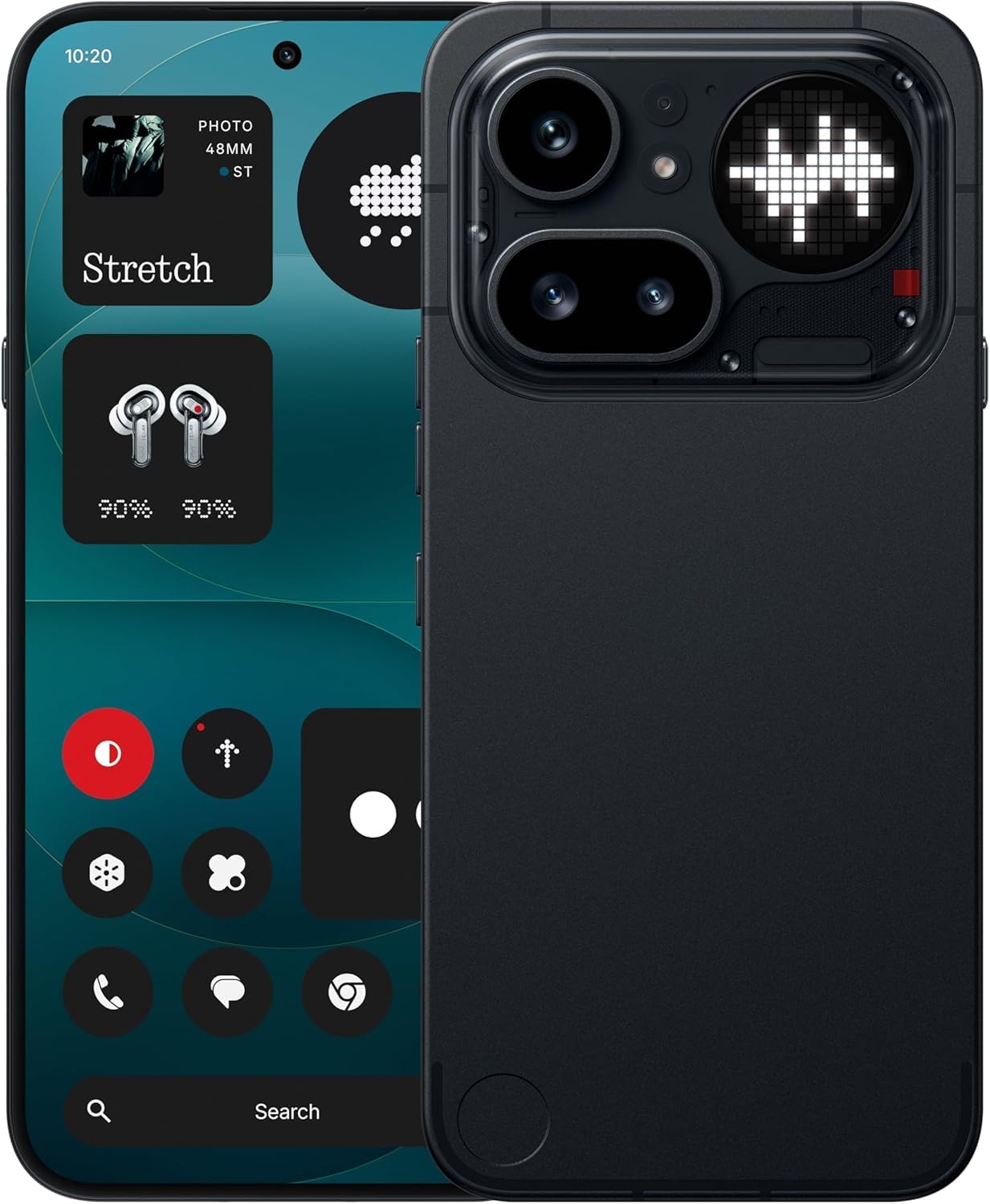
Imatge: Anvers i revers view of the Nothing Phone (4a) Pro, illustrating its design and port locations.
4. Engegada i configuració inicial
Press and hold the Power button until the Nothing logo appears. Follow the on-screen instructions to select your language, connect to a Wi-Fi network, sign in with your Google account, and transfer data from a previous device if desired. Complete the setup wizard to begin using your phone.
Funcionament del vostre dispositiu
1. Navegació bàsica
Your Nothing Phone (4a) Pro features an intuitive Android 14 operating system. Use touch gestures such as tapping, swiping, pinching, and spreading to navigate the interface. The 6.83-inch 1.5K Flexible AMOLED Display with a 144Hz refresh rate provides a smooth visual experience.
2. Sistema de càmeres
The device is equipped with a Pro 3-Camera System, designed for versatile photography. It includes a 50 MP OIS Sony main camera (1/1.56" sensor), a 50 MP OIS Periscope camera, and a 120° Sony ultra-wide camera. The system supports 0.6x ultra-wide to 140x ultra zoom, allowing you to capture details from various distances. A 32 MP front camera is also included for selfies and video calls.

Imatge: Detallada view of the Nothing Phone (4a) Pro's rear camera module, highlighting the 50 MP OIS Periscope, 120° Sony Ultra-Wide, and 50 MP OIS Sony Main cameras.
3. Característiques del programari
Experience the Nothing OS built on Android 14, offering a clean user interface and various customization options. The device integrates Google Gemini and ChatGPT for enhanced AI capabilities and smart assistance.
4. Gestió de la bateria
Your phone features a 5000 mAh Lithium-Ion battery. To optimize battery life, adjust screen brightness, disable unnecessary background apps, and utilize power-saving modes. Avoid extreme temperatures during charging and operation.
Imatge: Una mostra de collageasing key features of the Nothing Phone (4a) Pro, including the triple camera system, 5080 mAh battery, Snapdragon 7 Gen 4 processor, AMOLED display, and AI tool integration.
Manteniment
1. Neteja del dispositiu
Use a soft, lint-free cloth to clean the screen and body of your phone. Avoid using harsh chemicals or abrasive materials, which can damage the display and finish. For stubborn smudges, lightly dampNetegeu el drap amb aigua o un netejador de pantalles dissenyat per a electrònica.
2. Actualitzacions de programari
Comproveu i instal·leu regularment si hi ha actualitzacions de programari per assegurar-vos que el dispositiu tingui les darreres funcions, pegats de seguretat i millores de rendiment. Navegueu a Configuració > Sistema > Actualització del sistema per comprovar si hi ha actualitzacions disponibles.
3. Gestió de l'emmagatzematge
Your device comes with 256 GB of internal storage. To maintain optimal performance, regularly review i eliminar innecessaris files, apps, and media. You can check storage usage in Configuració > Emmagatzematge.
Resolució de problemes
1. El dispositiu no respon
If your phone becomes unresponsive, press and hold the Power button for approximately 10-15 seconds to force a restart. If the issue persists, ensure the device is charged.
2. Excessive Heating
It is normal for the device to warm up during intensive use, such as gaming or prolonged video streaming. If the phone becomes excessively hot, close background applications, reduce screen brightness, and avoid direct sunlight. If heating persists, contact customer support.
3. Problemes de connectivitat de xarxa
If you experience issues with Wi-Fi or cellular data, try toggling Airplane Mode on and off. Restart your device. For cellular issues, ensure your SIM card is properly inserted and your mobile data plan is active. You can also reset network settings in Configuració > Sistema > Opcions de restabliment > Restablir Wi-Fi, mòbil i Bluetooth.
4. Restabliment de fàbrica
As a last resort for persistent software issues, you may perform a factory data reset. This will erase all data on your phone. Abans de continuar, feu una còpia de seguretat de totes les dades importants. Vés a Configuració > Sistema > Opcions de restabliment > Esborra totes les dades (restabliment de fàbrica) i seguiu les indicacions.
Especificacions
| Característica | Detall |
|---|---|
| Marca | Res |
| Model | 4a Pro |
| Sistema operatiu | Android 14 |
| Memòria RAM | 8 GB |
| Capacitat d'emmagatzematge | 256 GB |
| Model de CPU | G4 |
| Velocitat de la CPU | 2.5 GHz |
| Color | Negre |
| Tipus de connector | USB Type C (USB 2.0) |
| Capacitat de la bateria | 5000 milionsamp Hours (Lithium-Ion) |
| Pes de l'article | 250 grams |
| Dimensions de l'article | 16.4 x 7.8 x 0.8 centímetres |
| Tipus de visualització | AMOLED |
| Resolució de visualització màxima | 1080 x 2400 |
| Tecnologia cel·lular | 5G |
| Contingut de la caixa | Headset (Note: Charger and cable may be sold separately) |
Informació de la garantia
Your Nothing Phone (4a) Pro comes with a Garantia limitada del fabricant d'1 any from the date of purchase. This warranty covers manufacturing defects under normal use. It does not cover damage caused by accidents, misuse, unauthorized modifications, or normal wear and tear.
For detailed terms and conditions, please refer to the warranty card included with your product or visit the official Nothing weblloc.
Atenció al client
For technical assistance, warranty claims, or general inquiries regarding your Nothing Phone (4a) Pro, please contact Nothing customer support.
- Fabricant: Res
- Packer Contact: Essentially Nothing
- Assistència en línia: Visit the official Nothing weblloc web per a preguntes freqüents, articles de suport i opcions de contacte. nothing.tech/support (Exampl'enllaç, l'enllaç real pot variar)
Please have your device's model number (4a Pro) and serial number ready when contacting support.
Documents relacionats4a Pro


Ask a question about this manual
Ask about setup, troubleshooting, compatibility, parts, safety, or missing instructions. Manuals+ will review the question and use this page’s manual context to help answer it.