
1. Introducció
This manual provides essential instructions for setting up, operating, maintaining, and troubleshooting your Nothing Phone (4a) Pro smartphone. Please read this guide thoroughly before using your device to ensure proper functionality and safety.
2. Contingut del paquet
Comproveu que el vostre paquet contingui els elements següents:
- Nothing Phone (4a) Pro Handset
- Auriculars
- Cable USB-Type C
- Eina expulsora de SIM
- Guia d'inici ràpid
- Informació de seguretat
3. Disseny del dispositiu
Familiarize yourself with the physical features of your Nothing Phone (4a) Pro.
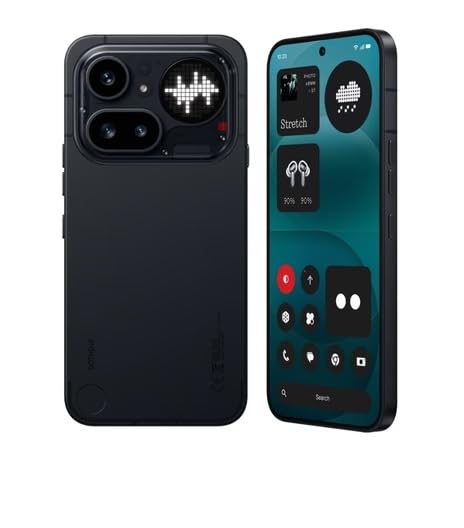
Figura 3.1: posterior View of Nothing Phone (4a) Pro. This image displays the back of the device, highlighting the dual camera system, LED flash, and the unique Glyph Interface. The Nothing brand logo is visible at the bottom.

Figura 3.2: Frontal i lateral View of Nothing Phone (4a) Pro. This image shows the device from the front and a slight angle, revealing the display with its punch-hole camera, and the power and volume buttons located on the sides.
3.1. Tauler frontal
- Visualització: AMOLED screen for visual output and touch interaction.
- Càmera frontal: Per a selfies i videotrucades.
- Auricular: Per a l'àudio durant les trucades.
3.2. Panell posterior
- Mòdul de càmera principal: Contains primary and secondary cameras.
- Flaix LED: Provides illumination for photos and as a flashlight.
- Interfície de glif: Unique LED lighting system for notifications and alerts.
3.3. Panells laterals
- Botó d'encesa: Situat al costat dret, s'utilitza per encendre/apagar i bloquejar/desbloquejar la pantalla.
- Botons de volum: Situat al costat esquerre, s'utilitza per ajustar el volum multimèdia i de trucades.
- Safata de la targeta SIM: Located on the left side, for inserting SIM cards.
3.4. Top and Bottom Panels
- Port USB tipus C: Situat a la part inferior, per a la càrrega i la transferència de dades.
- Micròfon: Per a l'entrada de veu durant les trucades i les gravacions.
- Ponent: Per a la sortida d'àudio.
4. Configuració
4.1. Inserció de la targeta SIM
- Localitzeu la safata de la targeta SIM al costat esquerre del dispositiu.
- Introduïu l'eina d'expulsió de la SIM al forat petit que hi ha al costat de la safata i premeu fermament fins que la safata surti.
- Col·loca la targeta o targetes nano-SIM a la safata amb els contactes daurats cap avall. Assegura't que estiguin orientades correctament.
- Empenyeu suaument la safata cap enrere a la ranura fins que encaixi al seu lloc.
4.2. Engegada inicial
- Manteniu premut el botó Botó d'engegada on the right side of the device until the Nothing logo appears on the screen.
- Segueix les instruccions que apareixen a la pantalla per seleccionar l'idioma, connectar-te a una xarxa Wi-Fi i configurar el teu compte de Google.
4.3. Carregant la bateria
Before first use, it is recommended to fully charge the device. Connect the USB Type-C cable to the phone's charging port and the other end to a compatible power adapter (sold separately) or a computer's USB port.
5. Funcionament del vostre dispositiu
5.1. Engegar/Apagar i reiniciar
- Encès: Press and hold the Power Button until the device vibrates and the Nothing logo appears.
- Apagar: Press and hold the Power Button, then tap "Power off" on the screen.
- Reinicia: Press and hold the Power Button, then tap "Restart" on the screen.
5.2. Navegació bàsica
- Toca: Toca la pantalla una vegada per obrir aplicacions, seleccionar elements o prémer botons.
- Llisca: Arrossega el dit per la pantalla per desplaçar-te, canviar de pantalla o ignorar notificacions.
- Pessigar: Feu servir dos dits per ampliar o reduir les fotos i web pàgines.
5.3. Realització de trucades
- Obriu el Telèfon aplicació.
- Introduïu el número de telèfon amb el teclat numèric o seleccioneu un contacte.
- Toqueu Truca icona per iniciar la trucada.
5.4. Ús de la càmera
- Obriu el Càmera aplicació.
- Enquadra la teva foto.
- Toqueu Obturador botó per fer una foto o el Registre botó per iniciar/aturar l'enregistrament de vídeo.
5.5. Connectivitat
- Wi-Fi: Vés a Configuració > Xarxa i Internet > Wi-Fi per connectar-se a les xarxes disponibles.
- Bluetooth: Vés a Configuració > Dispositius connectats > Bluetooth per emparellar-se amb altres dispositius Bluetooth.
- Dades mòbils: Vés a Configuració > Xarxa i Internet > Xarxa mòbil to manage cellular data usage.
6. Manteniment
6.1. Neteja del dispositiu
Feu servir un drap suau i sense borrissol per netejar la pantalla i la carcassa del telèfon. Eviteu utilitzar productes químics agressius o materials abrasius.
6.2. Actualitzacions de programari
Comproveu i instal·leu regularment si hi ha actualitzacions de programari per garantir un rendiment i una seguretat òptims. Aneu a Configuració > Sistema > Actualització del sistema.
6.3. Cura de la bateria
To prolong battery life, avoid extreme temperatures and do not let the battery completely drain frequently. Use only approved chargers and cables.
7. Solució De Problemes
If you encounter issues with your Nothing Phone (4a) Pro, try the following solutions:
- El dispositiu no s'encén: Assegureu-vos que la bateria estigui carregada. Connecteu-la a un carregador durant almenys 15 minuts i, a continuació, proveu d'engegar-la.
- Les aplicacions es bloquegen o es bloquegen: Close and reopen the app. If the issue persists, restart your phone.
- Senyal de xarxa deficient: Comproveu la inserció de la targeta SIM. Desplaceu-vos a una zona amb millor cobertura de xarxa.
- La bateria s'esgota ràpidament: Redueix la brillantor de la pantalla, tanca les aplicacions que no fas servir i desactiva les funcions innecessàries com el GPS o el Bluetooth quan no les facis servir.
- La pantalla tàctil no respon: Reinicieu el dispositiu. Si el problema continua, contacteu amb el servei d'assistència.
8. Especificacions
| Característica | Detall |
|---|---|
| Marca | Res |
| Model | Phone (4a) Pro |
| Sistema operatiu | Android 14 |
| Memòria RAM | 8 GB |
| Emmagatzematge intern | 128 GB (Flash Memory Supported Size Maximum) |
| Model de CPU | G4 |
| Velocitat de la CPU | 2.5 GHz |
| Color | Negre |
| Tipus de connector | USB Type C (USB 2.0) |
| Capacitat de la bateria | 5000 milionsamp Hours (Lithium-Ion) |
| Pes de l'article | 250 grams |
| Dimensions de l'article | 16.4 x 7.8 x 0.8 centímetres |
| Tipus de visualització | AMOLED |
| Resolució de visualització màxima | 1920 x 1080 |
| Tecnologia cel·lular | 5G |
| Tecnologia de xarxa sense fil | LTE |
9. Garantia i Suport
9.1. Informació de la garantia
Your Nothing Phone (4a) Pro comes with a 1 any manufacturer's warranty from the date of purchase. This warranty covers manufacturing defects under normal use conditions. Please retain your proof of purchase for warranty claims.
For detailed warranty terms and conditions, please refer to the warranty card included in your package or visit the official Nothing weblloc.
9.2. Atenció al client
If you require technical assistance, have questions about your device, or need to report an issue, please contact Nothing customer support.
- Assistència en línia: Visit the official Nothing support weblloc web per a preguntes freqüents, guies de resolució de problemes i opcions de contacte.
- Centres de servei: Information on authorized service centers can be found on the Nothing weblloc.
Manufacturer: Nothing
Packer/Importer Contact Information: Essentially Nothing