
1. Introducció
The Redragon M919 Pro is a high-performance wireless gaming mouse designed for precision and comfort. Featuring a lightweight design, multiple connectivity options, and a high-resolution optical sensor, it is suitable for various gaming and computing needs.

Imatge 1.1: De dalt a baix view of the Redragon M919 Pro Wireless Gaming Mouse, showcasing its ergonomic shape and button layout.
Key features include a 54-gram ultra-lightweight design, an optical sensor capable of up to 45,000 DPI, 8K polling rate, and versatile tri-mode connectivity (USB-C Wired, 2.4GHz Wireless, and Bluetooth 5.1).
2. Contingut del paquet
- Redragon M919 Pro Wireless Gaming Mouse
- Cable USB-C a USB-A
- Receptor USB de 2.4 GHz
- Manual d'usuari (aquest document)
3. Instruccions de configuració
3.1. Càrrega del ratolí
Before first use, it is recommended to fully charge the mouse. Connect the provided USB-C cable to the mouse's front port and the other end to a USB-A port on your computer or a USB wall adapter. The LED indicator on the mouse will show charging status and turn off when fully charged. A full charge provides up to 85 hours of battery life.
3.2. Modes de connectivitat
The M919 Pro supports three connectivity modes: USB-C Wired, 2.4GHz Wireless, and Bluetooth 5.1. A switch on the bottom of the mouse allows you to select the desired mode.

Image 3.1: Illustration of the mouse's triple-mode connectivity options.
3.2.1. Mode sense fil de 2.4 GHz
- Localitzeu el receptor USB de 2.4 GHz (dongle) a l'embalatge.
- Connecteu el receptor USB a un port USB-A disponible de l'ordinador.
- Feu lliscar el commutador de mode a la part inferior del ratolí fins a la posició "2.4G".
- El ratolí s'hauria de connectar automàticament.
3.2.2. Mode Bluetooth 5.1
- Feu lliscar el commutador de mode a la part inferior del ratolí fins a la posició "BT".
- A l'ordinador o dispositiu, obriu la configuració de Bluetooth i cerqueu dispositius nous.
- Select "Redragon M919 Pro" from the list of available devices to pair.
3.2.3. USB-C Wired Mode
- Connect the provided USB-C cable to the mouse and the USB-A end to your computer.
- El ratolí canviarà automàticament al mode amb cable i començarà a carregar-se.
3.3. Instal·lació de programari (opcional)
For advanced customization of buttons, DPI settings, and other features, Redragon provides dedicated software. This software can be accessed via a web-based driver, eliminating the need for a download.
- Accedeix al web-based driver at: controlhub.top/redragonzone/
- Segueix les instruccions que apareixen a la pantalla per personalitzar la configuració del ratolí.
4. Instruccions de funcionament
4.1. Funcions del botó
The M919 Pro features 6 programmable buttons. By default, these buttons perform standard mouse functions (left click, right click, scroll wheel click, forward, backward, DPI cycle). Through the Redragon software, these buttons can be remapped to various functions, macros, or media controls.
4.2. Ajust de DPI
The mouse features a dedicated DPI button, typically located behind the scroll wheel, allowing you to cycle through 5 adjustable DPI levels. The optical sensor supports up to 45,000 DPI for precise tracking.

Image 4.1: Location of the DPI button and an example of 5 adjustable DPI levels (400, 800, 1600, 2400, 3200 DPI).
4.3. Taxa de votació
The M919 Pro supports an 8000Hz polling rate in both wired and 2.4GHz wireless modes, providing ultra-low latency and responsive cursor movement.
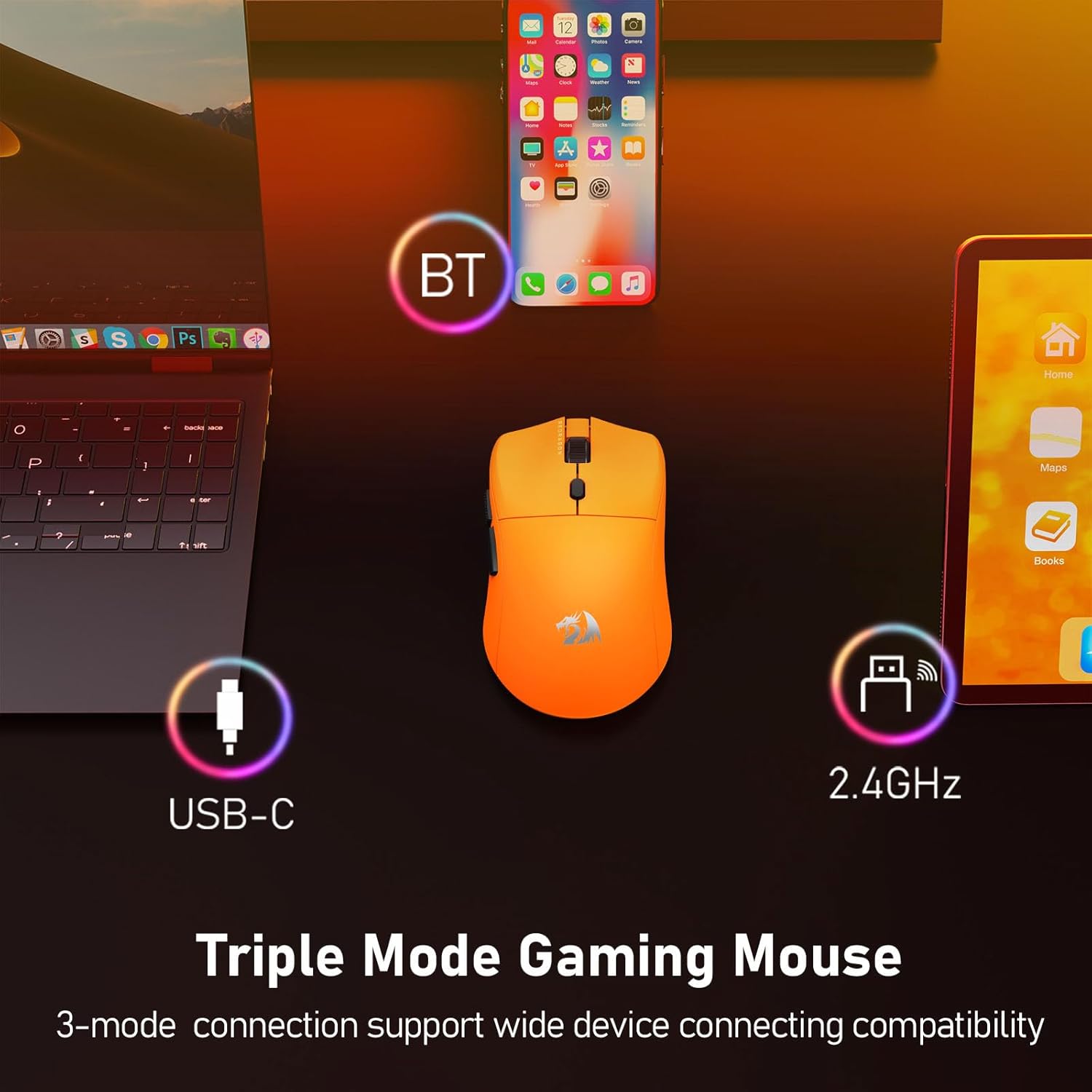
Image 4.2: Visual representation of the mouse's 8000Hz report rate capability.
4.4. Optimizing Mouse Accuracy
For optimal accuracy, it is recommended to disable the "Enhance pointer precision" option in your operating system's mouse settings. Further fine-tuning can be achieved using the Redragon software.
5. Manteniment
5.1. Neteja
Per netejar el ratolí, feu servir un drap suau i sec. Per a la brutícia persistent, feu servir un drap lleugerament sec.amp cloth can be used, ensuring no liquid enters the mouse's internal components. Avoid harsh chemicals or abrasive materials.
5.2. Coixinets de tefló per als peus
The mouse is equipped with large, wear-resistant Teflon foot pads to ensure smooth gliding. If the mouse's movement becomes rough over time, inspect the foot pads for wear or debris. Replacement foot pads may be available from Redragon support.

Imatge 5.1: View of the mouse's underside, highlighting the Teflon foot pads for smooth movement.
6. Solució De Problemes
- El ratolí no respon: Ensure the mouse is charged and the correct connectivity mode (2.4G, BT, or Wired) is selected. Try reconnecting the USB receiver or re-pairing Bluetooth.
- Connexió intermitent: Ensure the USB receiver is not obstructed and is within 10 meters of the mouse. Avoid placing the receiver near other wireless devices that may cause interference.
- Seguiment inexacte: Clean the optical sensor on the bottom of the mouse. Disable "Enhance pointer precision" in your operating system's mouse settings. Adjust DPI settings using the mouse button or software.
- Els botons no funcionen com s'esperava: Check the Redragon software for custom button assignments. Reset settings to default if necessary.
- Software not accessible: Ensure your internet connection is stable when accessing the web-based driver. Verify the URL: controlhub.top/redragonzone/.
7. Especificacions
| Característica | Detall |
|---|---|
| Model | M919 Pro |
| Pes | 54 g (aproximadament) |
| Connectivitat | USB-C amb cable, sense fil de 2.4 GHz, Bluetooth 5.1 |
| Sensor | Redragon 3953 Optical Sensor |
| Rang de DPI | Up to 45,000 DPI (5 adjustable levels) |
| Taxa de votació | Up to 8000Hz (Wired & 2.4GHz modes) |
| Botons | 6 Botons programables |
| Durada de la bateria | Fins a 85 hores |
| Compatibilitat de sistemes operatius | Windows 7+, macOS, Ubuntu 22.04+ |
| abast sense fils | Fins a 10 metres |
| Dimensions de l'article (L x A) | 4.76" de llargada x 2.52" d'amplada |
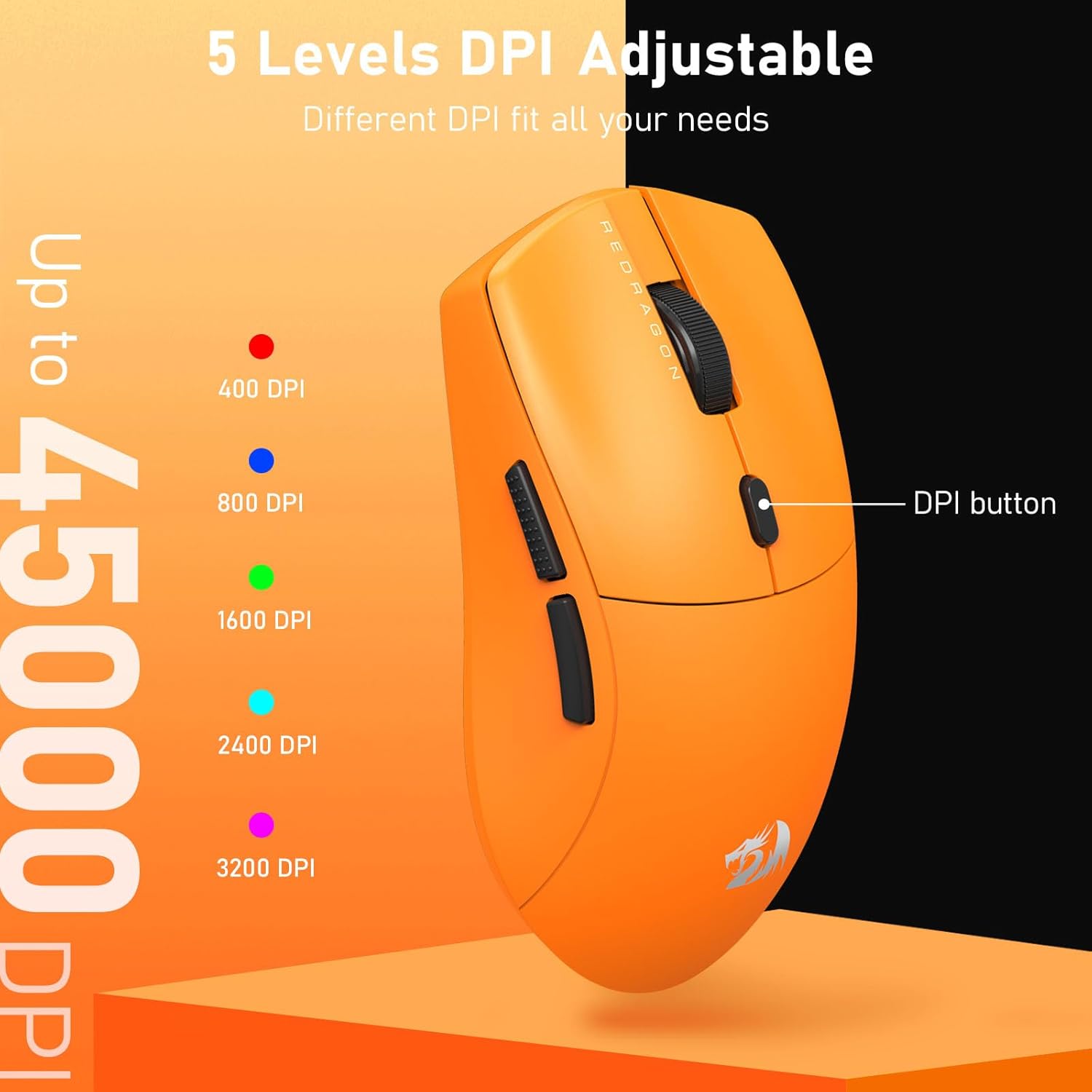
Image 7.1: Diagram illustrating the Redragon 3953 Optical Sensor and 8K report rate technology.

Image 7.2: The lightweight design of the M919 Pro, weighing approximately 54 grams.
8. Informació de la garantia
The Redragon M919 Pro Wireless Gaming Mouse comes with a Garantia del fabricant de 2 anys des de la data de compra. Aquesta garantia cobreix els defectes de materials i fabricació en condicions d'ús normal. No cobreix els danys causats per un mal ús, accidents, modificacions no autoritzades o desgast normal. Conserveu el comprovant de compra per a reclamacions de garantia.
9. Suport
For further assistance, technical support, or to access the latest software and drivers, please visit the official Redragon support portal:
You may also refer to the Redragon official weblloc web per obtenir informació de contacte i recursos addicionals.