
1. Configuració
1.1 Desembalatge i contingut del paquet
Carefully remove the television and all components from the packaging. Ensure all items listed below are present.
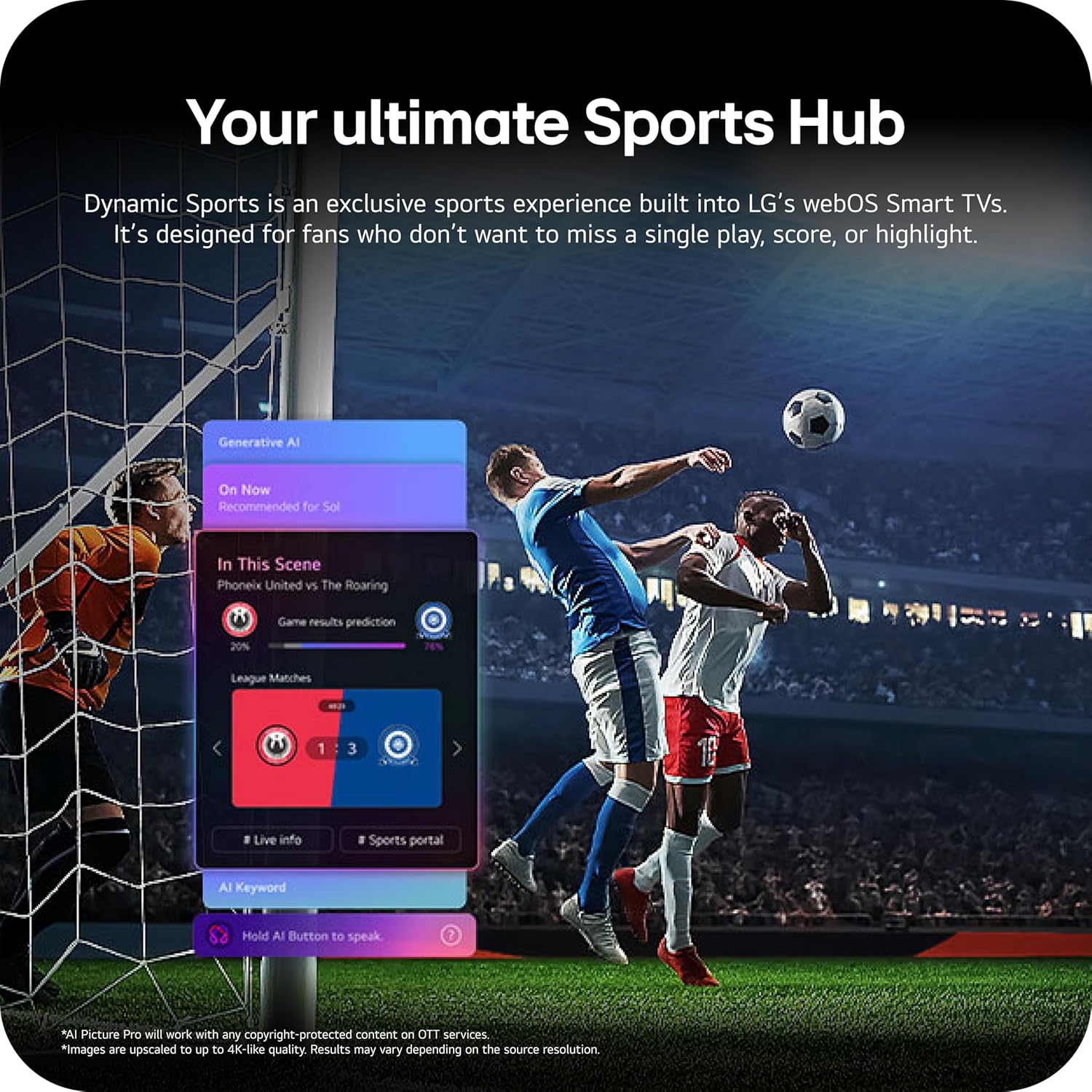
Image: The LG 65-inch OLED TV showing its dimensions with and without the stand, and a list of included accessories such as the Magic Remote, batteries, power cable, stand, and quick start guide.
Components inclosos:
- Televisor intel·ligent LG OLED evo AI 4K sèrie C6 de 65 polzades
- Remot màgic
- Piles del comandament a distància (2 AAA)
- Cable d'alimentació
- Dempeus
- Manual d'usuari (aquest document)
1.2 Instal·lació física
The LG OLED65C6PUA can be installed using the included stand or mounted on a wall. Refer to the separate Installation Manual (PDF) for detailed wall mounting instructions.
Instal·lació de l'estand:
- Col·loqueu la pantalla del televisor amb la pantalla cap avall sobre una superfície suau i plana per evitar que es faci malbé.
- Attach the stand to the designated area on the bottom of the TV using the provided screws. Ensure it is securely fastened.
- Aixequeu el televisor amb cura i col·loqueu-lo sobre una superfície estable i plana.
Dimensions:
- TV Dimensions with Stand (WxHxD): 56.7" x 34.6" x 9.1"
- TV Dimensions without Stand (WxHxD): 56.7" x 32.5" x 1.8"
- Stand Footprint: 18.5"
1.3 Connectivitat
Connect your external devices to the appropriate ports on the rear and side of the television.

Image: The back panel of the LG OLED TV, displaying multiple HDMI ports, USB ports, Ethernet port, and antenna input for connecting various devices.
- Ports HDMI (4): Connect Blu-ray players, gaming consoles, soundbars, and other HDMI-enabled devices.
- Ports USB (2): Connecteu dispositius d'emmagatzematge USB per a la reproducció de contingut multimèdia o actualitzacions de programari.
- Port Ethernet (LAN): Per a connexió a Internet per cable.
- Entrada d'antena/cable: Connecteu una antena o un senyal de televisió per cable.
- Optical Digital Audio Out (S/PDIF): Per connectar a sistemes d'àudio externs.
1.4 Engegada inicial i configuració de la xarxa
- Connecteu el cable d'alimentació al televisor i després a una presa de corrent.
- Premeu el botó d'engegada del comandament a distància o del televisor.
- Follow the on-screen instructions to complete the initial setup, including language selection, time zone, and network connection (Wi-Fi or Ethernet).
- An LG account may be required to access network-based smart services.
2. Instruccions de funcionament
2.1 Comandament a distància màgic
The Magic Remote allows for intuitive control of your TV with point, click, scroll, and voice commands.

Image: The LG Magic Remote, featuring a central scroll wheel, directional buttons, and dedicated buttons for various functions and streaming services.
- Botó d'encesa: Encén o apaga el televisor.
- Botons numèrics: Accés directe al canal.
- Pujar/baixar el volum: Ajusta el volum.
- Canal amunt/avall: Canvi de canals.
- Botó d'inici: Accedeix al webPantalla d'inici del sistema operatiu Smart TV.
- Pointer/Scroll Wheel: Navega pels menús i selecciona elements.
- Botó de comandament per veu: Activates intelligent voice recognition.
2.2 webOS Smart TV Platform (AI Hub)
El webOS 2026 platform provides access to streaming services, apps, and AI-powered features.

Image: A visual representation of the LG webOS Smart TV interface, highlighting AI features like Multi AI Search, AI Concierge, AI Voice ID, AI Picture Wizard, AI Chatbot, and AI Sound Wizard, all accessible via the remote's AI button.
- AI Hub: Press the AI button on your remote to access personalized recommendations and AI features.
- Serveis de streaming: Access popular apps like Netflix, Disney+, Prime Video, Apple TV, and YouTube.
- Canals LG: Enjoy over 400 free channels and 10,000+ movies & shows on-demand.
- Multi AI Search: Powered by Google Gemini & Microsoft Copilot for broader, more relevant search results.
2.3 Configuració d'imatge i so
Optimitzeu el vostre viewing and listening experience with advanced picture and sound technologies.

Image: A split screen on an LG OLED TV illustrating the difference between an anti-glare matte display and a Perfect Black & Perfect Color display, emphasizing the deep blacks and vibrant colors achieved by OLED technology.
- Potenciador de brillantor: Enhances visuals for brighter, more vivid detail, powered by the α11 AI Processor Gen 3.
- Negre perfecte i color perfecte: Over 8.3 million self-lit pixels deliver infinite contrast and accurate colors.
- Dolby Vision, HDR10, HLG: Supports multiple HDR formats for enhanced contrast and color.
- Mode cineasta: Preserves the director's original vision by disabling motion smoothing and other post-processing.
- Dolby Atmos: Proporciona un so immersiu i multidimensional.
- AI Picture & AI Sound: AI-assisted deep learning analyzes content to optimize picture and sound settings.
2.4 Característiques del joc
Experience responsive and fluid gameplay with dedicated gaming enhancements.

Image: A dynamic image of a race car on a track, overlaid with logos for 165Hz refresh rate, NVIDIA G-Sync, and AMD FreeSync Premium, indicating the TV's advanced gaming capabilities.
- Freqüència de refresc de 165 Hz: Provides ultra-smooth motion for gaming (up to 165Hz for PC gaming).
- Temps de resposta d'0.1 ms: Minimizes input lag for quick reactions.
- NVIDIA G-Sync i AMD FreeSync Premium: Reduces screen tearing and stuttering for compatible graphics cards.
- Four HDMI 2.1 Inputs: Supports high bandwidth features required for next-gen gaming.
2.5 Dynamic Sports Hub
Access an exclusive sports experience built into LG's webOS Smart TVs.

Image: A soccer match displayed on an LG webOS Smart TV, with an overlay showing the 'Dynamic Sports Hub' interface, offering game results predictions, live info, and a sports portal.
The Dynamic Sports Hub is designed for fans to track scores, highlights, and relevant information without missing live action.
3. Manteniment
3.1 OLED Care
The OLED Care feature helps protect your OLED display and maintain picture quality over time.

Image: A simple graphic displaying the 'OLED Care' logo with the LG brand, indicating a feature designed for display maintenance.
Access OLED Care settings through the TV menu to manage features like Pixel Cleaning and Screen Shift, which help prevent image retention.
3.2 Neteja del televisor
- Desendolla sempre el televisor abans de netejar-lo.
- Feu servir un drap de microfibra suau i sec per netejar suaument la pantalla i la carcassa.
- Per a marques difícils, esbandiu lleugeramentampen the cloth with water or a specialized screen cleaner (ensure it is safe for OLED displays). Do not spray liquid directly onto the screen.
- Eviteu utilitzar netejadors abrasius, ceres o dissolvents.
4. Solució De Problemes
Aquesta secció ofereix solucions a problemes comuns que podeu trobar.
4.1 Sense alimentació / El televisor no s'encén
- Assegureu-vos que el cable d'alimentació estigui ben connectat tant al televisor com a una presa de corrent que funcioni.
- Check if the wall outlet is receiving power by plugging in another device.
- Prova de prémer el botó d'engegada del televisor, no només el comandament a distància.
4.2 Sense imatge o imatge distorsionada
- Verifiqueu que s'ha seleccionat la font d'entrada correcta (per exemple, HDMI 1, HDMI 2).
- Check all cable connections between the TV and external devices (HDMI, antenna, etc.). Ensure they are firmly seated.
- Si feu servir una antena, comproveu-ne la connexió i la posició.
- Restart the connected device (e.g., cable box, gaming console).
4.3 El comandament a distància no funciona
- Replace the batteries in the Magic Remote (requires 2 AAA batteries).
- Assegureu-vos que no hi hagi obstacles entre el comandament a distància i el televisor.
- Re-pair the Magic Remote if it has become disconnected. Point the remote at the TV and press the Wheel (OK) button.
4.4 Sense so o so baix
- Comproveu el volum del televisor i assegureu-vos que no estigui silenciat.
- Si feu servir dispositius d'àudio externs (barra de so, receptor), assegureu-vos que estiguin encesos i connectats correctament.
- Check the audio output settings in the TV menu to ensure the correct output is selected (e.g., TV Speaker, Optical Out).
4.5 Problemes de connexió de xarxa
- For Wi-Fi, ensure the router is on and within range. Try restarting the router.
- For wired connection, ensure the Ethernet cable is securely connected to both the TV and the router.
- Check network settings in the TV menu to ensure correct configuration.
5. Especificacions
| Característica | Especificació |
|---|---|
| Nom del model | LGOLED65C6PUA |
| Número de model | OLED65C6PUA |
| Mida de la pantalla | 65 polzades |
| Tecnologia de visualització | OLED |
| Resolució | 4K (3840 x 2160) |
| Freqüència d'actualització | 120 Hz (Native), up to 165Hz for PC gaming |
| Processador | α11 AI Processor 4K Gen3 (Dual AI Engine) |
| Format HDR compatible | Dolby Vision, HDR10, HLG |
| Temps de resposta | 0.1 mil·lisegons |
| Sistema operatiu | webOS 2026 |
| Tecnologia de connectivitat | Bluetooth (v5.3), Ethernet, HDMI, USB, Wi-Fi |
| Ports HDMI totals | 4 (HDMI 2.1) |
| Ports USB totals | 2 (USB 2.0) |
| Sortida d'àudio | Òptic (S/PDIF) |
| Descripció del ponent | Dolby Atmos (2.2 Channel) |
| Característiques especials | AMD FreeSync, Built-In Speaker, Chromecast, Intelligent Voice Recognition, NVIDIA G-Sync |
| Font d'alimentació | 120 volts |
| Pes de l'article (sense suport) | 36.6 lliures |
| Item Dimensions (with stand) | 9.1 "P x 56.7" W x 34.6" H |
| Estàndard de muntatge VESA | 300 x 200 mm |
6. Garantia i Suport
6.1 Garantia del producte
This LG OLED TV (Model OLED65C6PUA) comes with a 1 Year Parts and Labor Limited Warranty des de la data de compra. Si us plau, conserveu el comprovant de compra per a reclamacions de garantia.
6.2 Plans de protecció addicionals
Extended protection plans may be available for purchase separately:
- Pla de protecció de 4 anys: Provides coverage for 48 months.
- Protecció completa: Un pla de subscripció mensual que cobreix les compres passades i futures elegibles.
For details on coverage and terms, please refer to the respective plan documentation or contact the provider.
6.3 Atenció al client
Per a assistència tècnica, resolució de problemes més enllà d'aquest manual o servei de garantia, poseu-vos en contacte amb el servei d'atenció al client de LG. Podeu trobar la informació de contacte a la pàgina oficial de LG. website or in the Quick Start Guide included with your TV.
També podeu consultar l'oficial Manual d'usuari (PDF) i Manual d'instal·lació (PDF) per a informació més detallada.