
1. Introducció
The Zapco Z-OTG-BT C is a high-resolution audio converter designed to enhance your audio experience by converting digital audio signals to high-quality analog and digital outputs. This device supports various input and output formats, ensuring compatibility with a wide range of audio systems. It features a high-performance DAC and OP-amp for superior sound reproduction.
2. Informació de seguretat
Si us plau, llegiu i comprengui totes les instruccions de seguretat abans de fer servir aquest dispositiu. Conservi aquest manual per a futures consultes.
- Font d'alimentació: Use only the specified DC 9-16V power supply. Using an incorrect power adapter may damage the device and void the warranty.
- Humitat: Do not expose the device to water, moisture, or extreme humidity. This can cause electric shock or fire.
- Ventilació: Ensure adequate ventilation around the unit. Do not block ventilation openings. Overheating can lead to malfunction.
- Col·locació: Place the device on a stable, flat surface. Avoid placing it near heat sources or in direct sunlight.
- Manteniment: No intenteu obrir ni fer el manteniment de la unitat vosaltres mateixos. Encarregueu totes les tasques de manteniment a personal qualificat.
- Neteja: Desconnecteu l'alimentació abans de netejar. Feu servir un drap suau i sec. No utilitzeu netejadors líquids ni en aerosol.
3. Contingut del paquet
Verifiqueu que tots els elements siguin presents al paquet:
- Zapco Z-OTG-BT C Audio Converter Unit
- Adaptador de corrent (DC 9-16V)
- Manual d'usuari (aquest document)
4. Configuració
Follow these steps to set up your Zapco Z-OTG-BT C audio converter:
- Connecta la font d'àudio: Connect your digital audio source device (e.g., smartphone, tablet, computer) to the OTG input port on the Zapco Z-OTG-BT C. This input supports 192KHz/32bit audio and also supports a charging function for the connected device.
- Connecta la sortida d'àudio: Choose your desired audio output method:
- Sortides RCA: Connect the Left and Right RCA outputs (1.5V RMS) to your amplifier or receiver's analog audio inputs.
- Digital Outputs (Optical/Coaxial): Connect either the Optical or Coaxial digital output to a compatible digital input on your external DAC or amplifier. These outputs support 48/96/192KHz digital inputs.
- Connectar l'alimentació: Connect the provided power adapter to the DC 9-16V power input on the Zapco Z-OTG-BT C, then plug the adapter into a suitable power outlet.
- Encès: The device will power on automatically once connected to power. Ensure all connections are secure before playing audio.
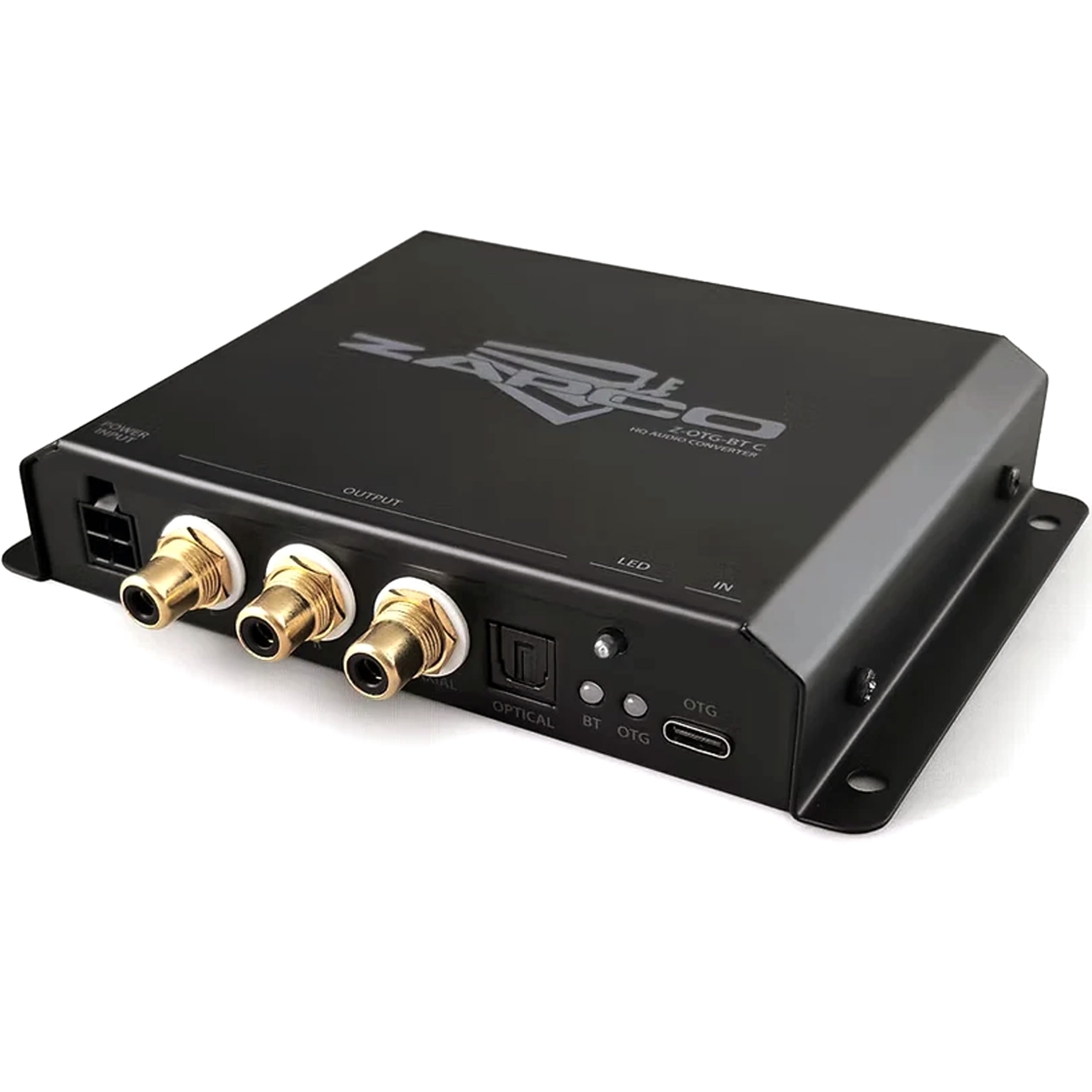
Imatge 1: Frontal view of the Zapco Z-OTG-BT C Hi-Res HQ Audio Converter, showing its various input and output ports.
5. Funcionament
Once the Zapco Z-OTG-BT C is set up and powered on, it operates automatically:
- Ensure your audio source device is playing audio.
- The Z-OTG-BT C will convert the incoming digital audio signal from the OTG input to the selected analog (RCA) or digital (Optical/Coaxial) outputs.
- Ajusta el volum del teu dispositiu connectat amplifier or receiver. The Z-OTG-BT C does not have its own volume control.
6. Manteniment
Un manteniment adequat garanteix la longevitat i el rendiment òptim del dispositiu:
- Neteja: Use a soft, dry, lint-free cloth to clean the exterior of the unit. Do not use abrasive cleaners, solvents, or chemical sprays.
- Emmagatzematge: Si guardeu el dispositiu durant un període prolongat, desconnecteu-lo de l'alimentació i guardeu-lo en un lloc fresc i sec, allunyat de la llum solar directa i de temperatures extremes.
- Gestió de cables: Ensure all cables are routed neatly and are not under strain or bent sharply, which can damage them over time.
7. Solució De Problemes
If you encounter issues with your Zapco Z-OTG-BT C, refer to the following troubleshooting guide:
| Problema | Causa possible | Solució |
|---|---|---|
| Sense sortida d'àudio |
|
|
| Poor audio quality / Distortion |
|
|
| Device not recognized by source (OTG) |
|
|
8. Especificacions
Detailed technical specifications for the Zapco Z-OTG-BT C:
- Tipus: Convertidor d'àudio
- Model: Z-OTG-BT C
- OTG Input: 192KHz/32bit (Supports Charging function)
- OP-Amp: JRC 5532 (High Performance Low-Noise Dual OP)
- DAC: TI PCM5102A 384KHz/32bit
- Sortides digitals: Optical and Coaxial (for connection with 48/96/192KHz Digital Inputs)
- Sortides RCA: Left + Right (1.5V RMS)
- Font d'alimentació: DC 9-16V
- Subministrament mínim Voltage: 9 volts_de_corrent_directa
- Volum de subministrament màximtage: 16 volts_de_corrent_directa
- Tipus d'interfície: Coaxial, Optical, RCA
- Nombre de canals: 2
- Mode de sortida d'àudio: estèreo
- Dimensions de la unitat (mm): 140 x 23 x 96
- Pes de l'article: 3 lliures
9. Garantia
The Zapco Z-OTG-BT C Hi-Res HQ Audio Converter comes with a 1 anys de garantia from the date of purchase. This warranty covers manufacturing defects and malfunctions under normal use. It does not cover damage caused by misuse, accidents, unauthorized modifications, or improper installation. Please retain your proof of purchase for warranty claims.
10. Suport
For technical assistance, warranty claims, or further inquiries regarding your Zapco Z-OTG-BT C, please contact Zapco customer support through their official website or the retailer from whom you purchased the product. Please have your model number (Z-OTG-BT C) and proof of purchase ready when contacting support.