
1. Introducció
Thank you for choosing the THOMSON TDF-1001P Digital Photo Frame. This device allows you to display your favorite photos and videos, play music, and utilize features like a calendar, clock, and alarm. With Wi-Fi connectivity, you can easily share media and receive weather updates. Please read this manual thoroughly before operating the device to ensure proper use and maintenance.
2. Informació de seguretat
- No exposeu el dispositiu a la humitat, la pluja ni a temperatures extremes.
- Eviteu col·locar el dispositiu a prop de fonts de calor o sota la llum solar directa.
- Feu servir només l'adaptador de corrent proporcionat. L'ús d'adaptadors no autoritzats pot fer malbé el dispositiu i anul·lar la garantia.
- No intenteu desmuntar ni reparar el dispositiu vosaltres mateixos. Encarregueu tot el manteniment a personal qualificat.
- Mantingueu el dispositiu allunyat de camps magnètics forts.
- Clean the screen with a soft, dry cloth. Do not use liquid cleaners or sprays directly on the screen.
3. Contingut del paquet
Si us plau, comproveu el paquet per veure si hi ha els elements següents:
- THOMSON TDF-1001P Digital Photo Frame
- Adaptador d'alimentació
- Manual d'usuari (aquest document)
- Stand (if applicable)
4. Producte acabatview
Familiaritzeu-vos amb els components del vostre marc de fotos digital.
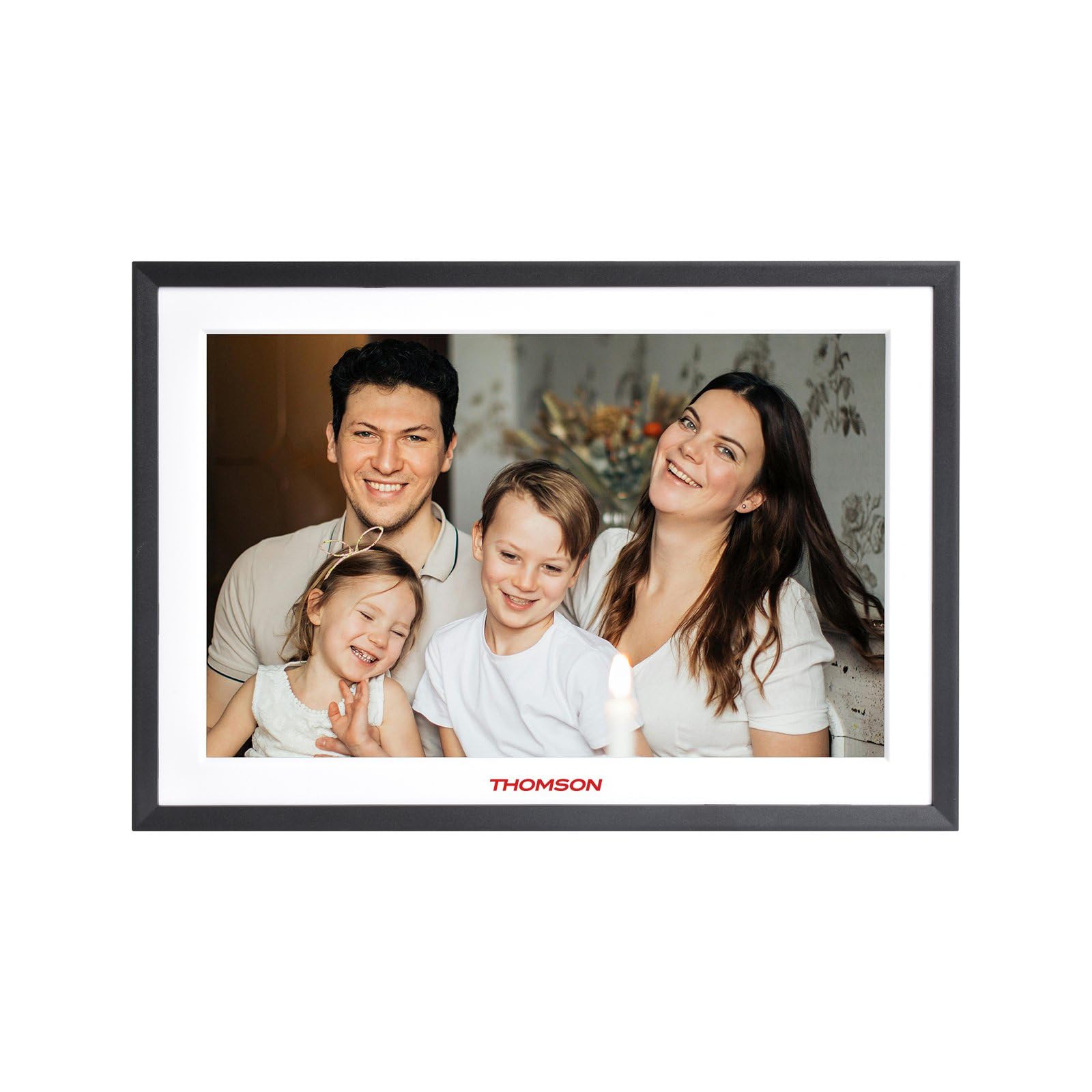
Figura 4.1: Davant view of the THOMSON TDF-1001P Digital Photo Frame. This image shows the 10.1-inch IPS display with a black frame, designed for clear photo and video playback.
4.1. Tauler frontal
- Pantalla tàctil IPS d'10.1 polzades: The main display for viewing content and interacting with the device.
4.2. Rear Panel and Ports
The rear panel typically includes various ports for connectivity and power.
- Entrada d'alimentació: Es connecta a l'adaptador de corrent proporcionat.
- Port USB: For connecting USB drives to transfer media.
- Ranura per a targeta SD: For inserting SD cards to expand storage or transfer media.
- Botó de restabliment: A small pinhole button to reset the device if necessary.
5. Configuració
5.1. Engegada inicial
- Unpack the digital photo frame and its accessories.
- Attach the stand to the back of the frame, ensuring it is securely fastened.
- Connect the power adapter to the power input port on the frame.
- Plug the power adapter into a wall outlet. The frame will automatically power on.
- Seguiu les instruccions a la pantalla per seleccionar el vostre idioma i regió.
5.2. Connexió Wi-Fi
Connecting to Wi-Fi enables online features like photo sharing and weather updates.
- From the main menu, tap on 'Settings'.
- Select 'Wi-Fi' or 'Network Settings'.
- Toggle Wi-Fi to 'On'. The frame will scan for available networks.
- Seleccioneu la xarxa Wi-Fi que vulgueu de la llista.
- Enter the Wi-Fi password using the on-screen keyboard and tap 'Connect'.
- Once connected, a Wi-Fi icon will appear on the status bar.
5.3. App Setup for Sharing
To share photos and videos via Wi-Fi, you will need to install the dedicated app on your smartphone.
- Locate the app name or QR code in the frame's settings under 'Cloud Services' or 'App Connection'.
- Download and install the app on your smartphone from your device's app store.
- Obre l'aplicació i crea un compte o inicia la sessió.
- Follow the app's instructions to pair your smartphone with the digital photo frame, typically by scanning a QR code displayed on the frame or entering a unique device ID.
- Once paired, you can send photos and videos directly from your smartphone to the frame.
6. Operating the Digital Photo Frame
6.1. Navegació per la interfície
The frame features a touch screen for easy navigation. Tap icons to open applications and swipe to browse content or menus.
6.2. Photo and Video Playback
- From the main menu, tap the 'Photos' or 'Gallery' icon.
- Select the source of your media (Internal Storage, SD Card, USB Drive, or Cloud/App).
- Browse through your albums or individual files. Tap on a photo or video to view això.
- During playback, you can typically swipe left/right to navigate between files, or tap the screen to reveal playback controls (play/pause, next, previous, rotate, delete).
6.3. Reproducció de música
- Tap the 'Music' icon from the main menu.
- Select the source of your music files.
- Browse and tap on a song to begin playback.
- Use the on-screen controls for play/pause, skip, volume adjustment, and repeat modes.
6.4. Calendar, Clock, and Alarm
- Calendari: Tap the 'Calendar' icon to view the current date and month. Some models may allow adding events.
- Rellotge: The current time is usually displayed on the home screen. Time settings can be adjusted in the 'Settings' menu.
- Alarma: Access the 'Alarm' function via the main menu or 'Settings'. You can set multiple alarms with custom times and sounds.
6.5. Weather Updates
If connected to Wi-Fi, the frame can display local weather information.
- Ensure the frame is connected to Wi-Fi.
- Go to 'Settings' and find 'Weather' or 'Location Services'.
- Enable weather updates and set your location (either automatically or manually).
- The weather forecast will then be displayed on the home screen or a dedicated weather widget.
7. Manteniment
7.1. Neteja del dispositiu
- Always power off and unplug the device before cleaning.
- Feu servir un drap suau i sense borrissol per netejar suaument la pantalla i el marc.
- Per a taques persistents a la pantalla, fregueu lleugeramentampen the cloth with water or a screen-safe cleaning solution, then wipe gently. Do not spray liquids directly onto the screen.
- Eviteu els productes de neteja o dissolvents abrasius.
7.2. Emmagatzematge
When not in use for extended periods, store the digital photo frame in a cool, dry place, away from direct sunlight and extreme temperatures. It is recommended to keep the original packaging for storage.
8. Solució De Problemes
Aquesta secció tracta problemes comuns que podeu trobar.
| Problema | Causa possible | Solució |
|---|---|---|
| El marc no s'encén. | L'adaptador de corrent no està connectat o està defectuós. | Assegureu-vos que l'adaptador de corrent estigui connectat correctament al marc i a una presa de corrent que funcioni. Proveu una altra presa de corrent. |
| No es pot connectar a la Wi-Fi. | Incorrect password, out of range, or router issue. | Verify the Wi-Fi password. Move the frame closer to the router. Restart your Wi-Fi router. |
| Photos/videos not displaying. | Sense suport file format, corrupted files, or incorrect source selected. | Assegureu-vos files are in supported formats (e.g., JPEG for photos, MP4 for videos). Check if the files are corrupted. Select the correct storage source (SD card, USB, internal). |
| La pantalla tàctil no respon. | Error temporal de programari. | Restart the frame by unplugging and replugging the power adapter. If the issue persists, use a pin to press the reset button on the back. |
9. Especificacions
| Característica | Especificació |
|---|---|
| Model | TDF-1001P |
| Mida de la pantalla | 10.1 polzades |
| Resolució | IPS de 800 * 1280 |
| Relació d'aspecte | 16:10 |
| Internal Flash Storage | 32 GB |
| Pantalla tàctil | G+P Type |
| Connectivitat | Wi-Fi |
| Funcions | Photo, Music, Video, Calendar, Clock, Alarm, Weather, Wi-Fi Sharing |
| Material | Plastic black frame and white middle frame |
| Dimensions de l'article (L x A) | 7.25" de llargada x 10.44" d'amplada |
| Font d'alimentació | Elèctric amb cable |
10. Informació de la garantia
The THOMSON TDF-1001P Digital Photo Frame comes with a Garantia limitada d'1 any from the date of purchase. This warranty covers manufacturing defects in materials and workmanship under normal use. It does not cover damage caused by misuse, accidents, unauthorized modifications, or external causes such as power surges.
Please retain your proof of purchase for warranty claims. For detailed warranty terms and conditions, refer to the warranty card included in your package or contact customer support.
11. Atenció al client
If you have any questions, require technical assistance, or need to make a warranty claim, please contact THOMSON customer support. Refer to the contact information provided on the product packaging or the official THOMSON weblloc.
When contacting support, please have your product model number (TDF-1001P) and proof of purchase readily available.


