
1. Introducció
The Lepro STV1 TV Backlight Camera LED Lights system enhances your viewing experience by synchronizing ambient lighting with your TV screen content. This system features AI technology for true-to-screen color reproduction, ultra-wide camera capture, instant light synchronization (LightIMS), black-screen detection, and AI-generated scenes. This manual provides detailed instructions for installation, operation, and maintenance of your STV1 TV Backlight system.
2. Què hi ha a la caixa
Verifiqueu que tots els components siguin presents abans de començar la instal·lació.
- 11.8FT TV Strip
- 2-in-1 Camera & Controller
- Adaptador
- Calibration Foam Pads
- Light Strip Mounting Brackets

An unboxing video is available to guide you through the package contents:
3. Configuració i instal·lació
Follow these steps to properly install your Lepro STV1 TV Backlight system.
3.1 Instal·lació física
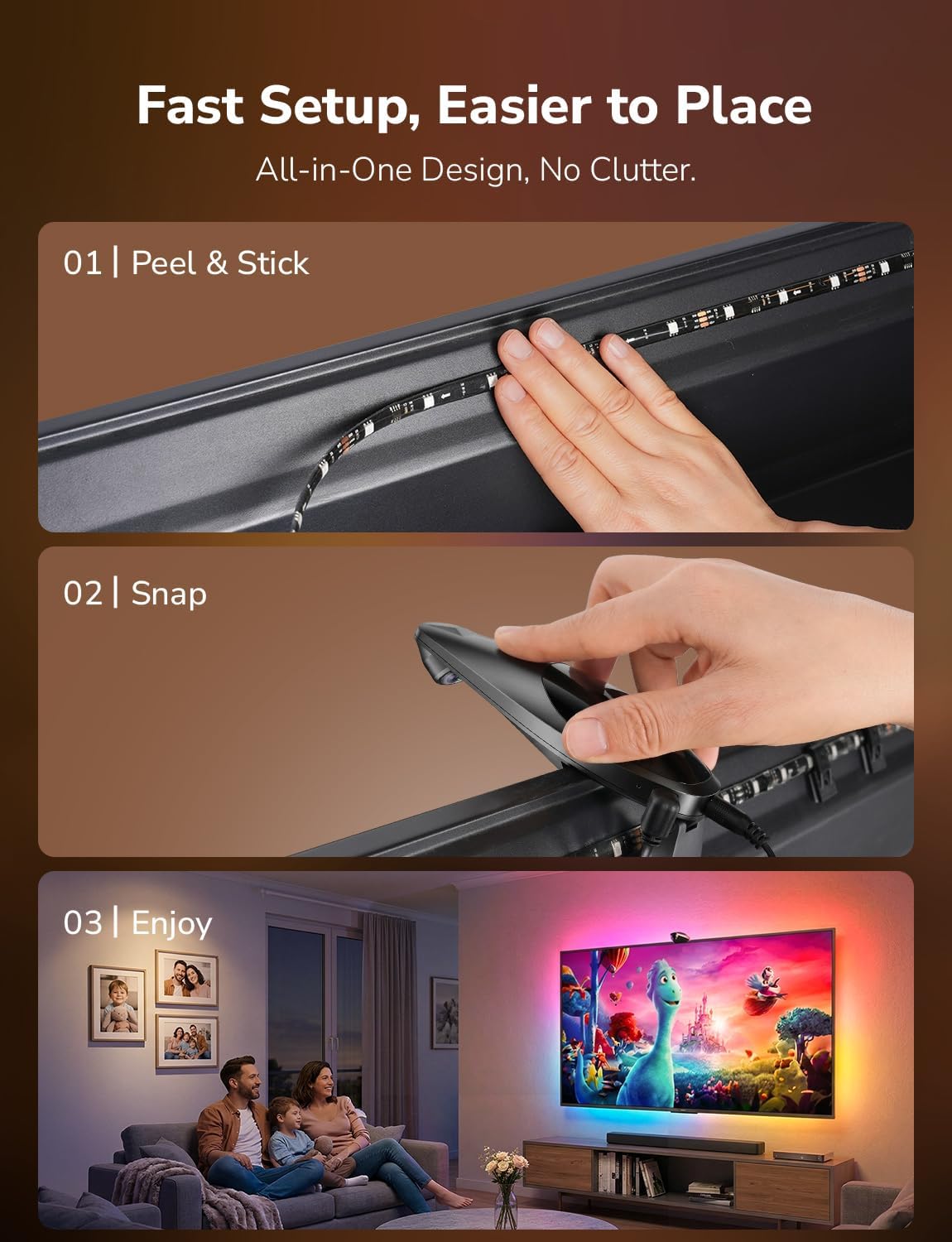
- Clean the TV Back: Ensure the back surface of your TV is clean and dry for optimal adhesive performance.
- Apply LED Strips: Carefully peel the adhesive backing from the LED strips and attach them to the back of your TV. The strips are designed to fit 55-65 inch TVs. Start from one corner and work your way around, ensuring the strips are securely pressed against the surface. Use the provided mounting brackets for additional reinforcement, especially at corners.
- Muntar la càmera: Place the 2-in-1 Camera & Controller unit on the top center edge of your TV. Ensure it is positioned at a 90-degree angle relative to the screen. Secure it with the camera adhesive pad.
- Connectar els cables: Connect the USB-C end of the LED light strip to the camera unit. Connect the power adapter to the camera unit and then plug it into a power outlet. Manage cables neatly using cable fix stickers if desired.


For a visual walkthrough of the installation process, refer to the official installation video:
3.2 App Setup and Calibration
- Descarrega l'aplicació Lepro: Download and install the official Lepro app on your smartphone or tablet.
- Initial Firmware Update: For optimal performance, the STV1 may require an initial firmware update via the Lepro app. Keep the device powered on during this process. Wi-Fi updates typically take about 6 minutes, while Bluetooth updates may take 7–8 minutes.
- Connecta't a Wi-Fi: Open the Lepro app and follow the on-screen instructions to connect your STV1 device to your 2.4 GHz Wi-Fi network.
- Calibració de la càmera: The app will guide you through the camera calibration process. This involves placing the provided calibration foam pads around your TV screen as instructed by the app to ensure accurate color detection. Ensure calibration lines do not overlap or extend beyond the screen edge.
4. Instruccions de funcionament
The Lepro STV1 offers various modes and features to enhance your viewexperiència.
4.1 LightIMS Instant Sync & True-to-Screen Color
The LightIMS technology provides ultra-responsive TV lighting, delivering up to 36% faster color synchronization. Combined with Lepro Lens Correction and exclusive algorithms, the addressable RGB LEDs ensure pixel-perfect, true-to-screen color accuracy, bringing content to life with an immersive glow.


Observe the immersive light sync in this short video:
4.2 LightGPM AI-Generated Scenes
Utilize the LightGPM 4 AI-Generated Scenes feature to create dynamic lighting effects. You can generate scenes from text, voice, or image prompts, such as matching your favorite team colors for sports events.
4.3 Smart Black-Screen Detection
The system automatically enters standby mode when your TV screen goes dark, conserving power without requiring manual intervention.
4.4 Seamless Sync for All Content
The STV1 reacts to all content in real-time, from movies and streaming apps to live sports and gaming, providing ambient light that follows the on-screen action.

See the seamless synchronization across different content types:
4.5 Hands-Free Control with Alexa Voice
Control your STV1 system using voice commands with Alexa. Simply say, for example, "Alexa, turn on TV lights" to manage your lighting without using the remote or app.

5. Manteniment
To ensure the longevity and optimal performance of your Lepro STV1 TV Backlight system, follow these simple maintenance guidelines:
- Neteja: Gently wipe the LED strips and camera unit with a soft, dry cloth. Avoid using abrasive cleaners or solvents, as these can damage the components.
- Comprovació d'adhesiu: Periodically check the adhesive of the LED strips and camera unit to ensure they remain securely attached to your TV. If necessary, re-secure with additional mounting brackets or appropriate adhesive.
- Actualitzacions de firmware: Regularly check the Lepro app for available firmware updates. Keeping your device's firmware up-to-date ensures you have the latest features and performance improvements.
- Gestió de cables: Ensure all cables are neatly managed and not under tension to prevent damage.
6. Solució De Problemes
If you encounter issues with your Lepro STV1 TV Backlight, refer to the following common solutions:
| Problema | Causa possible | Solució |
|---|---|---|
| Els llums no s'encenen | No power, loose connection, device not paired. | Check power adapter connection. Ensure the power outlet is functional. Verify the device is correctly paired in the Lepro app. |
| Lights not syncing with screen | Incorrect camera calibration, camera obstruction, outdated firmware. | Recalibrate the camera using the Lepro app. Ensure the camera lens is clean and unobstructed. Check for and install any available firmware updates. |
| Inaccurate colors | Improper calibration, ambient light interference. | Perform camera calibration again, ensuring accurate placement of foam pads. Reduce ambient room lighting for best results. |
| Problemes de connectivitat Wi-Fi | Contrasenya Wi-Fi incorrecta, xarxa de 5 GHz, distància des del router. | Ensure you are connecting to a 2.4 GHz Wi-Fi network. Double-check the Wi-Fi password. Move the TV closer to the router or use a Wi-Fi extender. |
| App freezing or unresponsive | App glitch, device communication error. | Restart the Lepro app. If the issue persists, restart your smartphone/tablet and the STV1 device (unplug and replug power). |
For further assistance, please refer to the FAQ video or contact Lepro customer support.
7. Especificacions
| Característica | Detall |
|---|---|
| Número de model | STV1-3 |
| Mida de TV compatible | 55''-65'' |
| Tipus de font de llum | LED (RGB+IC) |
| Nombre de fonts de llum | 108 |
| Connectivitat | Bluetooth, Wi-Fi (només 2.4 GHz) |
| Mètode de control | Control d'aplicacions, control per veu (Alexa, Assistent de Google) |
| Característiques especials | 2-in-1 Camera + Controller, AI Generated Scene, True-to-Screen Color, Ultra-wide Camera, LightIMS Instant Sync, Smart Black-Screen Detection |
| Font d'alimentació | Elèctric amb cable |
| Voltage | 120 volts de corrent altern |
| Wattage | 18.6 watts |
| Pes de l'article | 1.3 lliures |
| Tipus de material | Metall, plàstic |
| Ús interior/exterior | Interior |
8. Garantia i Suport
The Lepro STV1 TV Backlight Camera LED Lights come with a Garantia del fabricant de 2 anys.
For technical support, warranty claims, or any questions regarding your product, please contact Lepro customer service through their official weblloc web o la informació de contacte que es proporciona a l'embalatge del producte. També podeu visitar el Botiga Lepro a Amazon per obtenir recursos addicionals.


