
1. Introducció
Gràcies per la compraasing the GOWENIC 4-Channel Stereo Bluetooth Sound Mixer. This professional audio mixer is designed for a wide range of applications, including live sound, studio recording, karaoke, and events. It features a DSP 99 digital signal processor, a 7-band graphic equalizer, +48V phantom power, integrated Bluetooth MP3 player, and a versatile USB interface. This manual provides essential information for safe operation, setup, and maintenance of your device.
2. Instruccions de seguretat
- Font d'alimentació: Feu servir només l'adaptador de corrent proporcionat. Assegureu-vos que el volumtage compleix els requisits especificats al dispositiu.
- Aigua i humitat: Do not expose the mixer to water, rain, or excessive moisture. Avoid placing liquids near the device.
- Ventilació: Ensure adequate ventilation around the mixer. Do not block ventilation openings.
- Calor: Mantingueu el dispositiu allunyat de fonts de calor com ara radiadors, registres de calor, estufes o altres aparells que produeixin calor.
- Neteja: Desconnecteu l'alimentació abans de netejar. Feu servir un drap sec i suau. No utilitzeu netejadors líquids ni aerosols.
- Manteniment: No intenteu atendre aquest producte vosaltres mateixos. Consulteu tots els serveis a personal de servei qualificat.
- Col·locació: Place the mixer on a stable, level surface to prevent accidental falls.
3. Producte acabatview
The GOWENIC 4-Channel Stereo Bluetooth Sound Mixer is equipped with a comprehensive set of controls and connectivity options for professional audio mixing. Below is an overview of the main unit and its components.

Figura 3.1: Panell frontalview of the GOWENIC Mixer. This image displays the mixer's front panel, highlighting the input channels, equalization controls, DSP effects section, and main output faders.

Figure 3.2: Rear Panel Connections. This image shows the rear panel of the mixer, detailing the power input, main output jacks, and other auxiliary connections.
Característiques principals:
- 2 XLR Microphone Inputs with +48V Phantom Power
- 2 Stereo Line Inputs (1/4" TRS)
- 3-Band Equalizer on Input Channels
- 99-Bit DSP Digital Signal Processor with adjustable effects
- 7-Band Graphic Equalizer for Main Output
- Integrated Bluetooth MP3 Player
- USB Interface for Recording and PC Connection (Sound Card Functionality)
- Main Stereo Output (XLR/TRS) and Headphone Output
4. Configuració
4.1. Connexió d'alimentació
- Assegureu-vos que l'interruptor d'alimentació de la batedora estigui en la posició OFF.
- Connect the provided power adapter to the DC INPUT jack on the rear panel of the mixer.
- Connecteu l'adaptador d'alimentació a una presa de corrent adequada.
4.2. Connexió de micròfons
The mixer features 2 XLR microphone inputs (1/L and 2/R) with switchable +48V phantom power for condenser microphones.
- Connect your microphone(s) to the XLR inputs.
- If using condenser microphones requiring phantom power, press the +48V PHANTOM button for the respective channel. Ensure all connections are made before activating phantom power to prevent damage to equipment.
4.3. Connecting Line Inputs
Use the 1/4" TRS jacks for connecting line-level devices such as keyboards, guitars, or other audio players.
- Connect stereo line-level sources to the 3/4 (L/R) inputs.
4.4. Connexió de dispositius de sortida
- Sortida principal: Connecteu els altaveus principals o amplifier to the MAIN OUT (XLR or 1/4" TRS) jacks.
- Auriculars: Connect headphones to the PHONES 1/4" jack for monitoring.
4.5. USB Connection (PC/Recording)
The mixer can be connected to a computer via USB for recording or playback, functioning as an external sound card.
- Connect a USB cable from the mixer's USB port to your computer.
- Your computer should automatically detect the mixer as an audio device. Select it as the input/output device in your audio software settings.

Figure 4.1: Mixer connected to a computer for recording or live streaming. This image illustrates the mixer integrated into a computer-based audio production setup.
4.6. Emparellament Bluetooth
The integrated Bluetooth module allows wireless audio streaming from compatible devices.
- Premeu el botó MODE button on the digital audio player section until 'BT' is displayed.
- On your Bluetooth-enabled device (e.g., smartphone, tablet), search for available devices and select the mixer (usually named 'BT-MIXER' or similar).
- Un cop emparellat, podeu transmetre àudio sense fil al mesclador.
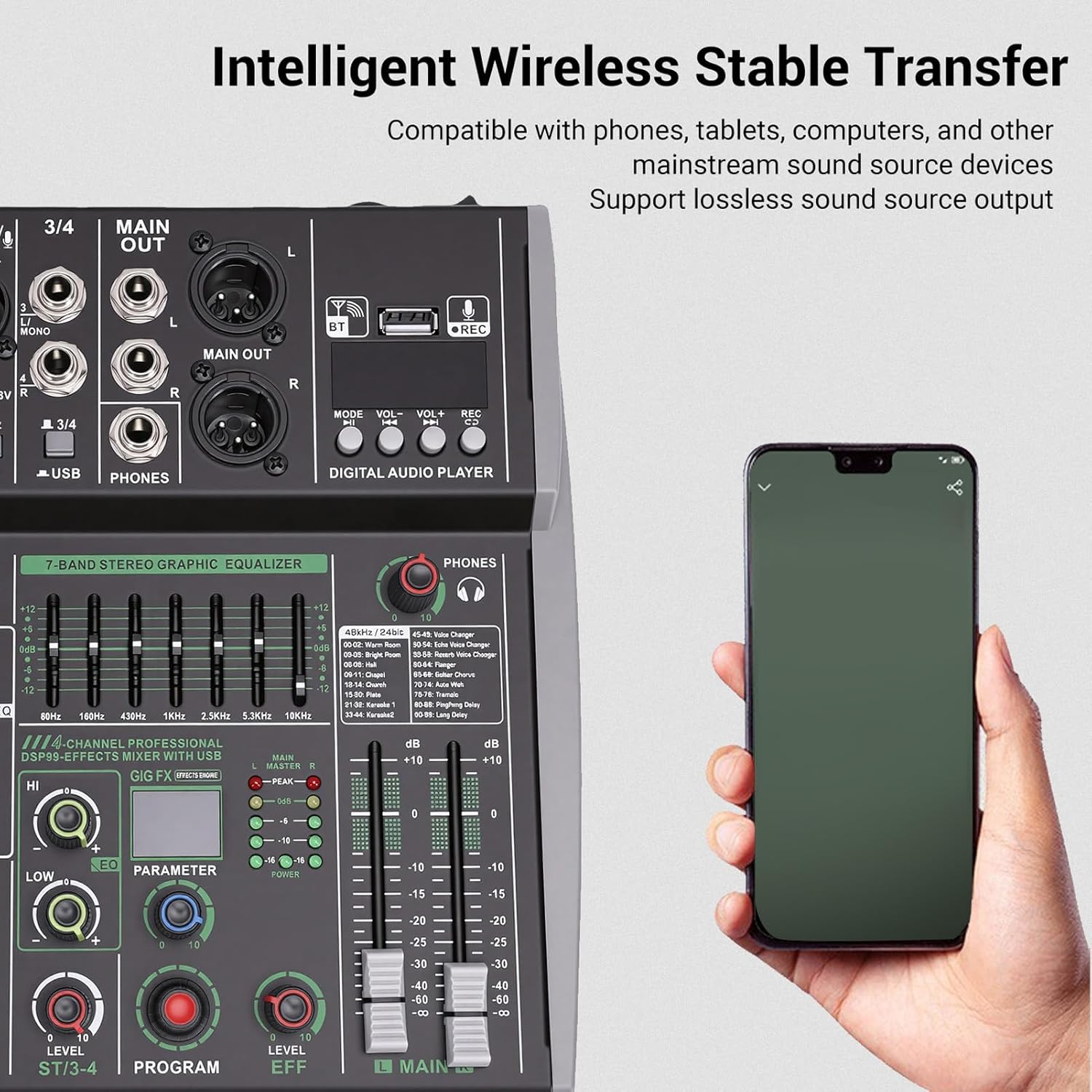
Figure 4.2: Bluetooth Wireless Connection. This image shows the mixer with a smartphone, demonstrating the wireless audio transfer capability.
5. Funcionament
5.1. Funcionament bàsic
- Encès: After connecting all cables, turn on the mixer by pressing the POWER button.
- Ajust del nivell d'entrada: Utilitza el GUANYA knob for each channel to set the input sensitivity. Adjust until the PEAK LED flashes only occasionally.
- Channel Equalization: Utilitza el HI, MITJANS, i BAIXA knobs for each input channel to adjust the tone.
- Efectes DSP:
- Gireu el PROGRAMA knob to select one of the 99 available DSP effects.
- Utilitza el PARÀMETRE knob to adjust specific parameters of the selected effect.
- Ajusteu el LEVEL EFF knob to control the overall effect send level to the main mix.
- Nivell de sortida principal: Utilitza el NIVEL PRINCIPAL fader to control the overall volume of the mixed audio. Monitor the main output meters to avoid clipping.
- Monitorització d'auriculars: Ajusteu el TELÈFONS knob to control the headphone volume.

Figure 5.1: DSP Effects and Main Level Controls. This image provides a detailed view of the DSP effect selection, parameter adjustment, and the main output level fader.
5.2. Funcions avançades
- 7-Band Stereo Graphic Equalizer: Use the faders in the 7-BAND STEREO GRAPHIC EQUALIZER section to fine-tune the overall frequency response of the main output. Adjust specific frequency bands (60Hz, 160Hz, 400Hz, 1KHz, 2.5KHz, 6.3KHz, 16KHz) to shape your sound.
- Digital Audio Player (USB/Bluetooth):
- Mode: Switch between USB playback, Bluetooth, and PC sound card modes.
- VOL + / VOL-: Adjust the volume of the digital audio player.
- REC: Press to initiate recording to a connected USB drive (if supported by the specific model and firmware).
6. Manteniment
6.1. Neteja
- Desconnecteu sempre el cable d'alimentació abans de netejar.
- Use a soft, dry, lint-free cloth to wipe the exterior surfaces of the mixer.
- Per a la brutícia persistent, lleugerament dampRenta el drap amb aigua. Evita fer servir productes químics agressius, dissolvents o netejadors abrasius.
- Do not allow any liquids to enter the mixer's openings.
6.2. Emmagatzematge
- Quan no l'utilitzeu durant períodes prolongats, guardeu la batedora en un lloc fresc i sec, allunyat de la llum solar directa i de temperatures extremes.
- Protect the mixer from dust by covering it with a dust cover or placing it back in its original packaging.
7. Solució De Problemes
| Problema | Causa possible | Solució |
|---|---|---|
| Sense sortida de so |
|
|
| So distorsionat |
|
|
| Bluetooth no connectat |
|
|
| L'alimentació phantom no funciona |
|
|
8. Especificacions
| Característica | Especificació |
|---|---|
| Tipus d'element | 4-Channel Sound Mixer |
| Material | ABS, ferro |
| Processador de senyal digital | 99 Bits DSP Effects |
| Poder fantasma | +48V (with independent switch) |
| Input Channel Equalizer | 3-Band (HI, MID, LOW) |
| Main Output Equalizer | Equalitzador gràfic estèreo de 7 bandes |
| Bluetooth | Integrated MP3 Player with Bluetooth connectivity |
| Interfície USB | Supports recording via USB drive, PC recording, integrated sound card |
| Entrades de micròfon | 2 x XLR (balanced/unbalanced) |
| Entrades de línia | 2 x 1/4" TRS Stereo, RCA (as per specifications) |
| Tecnologia de connectivitat | Ethernet (as per specifications) |
| Número de model | GOWENICphjvk8lic5-12 |
| País d'origen | Xina |
9. Garantia i Suport
9.1. Informació de la garantia
All purchased products come with a standard 120-day warranty. The warranty period begins on the day the product was originally shipped. The warranty covers all products and conditions identified in the manufacturer's original warranty. Please note that some specific products may not be covered by this warranty.
9.2. Atenció al client
For technical assistance, troubleshooting, or warranty claims, please contact your retailer or the GOWENIC customer support team. Please have your product model number (GOWENICphjvk8lic5-12) and purchase information ready when contacting support.