
SmallRig RF20C
SmallRig RF20C RGB Portable LED Photo Torch User Manual
Model: RF20C (5335)
Marca: SmallRig
1. Introducció
The SmallRig RF20C RGB Portable LED Photo Torch is a versatile and powerful lighting tool designed for photographers, videographers, and content creators. It features 5-color LED beads, adjustable beam angle, and supports creative lighting effects with included gobos. This manual provides essential information for the safe and effective use of your device.
2. Informació de seguretat
- No exposeu el dispositiu a l'aigua ni a una humitat excessiva.
- Eviteu l'exposició directa dels ulls a la llum LED.
- Do not disassemble or modify the device. Repairs should only be performed by authorized personnel.
- Mantenir fora de l'abast dels nens.
- Ensure proper ventilation during extended use, as the device may become warm.
- Feu servir només el cable de càrrega i l'adaptador de corrent especificats.
3. Contingut del paquet
Verifiqueu que tots els elements siguin presents al vostre paquet:
- RF20C Portable Focusable LED Video Light x 1
- Gobos x 20
- Silicone Gobo Holder x 1
- Bossa d'emmagatzematge x 1
- Manual d'usuari x 1 (Aquest document)
- Cable de càrrega x 1
4. Configuració
4.1 Càrrega inicial
Before first use, fully charge the RF20C. Connect the provided USB-C charging cable to the device's charging port and to a compatible USB power adapter (PD 36W recommended). The device can be used while charging.

Figure 4.1: Internal battery illustration and runtime information.

Figure 4.2: Portable design, mounting options, cooling fan, and charging capability.
4.2 Attaching Gobos
To use the creative pattern gobos, first remove the plano-convex lens from the front of the light. Then, attach the silicone gobo holder and insert the desired gobo. This ensures optimal projection effects.

Figure 4.3: Gobo projection examples and installation tip.
5. Instruccions de funcionament
5.1 Engegada/Apagada i Controls Bàsics
The RF20C features a single multi-function button for control. To prevent accidental activation during transport, the device requires a specific action to turn on.
- Encès: Rotate the control button to turn on the device.
- Apagar: Press and hold the control button for 3 seconds.
- Canvia el color: Short press the control button to cycle through the available colors (Red, 5600K White, Purple, Orange, Cyan).
- Ajusta la brillantor: Rotate the control button to increase or decrease the light brightness.
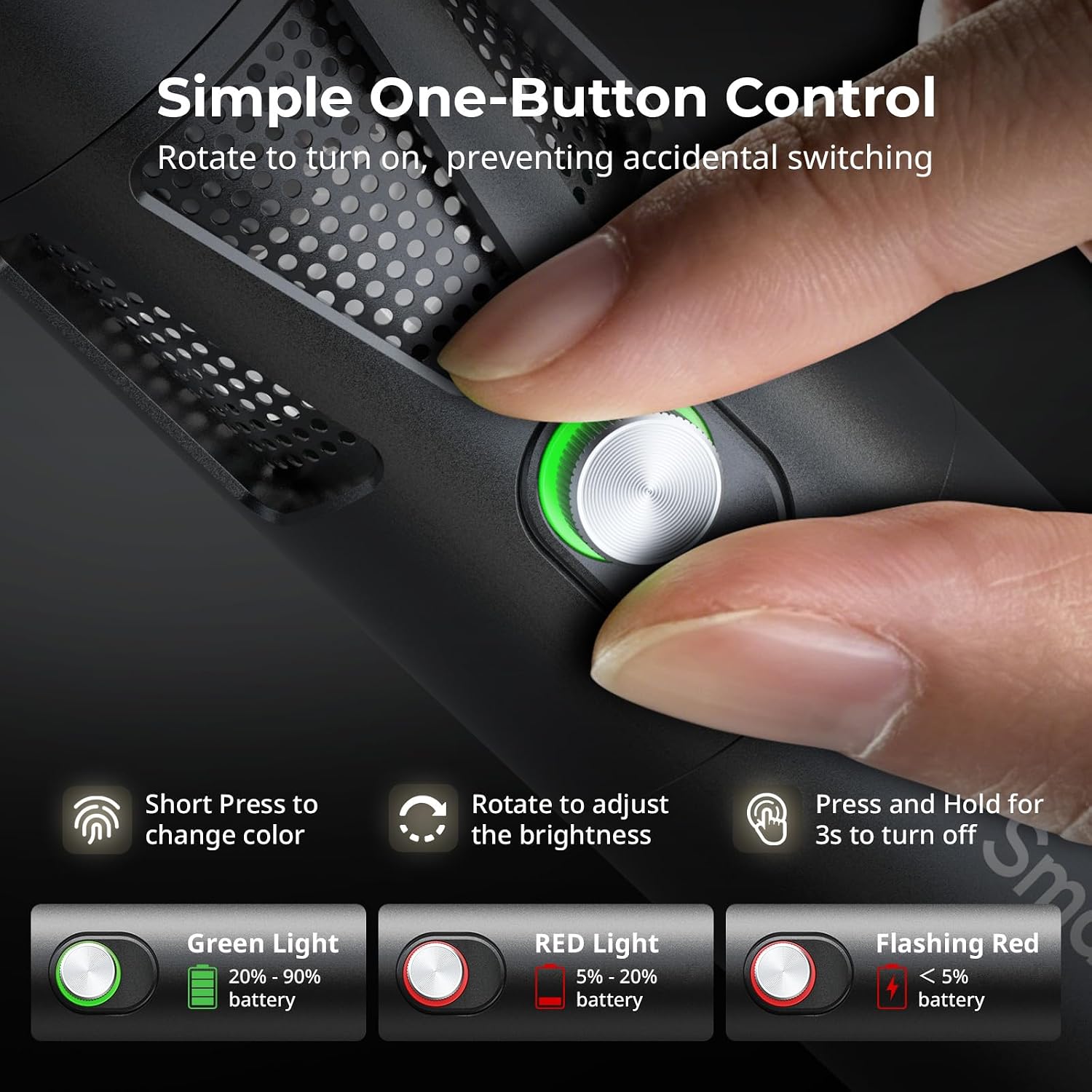
Figure 5.1: One-button control and battery indicator.

Figure 5.2: Available LED colors.
5.2 Ajust de l'angle del feix
The front plano-convex lens allows for adjustment of the beam angle. Push or pull the lens to change the focus of the light from a narrow 24° beam to a wider 60° diffusion.
- Extend the lens: Narrows the beam (e.g., 24°).
- Retract the lens: Diffuses the beam (e.g., 60°).

Figure 5.3: Beam angle adjustment mechanism.
5.3 Indicador de bateria
The control button's LED indicates the battery status:
- Llum verda: 20% - 90% battery remaining.
- Llum vermella: 5% - 20% battery remaining.
- Llum vermella intermitent: Menys del 5% de bateria restant.

Figure 5.4: Brightness comparison of RF20C.
6. Manteniment
- Clean the device regularly with a soft, dry cloth. Do not use harsh chemicals or abrasive materials.
- Guardeu el dispositiu en un lloc fresc i sec, allunyat de la llum solar directa i de temperatures extremes.
- When not in use for extended periods, charge the battery to approximately 50% every three months to prolong battery life.
- Keep the lens and LED surface free from dust and fingerprints for optimal light output.
7. Solució De Problemes
| Problema | Causa possible | Solució |
|---|---|---|
| El dispositiu no s’encén. | Bateria baixa; procediment d'encesa incorrecte. | Charge the device. Ensure you rotate the control button to power on. |
| La sortida de llum és tènue. | Low battery; brightness set too low; dirty lens. | Charge the device. Rotate the control button to increase brightness. Clean the lens. |
| Gobo projection is blurry. | Plano-convex lens not removed; gobo not seated correctly. | Remove the plano-convex lens before attaching the silicone gobo holder. Ensure gobo is properly inserted. |
| Device becomes warm during use. | Normal operation, especially at high power; fan obstruction. | This is normal. Ensure the fan vents are not obstructed for proper heat dissipation. If excessively hot, reduce brightness or allow to cool. |
| El soroll del ventilador és perceptible. | Normal operation for cooling. | The device uses a high-speed fan for efficient heat dissipation. This noise is part of normal operation. Consider distance from audio recording equipment. |
8. Especificacions
| Característica | Detall |
|---|---|
| Model | RF20C (5335) |
| Poder | 20 W |
| Entrada | 20 V / 1.8 A (max. 36 W) |
| Colors LED | Red, 5600K White, Purple, Orange, Cyan |
| Índex de reproducció del color (CRI) | ≥ 97 |
| Índex de coherència de la il·luminació de televisió (TLCI) | ≥ 99 (at 5600 K) |
| Lluminància | 5400 Lux @ 1m / 5600K |
| Capacitat de la bateria | 10000mAh (2 x 5000mAh / 7.4V / 37Wh) |
| Temps d'execució (potència màxima) | Fins a 1.5 hores |
| Carregant | USB-C PD 36W Fast Charging, supports charging while operating |
| Ajust d'angle de feix | 24° a 60° |
| Material | Aliatge d'alumini, ABS |
| Dimensions del producte | φ49.0 x 200.0 mm / φ1.9 x 7.9 inches |
| Pes del producte | 520.0 ± 20.0 g / 18.3 ± 0.7 oz |
| Tecnologia de connectivitat | USB |
| País d'origen | Xina |
9. Garantia i Suport
SmallRig products are designed and manufactured to the highest quality standards. This product is covered by a limited warranty from the date of purchase. For detailed warranty terms, technical support, or service inquiries, please refer to the official SmallRig weblloc web o poseu-vos en contacte amb el vostre distribuïdor local.
Conserveu el vostre comprovant de compra per a reclamacions de garantia.
10. Escenaris d'ús
The SmallRig RF20C is suitable for various applications, including:
- Fotografia
- Gravació de vídeo
- Transmissió en directe
- Creative Accent Lighting
- Macro Work and Close-ups

Figura 10.1: Examples of RF20C usage scenarios.
Ask a question about this manual
Ask about setup, troubleshooting, compatibility, parts, safety, or missing instructions. Manuals+ will review the question and use this page’s manual context to help answer it.