
1. Acabatview
The Philips TAZ2200 is a versatile portable sound machine designed for enjoying various audio formats. It features a top-loading CD player, a front-loading cassette player, FM radio, Bluetooth 6.0 connectivity, USB playback, and a 3.5mm audio input. Equipped with dynamic bass boost and 6W stereo speakers, it delivers rich sound. The unit can be powered by AC mains or batteries and includes a carrying handle for portability.
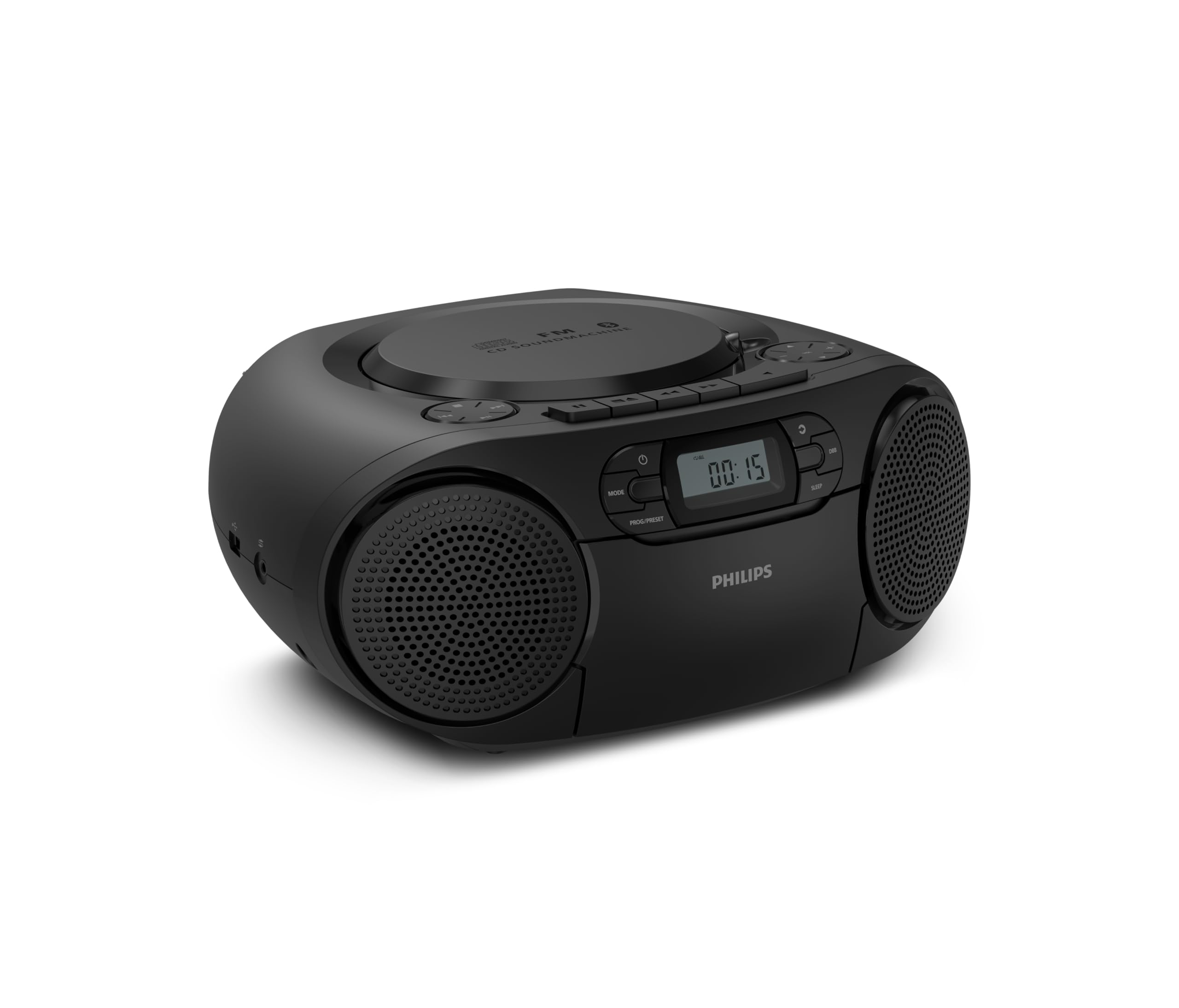
Davant view of the Philips TAZ2200 CD Soundmachine, showing the main display and control buttons.
2. Informació de seguretat
Please read these safety instructions carefully before using your device and keep them for future reference. Incorrect use may result in hazards.
- Font d'alimentació: Feu servir només l'adaptador de corrent o les piles especificades. Assegureu-vos que el volumtage matches the requirements of the unit.
- Aigua i humitat: No exposeu la unitat a la pluja, la humitat, les goteges o les esquitxades. No col·loqueu objectes plens de líquids, com ara gerros, a sobre de la unitat.
- Ventilació: Ensure adequate ventilation. Do not block any ventilation openings. Maintain a minimum distance around the unit for sufficient ventilation.
- Calor: No col·loqueu la unitat a prop de fonts de calor com ara radiadors, registres de calor, estufes o altres aparells (inclosos amplificadors) que produeixen calor.
- Bateries: Follow correct polarity when inserting batteries. Do not mix old and new batteries, or different types of batteries. Remove batteries if the unit is not used for a long period.
- Neteja: Desendolleu la unitat de la presa de corrent abans de netejar-la. Feu servir un drap suau i sec. No utilitzeu netejadors líquids ni aerosols.
- Manteniment: No intenteu atendre aquest producte vosaltres mateixos. Consulteu tots els serveis a personal de servei qualificat.
3. Què hi ha a la caixa
En desempaquetar, assegureu-vos que hi hagi tots els elements que s'enumeren a continuació:
- Philips TAZ2200 CD Soundmachine
- Cable d'alimentació
- Guia d'inici ràpid
- Llibret de garantia
- Full de seguretat
4. Controls i connexions
Controls del panell frontal
The front panel features the main display, power button, mode selection, program/preset buttons, and dynamic bass boost (DBB) control. Playback controls for CD and USB are also located here.

Front detallat view showing the display, power, mode, program/preset, and DBB buttons.
Side and Rear Connections
The side of the unit provides a USB port for digital audio playback and a 3.5mm audio input jack for connecting external devices.

lateral view illustrating the USB port and Audio Input jack.
The top of the unit houses the CD compartment and additional playback controls, while the rear features the AC power input and the FM antenna.

A dalt view showing the CD compartment and associated controls.

posterior view displaying the AC power input and the telescopic FM antenna.
5. Configuració
5.1 Font d'alimentació
Alimentació CA
- Assegureu-vos que la unitat estigui apagada.
- Connect the supplied power cable to the AC IN socket on the rear of the sound machine.
- Plug the other end of the power cable into a wall power outlet.
Potència de la bateria
For portable use, the unit can operate on 6 x C-type batteries (not included).
- Obriu la tapa del compartiment de la bateria situada a la part inferior de la unitat.
- Insert 6 C-type batteries, ensuring correct polarity (+/-) as indicated inside the compartment.
- Tanqueu bé la tapa del compartiment de la bateria.
5.2 Ajust de l'antena
For optimal FM radio reception, fully extend the telescopic antenna located at the rear of the unit. Adjust its position and angle to achieve the clearest signal.
6. Instruccions de funcionament
6.1 Funcionament general
- Encès/apagat: Premeu el botó PODER botó per encendre o apagar la unitat.
- Control de volum: Utilitza el VOL + or VOLUM - botons per ajustar el nivell de volum.
- Dynamic Bass Boost (DBB): Premeu el botó DBB button to activate or deactivate the dynamic bass boost feature for enhanced bass sound.
- Selecció del mode: Premeu el botó MODE button repeatedly to switch between CD, Cassette, FM Radio, Bluetooth, USB, and Audio Input modes.
6.2 Reproducció de CD
- Obriu la tapa del compartiment de CD a la part superior de la unitat.
- Place a CD (CD, CD-R, or CD-RW) with the label side facing up onto the spindle.
- Tanqueu la coberta del compartiment del CD.
- Premeu el botó MODE botó per seleccionar el mode CD.
- Premeu el botó REPRODUCCIÓ/PAUSA per iniciar la reproducció.
- Utilitza el SALTAR botons (|< or >>|) per saltar pistes.
- Mantén premut |< or >>| per cercar dins d'una pista.
- Premeu el botó STOP botó per aturar la reproducció.
6.3 Reproducció de cassets
- Open the cassette compartment door on the front of the unit.
- Introduïu una cinta de casset amb la vora oberta cap amunt.
- Tanqueu la porta del compartiment del casset.
- Premeu el botó MODE button to select Cassette mode.
- Premeu el botó JUGAR per iniciar la reproducció.
- Utilitza el AVANT RÀPID or REBOBINAR botons per avançar o rebobinar la cinta ràpidament.
- Premeu el botó STOP botó per aturar la reproducció.
6.4 Ràdio FM
- Premeu el botó MODE button to select FM Radio mode.
- Escaneig automàtic: Manteniu premut el botó PROG/PRESET button to automatically scan and store available FM stations.
- Sintonització manual: Premeu el botó TUNING botons (|< or >>|) to manually tune to a desired frequency.
- Desant els valors predefinits: After tuning to a station, press PROG/PRESET once, then use |< or >>| per seleccionar un número preestablert i premeu PROG/PRESET de nou per confirmar.
- Recordant presets: En mode FM, premeu PROG/PRESET repeatedly to cycle through saved preset stations.
6.5 Reproducció Bluetooth
- Premeu el botó MODE per seleccionar el mode Bluetooth. La pantalla mostrarà "BT" i parpellejarà, indicant que està en mode d'emparellament.
- Al dispositiu amb Bluetooth (telèfon intel·ligent, tauleta), activeu Bluetooth i cerqueu els dispositius disponibles.
- Select "Philips TAZ2200" from the list of devices.
- Once paired, the unit will emit a confirmation sound, and 'BT' will stop flashing.
- Start playing audio on your connected device. The sound will be streamed to the sound machine.
Reproducció USB 6.6
- Insert a USB flash drive into the USB port on the side of the unit.
- Premeu el botó MODE botó per seleccionar el mode USB.
- La unitat detectarà automàticament i començarà a reproduir àudio compatible files (MP3, WAV, WMA).
- Feu servir els controls de reproducció (REPRODUCCIÓ/PAUSA, SALTAR, STOP) as you would for CD playback.
6.7 Audio Input (AUX)
- Connect one end of a 3.5mm audio cable (not included) to the AUDIO IN jack on the side of the sound machine.
- Connect the other end of the audio cable to the headphone jack or audio output of your external device (e.g., MP3 player, turntable).
- Premeu el botó MODE button to select Audio Input mode.
- Start playing audio on your external device. The sound will be played through the sound machine.
7. Manteniment
- Neteja de la unitat: Wipe the exterior of the unit with a soft, slightly damp tela. No utilitzeu netejadors abrasius ni dissolvents.
- Cura del reproductor de CD: Keep the CD compartment clean. If the lens is dirty, use a specialized CD lens cleaner. Avoid touching the lens.
- Cura del reproductor de cassets: Periodically clean the tape heads and pinch rollers with a cotton swab lightly dampamb alcohol isopropílic.
- Substitució de la bateria: If using batteries, replace all 6 C-type batteries when the unit's performance diminishes or if the unit will not be used for an extended period.
- Emmagatzematge: When not in use, store the unit in a clean, dry place away from direct sunlight and extreme temperatures.
8. Solució De Problemes
If you encounter any issues with your Philips TAZ2200, please refer to the table below for common problems and solutions.
| Problema | Causa possible | Solució |
|---|---|---|
| Sense poder | Cable d'alimentació no connectat; piles esgotades o inserides incorrectament. | Comproveu la connexió de CA; canvieu les piles o assegureu-vos que la polaritat sigui correcta. |
| Sense so | Volum massa baix; Mode incorrecte seleccionat; Auriculars connectats. | Increase volume; Select the correct source mode (CD, FM, BT, etc.); Disconnect headphones. |
| El CD no es reprodueix | CD inserit incorrectament; el CD està brut o ratllat; el format de CD no és compatible. | Insert CD with label side up; Clean or replace CD; Ensure CD is CD-R/RW compatible. |
| Cassette not playing | Cassette inserted incorrectly; Tape is damaged. | Insert cassette correctly; Try a different cassette. |
| Mala recepció FM | Antena no estesa o posicionada correctament; Senyal feble. | Esteneu i ajusteu completament l'antena telescòpica; proveu de moure la unitat a una altra ubicació. |
| Bluetooth no connectat | Unit not in pairing mode; Bluetooth device too far; Device already paired with another unit. | Ensure unit is in Bluetooth mode and flashing; Move device closer; Disconnect from other devices. |
| Problemes de reproducció per USB | Unitat USB no inserida correctament; Incompatible file format; USB drive corrupted. | Reinsert USB drive; Ensure files are MP3, WAV, or WMA; Try a different USB drive. |
9. Especificacions
| Característica | Especificació |
|---|---|
| Marca | PHILIPS |
| Número de model | TAZ2200/10 |
| Tecnologia de connectivitat | Bluetooth 6.0, USB, Audio Input (3.5mm) |
| Tipus d'altaveu | Stereo (2 speakers) |
| Potència de sortida | 6 watts (màx.) |
| Mitjans suportats | CD, CD-R, CD-RW, Cassette, USB (MP3, WAV, WMA) |
| Sintonitzador de ràdio | Digital FM with 20 presets |
| Font d'alimentació | AC (wired), 6 x C-type batteries (not included) |
| Dimensions (LxWxH) | 24.5 x 28.5 x 12.5 cm |
| Pes | 1.35 quilos |
| Color | Plata |
10. Garantia i Suport
10.1 Garantia del producte
This Philips TAZ2200 CD Soundmachine comes with a 2 any de garantia des de la data de compra. Si us plau, conserveu el comprovant de compra per a reclamacions de garantia. La garantia cobreix defectes de fabricació i avaries en condicions d'ús normals.
10.2 Atenció al client
For technical assistance, troubleshooting beyond this manual, or warranty service, please refer to the contact information provided in the warranty booklet included with your product. You can also visit the official Philips support website for your region for further assistance and FAQs.