
1. Introducció
The TIDRADIO TD-G19 is a 4G LTE Push-to-Talk (PoC) radio designed for long-range, nationwide communication. This device utilizes cellular networks to provide extensive coverage, making it suitable for various applications including family use, job sites, and team coordination. It features AI noise reduction, Bluetooth connectivity, and app-based management for enhanced functionality and ease of use.

Image: Two TD-G19 radios demonstrating their capability for nationwide communication across the US, Canada, and Mexico.
2. Què hi ha a la caixa
Verifiqueu que tots els elements siguin presents al vostre paquet:
- 2 x TD-G19 PoC Radios
- 2 x SIM Cards (2.0 version)
- 2 x Auriculars
- 2 x Charging Adapters
- 2 x Type-C Data Cables
- 1 x manual d'instruccions
3. Producte acabatview
Familiarize yourself with the components of your TD-G19 radio.
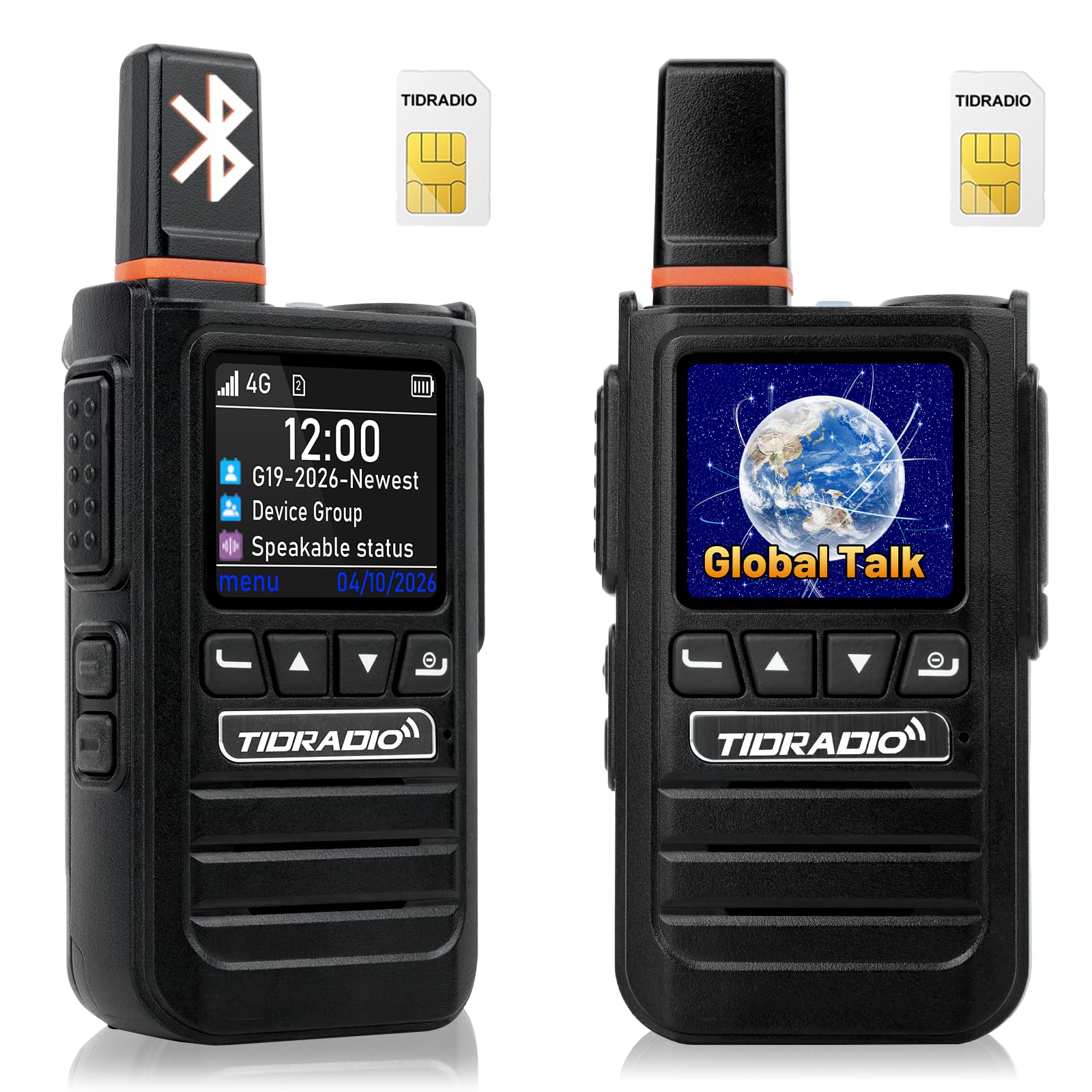
Imatge: Frontal view of the TD-G19 radio, highlighting its display and control buttons.
Components clau:
- Antena: For signal reception and transmission.
- Pantalla LCD: Displays status, menu, and call information.
- Botó PTT: Push-to-Talk button for initiating and ending transmissions.
- Botons de navegació: Per a la navegació i selecció de menús.
- Control de volum/alimentació: Controla l'encesa/apagada i el volum de l'àudio.
- Altaveu/micròfon: Per a l'entrada i sortida d'àudio.
- Port de càrrega tipus C: Per carregar el dispositiu.
- Compartiment de la bateria: Conté la bateria recarregable.
4. Configuració
4.1. Instal·lació de la bateria
- Assegureu-vos que la ràdio estigui apagada.
- Localitzeu la tapa del compartiment de la bateria a la part posterior de la ràdio.
- Slide the latch to unlock and remove the cover.
- Insert the 3000mAh Lithium Polymer battery, aligning the contacts.
- Replace the battery cover and slide the latch to lock it securely.
4.2. SIM Card Activation and Installation
The TD-G19 uses a 2.0 SIM card for 4G LTE connectivity. Follow these steps to activate and install your SIM card:
- Activació: Activate the provided SIM card via the dedicated mobile application (ODmaster APP) following the on-screen instructions. The first year of data is free; renewal costs 9.9 yuan/year. You may also use your own cellular card.
- Instal·lació: With the battery removed, locate the SIM card slot. Insert the activated SIM card into the slot, ensuring correct orientation.
- Reinstall the battery and cover.
Video: A guide on how to quickly activate your TD-G19 radio.
4.3. Engegada inicial
- Rotate the Volume/Power knob clockwise until the screen illuminates.
- The radio will boot up and attempt to connect to the 4G LTE network.
- Once connected, the network status indicator will show signal strength.
4.4. APP Management (ODmaster APP)
The ODmaster APP allows for comprehensive management of your TD-G19 radios. This includes creating groups, binding devices, and reviewing call history.

Imatge: Més deview of the ODmaster APP functionalities for managing PoC radios.
- Download & Install: Download the ODmaster APP from your device's app store.
- Creació del compte: Creeu un compte o inicieu sessió.
- Dispositiu d'enllaç: Use the app to scan and bind your TD-G19 radio to your account.
- Crear grups: Freely create communication groups. Each account can create up to 20 groups, with each group supporting up to 200 members.
- Add Members: Invite members to your groups.
5. Instruccions de funcionament
5.1. Comunicació bàsica
The TD-G19 supports various call types for efficient communication.

Image: Communication modes including single call, multi-party call, and group call.
- One-to-One Call: Select a contact from your list and press the PTT button to initiate a private call.
- Multi-Member Call: Select multiple contacts to create a temporary multi-member conversation.
- One-Click PTT Group Call: After entering a group, the radio will be in standby mode. Press the PTT button to broadcast to all members of the active group. After single or multi-person calls, you will automatically return to the standby group.
5.2. Connectivitat Bluetooth
The TD-G19 supports Bluetooth 5.1 (BR/EDR/BLE) for connecting external audio devices.

Image: The TD-G19 supports various Bluetooth devices for hands-free operation.
- Maridatge: Navigate to the Bluetooth settings on your TD-G19 radio. Enable Bluetooth and search for available devices. Select your desired Bluetooth headset or microphone to pair.
- Compatibilitat: The TD-G19 is compatible with TIDRADIO wireless hand mics (TID-MIC) which support both receiving and transmitting. Third-party Bluetooth headsets typically support receiving audio only, but not transmitting. It also supports Kenwood-interface hand mics (K-type).
5.3. Reducció de soroll de la IA
The integrated AI sound-optimizing algorithm reduces background noise by up to 98% while preserving voice clarity. This feature is automatically active to ensure clear communication in noisy environments.

Image: Demonstrates the effectiveness of AI noise reduction for clearer reception and transmission.
5.4. Auto-Recording Feature
The TD-G19 can automatically record conversations. To utilize this feature, the ODmaster APP must be running in the background. All group members can view chat history, ensuring no crucial information is missed. Voice messages will not be recorded if the APP is closed.
5.5. Over-The-Air (OTA) Updates
The device supports one-click OTA auto-updates. This allows you to receive new features, extend the device's life, and improve performance without needing cables or manual intervention.
6. Característiques clau
The TIDRADIO TD-G19 offers a robust set of features for reliable and efficient communication:

Image: Key features of the TD-G19, including 4G LTE, Bluetooth, and APP management.
- Nationwide 4G LTE PoC Communication: Enjoy unlimited range communication across states, cities, and remote areas where 4G signal is available. Compatible with major US carriers (AT&T, Verizon, T-Mobile). No FCC license required for daily use.
- AI Noise Reduction & 3W Speaker: Advanced AI algorithm reduces 98% of background noise, ensuring clear audio. The 3W high-definition speaker provides loud and clear sound, even in noisy environments.
- APP Management: Use the ODmaster APP to create and manage groups (up to 20 groups, 200 members per group), bind devices, and playback call content.
- Connectivitat Bluetooth: Supports Bluetooth 5.1 for connecting external earpieces, headphones, and shoulder mics for hands-free operation.
- Bateria recarregable de 3000 mAh: Provides 3-7 days of standby time. Features a universal Type-C charging port for fast charging and a replaceable design for extended field use.
- High Security Level: Built-in AES-256 end-to-end encryption protects voice and position data from unauthorized access.
- OTA Auto-Update: One-click over-the-air updates for new features and performance improvements.
- Compatibilitat: Compatible with other TIDRADIO PoC radios including TD-G18, TD-G100, TD-M15, TD-M13, and TD-M2.
7. Especificacions
| Característica | Detall |
|---|---|
| Número de model | TD-G19 |
| Marca | TIDRADIO |
| Color | Negre |
| Nombre de canals | 200 (via APP management) |
| Interval de freqüència | 4G LTE (AT&T, Verizon, T-Mobile) |
| Interval de conversa màxim | Nationwide (12430 Miles) |
| Voltage | 3.7V DC |
| Nivell de resistència a l'aigua | Resistent a l'aigua |
| Tipus de bateria | Polímer de liti |
| Capacitat de la bateria | 3000 mAh |
| Durada mitjana de la bateria | 72 hours (Standby 3-7 days) |
| Protocol de connectivitat | Bluetooth 5.1 |
| Tipus de sintonitzador | 4G/LTE |
| Característiques especials | APP Management, AI Noise Reduction, Long Range, Rugged Design, Rechargeable, Bluetooth, APP Recording, Battery Saver Mode, AES-256 Encryption |
8. Manteniment
8.1. Neteja
- Netegeu l'exterior de la ràdio amb un drap suauamp tela.
- No utilitzeu productes químics ni productes de neteja abrasius.
- Assegureu-vos que el port de càrrega estigui lliure de pols i deixalles.
8.2. Cura de la bateria
- Carregueu la bateria completament abans del primer ús.
- Use only the provided charging adapter and Type-C cable.
- Avoid overcharging or completely draining the battery for optimal lifespan.
- Guardeu la ràdio i la bateria en un lloc fresc i sec quan no les feu servir durant períodes prolongats.
9. Solució De Problemes
| Problema | Causa possible | Solució |
|---|---|---|
| Sense poder | Bateria no instal·lada correctament o descarregada. | Check battery installation. Charge the battery. |
| No es pot connectar a la xarxa | No 4G signal, SIM card not activated or installed correctly. | Move to an area with 4G coverage. Verify SIM card activation and installation. |
| Mala qualitat d'àudio | Weak signal, excessive background noise. | Move to an area with better signal. AI noise reduction is active, but extreme noise may still affect clarity. |
| El dispositiu Bluetooth no està vinculat | Bluetooth not enabled, device out of range, or incompatible. | Ensure Bluetooth is enabled on both devices. Bring devices closer. Check compatibility (third-party devices may be receive-only). |
| APP not recording calls | ODmaster APP is not running in the background. | Ensure the ODmaster APP is open and running in the background on your smartphone. |
10. Informació de seguretat
- No desmunteu ni modifiqueu la ràdio.
- Mantingueu la ràdio allunyada de temperatures extremes, la llum solar directa i la humitat.
- Avoid dropping or subjecting the radio to severe impact.
- Utilitzeu només accessoris aprovats pel fabricant.
- Do not operate the radio while driving or performing tasks that require full attention.
- Elimineu les piles i els components electrònics de manera responsable d'acord amb la normativa local.
11. Suport
TIDRADIO provides lifetime Over-The-Air (OTA) support to efficiently resolve any usage issues. For further assistance, please refer to the official TIDRADIO weblloc o contacteu amb el servei d'atenció al client.
Vídeo: Un overview of the 2026 TIDRADIO TD-G19 4G PoC Radio with Bluetooth.