
Introducció
Thank you for choosing the iScooter DX5 Electric Scooter. This manual provides essential information for the safe assembly, operation, maintenance, and troubleshooting of your scooter. Please read it thoroughly before your first ride to ensure optimal performance and safety.
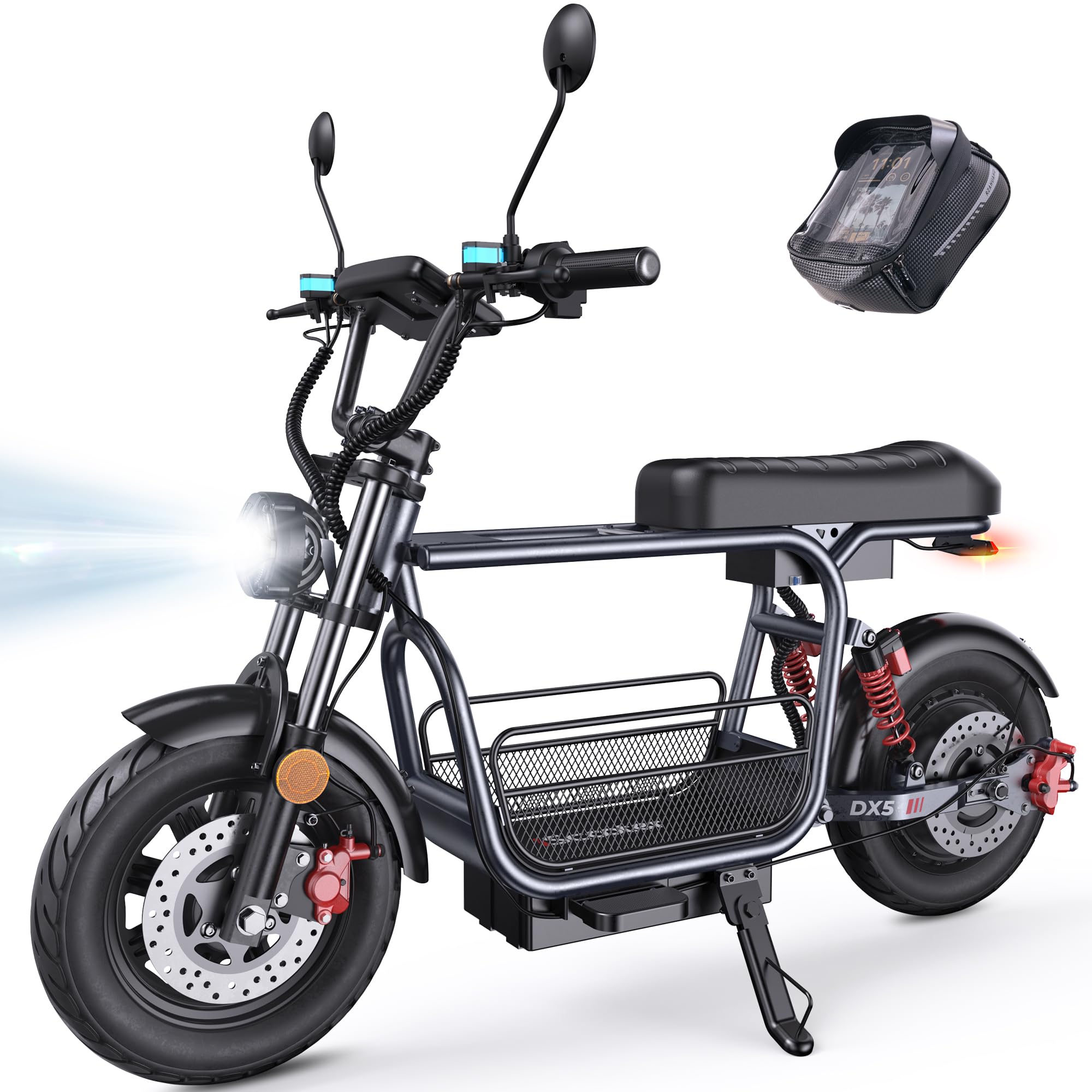
Figure 1: iScooter DX5 Electric Scooter with key features highlighted.
Informació de seguretat
Always prioritize safety when operating your electric scooter. Failure to follow safety guidelines can result in serious injury or damage to the product.
- Porteu sempre casc i equip de seguretat adequat.
- Do not ride in wet conditions or on slippery surfaces.
- Respecteu les lleis i regulacions de trànsit locals.
- Feu una inspecció prèvia a la conducció abans de cada ús, comprovant els frens, els pneumàtics i totes les connexions.
- Do not allow children under the age of 16 to operate the scooter.
- Mantingueu una distància de seguretat amb altres vehicles i vianants.
Muntatge i muntatge
Your iScooter DX5 comes partially assembled. Follow these steps to complete the setup.
1. Desembalatge i identificació de components
Traieu amb cura tots els components de l'embalatge. Verifiqueu que totes les peces siguin presents segons la llista d'embalatge.

Figure 2: All components of the iScooter DX5 Electric Scooter laid out for assembly.
2. Guia de vídeo de muntatge
For a detailed visual guide on assembling your iScooter DX5, please watch the official installation video below.
Video 1: Official installation guide for the iScooter DX5 Electric Scooter with Seat.
3. Key Assembly Steps
Refer to the video for detailed instructions. Key steps include:
- Instal·lació del manillar: Secure the handlebars to the stem using the provided tools.
- Mirror Attachment: Instal·leu la part posteriorview mirrors on both sides of the handlebars.
- Headlight Mounting: Attach the front LED headlight to the designated position.
- Muntatge de la roda davantera: Carefully install the front wheel, ensuring the brake rotor aligns correctly with the caliper.
- Instal·lació del parafang: Secure the front and rear fenders.
- Footrest and Seat: Attach the footrests and ensure the seat is securely fastened.
- Accessoris d'emmagatzematge: Install the removable storage basket and scooter bag as desired.

Figure 3: Detachable front basket for convenient storage.

Figure 4: Scooter bag for carrying small essentials.
Instruccions de funcionament
1. Powering On/Off and NFC Unlocking
To power on your scooter, ensure the battery disconnect switch is in the 'ON' position. The DX5 features NFC unlocking for convenience and security. Simply tap your NFC card to the designated area on the display to unlock and activate the scooter.
2. Modes de velocitat
The iScooter DX5 offers four adjustable speed modes to suit various riding conditions:
- Engranatge 1: 15 MPH (Easy start, energy-saving mode)
- Engranatge 2: 21 MPH (Urban commuting, steady speed)
- Engranatge 3: 28 MPH (Balanced power, faster ride)
- Engranatge 4: 35 MPH (Turbo sprint, full power)

Figure 5: Four speed modes for versatile riding.
3. Smart Display and Controls
Monitor your ride with the full-color 9-inch LCD screen, which displays speed, battery level, and system alerts. The handlebars feature intuitive controls:
- Botó de senyal de gir: Quick toggle for safe left/right turns.
- Interruptor de fars: Control front light with a single press.
- Botó de trompa: Instant alert to pedestrians or traffic.
- 'S' Gear Button: Easily shift between 4 speed modes.
- Desbloqueig NFC: Tap to unlock for fast, secure, keyless operation.

Figure 6: Handlebar controls and LCD display.
4. Sistema de frenada
The scooter is equipped with dual hydraulic disc brakes for reliable stopping power. The system also includes a power cut-off when braking for added safety.

Figure 7: Dual hydraulic disc brakes for instant control.
5. Sistema d'il·luminació
For enhanced visibility and safety, especially during night rides, the DX5 features:
- Bright LED headlights.
- Integrated turn signals.
- Brake lights on the taillight.

Figure 8: Advanced lighting system for safe rides.
6. Alarma antirobatori
The DX5 includes a built-in anti-theft alarm system for added security. Refer to the display for system alerts.
Manteniment
Regular maintenance ensures the longevity and safe operation of your iScooter DX5.
1. Carregant la bateria
The scooter features a high-capacity 48V 15.6Ah (748.8Wh) lithium battery. Charge time is approximately 6-8 hours. Always use the provided charger.

Figure 9: Battery specifications and charging information.
2. Tire Care
The DX5 is equipped with durable 15" x 3.0" vacuum pneumatic e-motorcycle tires. Regularly check tire pressure and inspect for wear or damage.

Figure 10: Rugged 15-inch tires for grip and stability.
3. Suspension System
The advanced dual suspension system (front hydraulic and rear air spring) provides a comfortable ride. Periodically inspect the suspension components for proper function.

Figure 11: Advanced dual suspension system.
4. Neteja general
Neteja el teu patinet regularment amb anuncisamp drap. Eviteu utilitzar dolls d'aigua a alta pressió directament sobre els components elèctrics.
Resolució de problemes
If you encounter any issues with your iScooter DX5, please refer to the following basic troubleshooting steps:
- El patinet no s'encén: Check the battery disconnect switch is in the 'ON' position. Ensure the battery is charged.
- Loss of power during ride: Check battery level. Ensure all electrical connections are secure.
- Brakes not responding: Inspect brake levers and calipers for any obstructions or damage.
- Sorolls inusuals: Deixa de conduir immediatament i inspecciona el patinet per si hi ha peces soltes o danys.
Per a problemes més complexos, poseu-vos en contacte amb l'atenció al client.
Especificacions
Below are the key specifications for the iScooter DX5 Electric Scooter:
| Característica | Especificació |
|---|---|
| Nom del model | DX5 |
| Motor | 1500W (Peak) / 1000W (Rated) Brushless Motor |
| Bateria | Bateria de liti de 48 V i 15.6 Ah (748.8 Wh) |
| Velocitat màxima | 35 MPH (56 km/h) |
| Interval màxim | 38-45 milles |
| Pneumàtics | 15" x 3.0" Vacuum Pneumatic E-Motorcycle Tires |
| Frens | Frens de disc hidràulics duals |
| Suspensió | Front Hydraulic Suspension & Rear Air Spring Suspension |
| Capacitat de càrrega màxima | 330 lliures |
| Dimensions del producte | 58.27 cm de llargada x 26.8 cm d'amplada x 55.1 cm d'alçada |
| Pes de l'article | 100 lliures |
| Resistència a l'aigua | IPX4 |

Figure 12: iScooter DX5 dimensions.
Garantia
iScooter offers a limited warranty. We provide a 360-day or 180-day warranty on different parts. Please refer to your purchase documentation for specific warranty terms and conditions.
Atenció al client
For any inquiries, technical assistance, or warranty claims, please contact iScooter customer support:
- Call Center: +1 (855) 696-2888
- Live Chat/Email: support@iscooterglobal.com

Figure 13: iScooter Customer Support.


