
1. Introducció
This manual provides detailed instructions for the operation and maintenance of your Radioddity GS-10B Pro Amateur Radio Transceiver. Please read this manual thoroughly before using the device to ensure proper function and safety. The Radioddity GS-10B Pro is a versatile 8W dual-band radio featuring real-time spectrum display, comprehensive HF SSB/CW reception, and convenient app programming.
2. Producte acabatview
2.1 Components inclosos
The Radioddity GS-10B Pro package includes the following items:
- 1 x GS-10B Pro Transceiver
- 1 bateria de 2500 mAh
- 1 antena estàndard
- 1 x Donut SW Antenna
- 1 x Donut MW Antenna
- 1 x cable de càrrega USB-C
- 1 x Manual d'usuari (aquest document)

Figure 2.1: Radioddity GS-10B Pro included components.
2.2 Característiques clau
- Real-time Spectrum Display: Visualizes signal activity on a 1.77-inch color screen.
- Comprehensive HF SSB/CW Reception: Covers 150 kHz to 30 MHz, supporting SSB (USB/LSB) and CW.
- Multi-band Scanner Receiver: Includes UHF, VHF, HF, Airband AM, and commercial FM radio.
- Dual SMA Antenna Ports: Separate ports for VHF/UHF TX/RX and dedicated HF reception.
- Wireless Bluetooth Programming: Program frequencies and synchronize codeplugs via a smartphone app.
- 999 canals de memòria: Extensive channel storage for coordinated communications.
- 3-Level TX Power: Selectable output at 2W, 5W, or 8W.
3. Configuració
3.1 Instal·lació i càrrega de la bateria
- Ensure the transceiver is powered off.
- Align the 2500 mAh battery with the battery compartment on the back of the transceiver.
- Feu lliscar la bateria al seu lloc fins que faci clic de manera segura.
- Connect the USB-C charging cable to the transceiver's USB-C port and a compatible USB power adapter.
- The charging indicator will illuminate. Charge the battery fully before first use (approximately 3 hours).

Figure 3.1: USB-C charging for the 2500mAh battery.
3.2 Connexió de l'antena
The GS-10B Pro features two SMA antenna ports:
- VHF/UHF Port: For the standard antenna, used for transmitting and receiving in VHF/UHF bands.
- HF Reception Port: For the dedicated donut SW/MW antennas, used for HF reception only.
- For VHF/UHF operation, screw the standard antenna clockwise onto the top-left SMA connector.
- For HF reception, remove the protective cap from the top-center SMA connector and screw on either the Donut SW or Donut MW antenna.
- Ensure antennas are securely fastened but do not overtighten.

Figure 3.2: Connecting the donut antennas to the dual SMA ports.
4. Instruccions de funcionament
4.1 Funcionament bàsic
- Encès/apagat: Rotate the top-right knob clockwise to power on the transceiver. Rotate counter-clockwise until it clicks to power off.
- Ajust de volum: Rotate the same knob to adjust the volume after power-on.
- Selecció de freqüència: Use the up/down arrow buttons or the numeric keypad to enter desired frequencies.
- Transmissió (PTT): Press and hold the Push-To-Talk (PTT) button on the left side of the transceiver to transmit. Release to receive.
4.2 Real-time Spectrum Display
The 1.77-inch color display provides a real-time spectrum and waterfall diagram, allowing you to visualize signal activity. This feature helps in quickly identifying active frequencies, monitoring signal variations, and detecting potential interference across all supported reception bands.
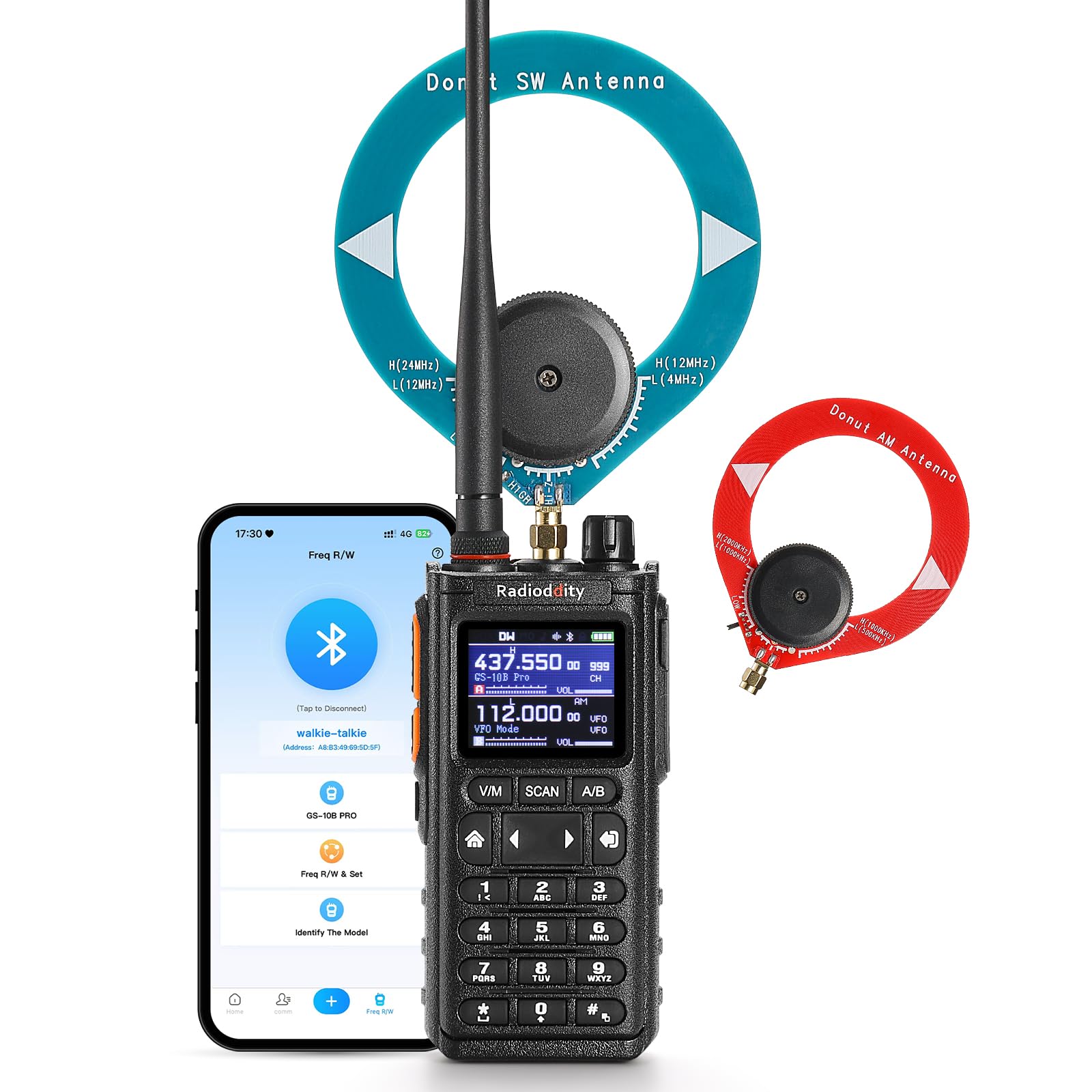
Figure 4.1: Real-time spectrum display in action.
4.3 Multi-band Receiver
The GS-10B Pro functions as a multi-band scanner, covering a wide range of frequencies for signal monitoring. This includes UHF, VHF, HF, Airband AM, and commercial FM radio. Direct frequency entry allows immediate access to specific channels for aeronautical communications, radio broadcasts, and local radio activities.

Figura 4.2: Mésview of supported reception bands.
4.4 HF SSB/CW Reception
The transceiver offers full support for SSB (USB/LSB) and CW reception across the 150 kHz to 30 MHz band. This enables reliable listening to weak signal shortwave transmissions, amateur radio communications, and long-distance HF broadcasts, particularly useful during field activities and emergency monitoring.
4.5 Multi-mode Modulation
The GS-10B Pro supports various modulation modes, enhancing its versatility for different communication needs. These modes include AM, FM, SSB (LSB/USB), and CW.

Figure 4.3: Supported modulation modes.
4.6 Wireless Bluetooth Programming
Program your transceiver directly using a smartphone app via Bluetooth. This eliminates the need for PC drivers or programming cables, allowing for quick channel management and synchronization of up to 999 memory channels. The app is available for both iOS and Android devices.

Figure 4.4: Wireless programming via smartphone app.
Download the 'Walkie-Talkie Tool' app:
4.7 TX Power Levels
The GS-10B Pro offers three selectable transmit power levels: 2W, 5W, and 8W. Choose the appropriate power level based on your communication needs to optimize battery life and range.
- 2 W: Ideal for short-range communication and power saving.
- 5 W: Balanced output for general outdoor use.
- 8 W: Maximum range for emergency situations or long-distance communication.

Figure 4.5: Selectable TX power output levels.
4.8 canals de memòria
The transceiver supports up to 999 memory channels. This allows you to store frequently used frequencies and settings for quick access, facilitating efficient communication in various scenarios.

Figure 4.6: Memory channel display.
4.9 Dual Watch & Dual PTT
The Dual Watch feature allows the radio to monitor two different frequencies simultaneously, ensuring you are always ready on two channels. The Dual PTT function enables quick switching between these two channels for transmission.

Figure 4.7: Dual Watch and Dual PTT operation.
4.10 Transmission Noise Reduction
The GS-10B Pro incorporates transmission noise reduction technology to provide clearer voice communication, even in noisy environments. This feature enhances audio quality for both transmitting and receiving parties.

Figure 4.8: Transmission noise reduction illustration.
4.11 Channel Copy Function
The channel copy function allows for quick duplication of channel settings, including frequency and CTCSS/DCS tones, from one radio to another. This feature simplifies programming multiple radios with identical settings.

Figure 4.9: Channel copy in one second with auto-detect frequency & CTCSS/DCS.
5. Manteniment
- Neteja: Utilitzeu un suau, damp cloth to clean the exterior of the transceiver. Do not use harsh chemicals or solvents.
- Cura de la bateria: Guardeu la bateria en un lloc fresc i sec quan no la feu servir. Eviteu descarregar completament la bateria amb freqüència per allargar-ne la vida útil.
- Cura de l'antena: Ensure antennas are free from damage. Do not bend or force antennas, as this can affect performance.
- Emmagatzematge: When storing the transceiver for extended periods, remove the battery and store the unit in a dry, dust-free environment.
6. Solució De Problemes
If you encounter issues with your Radioddity GS-10B Pro, refer to the following common troubleshooting steps:
| Problema | Causa possible | Solució |
|---|---|---|
| Transceiver does not power on. | La bateria està descarregada o no està instal·lada correctament. | Carregueu la bateria completament. Assegureu-vos que la bateria estigui correctament col·locada al compartiment. |
| No es pot transmetre ni rebre. | Antenna not connected or damaged. Incorrect frequency/channel selected. Low battery. | Check antenna connection. Verify frequency and channel settings. Recharge battery. |
| Mala qualitat d'àudio. | Weak signal. Interference. Incorrect squelch setting. | Adjust antenna position. Move away from sources of interference. Adjust squelch level. |
| App programming not working. | Bluetooth not enabled. Incorrect app version. Transceiver not in programming mode. | Ensure Bluetooth is active on both devices. Download the latest app. Follow app instructions for connecting. |
If the problem persists after attempting these solutions, please contact Radioddity customer support.
7. Especificacions
| Característica | Especificació |
|---|---|
| Marca | Radioditat |
| Número de model | GS-10B Pro |
| Nombre de canals | 999 |
| Espectre de freqüència | 144-146 MHz & 430-440 MHz (TX/RX), 150 kHz - 30 MHz (HF RX), Airband, FM Broadcast |
| Abast màxim de conversa | 6 quilòmetres |
| Voltage | 7.4 Volts |
| Nivell de resistència a l'aigua | No resistent a l'aigua |
| Bateria | 1 x 2500 mAh (included) |
| Protocol de connectivitat | Bluetooth |
| Origen | Xina |
8. Garantia i Suport
Your Radioddity GS-10B Pro comes with a Garantia del fabricant de 2 anys. Radioddity is committed to providing excellent customer service with over 11 years of experience and 5-star rated support.
For technical assistance, troubleshooting, or warranty claims, please contact Radioddity customer support through their official weblloc web o la plataforma on vau comprar el producte.