
1. Introducció
Gràcies per la compraasing the AIWA MSBTU-900DAB HiFi System. This all-in-one audio system delivers powerful stereo sound with 100W RMS output, featuring a Class D amplifier. It offers a wide range of audio sources including Internet Radio, DAB+, FM RDS, Bluetooth 5.2, CD MP3, and USB playback. Multiple connectivity options such as HDMI ARC, Phono input, Optical, RCA, and AUX ensure compatibility with various devices. This manual provides detailed instructions for setup, operation, and maintenance to help you get the most out of your new system.
2. Informació de seguretat
Please read all safety instructions carefully before operating the unit and retain them for future reference. Failure to follow these instructions may result in electric shock, fire, or damage to the unit.
- Font d'alimentació: Connecteu la unitat només a una presa de corrent de CA del volum especificat.tage. Ensure the power plug is fully inserted.
- Ventilació: Do not block any ventilation openings. Allow sufficient space around the unit for proper airflow to prevent overheating.
- Aigua i humitat: No exposeu la unitat a la pluja, la humitat, les goteges o les esquitxades. No col·loqueu objectes plens de líquids, com ara gerros, a sobre de la unitat.
- Calor: Mantingueu la unitat allunyada de fonts de calor com ara radiadors, registres de calor, estufes o altres aparells (inclosos amplificadors) que produeixen calor.
- Neteja: Desendolleu la unitat de la presa de corrent abans de netejar-la. Feu servir només un drap suau i sec. No utilitzeu netejadors líquids ni netejadors en aerosol.
- Manteniment: No intenteu atendre aquest producte vosaltres mateixos. Consulteu tots els serveis a personal de servei qualificat.
- Col·locació: Place the unit on a stable, flat surface. Avoid placing it in direct sunlight or near strong magnetic fields.
3. Contingut del paquet
Si us plau, comproveu que tots els elements estiguin presents a l'embalatge:
- Main Unit (AIWA MSBTU-900DAB)
- Dues unitats d'altaveus
- Control remot
- Cable d'alimentació
- Manual d'usuari (aquest document)
- Antena FM
4. Producte acabatview
4.1 Tauler frontal

Imatge: Frontal view of the AIWA MSBTU-900DAB main unit.
The front panel features the main display, a large multifunction controller for navigation and volume, and various control buttons:
- ESTÀNDUT: Encendre/apagar la unitat.
- FONT: Select input source (CD, USB, Bluetooth, Internet Radio, DAB+, FM, HDMI ARC, Phono, AUX).
- PARELL BT: Inicia el mode d'emparellament Bluetooth.
- PRESET: Access preset stations.
- BACK/PLAY/PAUSE/NEXT/STOP/EJECT: CD/USB playback controls.
- MENÚ: Access system menus.
- BAIX/AGUS: Ajusta els nivells de greus i aguts.
- Controlador multifunció: Rotate to adjust volume or navigate menus; press to confirm.
- TELÈFONS: Sortida d'auriculars de 3.5 mm.
- AUX IN: Entrada auxiliar de 3.5 mm.
- USB MP3: USB port for MP3 playback.
4.2 Panell posterior
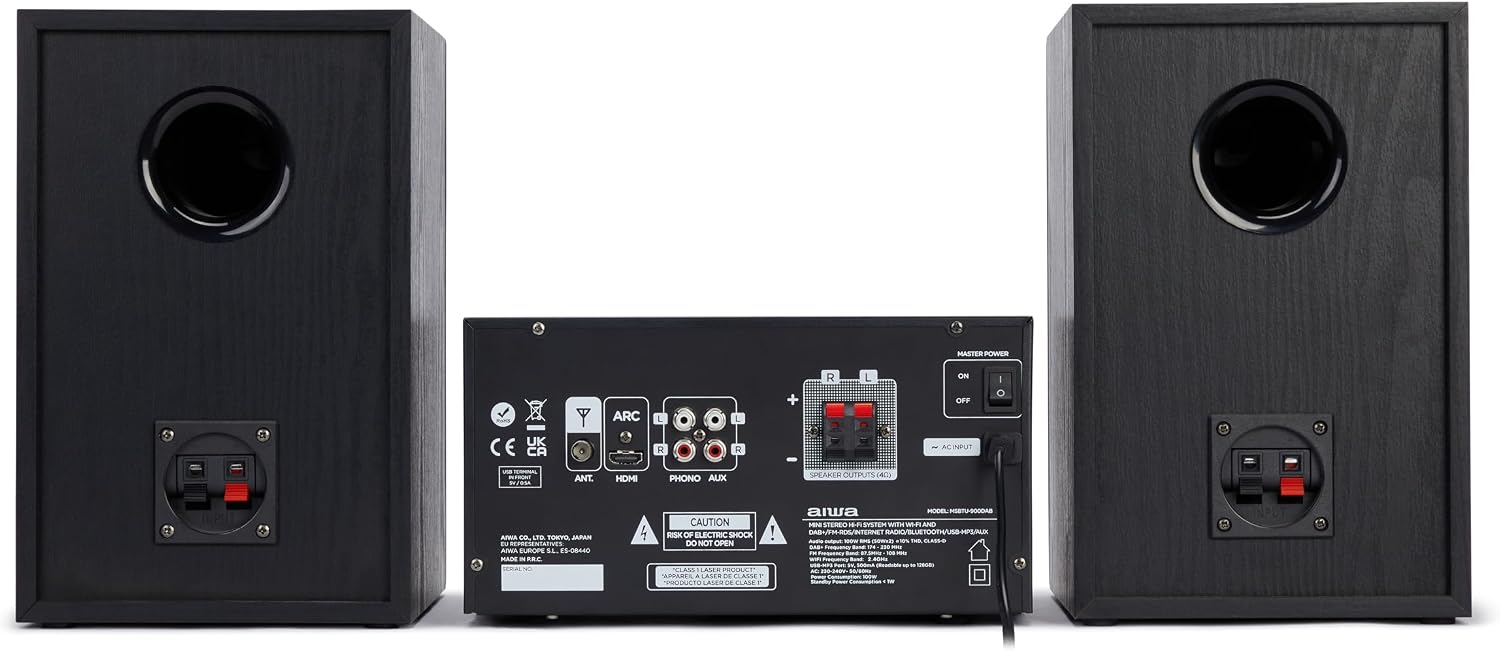
Imatge: Part posterior view of the AIWA MSBTU-900DAB main unit.
The rear panel provides various connection ports:
- FORMIGA: FM/DAB+ antenna input.
- ARC HDMI: HDMI Audio Return Channel for TV connection.
- TPTICA: Entrada d'àudio digital òptica.
- PHONO (L/R): RCA input for turntable with RIAA equalizer.
- AUX (L/R): RCA auxiliary input.
- SPEAKER OUTPUTS (L/R): Terminals for connecting passive speakers.
- ENTRADA CA: Connexió del cable d'alimentació.
- PODER MÀSTER: Interruptor d'alimentació principal.
4.3 Control remot

Image: AIWA MSBTU-900DAB remote control.
The remote control provides convenient access to all functions:
- POTÈNCIA: Enceneu / apagueu la unitat.
- Mode: Switch between different playback modes/sources.
- STOP/SHUFFLE/PROG/PRESET/EJECT/REPEAT: CD/USB playback and radio functions.
- MENÚ / INFORMACIÓ: Access menus and display information.
- Botons de navegació (amunt/avall/esquerra/dreta/d'acord): Navigate menus and control playback.
- REPRODUCCIÓ/PAUSA: Reprodueix o posa en pausa el contingut multimèdia.
- EQ: Seleccioneu els valors predefinits de l'equalitzador.
- BAIX/AGUS: Adjust bass and treble.
- MUT: Silencia/activa l'àudio.
- VOL +/-: Ajustar el volum.
- Botons numèrics (0-9): Direct input for radio stations or tracks.
- ALARM/SLEEP/SNOOZE: Timer functions.
5. Configuració
5.1 Desembalatge
Carefully remove all components from the packaging. Keep the packaging materials for future transport or storage.
5.2 Connexió dels altaveus

Image: AIWA MSBTU-900DAB HiFi System with main unit and speakers.
Connect the speaker cables from the speaker units to the corresponding SPEAKER OUTPUTS (L/R) terminals on the rear of the main unit. Ensure correct polarity (+ to + and - to -) for optimal sound quality.
5.3 Connexió de l'antena
Connect the supplied FM antenna to the ANT terminal on the rear panel. Extend the antenna fully for best FM/DAB+ reception.
5.4 Connexió d'alimentació
Plug the power cable into the AC INPUT on the rear panel of the main unit, then plug the other end into a suitable wall power outlet.
5.5 Encès inicial
Flip the MASTER POWER switch on the rear panel to the 'ON' position. Press the STANDBY button on the front panel or remote control to turn on the unit.
5.6 Network Setup (WLAN)
For Internet Radio and app compatibility, connect the system to your Wi-Fi network:
- Premeu el botó MENU.
- Navigate to 'Network' or 'System Settings' and select 'Network Wizard' or 'Wi-Fi Setup'.
- The system will scan for available Wi-Fi networks. Select your network from the list.
- Enter your Wi-Fi password using the multifunction controller or remote control.
- Confirm the connection. Once connected, the Wi-Fi icon will appear on the display.
6. Instruccions de funcionament
6.1 Selecció de la font
Press the SOURCE button on the front panel or remote control repeatedly to cycle through available input sources: Internet Radio, DAB+, FM, CD, USB, Bluetooth, HDMI ARC, Phono, AUX.
6.2 Ràdio per Internet
Once connected to Wi-Fi:
- Select 'Internet Radio' as the source.
- Use the multifunction controller or navigation buttons to browse stations by location, genre, or search.
- Seleccioneu una emissora per iniciar la reproducció.
- To save a station as a preset, refer to the 'Presets' section in the full manual.
Ràdio DAB+ 6.3
Ensure the FM/DAB+ antenna is connected.
- Select 'DAB+' as the source.
- The system will automatically scan for available DAB+ stations upon first use.
- Feu servir els botons de navegació per seleccionar una emissora de la llista.
Ràdio RDS 6.4 FM
Ensure the FM/DAB+ antenna is connected.
- Select 'FM' as the source.
- Press and hold the NEXT/PREVIOUS buttons to auto-scan for stations.
- Press briefly to fine-tune. RDS information (station name, program type) will be displayed if available.
6.5 Funcionament Bluetooth
Vincular un dispositiu Bluetooth:
- Select 'Bluetooth' as the source. The display will show 'BT Pairing' or similar.
- On your smartphone, tablet, or computer, enable Bluetooth and search for devices.
- Select 'AIWA MSBTU-900DAB' from the list of found devices.
- Once paired, you can stream audio from your device to the HiFi system.
6.6 Reproducció de CD

Image: AIWA MSBTU-900DAB with CD tray open.
The system supports CD, CD-R, CD-RW, and CD-MP3 discs.
- Select 'CD' as the source.
- Press the EJECT button to open the motorized CD tray.
- Place a disc gently into the tray with the label side facing up.
- Press EJECT again to close the tray. Playback will start automatically or can be initiated with the PLAY/PAUSE button.
Reproducció USB 6.7
The USB port supports MP3 playback from USB drives up to 128GB.
- Insert a USB drive into the USB MP3 port on the front panel.
- Select 'USB' as the source.
- Use the navigation buttons to browse folders and files. Press PLAY/PAUSE to start playback.
6.8 HDMI ARC
Connect your TV's HDMI ARC output to the HDMI ARC input on the rear panel of the HiFi system. Select 'HDMI ARC' as the source to output TV audio through the system's speakers. Ensure ARC is enabled on your TV settings.
6.9 entrades de phono
Connect a turntable to the PHONO (L/R) RCA inputs on the rear panel. Select 'Phono' as the source. The built-in RIAA equalizer will process the audio signal.
6.10 Entrada AUX
Connect external audio devices (e.g., MP3 player, smartphone) to the front 3.5mm AUX-IN port or the rear RCA AUX (L/R) inputs. Select 'AUX' as the source.
6.11 Ajustaments de so
Use the BASS and TREBLE buttons on the front panel or remote control to adjust the sound characteristics. The remote also offers an EQ button for preset equalizer modes.
7. Manteniment
7.1 Neteja de la unitat
Always unplug the unit from the power outlet before cleaning. Use a soft, dry, lint-free cloth to wipe the surfaces. Do not use abrasive cleaners, waxes, or solvents as they may damage the finish.
7.2 CD Lens Cleaning
If CD playback becomes erratic, the CD lens may be dirty. Use a commercially available CD lens cleaner disc to clean the lens. Do not attempt to clean the lens manually.
8. Solució De Problemes
If you encounter problems with your HiFi system, please refer to the following common issues and solutions before contacting support.
| Problema | Causa possible | Solució |
|---|---|---|
| Sense poder | Power cable not connected; Master Power switch off | Ensure power cable is securely connected. Turn Master Power switch ON. Press STANDBY button. |
| Sense so | Volume too low; Mute activated; Incorrect source selected; Speakers not connected | Increase volume. Deactivate Mute. Select correct input source. Check speaker connections. |
| Mala recepció de ràdio | Antenna not extended or poorly positioned | Extend and reposition the FM/DAB+ antenna for better signal. |
| Problemes de connexió Bluetooth | Device not in pairing mode; Out of range; Interference | Ensure unit is in Bluetooth pairing mode. Move device closer. Avoid obstacles. Try re-pairing. |
| El CD no es reprodueix | Disc inserted incorrectly; Disc dirty/scratched; Unsupported disc format | Insert disc correctly (label side up). Clean disc. Use supported CD formats. |
9. Especificacions
- Model: MSBTU-900DAB
- Potència de sortida: 100 W RMS (2 x 50 W RMS)
- AmpTipus més viu Classe D
- Versió Bluetooth: 5.2
- Connectivitat sense fils: WLAN (Wi-Fi)
- Radio Tuners: Internet Radio, DAB+, FM RDS (40 preset stations)
- Compatibilitat amb CD: CD, CD-R, CD-RW, CD-MP3 (with ID3 tag mostrar)
- Reproducció USB: MP3 (supports up to 128 GB)
- Entrades: HDMI ARC, Optical, Phono (RIAA equalizer), RCA AUX (rear), 3.5mm AUX-IN (front), USB
- Sortides: Auriculars de 3.5 mm
- Tipus d'altaveu: estèreo
- Color: Negre
- Dimensions (paquet): 75.59 x 37.29 x 35.5 cm
- Pes (paquet): 10.92 kg
- Font d'alimentació: Elèctric amb cable
10. Garantia i Suport
10.1 Informació de la garantia
This AIWA MSBTU-900DAB HiFi System comes with a Garantia del fabricant de 2 anys from the date of purchase. This warranty covers manufacturing defects and faulty materials under normal use. Please retain your proof of purchase for warranty claims.
La garantia no cobreix:
- Damage caused by accident, misuse, abuse, neglect, or unauthorized modification.
- Desgast normal.
- Damage caused by power surges or improper voltage connexió.
- Damage caused by failure to follow the instructions in this manual.
10.2 Atenció al client
For technical assistance, warranty service, or general inquiries, please contact your local AIWA dealer or visit the official AIWA weblloc per obtenir informació de contacte d'assistència.