
1. Introducció
This manual provides essential information and instructions for using your realme 16T 5G Smartphone. Please read this manual thoroughly before using your device to ensure proper operation and to maximize its performance and longevity. Keep this manual for future reference.
2. Què hi ha a la caixa
Verifiqueu que tots els elements siguin presents al paquet del producte:
- realme 16T Smartphone
- Cable de dades USB
- Funda de telèfon
- Guia d'inici ràpid
3. Dispositiu acabatview
Familiarize yourself with the physical components of your realme 16T 5G Smartphone.
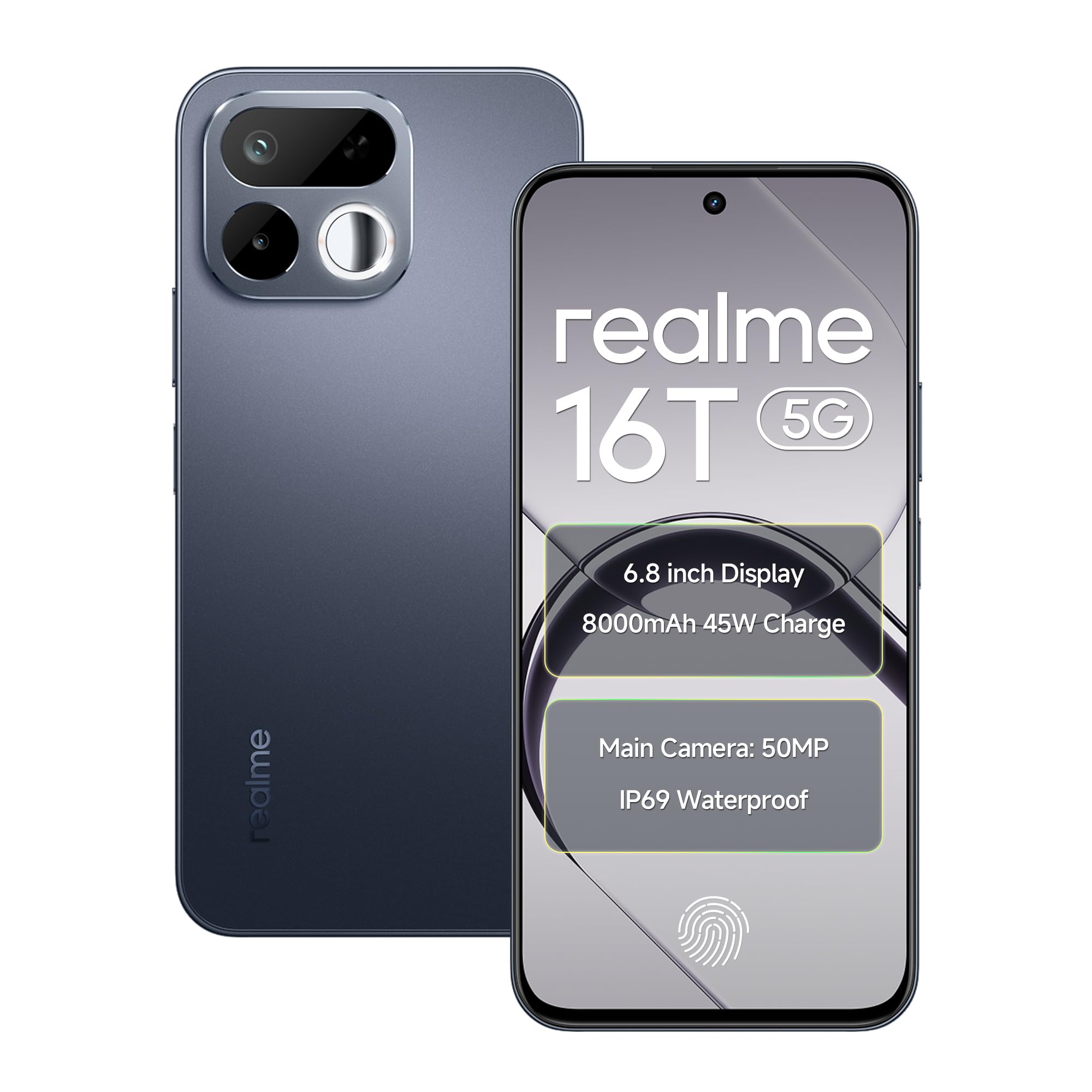
Imatge: Anvers i revers view of the realme 16T 5G Smartphone, showcasinel seu disseny i el mòdul de càmera.
Característiques principals:
- Visualització: 6.8-inch HD+ LCD with 144Hz refresh rate and 1200 nits peak brightness.
- Processador: MediaTek Dimensity 6300 Octa-core chipset.
- Bateria: 8000mAh capacity with 45W SUPERVOOC flash charging.
- Càmera: 50MP AI main camera with selfie mirror functionality.
- Durabilitat: IP69 Pro dust and water resistance, MIL-STD-810H military-grade reliability.
- Sistema operatiu: Android 16 with realme UI 7.0.
4. Configuració
4.1 Inserció de targetes SIM i targetes MicroSD
- Localitza la safata de la targeta SIM al lateral del dispositiu.
- Use the provided SIM ejector tool to open the SIM tray.
- Carefully place your Nano-SIM cards (supports dual 5G SIM) and a microSD card (for expandable storage up to 2TB) into the designated slots. Ensure the gold contacts are facing down.
- Gently push the SIM tray back into the device until it is flush with the side.
4.2 Engegada inicial i configuració bàsica
- Mantingueu premut el botó d'engegada fins que aparegui el logotip de Realme.
- Segueix les instruccions que apareixen a la pantalla per seleccionar l'idioma i la regió i connectar-te a una xarxa Wi-Fi.
- Inicia la sessió amb el teu compte de Google o crea'n un de nou per accedir als serveis de Google i a Play Store.
- Set up your preferred screen lock method (PIN, pattern, password, fingerprint, or face unlock).
5. Instruccions de funcionament
5.1 Gestió de l'energia
- Encès: Press and hold the Power button until the device vibrates and the realme logo appears.
- Apagar: Mantingueu premut el botó d'engegada i, a continuació, toqueu "Apagar" a la pantalla.
- Reinicia: Press and hold the Power button, then tap 'Restart' on the screen.
5.2 Configuració de la pantalla
Your realme 16T features a 6.8-inch HD+ LCD with a 144Hz refresh rate for smooth visuals and a 180Hz touch sampling rate for responsive interaction. The display offers up to 1200 nits peak brightness for clear visibility in various lighting conditions.

Image: The realme 16T 5G Smartphone display showcasing a game, highlighting the 144Hz refresh rate and bright visuals.
- To adjust refresh rate: Go to Settings > Display > Screen refresh rate.
- To adjust brightness: Go to Settings > Display > Brightness level or use the quick settings panel.
5.3 Bateria i càrrega
The device is equipped with an 8000mAh battery and supports 45W SUPERVOOC flash charging.

Image: An illustration of the realme 16T 5G Smartphone's 8000mAh battery capacity and 45W charging capability, with usage estimates for WhatsApp, Instagram, gaming, and YouTube.
- Use the provided 45W SUPERVOOC charger and USB Data Cable for optimal charging speed.
- Avoid using non-certified chargers or cables to prevent damage to the device.
5.4 Funcions de la càmera
The realme 16T features a 50MP AI main camera. It also includes a selfie mirror function, allowing you to use the rear camera for high-quality selfies.

Image: A person taking a selfie using the realme 16T 5G Smartphone's selfie mirror feature, highlighting the 50MP camera.

Image: A collage demonstrating the AI image editing capabilities of the realme 16T 5G Smartphone, including original, modeling photoshoot, 3D emoji, and cartoon shot options.
- Obre l'aplicació Càmera des de la pantalla d'inici o des del calaix d'aplicacions.
- Switch between photo, video, portrait, and other modes.
- Utilize the AI features for enhanced image processing and editing.
5.5 Funcions de seguretat
The device supports side fingerprint recognition and face recognition for secure and quick unlocking.
- To set up fingerprint unlock: Go to Configuració > Seguretat > empremta digital i seguiu les instruccions.
- To set up face unlock: Go to Configuració > Seguretat > Desbloqueig facial i seguiu les instruccions.
5.6 Connectivitat
The realme 16T supports 5G dual-SIM dual-standby, Wi-Fi, Bluetooth, and USB OTG.
- Xarxa 5G: Ensure your SIM cards are 5G enabled and you are in a 5G coverage area.
- Wi-Fi: Connecteu-vos a xarxes Wi-Fi mitjançant Configuració > Wi-Fi.
- Bluetooth: Emparella amb dispositius Bluetooth mitjançant Configuració > Bluetooth.
- USB OTG: Connect USB devices (e.g., flash drives) using a USB OTG adapter.
5.7 Àudio
Experience studio-quality sound with Hi-Res high-resolution audio certification. The device also features 400% Ultra Volume for enhanced audio output.

Image: A person holding the realme 16T 5G Smartphone while playing a game, illustrating the 400% Ultra Volume feature with sound waves emanating from the device.
6. Manteniment
6.1 Neteja del vostre dispositiu
- Feu servir un drap suau i sense borrissol per netejar la pantalla i la carcassa del telèfon.
- Eviteu utilitzar productes químics o materials abrasius.
6.2 Actualitzacions de programari
Comproveu i instal·leu regularment si hi ha actualitzacions de programari per assegurar-vos que el dispositiu tingui les darreres funcions, pegats de seguretat i millores de rendiment.
- Vés a Configuració > Quant al dispositiu > Versió de la interfície d'usuari de Realme per comprovar si hi ha actualitzacions.
6.3 Gestió d'emmagatzematge
Manage your device's storage to maintain optimal performance. The device supports microSD card expansion up to 2TB.
- Vés a Configuració > Emmagatzematge a view ús d'emmagatzematge i alliberar espai.
- Regularly back up important data to cloud storage or an external device.
6.4 Durability and Resistance
The realme 16T is designed with IP69 Pro dust and water resistance and MIL-STD-810H military-grade environmental reliability.

Image: The realme 16T 5G Smartphone on a wooden surface with spilled coffee, demonstrating its IP69 Pro dust and water resistance.
Image: A person running with the realme 16T 5G Smartphone, which is shown with debris around it, illustrating its military-grade shock resistance.
While resistant, avoid intentional exposure to water or dust, and do not submerge the device. Damage caused by liquid or dust ingress may not be covered under warranty if proper care is not taken.
7. Solució De Problemes
This section addresses common issues you might encounter with your realme 16T 5G Smartphone.
| Problema | Possible solució |
|---|---|
| El dispositiu no s'encén | Ensure the battery is charged. Connect the device to the charger for at least 10 minutes, then try powering on again. If it still doesn't work, perform a force restart by holding the Power button for 10-15 seconds. |
| La bateria s'esgota ràpidament | Check for apps running in the background. Reduce screen brightness, disable unnecessary features like GPS or Bluetooth when not in use. Go to Configuració > Bateria per identificar les aplicacions que consumeixen energia. |
| Problemes de connectivitat de xarxa (5G/Wi-Fi) | Restart the device. Check if Airplane Mode is off. For mobile data, ensure your SIM card is properly inserted and has an active plan. For Wi-Fi, try forgetting the network and reconnecting, or restart your router. |
| Les aplicacions es bloquegen o es bloquegen | Esborra la memòria cau de l'aplicació problemàtica (Configuració > Aplicacions > [Nom de l'aplicació] > Emmagatzematge > Esborra la memòria cau). If the issue persists, try reinstalling the app. Ensure your device software is up to date. |
| Fingerprint/Face unlock not working | Ensure your finger/face is clean and dry. Re-register your fingerprint/face in Configuració > Seguretat. Check for any physical obstructions on the sensor or camera. |
If you encounter issues not listed here or if the suggested solutions do not resolve your problem, please contact realme customer support.
8. Especificacions
Detailed technical specifications for the realme 16T 5G Smartphone:
| Característica | Especificació |
|---|---|
| Marca | realme |
| Model | 16T |
| Sistema operatiu | Android 16 (with realme UI 7.0) |
| Processador | MediaTek Dimensity 6300 Octa-core (2.4 GHz) |
| RAM | 6 GB (també disponible en 8 GB) |
| Emmagatzematge intern | 128 GB (també disponible en 256 GB) |
| Emmagatzematge ampliable | Up to 2 TB via microSD |
| Mostra | 6.8-inch HD+ LCD, 144Hz Refresh Rate, 1200 nits Peak Brightness |
| Càmera posterior | Càmera principal amb IA de 50 MP |
| Bateria | 8000 mAh |
| Carregant | Càrrega flaix SUPERVOOC de 45 W |
| Connectivitat | 5G Dual SIM, Wi-Fi, Bluetooth, USB Type-C, USB OTG |
| Resistència a l'aigua | IP69 Pro |
| Durabilitat | MIL-STD-810H Military-Grade |
| Dimensions | 16.6 x 7.8 x 0.8 centímetres |
| Pes | 192 grams |
9. Informació de la garantia
Your realme 16T 5G Smartphone comes with a 1-year official manufacturer warranty des de la data de compra. Aquesta garantia cobreix els defectes de fabricació en condicions d'ús normal. Si us plau, conserveu el comprovant de compra per a reclamacions de garantia.
La garantia no cobreix:
- Damage caused by improper use, accidents, or unauthorized repairs.
- Desgast normal.
- Damage caused by liquid or dust ingress if not handled according to IP69 Pro guidelines.
For detailed warranty terms and conditions, please refer to the warranty card included in your product package or visit the official realme weblloc.
10. Support & Safety Information
10.1 Atenció al client
For further assistance, technical support, or service inquiries, please contact realme customer service:
- Visit the official realme support weblloc: realme Support (India)
- Refer to the contact information provided in your Quick Start Guide.
10.2 Directrius de seguretat
To ensure safe operation of your device, please observe the following:
- No utilitzeu el telèfon mentre conduïu.
- Eviteu exposar el dispositiu a temperatures extremes.
- Use only realme-approved accessories.
- No intenteu desmuntar o reparar el dispositiu vosaltres mateixos.
- Desfeu-vos del dispositiu i de la bateria de manera responsable d'acord amb la normativa local.