
1. Informació important de seguretat
Please read all instructions carefully before assembly and use to ensure safe operation and prolong the life of your desk frame. Keep this manual for future reference.
- Assegureu-vos que tots els components siguin presents i no estiguin danyats abans de començar el muntatge.
- Do not exceed the maximum load capacity of 200 kg (static) / 160 kg (dynamic) to prevent damage or injury.
- Mantingueu els nens i les mascotes allunyats de l'escriptori durant els ajustos d'alçada.
- Verify that there are no obstacles in the desk's path (above or below) when adjusting its height.
- Utilitzeu només l'adaptador d'alimentació subministrat amb el producte.
- Do not attempt to disassemble the motor or control box. Contact customer support for repairs.
- If any unusual sounds, smells, or malfunctions occur, immediately unplug the desk and contact customer support.
2. Producte acabatview
Característiques clau
- Powerful Dual Motor System: Ensures smooth and strong lifting, supporting static loads up to 200 kg and dynamic loads up to 160 kg. Offers a rapid adjustment speed of 40 mm/s.
- Extra-Wide Height Adjustment Range: 3-section inverted frame allows height adjustments from 60 cm to 125 cm, suitable for various users and activities.
- Smart Control Panel with Memory: Features an LED display, 4 programmable memory presets for quick height adjustments, and an integrated USB charging port.
- Flexible Desktop Compatibility: Accommodates desktops ranging from 120 cm to 180 cm in width.
- Sistema anticol·lisió: Automatically stops and reverses if an obstruction is detected during height adjustment.
- Estabilitat reforçada: Features reinforced lower columns for enhanced stability, even at maximum height.
- Funcionament silenciós: Operates at a low noise level, typically below 45 dB.
Components
The FLEXISPOT E200 desk frame includes all necessary parts for assembly, such as the leg columns, feet, crossbar, control box, handset, and power adapter. A desktop is not included and must be purchased separately.
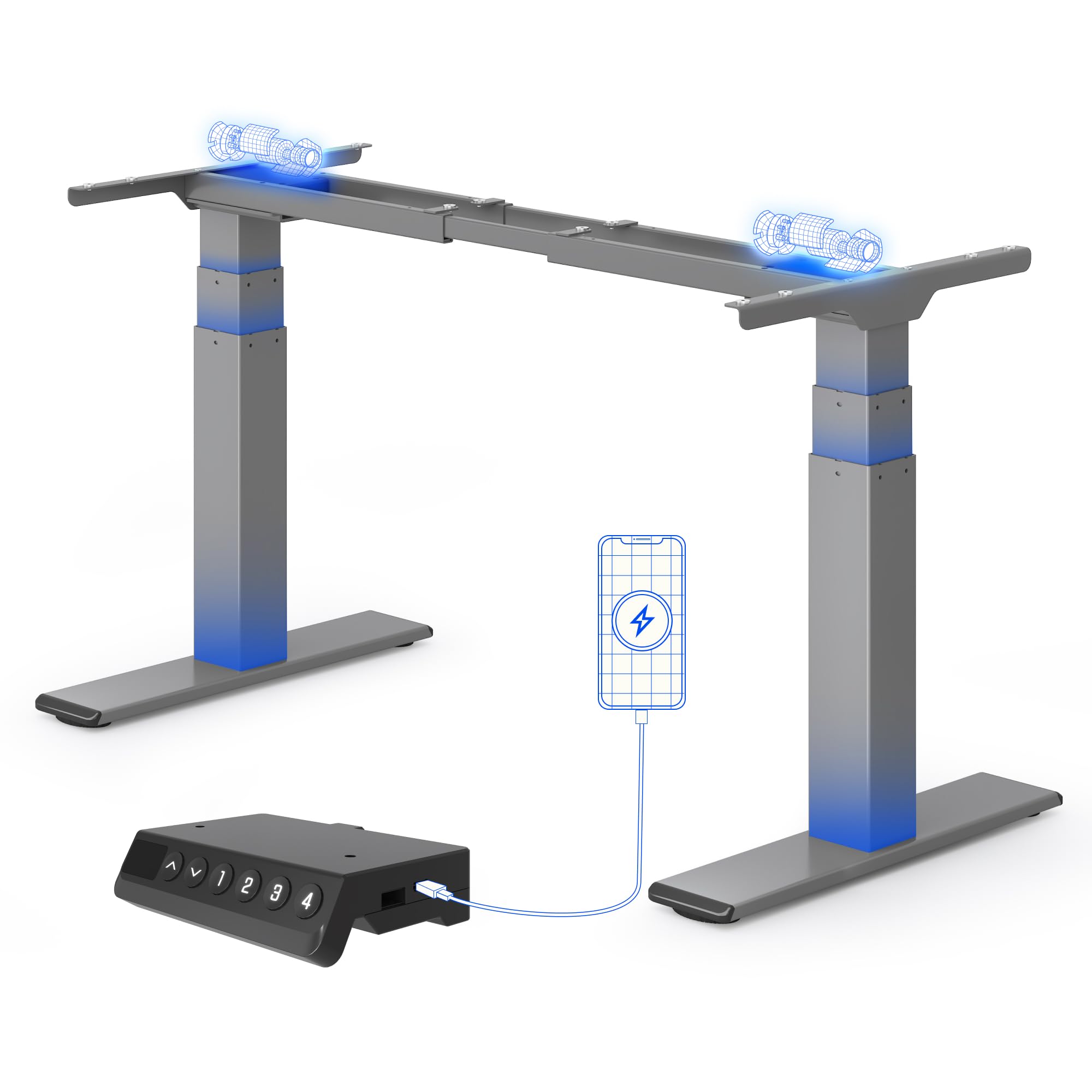
Un clar view of the FLEXISPOT E200 electric standing desk frame in grey. This image showcases the robust dual-motor design and the overall structure of the frame, ready for a desktop to be installed.
3. Muntatge i muntatge
Assembly of the FLEXISPOT E200 desk frame requires careful attention to detail. Please refer to the separate detailed assembly manual included in your product packaging for step-by-step instructions and diagrams. Ensure you have adequate space and assistance if needed, as the components can be heavy.
Passos de l'Assemblea General:
- Desembaleu tots els components i verifiqueu-los amb la llista de peces del manual.
- Attach the feet to the leg columns.
- Connect the leg columns to the crossbar.
- Mount the control box and handset to the frame.
- Connect all cables (motors to control box, handset to control box, power adapter to control box).
- Secure your chosen desktop to the frame using the provided screws.
Compatibilitat d'escriptori
The E200 frame is designed to be compatible with a wide range of desktop sizes. Ensure your desktop falls within the following dimensions for optimal performance and stability:
- Amplada de l'escriptori: 120 cm a 180 cm

This image shows the adjustable frame width of the FLEXISPOT E200, indicating its compatibility with various desktop sizes. The frame can accommodate desktops with a minimum width of 120 cm and a maximum width of 180 cm, offering versatility for different workspace needs.
4. Instruccions de funcionament
Tauler de control
The E200 features an intuitive smart control panel for easy operation.

This image displays the intelligent control panel of the FLEXISPOT E200. It features an LED screen showing the current height, up and down adjustment buttons, four programmable memory buttons (1, 2, 3, 4) for saving preferred heights, and a convenient integrated USB port for charging devices.
- Fletxes amunt/avall: Press and hold to adjust the desk height upwards or downwards. Release to stop at the desired height. The LED display will show the current height.
- Preajustos de memòria (1, 2, 3, 4): These buttons allow you to save and recall up to four preferred height settings.
- Port USB: An integrated USB port is available for charging your mobile devices or accessories.
Configuració de preajustos de memòria
- Ajusteu l'escriptori a l'alçada desitjada amb les fletxes amunt/avall.
- Press the 'M' button (Memory button). The LED display will show 'S-'.
- Within 3 seconds, press one of the number buttons (1, 2, 3, or 4). The display will show 'S-1', 'S-2', etc., and beep to confirm the setting is saved.
- Per recuperar una alçada desada, simplement premeu el botó numèric corresponent (1, 2, 3 o 4). L'escriptori es mourà automàticament a la posició desada.
Anti-Collision System
The FLEXISPOT E200 is equipped with an anti-collision system to prevent damage to the desk or objects in its path. If the desk encounters an obstruction during height adjustment, it will automatically stop and reverse slightly to avoid collision. This feature enhances safety and protects your belongings.
5. Manteniment
Regular maintenance helps ensure the longevity and optimal performance of your FLEXISPOT E200 desk frame.
- Neteja: Netegeu el marc de l'escriptori amb un drap suauamp drap. Eviteu utilitzar netejadors abrasius o productes químics agressius que puguin danyar l'acabat.
- Inspecció: Periodically check all screws, bolts, and connections to ensure they are tight. Retighten if necessary.
- Lliurament d'obstacles: Keep the area around the lifting columns and motors free from dust, debris, and any obstructions.
- Lubricació: Do not lubricate the lifting columns or internal mechanisms unless specifically instructed by FLEXISPOT customer support.
6. Solució De Problemes
If you encounter any issues with your FLEXISPOT E200 desk frame, please refer to the following common troubleshooting steps. If the problem persists, contact customer support.
| Problema | Causa possible | Solució |
|---|---|---|
| L'escriptori no es mou. | No power, loose connection, or motor error. |
|
| L'escriptori es mou de manera irregular o fa sorolls estranys. | Uneven load, loose components, or motor synchronization issue. |
|
| Anti-collision system triggers too often or not at all. | Sensitivity setting or obstruction. |
|
| La pantalla LED mostra un codi d'error. | Mal funcionament específic del sistema. | Refer to the detailed manual for a list of error codes and their corresponding solutions. If not found, contact customer support. |
7. Especificacions
| Característica | Detall |
|---|---|
| Marca | FLEXISPOT |
| Número de model | E200 |
| Forma | Rectangular |
| Product Dimensions (D x W x Min H) | 60 x 125 x 58 cm |
| Color | Gris |
| Pes de l'article | 28.7 quilos |
| Load Capacity (Static/Dynamic) | 200 kg / 160 kg |
| Interval d'ajust d'altura | 60 - 125 cm |
| Velocitat màxima d'elevació | 40 mm/s |
| Nivell de soroll | <45 dB |
| Components inclosos | Port USB integrat |
| Muntatge obligatori | Sí |
| UPC | 840521562768 |
| País d'origen | Xina |

This diagram illustrates the key dimensions and performance specifications of the FLEXISPOT E200 electric standing desk frame. It highlights the adjustable height range of 60-125 cm, a maximum load capacity of 200 kg, a lifting speed of 40 mm/s, and a low noise level of less than 45 dB. The image also confirms a 10-year warranty and anti-collision rebound function.
8. Garantia i Suport
Informació de la garantia
The FLEXISPOT E200 Electric Standing Desk Frame comes with a 10 any de garantia, reflecting our confidence in its durability and quality. This warranty covers manufacturing defects and ensures reliable performance under normal use. Please retain your proof of purchase for warranty claims.
Atenció al client
For any questions, assistance with assembly, troubleshooting, or warranty claims, please contact FLEXISPOT customer service. Our dedicated support team is ready to help you.
You can find more information and contact details on the official FLEXISPOT weblloc web o a través de la seva botiga de la marca Amazon: