
Introducció
Thank you for choosing the KIMEX Gaming Desk 150-9001. This desk is designed to provide a functional and immersive environment for your gaming sessions. It features a spacious 120x60 cm tabletop, robust steel and aluminum construction, and integrated customizable RGB lighting. This manual provides detailed instructions for assembly, operation, maintenance, and troubleshooting to ensure optimal use of your new gaming desk.
Please read this manual carefully before assembly and use, and retain it for future reference.
Instruccions de configuració
1. Desembalatge i comprovació de components
- Obriu amb cura l'embalatge i retireu tots els components.
- Place all parts on a soft, clean surface to prevent scratches.
- Verify that all parts listed in the assembly diagram (not provided in this manual, refer to included packaging) are present and undamaged.
2. Muntatge
Assembly typically requires two people. Ensure all screws are tightened securely but do not overtighten.
- Attach the desk legs to the tabletop using the provided hardware. Ensure the legs are oriented correctly for stability.
- Secure any crossbars or support beams between the legs as indicated in your assembly diagram.
- Install the adjustable feet at the bottom of the desk legs. These can be adjusted to level the desk on uneven surfaces.
- Attach the headphone hook and cup holder to the designated slots on the tabletop.
- Connect the RGB lighting power cable to a suitable USB power source (e.g., computer USB port, USB wall adapter).
- Optionally, apply the decorative sticker to the desk legs as desired.
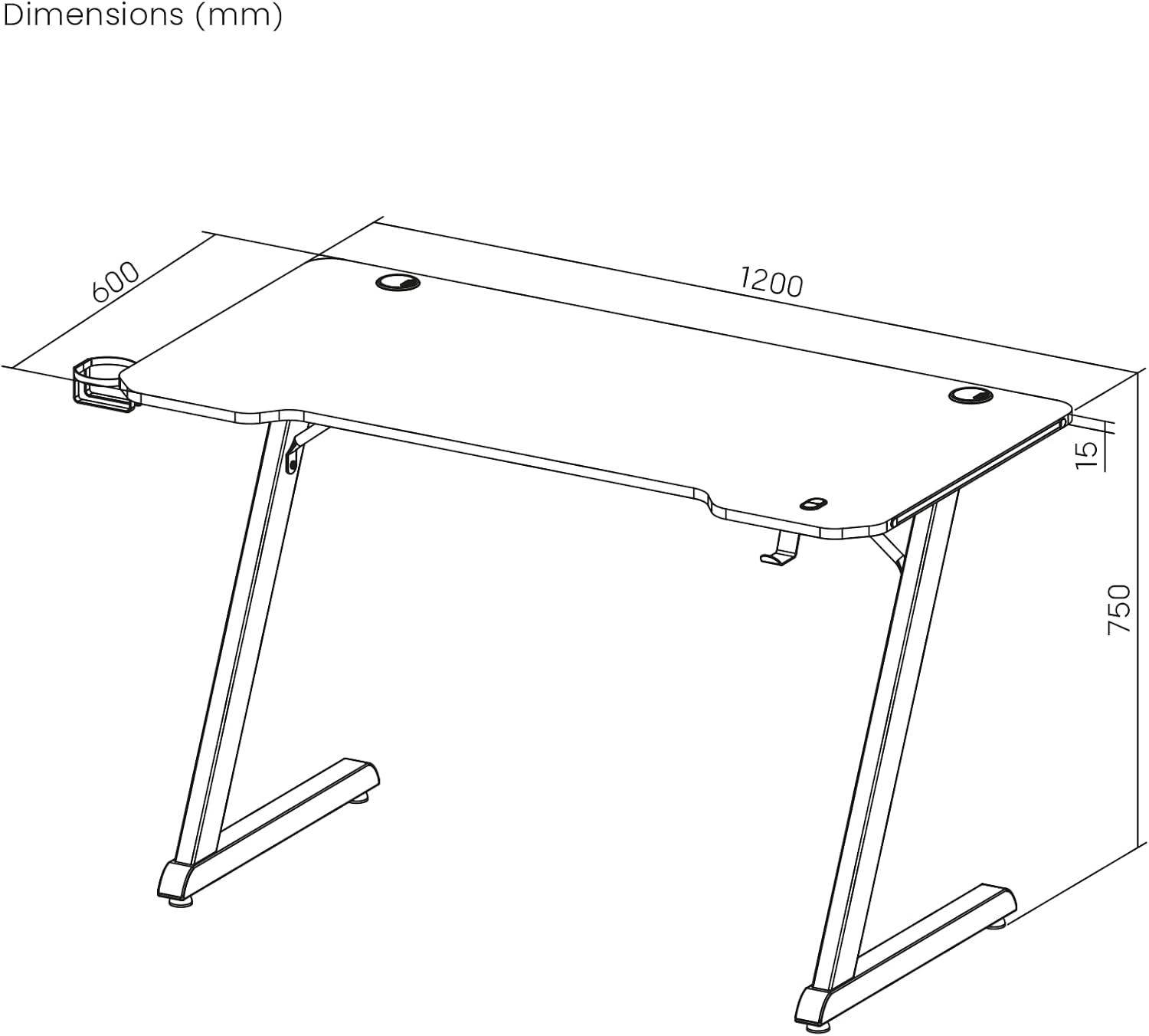
Figura 1: Dimensions of the KIMEX Gaming Desk 150-9001. The tabletop measures 1200mm (width) x 600mm (depth) x 15mm (thickness). The overall height of the desk is 750mm.

Figura 2: lateral view of a desk leg, showing the Z-shape design and an optional decorative sticker with green and grey accents. The sticker can be applied during assembly.
Instruccions de funcionament
1. Control de la il·luminació RGB
The desk features integrated RGB LED lighting around the edge of the tabletop. Control buttons are located on the desk surface.

Figura 3: Close-up of the RGB control buttons integrated into the desk surface. The buttons are labeled 'MODE' and 'COLOR'.
- Botó MODE: Press this button to cycle through various lighting effects and patterns (e.g., static colors, breathing effects, dynamic transitions).
- Botó COLOR: When a static color mode is selected, press this button to change the color. In some dynamic modes, it may adjust color variations.
- To turn off the RGB lighting, cycle through the modes until the lights turn off, or disconnect the USB power source.
2. Ús d'accessoris
- Ganxo dels auriculars: Use the integrated hook on the side of the desk to hang your gaming headset, keeping it easily accessible and off the desk surface.
- Portavasos: The attached cup holder provides a secure place for your beverage, reducing the risk of spills on your equipment.

Figura 4: Primer pla view of the integrated cup holder and the customizable RGB lighting strip along the edge of the desk.
Manteniment
- Neteja: Wipe the desk surface and legs with a soft, damp cloth. Avoid abrasive cleaners or harsh chemicals that could damage the finish or RGB strip.
- Pols: Regularly dust the desk to prevent accumulation, especially around the RGB lighting and cable management grommets.
- Apretament: Reviseu periòdicament tots els cargols i perns per assegurar-vos que romanen ajustats. Torneu a apretar-los si cal per mantenir l'estabilitat.
- Capacitat de pes: Do not exceed the maximum recommended load capacity of 75 kg to prevent damage to the desk.
Resolució de problemes
| Problema | Causa possible | Solució |
|---|---|---|
| La il·luminació RGB no s'encén. | Cable d'alimentació no connectat o defectuós. | Ensure the USB power cable is securely connected to a working USB port or adapter. Try a different USB power source. |
| RGB lighting is stuck on one color/mode. | Control buttons unresponsive. | Disconnect and reconnect the USB power. Press the MODE/COLOR buttons firmly. |
| L'escriptori sembla inestable o trontolla. | Cargols solts o terra irregular. | Check and tighten all assembly screws. Adjust the leveling feet at the bottom of the desk legs to stabilize. |
| Accessories (cup holder/headphone hook) are loose. | Not properly installed or tightened. | Ensure accessories are fully inserted into their slots and any securing mechanisms are engaged. |
Especificacions del producte
| Marca | KIMEX |
| Número de model | 150-9001 |
| Disseny d'escriptori | Computer Desk / Gaming Desk |
| Dimensions (L x A x A) | 120 x 60 x 75 cm (47.2 x 23.6 x 29.5 polzades) |
| Gruix de la taula | 1.5 cm (0.6 polzades) |
| Pes | 12 kg (26.4 lliures) |
| Capacitat de càrrega màxima | 75 kg (165 lliures) |
| Color | Negre mat |
| Material de taula | Melamine (MDF) |
| Material base | Acer d'aliatge |
| Material dels peus | Acer inoxidable |
| Característiques especials | Customizable RGB Lighting, Headphone Hook, Cup Holder |
| Muntatge obligatori | Sí |
Informació de la garantia
The KIMEX Gaming Desk 150-9001 comes with a Garantia del fabricant de 3 anys. Aquesta garantia cobreix els defectes de materials i de mà d'obra en ús normal.
Please retain your proof of purchase for any warranty claims. For specific terms and conditions, refer to the warranty card included with your product or contact customer support.
Atenció al client
If you have any questions, require assistance with assembly, or encounter any issues not covered in this manual, please contact KIMEX customer support.
For further information and support, you may visit the official KIMEX store on Amazon: KIMEX Amazon Store.