
Introducció
The Moondrop x Wuthering Waves U.C.T.S. is an Ultra HiFi Sound Open Wireless System (OWS) headset designed for gaming and high-fidelity audio. It features hybrid dual drivers, AI noise cancelling, LHDC-V transmission, and LE Audio support. This manual provides essential information for the proper use and care of your U.C.T.S. headset.
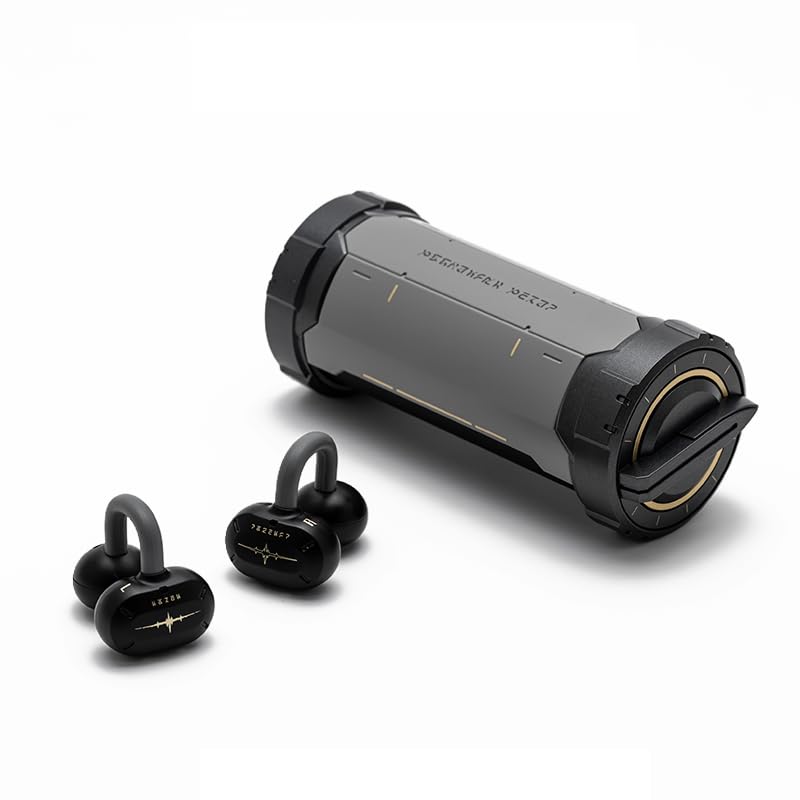
Image: The Moondrop x Wuthering Waves U.C.T.S. gaming headset with its cylindrical charging case.
Què hi ha a la caixa
Verifiqueu que tots els elements siguin presents al paquet:
- Auriculars (esquerra i dreta)
- Estoig de càrrega
- Cable de càrrega USB-C (no apareix explícitament a la llista però és estàndard)
- Manual
- Instrucció de vestir
- Guidance Card
- Targeta de servei
- Collaboration Badge x2
- Laser Ticket x2
- Corda x1

Image: The complete package contents, including the headset, charging case, and various collaboration merchandise.
Configuració
1. Càrrega inicial
Before first use, fully charge the earbuds and charging case. Connect the USB-C cable to the charging port on the case and to a power source. The earbuds will charge automatically when placed inside the case.
- Earbud Charging Time: Approximately 1.7 Hours
- Charging Case Charging Time: Approximately 2 Hours

Image: The charging case opened, revealing the earbuds securely placed inside for charging.
2. Emparellament Bluetooth
- Assegureu-vos que els auriculars estiguin carregats i col·locats a l'estoig de càrrega.
- Obre l'estoig de càrrega. Els auriculars entraran automàticament en mode d'emparellament.
- Al dispositiu (telèfon intel·ligent, tauleta, ordinador), activeu el Bluetooth i cerqueu els dispositius disponibles.
- Select "Moondrop U.C.T.S." from the list of found devices to connect.
- For LC3 codec, connect to "Moondrop U.C.T.S.-LEA" after activating it in the app.
3. Moondrop App Installation
For full customization and advanced features, download the Moondrop App. The app allows you to adjust sound settings, customize touch controls, and manage dual-device connectivity.
- Android users: Download from moondroplab.com or Google Play Store.
- iOS users: Download from the App Store.

Image: A smartphone displaying the Moondrop U.C.T.S. application interface, showing earbud status and settings.
Instruccions de funcionament
Portant els auriculars
The U.C.T.S. earbuds feature a C-shaped bridge design for comfortable and secure open-ear placement. Ensure the earbuds are positioned correctly over your ears for optimal sound and stability.

Image: A user wearing the Moondrop U.C.T.S. earbuds, demonstrating their open-ear fit.
Controls tàctils
The earbuds feature touch-sensitive areas for control. Default controls include:
- Doble toc: Reprodueix/Pausa l'àudio.
- Triple Tap (Left): Cançó anterior.
- Triple Tap (Right): Cançó següent.
- Four Taps: Switch between Low Latency Game Mode and High-Fidelity Music Mode.
Customization of touch controls is available through the Moondrop App.
Modes de so
- Mode de joc de baixa latència: Provides a 55ms low-latency experience, suitable for gaming. Activate by four taps on the earbud.
- High-Fidelity Music Mode: Standard audio mode for music playback.
Connectivitat de dos dispositius
The U.C.T.S. supports simultaneous connection to two devices. Switch between connected devices using the Moondrop App for a seamless experience.
AI Noise Cancelling (ENC)
Equipped with a built-in NPU core and an AI ENC algorithm, the headset effectively reduces environmental noise during calls, enhancing vocal clarity.
Dipole Directional Sound Transmission
This technology minimizes sound leakage by directing sound towards the ear canal, reducing up to 97% of sound leakage at 15cm from the ear.
Manteniment
Carregant
Recharge the earbuds by placing them in the charging case. Recharge the case using a USB-C cable. Regular charging ensures optimal battery performance.
- Earbud Battery Life: Approximately 9 hours (AAC)
- Charging Case Battery Life: Approximately 21.5 Hours (AAC)
- Total Playback Time: 9 + 21.5 hours
- Standby Time: 50 + 120 hours
Neteja
Gently wipe the earbuds and charging case with a soft, dry, lint-free cloth. Avoid using abrasive materials, alcohol, or chemical cleaners. Do not immerse the device in water.
Resolució de problemes
Problemes de connectivitat
- Auriculars que no s'emparellan: Ensure earbuds are charged. Place them in the case, close, then open to re-enter pairing mode. Check your device's Bluetooth settings.
- L'aplicació no es connecta: If the Moondrop App struggles to connect, try restarting the app or your device. Ensure Bluetooth is active and the earbuds are connected to your phone.
- Connexió inestable: Ensure you are within the 10-meter working distance (or up to 40 meters in open environments). Avoid physical obstructions between the earbuds and your device.
Problemes de so
- Sense so: Check device volume and earbud battery level. Ensure earbuds are properly connected via Bluetooth.
- Volum baix: Adjust volume on both your device and through the app.
- Fuita de so: Ensure earbuds are correctly positioned on your ears.
Especificacions
- Tipus de producte:
- Ultra HiFi Sound OWS
- Model:
- MD-OWS-014 (WUTHERING WAVES xMOONDROP U.C.T.S.)
- Versió Bluetooth:
- Bluetooth 6.0
- Bluetooth Profiles:
- A2DP/AVRCP/HFP/HSP
- Còdec d'àudio:
- SBC/AAC/LC3/LHDC-V
- Port de càrrega:
- USB-C
- Distància de treball:
- 10 Meters (Barrier-free Environment)
- Capacitat d'auriculars:
- 3.7 V/40 mAh
- Capacitat de la bateria de la funda de càrrega:
- 3.7 V/300 mAh
- Col·locació de les orelles:
- Orella oberta
- Factor de forma:
- True Wireless
- Tecnologia de connectivitat:
- Sense fil
Garantia
Aquest producte ve amb un 1 anys de garantia from the date of purchase. Please retain your proof of purchase for warranty claims. The warranty covers manufacturing defects but does not cover damage caused by misuse, accidents, or unauthorized modifications.
Suport
For further assistance, technical support, or warranty inquiries, please refer to the service card included in your package or visit the official Moondrop store: