
Introducció
Thank you for choosing the Hodozzy 7-Inch Double Din Car Stereo. This unit features a vibrant 7-inch touchscreen, Wireless CarPlay, Android Auto, Bluetooth connectivity, FM radio, EQ sound customization, online video playback, Mirror Link, and support for USB, AUX, Type-C, and Steering Wheel Controls (SWC). It also includes a dedicated input for a backup camera. This manual provides detailed instructions for installation, operation, and troubleshooting to ensure optimal performance and user experience.
Què hi ha a la caixa
Si us plau, comproveu el contingut del vostre paquet. Si falta algun article o hi ha algun malmès, poseu-vos en contacte amb el vostre distribuïdor.
- Hodozzy 7-Inch Double Din Car Stereo Unit
- Cable d'alimentació
- Cable de banya
- Suport de muntatge
- Manual d'usuari (aquest document)
- Càmera de seguretat
- Accessories (e.g., screws, trim frame)

Figura 1: Diagrama del contingut del paquet
Configuració i instal·lació
Professional installation is recommended. Ensure the vehicle's power is disconnected before beginning installation. Refer to the wiring diagram provided on the unit and in the included user manual for correct connections.
Connexions de cablejat
Connect the power cable, horn cable, and other necessary inputs (e.g., backup camera, USB, AUX) according to the wiring diagram. Pay close attention to positive, negative, and accessory power lines.

Figure 2: Car Stereo Unit Overview
Muntatge
Use the provided mounting brackets to secure the unit into your vehicle's double DIN slot. Ensure the unit is firmly in place to prevent movement during driving.
Instruccions de funcionament
7-Inch Touchscreen and Physical Controls
The unit features a responsive 7-inch touchscreen for primary interaction. Additionally, tactile piano keys provide precise control for essential functions. The user interface is designed for intuitive navigation. You can personalize the backlight settings with multiple color options.

Figure 3: Touchscreen and Physical Buttons
CarPlay sense fil i Android Auto
Connect your smartphone wirelessly or via USB to access CarPlay (for iPhone) or Android Auto (for Android phones). This allows you to use navigation, make calls, send messages, and play music directly from your phone's interface displayed on the car stereo screen.
- Assegureu-vos que el Bluetooth i la Wi-Fi estiguin activats al vostre telèfon intel·ligent.
- On the car stereo, select the CarPlay or Android Auto icon.
- Segueix les instruccions que apareixen a la pantalla per emparellar el dispositiu.
- Once connected, your phone's compatible apps will appear on the stereo display.
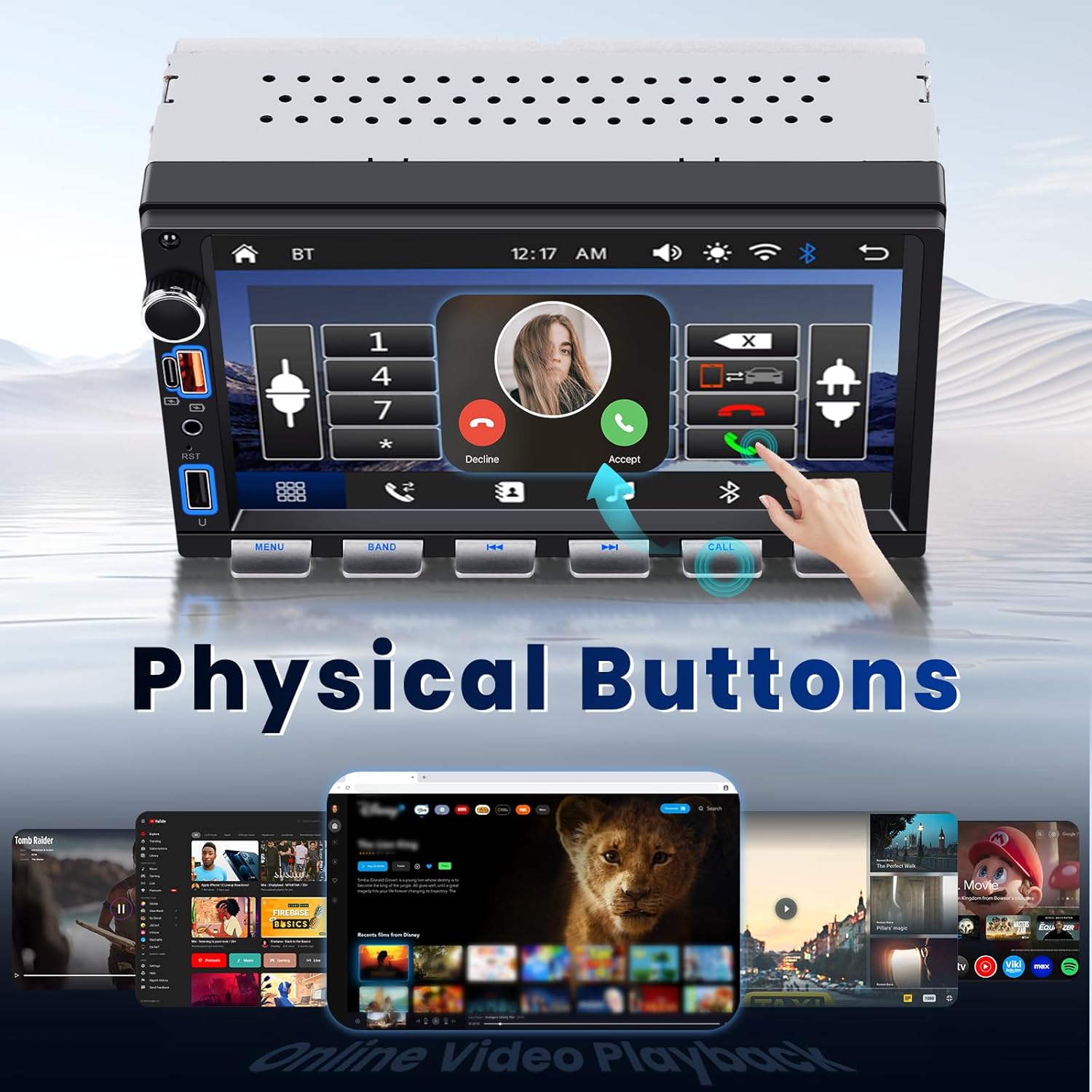
Figura 4: Interfície de CarPlay i Android Auto
Bluetooth Music and Hands-Free Calling
Pair your phone via Bluetooth for wireless audio streaming and hands-free calls.
- Go to the Bluetooth menu on the car stereo.
- Activa el Bluetooth al telèfon i busca els dispositius disponibles.
- Select "Hodozzy" (or similar device name) from your phone's list and confirm pairing.
- Once paired, you can stream music or make/receive calls directly through the stereo.
Ràdio FM
Access traditional FM radio stations within the frequency range of 87.5 - 108 MHz.
- Seleccioneu la icona "Ràdio FM" del menú principal.
- Use the scan function to find stations or manually tune to a specific frequency.
- Desa les teves emissores preferides com a predefinides per accedir-hi ràpidament.

Figure 5: Bluetooth, FM Radio, EQ, and Backlight Settings
Online Video Playback
The unit supports online video streaming through its built-in browser, allowing access to platforms like YouTube. Ensure the unit is connected to a Wi-Fi hotspot (e.g., from your smartphone) for internet access.
Funció d'enllaç mirall
Use Mirror Link to display your smartphone's screen directly onto the car stereo. This feature is compatible with both Android and iOS devices.
- Select the "Mirror Link" icon from the main menu.
- Follow the specific instructions displayed on the stereo for connecting your Android or iOS device. This typically involves connecting via USB and enabling USB debugging (for Android) or trusting the device (for iOS).
Configuració de so EQ
Fine-tune your audio experience using the built-in Equalizer (EQ). Adjust bass, treble, and other sound profiles per adaptar-se a les vostres preferències.
- Access the EQ settings from the audio menu.
- Choose from preset sound modes or customize individual frequency bands.
USB, AUX, and Type-C Connectivity
The unit provides multiple ports for versatile connectivity:
- Port USB: For media playback from USB drives or connecting smartphones for wired CarPlay/Android Auto.
- Port de tipus C: For fast charging compatible devices and data transfer.
- Entrada AUX: Connecteu dispositius d'àudio externs amb un cable d'àudio de 3.5 mm.

Figure 6: Interface and Connectivity Ports
Control del volant (SWC)
If your vehicle supports steering wheel controls, you can configure them to manage the stereo's functions (e.g., volume, track changes, call answering) directly from your steering wheel. Refer to the wiring diagram for SWC connections and the unit's settings menu for programming.
Entrada de càmera de marxa enrere
The unit includes a dedicated input for the provided backup camera. When properly installed and connected, the stereo will automatically display the rear view when the vehicle is in reverse gear, enhancing safety and visibility.

Figure 7: Backup Camera and Steering Wheel Controls
Manteniment
Per garantir la longevitat i el rendiment òptim de l'equip de música del vostre cotxe, seguiu aquestes pautes de manteniment:
- Neteja: Use a soft, dry cloth to clean the touchscreen and physical buttons. Avoid abrasive cleaners or solvents that could damage the surface.
- Actualitzacions de programari: Consulteu periòdicament el lloc web oficial de Hodozzy website or contact support for any available firmware updates. Updates can improve performance and add new features.
- Condicions ambientals: Eviteu exposar la unitat a temperatures extremes, a la llum solar directa durant períodes prolongats o a una humitat excessiva.
Resolució de problemes
Si teniu problemes amb l'estèreo del vostre cotxe Hodozzy, consulteu els següents problemes i solucions habituals:
| Problema | Causa possible | Solució |
|---|---|---|
| Sense poder | Incorrect wiring, blown fuse, loose connection. | Check power and ground connections. Inspect vehicle's fuse box and the unit's fuse. Ensure accessory wire is connected correctly. |
| Sense so | Speaker wires incorrectly connected, volume too low, mute activated, incorrect audio source. | Verify speaker wiring. Increase volume. Check if mute is active. Select the correct audio source (e.g., FM, Bluetooth, USB). |
| CarPlay/Android Auto no es connecta | Bluetooth/Wi-Fi off, incorrect pairing, phone software issue, cable issue (for wired). | Ensure phone's Bluetooth and Wi-Fi are on. Forget device on both phone and stereo and re-pair. Restart phone and stereo. Try a different USB cable if using wired connection. |
| La càmera de marxa enrere no es mostra | Camera not connected, reverse trigger wire not connected, faulty camera. | Check camera video input and reverse trigger wire connection to the vehicle's reverse light circuit. Ensure camera is powered. |
| Buttons Unresponsive / Screen Frozen | Error temporal de programari. | Perform a soft reset by pressing the reset button (if available) or by turning off the vehicle's ignition and restarting. |
| Mala recepció de ràdio | Antenna not connected, damaged antenna, weak signal area. | Ensure antenna is securely connected. Check antenna for damage. Try scanning for stations in a different location. |
Si el problema persisteix després de provar aquestes solucions, poseu-vos en contacte amb el servei d'atenció al client de Hodozzy.
Especificacions
| Característica | Detall |
|---|---|
| Marca | Hodozzy |
| Model | 7-Inch Double Din Car Stereo |
| Mida de la pantalla | 7 polzades |
| Tecnologia de connectivitat | Bluetooth, USB |
| Característiques especials | Wireless/Wired Android Auto, Wireless/Wired Apple CarPlay, Built-In Bluetooth, Hands-Free Calling, Mirror Link, FM Radio, EQ, Online Video Playback, SWC, Backup Camera Input |
| Dispositius compatibles | Smartphone |
| Tipus de connector | RCA, USB, Type-C, AUX |
| Mode de sortida d'àudio | estèreo |
| Potència de sortida | 45 watts (per channel) |
| Potència de sortidatage | 180 watts (total) |
| Nombre de canals | 4 |
| Serveis d'Internet compatibles | YouTube (via built-in browser) |
| Tipus de sortida d'àudio | Altaveus |
| Formats de suports admesos | AVI, MP3 Audio, MPEG |
| Interval de freqüència FM | 87.5 - 108 MHz |
Informació de la garantia
This Hodozzy car stereo unit comes with a 2 any de garantia. Please retain your proof of purchase for warranty claims. For specific terms and conditions, or to initiate a warranty claim, please contact the seller or Hodozzy customer support directly.
Atenció al client
For further assistance, technical support, or inquiries regarding your Hodozzy product, please visit the official Hodozzy store or contact their customer service department.
Marca: Hodozzy
Botiga online: Botiga Hodozzy a Amazon