

ALIMENTACIÓ I CONFIGURACIÓ


SMART CONTROLLER (x1) SENSOR PROBE (x1)


CONTROLLER PLATE BOLTS (x2) HEX NUTS (X3)


WOOD SCREWS (WALL HANG) (X2) WIRE TIE (X1)
PAS 1
Plug the sensor probe into the controller’s 3.mm jack. Set the probe near your plants in your grow tent for the most accurate reading.

PAS 2
Plug your device’s UIS connector into one of the controller’s ports to connect and power the controller.

PAS 3
Plug your UIS device’s power cord into an AC power outlet to power it.

You may use the included tie mounts and wire ties to manage the cords.
 ACABATVIEW

a. CURRENT TIME
b. CURRENT LEVEL
c. COUNTDOWN
d. PROBE HUMIDITY
e. USER SETTING
f. ALERT ICONS
g. PROBE VPD
h. PROBE TEMP.
i. MODE
j. PORTS
1. Port Button – Cycles through all connected devices.
2. Botó de mode – Cycles through the controller’s programming modes.
3. Setting Button – Cycles through the controller settings.
4. Up/Down Buttons – Adjusts the parameters of the mode or setting you are in.
ENVIRONMENTAL GUIDE
Use either VPD or Temp/RH as a guide when programming your devices.
| Planta Stage | VPD | Temperatura | Humitat relativa | Durada de la llum |
| Germinació | 0.2-0.8 kPa | 70 ° -80 ° C (21 ° -27 ° F) | 70%-80% | 13+ Hours/Day |
| Plàntula | 0.6-1.1 kPa | 70 ° -80 ° C (21 ° -27 ° F) | 60%-70% | 13+ Hours/Day |
| Vegetativa | 0.6-1.4 kPa | 70 ° -80 ° C (21 ° -27 ° F) | 50%-70% | 13+ Hours/Day |
| Floració | 0.8-1.8 kPa | 70 ° -80 ° C (21 ° -27 ° F) | 40%-60% | 12 Hours/Day |
Use the following steps to select the ideal programming for your device. Each port can run only one mode. Each mode’s functionality can be affected by certain controller settings.

- Select a PORT
TOTS 
1 2 3 4 - Select a MODE program for the port to run
OFF Mode / Min Level (pg. 4) ON Mode / Max Level (pg. 4) AUTO Mode (pg. 4) VPD Mode (pg. 5) TIMER TO ON Mode (pg. 5) TIMER TO OFF Mode (pg. 5) CYCLE Mode (pg. 6) SCHEDULE Mode (pg. 6) - Review PROGRAMACIÓ that may affect modes
Max/Min Level Setting (pg.4)
Affects ALL Modes - Review CONFIGURACIÓ that may affect modes
Transition Setting (pg.8)
Affects AUTO and VPD ModesBuffer Setting (pg.9)
Affects AUTO and VPD Modes - Return to resume programming
 MODES
MODES
OFF MODE (MIN LEVEL) / ON MODE (MAX LEVEL)
MODE DESACTIVAT
SET TO
3
NIVELL MIN
Sets the minimum level your device will run at in all other modes.
NIVELLS 
EN MODE
SET TO
6
NIVEL MÀXIM
Sets the maximum level your device will run at in all other modes.
NIVELLS 
MODE AUTOMÀTIC
All four triggers can activate and run simultaneously. Turn off any triggers not in use by holding down the up and down buttons together.
HIGH TEMP. TRIGGER FOR COOLING FANS
Activates your device if temperature levels meet or exceed your set figure.
HIGH TEMP. TRIGGER
HIGH HUMID. TRIGGER FOR DEHUMIDIFIERS
Activates your device if relative humidity levels meet or exceed your set figure.
HIGH HUMID. TRIGGER
LOW TEMP. TRIGGER FOR HEATERS
Activates your device if temperature levels meet or fall below your set figure.
LOW TEMP. TRIGGER
LOW HUMID. TRIGGER FOR HUMIDIFIERS
Activates your device if relative humidity levels meet or fall below your set figure.
LOW HUMID. TRIGGER
VPD MODE
Measures the ambient temperature, relative humidity, and your plant’s leaf temperature. Monitoring this will help you create the ideal evaporation rate for your plant to ensure a steady flow of nutrients from its roots to the rest of its anatomy. VPD Mode is specifically designed for grow applications.

HIGH VPD TRIGGER
Activates your device if VPD levels meet or exceed your set figure.
HIGH VPD TRIGGER
LOW VPD TRIGGER
Activates your device if VPD levels meet or fall below your set figure.
LOW VPD TRIGGER
TEMPORIZADOR PER A LA MODE ON
Sets a timer that will turn on your device at the end of the countdown. This mode will not repeat automatically but must be reset.
TEMPORITZADOR A APAGAT
(Countdown End Point)
TEMPORIZADOR PER A LA MODE APAGAT
Sets a timer that will turn off your device at the end of the countdown. This mode will not repeat automatically but must be reset.
TEMPORITZADOR A ENCÈS
(Countdown End Point)
MODE CICLE
Sets an ON duration and an OFF duration for your device to cycle through continuously. Both ON and OFF countdown timers must be set in order for your device to properly cycle.
En aquest example, the ON duration is set to 30 minutes and the OFF duration is set to 1 hour.
Your device will turn on for 30 minutes and turn off for 1 hour. It will then turn on for 30 minutes again before turning off for 1 hour. This cycle will continue until you leave this mode.

MODE HORARI
Sets a daily schedule for your device to trigger on and off. Both ON and OFF clock times must be set in order for your device to be properly scheduled. The controller clock time must also be set under Settings in order for your device to properly follow schedules.
En aquest example, the ON time is set to 9 AM and the OFF time is set to 7 PM. This will trigger your device to run between 9 AM to 7 PM on a daily basis while you remain in this mode.

 CONFIGURACIÓ
CONFIGURACIÓ DE LA PANTALLA
Adjusts display brightness and auto-dimming. Cycle through levels 1, 2, 3, A2 and A3. A2 and AS set the brightness level at 2 and 3, respectively, dimming to level 1 after 15 seconds of inactivity.

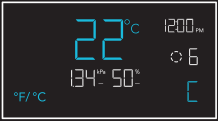
AJUSTE °F/°C
Changes the displayed units to Fahrenheit or Celsius. All displayed units automatically convert when adjusting this setting.
AJUSTE DEL RELOJ
Adjusts the current clock time. Cycling through 12:00 will automatically change the units to AM or PM.

AJUSTE DE CALIBRACIÓ
Adjusts the temp. and humidity readings the sensor probe is measuring. The calibration cycle ranges from -20°F to 20°F (-10°C to 10°C) for temp. and -10% to 10% for humidity.

VPD LEAF OFFSET
Adjusts the sensor probe’s VPD reading in 1° increments. The calibration cycle ranges from -20°F to 20°F (or -10°C to 10°C).

Screen elements are enlarged for display purposes only.
TRANSITION SETTINGS
The transition setting adjusts how your device will shift between levels when triggered to run in AUTO Mode (temperature and/or humidity) or VPD Mode. In high triggers, this will create intervals above your set trigger point. In low triggers, this will create intervals below your set trigger point.
For each interval the probe reading passes, your device’s level will adjust by one. Please note your device’s levels will be limited by your min and max level settings.

CONFIGURACIÓ DEL BUFER
This setting creates a gap from your AUTO Mode temperature, humidity, and VPD triggers. This sets a separate trigger-off point to keep your device from triggering too quickly due to small climate fluctuations.
While a buffer setting is active, your device will stay on after triggering, remaining on even after the reading falls below your set trigger point. Your device will only turn off when the reading falls below the separate trigger-off point.
HIGH TRIGGEW
En aquest example, your set trigger point is 89°F and buffer setting is 6°F. After turning on, your device will stay on until the temperature reaches 83°F.

- Trigger OFF point 83°F
- Trigger ON point 89°F
LOW TRIGGERS
En aquest example, your set trigger point is 51 °F and buffer setting is 6°F. After turning on, your device will stay on until the temperature reaches 57°F.

- Trigger ON point 51°F
- Trigger OFF point 57°F
 Dreceres del controlador
FÀBRICA RESE
Mantingueu premuts els botons de mode, amunt i avall junts durant 5 segons per restablir el controlador i restaurar la configuració de fàbrica.
MANTENIM


BLOQUEU DEL CONTROLADOR
Manteniu premut el botó de configuració per bloquejar el controlador en el seu mode actual. Manteniu premut el botó de configuració per desbloquejar el controlador.
MANTENIM

OCULTAR PANTALLA
Bloqueja el controlador perquè no es pugui ajustar cap configuració. Veure més amunt. A continuació, premeu el botó de configuració per apagar la pantalla. Si torneu a prémer-lo, es tornarà a encendre la pantalla.
PREMSA
SALTAR AL MODE DESACTIVAT
Manteniu premut el botó de mode durant 3 segons en qualsevol mode o configuració per saltar automàticament al mode OFF.
MANTENIM
RESE ‘TO OFF/DEFALP
Mantingueu premuts els botons amunt i avall junts durant 2 segons per restablir el valor del vostre mode actual o la configuració del controlador.
MANTENIM
AUGMENT AUTOMÀTICASING O DECREASING
Manteniu premut el botó amunt o avall per augmentar o reduir la configuració de l'usuari automàticament fins que els deixeu anar.
HOLD HOLD
OR
MÉS INFORMACIÓ

Visita el nostre weblloc a www.acinfinity.com for more information on how to program CONTROLLER 69 PRO.
Preguntes freqüents

WEBLLOC | www.acinfinity.com
CORREU ELECTRÒNIC | support@acinfinity.com
TELÈFON | 626-923-6399, de 9:5 a XNUMX:XNUMX PST
ADREÇA | 21880 BAKER PARKWAY
CIUTAT DE LA INDÚSTRIA, CA 91789
DISTRIBUIDORS
CORREU ELECTRÒNIC | dealers@acinfinity.com
TELÈFON | 626-838-4656, de 9:5 a XNUMX:XNUMX PST
GARANTIA

El nostre programa de garantia és el nostre compromís amb vostè, el client original, que el producte venut per AC Infinity Inc. estigui lliure de defectes durant DOS ANYS a partir de la data de compra. Si teniu cap problema amb aquest producte, poseu-vos en contacte amb nosaltres i resoldrem el vostre problema amb molt de gust o us reemborsem completament!
COPYRIGHT © 2023 AC INFINITY INC. TOTS ELS DRETS RESERVATS
Cap part dels materials, inclosos els gràfics o els logotips disponibles en aquest fullet, no es poden copiar, fotocopiar, reproduir, traduir o reduir a cap mitjà electrònic o forma llegible per màquina, totalment o parcialment, sense el permís específic d'AC Infinity Inc.
CONTROLADOR 69 PRO
GUIA RÀPIDA D'INICIACIÓ


AC INFINITY

CORNER RADIUS: 10mm
Documents/Recursos
 |
AC Infinity Controller 69 Independent Programs [pdfGuia de l'usuari 230510, CTR69P2305X1, Controller 69 Independent Programs, Controller 69, Independent Programs, Programs |