1. Introducció
Gràcies per la compraasing the AIWA BBTC-550 Portable Radio Cassette Player. This versatile device combines classic audio formats with modern connectivity, allowing you to enjoy your music from various sources. Please read this manual carefully before using the unit to ensure proper operation and to maximize your listening experience. Keep this manual for future reference.
Característiques principals:
- Portable Radio Cassette with CD reader, USB, and Bluetooth 5.0 connection.
- Cassette player and recorder with Auto-Stop function.
- USB port for MP3 music playback.
- AUX IN input (3.5mm) for connecting external audio devices.
- Headphone socket (3.5mm).
- Compatible with CD/CD-R/MP3 discs with 20 programmable memories.
- FM PLL Radio with 40 programmable station presets.
- Digital clock with 24-hour display.
- High-frequency range dynamic speakers with super bass and amplified treble.
- Panoramic LCD screen with soft tonality backlight.
2. Producte acabatview
The AIWA BBTC-550 is designed for ease of use and portability. Below are images illustrating the device's main components and features.

Figura 2.1: Frontal view of the AIWA BBTC-550, showing the display, control buttons, and speakers.

Figura 2.2: De dalt a baix view of the AIWA BBTC-550 with the CD compartment lid open.

Figura 2.3: lateral view of the AIWA BBTC-550 with the cassette compartment door open and the telescopic antenna extended.

Figure 2.4: Close-up of the side panel showing the 3.5mm headphone jack, 3.5mm AUX IN port, and USB/MP3 port.
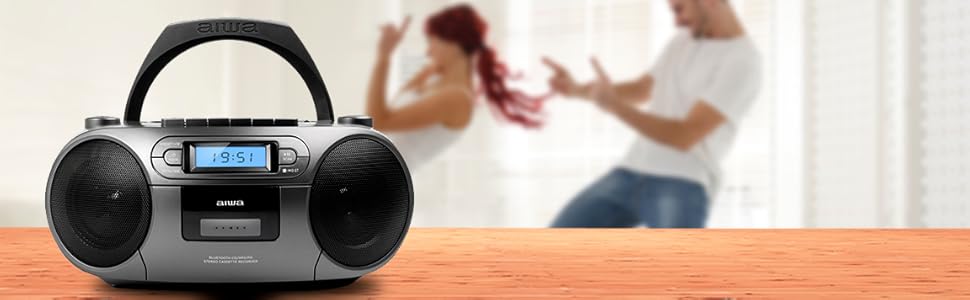
Figure 2.5: Promotional image highlighting the multi-functionality of the AIWA BBTC-550.
3. Configuració
3.1 Font d'alimentació
The AIWA BBTC-550 can be powered by either AC mains electricity or batteries for portable use.
- Alimentació CA: Connect the provided AC power cord to the AC IN socket on the unit and then to a standard 230V/50Hz wall outlet.
- Potència de la bateria: For portable use, insert 6 x 1.5V LR14/UM2/C batteries into the battery compartment located on the bottom of the unit. Ensure correct polarity (+/-) when inserting batteries.
3.2 Ajust de l'antena
For optimal FM radio reception, fully extend the telescopic antenna. Adjust its position and angle to achieve the clearest signal.
4. Instruccions de funcionament
4.1 Controls generals
- Botó d'encendre: Premeu per encendre o apagar la unitat.
- Botó MODE: Press to switch between CD, USB, Bluetooth, Radio, and Cassette modes.
- Pom de VOLUM: Gireu per ajustar el nivell de so.
- Pantalla LCD: Shows current mode, track number, frequency, and time.
4.2 Reproducció de CD
- Premeu el botó MODE botó per seleccionar el mode CD.
- Open the CD compartment lid and place a CD (CD/CD-R/MP3 compatible) with the label side facing up. Close the lid securely.
- The unit will read the disc, and the total number of tracks will appear on the display.
- Premeu el botó PLAY/PAUSE (►/❚❚) per iniciar la reproducció.
- Premeu PLAY/PAUSE (►/❚❚) again to pause, and press once more to resume.
- Premeu el botó OMET (►►| / |◄◄) botons per saltar a la pista següent o anterior.
- Premeu el botó ATURAR (■) botó per aturar la reproducció.
- Reproducció del programa: Mentre esteu en mode d'aturada, premeu la tecla PROG/HORA botó. Utilitza el SALTAR buttons to select a track, then press PROG/HORA again to add it to the program list. Repeat for up to 20 tracks. Press JUGAR per iniciar la reproducció programada.
4.3 Cassette Operation
- Premeu el botó MODE button to select Cassette mode.
- Open the cassette compartment door and insert a cassette tape. Close the door.
- Reproducció: Premeu el botó REPRODUIR (►) button to start playing the tape.
- Avançar/rebobinar ràpid: Premeu el botó FF (►►) or REW (◄◄) botons. Premeu ATURAR (■) per aturar l'enrotllament.
- Atura: Premeu el botó ATURAR (■) button to stop playback or winding. The unit features an Auto-Stop function at the end of the tape.
- Gravació: Insert a blank cassette. Select the desired audio source (CD, USB, Bluetooth, Radio, or AUX IN). Press the REGISTRE (●) button on the cassette deck. The unit will start recording from the selected source. Press ATURAR (■) per acabar d’enregistrar.
Reproducció USB 4.4
- Premeu el botó MODE botó per seleccionar el mode USB.
- Inseriu una unitat flash USB que contingui àudio MP3 files al port USB.
- The unit will automatically detect and start playing the MP3 files.
- Utilitza el PLAY/PAUSE (►/❚❚) i OMET (►►| / |◄◄) buttons for control, similar to CD playback.
4.5 Connexió Bluetooth
- Premeu el botó MODE button to select Bluetooth mode. The display will show 'BT' and start flashing, indicating it's in pairing mode.
- Al dispositiu amb Bluetooth (telèfon intel·ligent, tauleta, etc.), activeu el Bluetooth i cerqueu els dispositius disponibles.
- Select 'AIWA BBTC-550' from the list of devices.
- Once paired, the unit will emit a confirmation sound, and 'BT' on the display will stop flashing.
- You can now play audio from your connected device through the AIWA BBTC-550. Use your device or the unit's controls for playback.
4.6 Ràdio FM
- Premeu el botó MODE button to select FM Radio mode.
- Esteneu l'antena telescòpica per a una millor recepció.
- Escaneig automàtic: Manteniu premut el botó ESCANEAR button to automatically scan and save available FM stations. The unit can store up to 40 presets.
- Sintonització manual: Premeu breument ESCANEAR button to manually tune up or down the frequency.
- Seleccioneu presets: Utilitza el PRESET (+10) botó per anar ciclant per les estacions desades.
4.7 AUX IN
- Premeu el botó MODE botó per seleccionar el mode AUX IN.
- Connect an external audio device (e.g., MP3 player, smartphone) to the 3.5mm AUX IN port using a 3.5mm audio cable (not included).
- Play audio from your external device. The sound will be output through the AIWA BBTC-550 speakers.
- Adjust the volume using the unit's VOLUME knob and/or your external device's volume control.
4.8 Ús d'auriculars
To listen privately, plug 3.5mm stereo headphones into the HEADPHONES socket. The speakers will automatically mute when headphones are connected.
4.9 Configuració del rellotge
The unit features a digital clock with a 24-hour display.
- En mode d'espera, manteniu premut el botó PROG/HORA botó.
- Utilitza el OMET (►►| / |◄◄) botons per ajustar l'hora. Premeu PROG/HORA per confirmar.
- Utilitza el OMET (►►| / |◄◄) botons per ajustar els minuts. Premeu PROG/HORA to confirm and exit clock setting mode.
5. Especificacions
| Característica | Especificació |
|---|---|
| Nom de marca | AIWA |
| Número de model | BBTC-550 |
| Tipus | AM / FM Radio Cassette Player |
| Estil | Taula / Portàtil |
| Material del cos | Plàstic |
| Dimensions (AxAxP) | 38 x 38 x 26 cm |
| Pes (producte) | Aprox. 2.04 kg |
| Bluetooth | Sí (versió 5.0) |
| WIFI | No |
| Pantalla | Yes (Panoramic LCD with backlight) |
| Compatibilitat amb CD | CD/CD-R/MP3 |
| Reproducció USB | MP3 files |
| AUX IN | presa de 3.5 mm |
| Sortida d'auriculars | presa de 3.5 mm |
| Presets de ràdio | 40 (FM PLL) |
| Font d'alimentació (CA) | 230V/50Hz |
| Font d'alimentació (CC) | 6 x 1.5V LR14/UM2/C batteries |
| Certificació | CE, RoHS |
| Origen | Xina |
| Dimensions del paquet | 36.7 x 29 x 17.7 cm |
| Pes del paquet | 2.5 kg |
6. Manteniment
6.1 Neteja de la unitat
- Desconnecteu sempre la unitat de la font d'alimentació abans de netejar-la.
- Utilitzeu un drap suau i sec per netejar les superfícies exteriors.
- Per a marques difícils, esbandiu lleugeramentampNetegeu el drap amb aigua i un detergent suau i, a continuació, eixugueu-lo immediatament.
- No utilitzeu netejadors abrasius, ceres o dissolvents, ja que poden danyar l'acabat.
6.2 Cura de les lents de CD
- Never touch the CD lens.
- If the CD lens gets dirty, use a commercially available CD lens cleaner to clean it.
6.3 Cassette Deck Care
- Regularly clean the tape heads, capstan, and pinch roller with a cotton swab lightly moistened with tape head cleaner or isopropyl alcohol.
- Demagnetize the tape heads periodically to prevent sound degradation.
6.4 Substitució de la bateria
- When the unit's performance diminishes or the display dims, it's time to replace the batteries.
- Open the battery compartment, remove old batteries, and insert new ones, ensuring correct polarity.
- Eliminar les piles velles de manera responsable d'acord amb la normativa local.
- Traieu les piles si no heu d'utilitzar la unitat durant un període prolongat per evitar fuites.
7. Solució De Problemes
If you encounter any issues with your AIWA BBTC-550, please refer to the following common problems and solutions:
| Problema | Causa possible | Solució |
|---|---|---|
| Sense poder | AC cord not properly connected; Batteries depleted or incorrectly inserted. | Comproveu la connexió del cable de CA; substituïu les piles, assegurant-vos de la polaritat correcta. |
| Sense so | Volum massa baix; Auriculars connectats; Mode incorrecte seleccionat. | Increase volume; Disconnect headphones; Select the correct mode (CD, USB, BT, Radio, AUX). |
| El CD salta o no es reprodueix | CD is dirty or scratched; CD inserted incorrectly; Lens is dirty. | Clean or replace CD; Insert CD with label side up; Clean CD lens. |
| El casset no reprodueix/grava | Tape heads/capstan dirty; Cassette damaged; Incorrect mode. | Clean tape heads/capstan; Try a different cassette; Ensure Cassette mode is selected. |
| Bluetooth no connectat | Unit not in pairing mode; Bluetooth disabled on external device; Device too far. | Ensure unit is in Bluetooth pairing mode; Enable Bluetooth on your device; Move device closer (within 10m). |
| Mala recepció de ràdio FM | Antenna not extended/adjusted; Weak signal area. | Esteneu i ajusteu completament l'antena telescòpica; proveu de moure la unitat a una altra ubicació. |
| USB no reconegut | USB drive formatted incorrectly; Files not MP3; USB drive damaged. | Ensure USB is FAT32 format; Check files are MP3; Try a different USB drive. |
8. Garantia i Suport
The AIWA BBTC-550 comes with a standard manufacturer's warranty. Please refer to the warranty card included in your product packaging for specific terms and conditions, including the warranty period and coverage details.
Atenció al client:
If you experience any problems with your unit that are not covered in the troubleshooting section, or if you require further assistance, please contact your retailer or the AIWA customer support service in your region. Keep your purchase receipt as proof of purchase for warranty claims.
For the latest information and support, you may also visit the official AIWA weblloc.


