1. Introducció
Thank you for choosing the VEVOR Thermal Imaging Camera HT-W01. This portable device is designed to provide high-resolution thermal imaging capabilities directly to your Android or iOS smartphone, enabling quick diagnosis and easy troubleshooting across various applications. With its advanced features and user-friendly design, you can efficiently identify temperature anomalies in electrical systems, plumbing, HVAC, and building inspections.

2. Informació de seguretat
Si us plau, llegiu i comprengui totes les instruccions de seguretat abans d'utilitzar aquest producte. Si no segueix aquestes instruccions, pot provocar descàrregues elèctriques, incendis o lesions greus.
- No exposeu el dispositiu a temperatures extremes, llum solar directa ni humitat elevada.
- Mantingueu el dispositiu allunyat de l'aigua i altres líquids.
- No intenteu desmuntar ni modificar el dispositiu. Les reparacions només les ha de realitzar personal qualificat.
- Use only the specified charging cable (TYPE-C) to charge the device.
- Avoid pointing the thermal camera directly at intense heat sources for prolonged periods, as this may damage the sensor.
- Ensure the device is securely attached to your smartphone to prevent accidental drops.
3. Contingut del paquet
Verifiqueu que tots els elements siguin presents al vostre paquet:
- VEVOR Thermal Imaging Camera HT-W01
- Cable de càrrega TIPUS C
- Manual d'usuari (aquest document)
4. Producte acabatview
The VEVOR HT-W01 Thermal Imaging Camera offers advanced features for precise thermal analysis:
- High-Definition Thermal Imaging: 256 x 192 IR resolution for clear visuals.
- Ampli rang de temperatures: Detects temperatures from -4°F to 1022°F (-20°C to 550°C).
- Alta sensibilitat tèrmica: 32.18°F / 0.1°C for capturing subtle temperature variations.
- Compatibilitat amb telèfons intel·ligents: Connects wirelessly to most Android and iOS smartphones.
- Freqüència d'actualització ràpida: 25Hz ensures smooth, real-time image display without lag.
- Càmera de llum visible: Integrated 640 x 480 pixels visible light camera for image overlay (Picture-in-Picture, PIP).
- Enfocament automàtic: No manual focusing required for easier operation.
- Hotspot Tracking: Automatically identifies and tracks the hottest point in the image.
- Disseny durador: IP54 rated for waterproof and shockproof protection.
- Llarga vida útil de la bateria: Built-in Lithium-ion battery provides approximately 2 hours of continuous use.
- Estàndard File Formats: Saves images as JPG and videos as MPEG-4 (MOV for iOS, MP4 for Android).


5. Especificacions
| Característica | Especificació |
|---|---|
| Número de model de l'article | HT-W01 |
| Resolució d'imatges tèrmiques | 256 x 192 píxels |
| Visible Light Camera Resolution | 640 x 480 píxels |
| Pixel Pitch | 12 µm |
| Sensibilitat tèrmica | 32.18 °F / 0.1 °C |
| Distància de focus | 0.13 polzades / 3.2 mm |
| Emissivitat ajustable | 0.01-1.00 |
| Camp de View | 56.0° × 42.0° |
| Interval de longituds d'ona | 8-14 µm |
| Tipus d'interfície | TIPUS-C |
| Material principal | ABS + PC + Zinc Alloy |
| Temperatura de funcionament | De 14 °F a 122 °F / -10 °C a 50 °C |
| Pes net | 0.55 lliures / 0.25 kg |
| Interval de detecció de temperatura | -4 °F a 1022 °F / -20 °C a 550 °C |
| Temperatura d'emmagatzematge | -4 °F a 140 °F / -20 °C a 60 °C |
| Precisió de la mesura de la temperatura | 300°C ~ 550°C: ±4%; -15°C ~ 300°C: ±2°C or ±2%; -20°C ~ -15°C: ±4% |
| Dimensions del producte | 5.98 x 1.4 x 1.34 polzades / 152 x 35.6 x 34 mm |
| Bateria | Lithium-ion, approx. 2 hours battery life |
| Classificació de protecció | IP54 (Waterproof and Shockproof) |
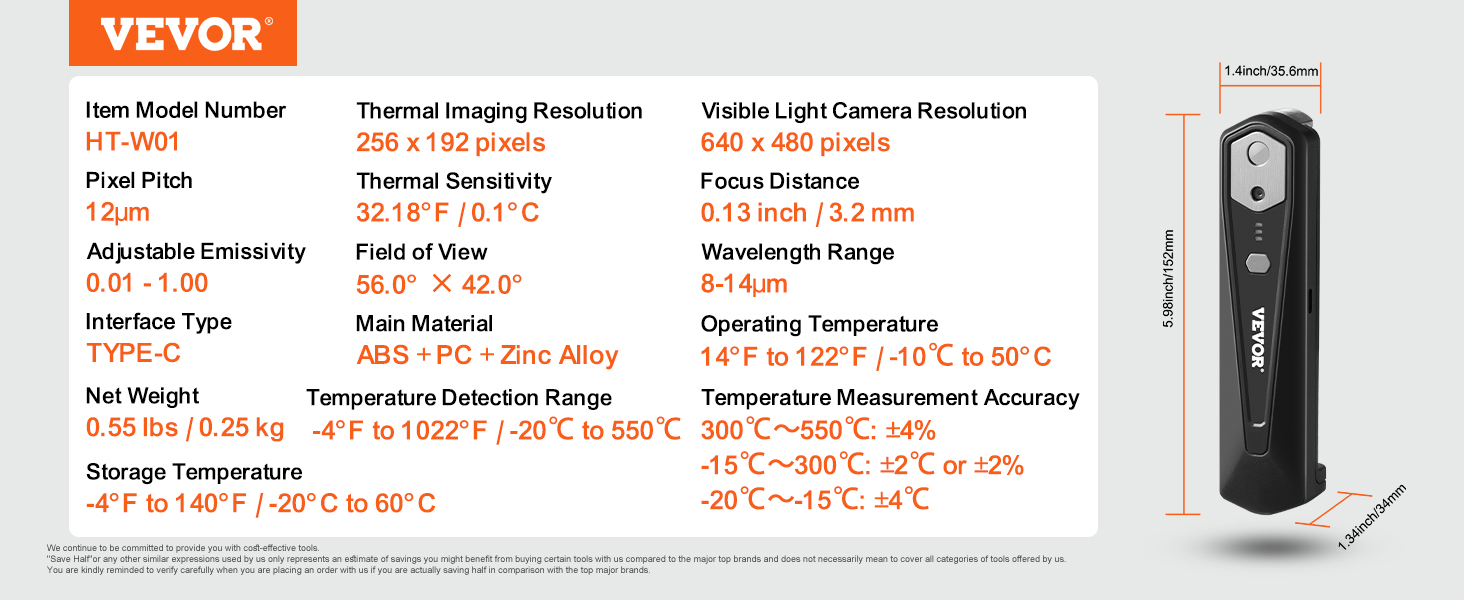

6. Configuració
- Carregueu el dispositiu: Before first use, fully charge the thermal imaging camera using the provided TYPE-C charging cable. Connect the cable to the camera's TYPE-C port and a suitable USB power source.
- Instal·leu l'aplicació: Download and install the official VEVOR thermal imaging application from your smartphone's app store (Google Play Store for Android, Apple App Store for iOS). Cerca "VEVOR Thermal Imager" or refer to the QR code in the product packaging if available.
- Connexió al telèfon intel·ligent:
- Attach the thermal imaging camera to your smartphone. The camera is designed to connect wirelessly.
- Open the VEVOR thermal imaging application on your smartphone.
- Follow the on-screen prompts within the app to establish a wireless connection with the camera. The camera typically creates its own Wi-Fi network or connects via Wi-Fi Direct.

7. Instruccions de funcionament
- Encès: Press and hold the power button on the thermal imaging camera until the indicator lights illuminate.
- Inicia l'aplicació: Open the VEVOR thermal imaging application on your connected smartphone. The app should automatically detect and connect to the camera.
- Real-time Thermal View: The app will display a live thermal image feed. The 25Hz refresh rate ensures a smooth, real-time view of temperature changes.
- Visible Light & PIP Mode: Utilize the visible light camera feature to overlay thermal and visual images. This can be activated within the app settings, often referred to as Picture-in-Picture (PIP) mode, to enhance detail and context.
- Hotspot Tracking: The camera automatically tracks and highlights the hottest point in the frame. This feature is useful for quickly identifying areas of concern.
- Captura imatges/vídeos: Use the dedicated buttons within the app to capture thermal images (JPG) or record videos (MOV for iOS, MP4 for Android).
- Ajustar la configuració: Explore the app's settings to adjust emissivity, color palettes, temperature units, and other parameters to suit your inspection needs.
- Apagar: After use, press and hold the power button on the camera until the indicator lights turn off. Close the application on your smartphone.


8. Manteniment
- Neteja: Feu servir un drap suau i sec per netejar la lent i el cos de la càmera. No utilitzeu productes de neteja abrasius ni dissolvents.
- Emmagatzematge: Guardeu el dispositiu en un lloc fresc i sec, allunyat de la llum solar directa i de temperatures extremes.
- Cura de la bateria: Per a una durada òptima de la bateria, eviteu descarregar-la completament amb freqüència. Carregueu el dispositiu regularment, fins i tot si no l'utilitzeu durant períodes prolongats.
9. Solució De Problemes
- El dispositiu no s'encén:
- Ensure the battery is charged. Connect the device to a power source using the TYPE-C cable and try again.
- Unable to connect to smartphone:
- Verify that the VEVOR app is installed and updated to the latest version. Ensure your smartphone's Wi-Fi is enabled and try reconnecting through the app. Restart both the camera and your smartphone if the issue persists.
- Image appears blurry or inaccurate:
- The camera features automatic focusing, so manual adjustment is not needed. Ensure the lens is clean and free from obstructions. Check the emissivity settings in the app, as incorrect emissivity can affect temperature readings.
- Autonomia curta de la bateria:
- Ensure the device is fully charged before use. Battery performance can degrade over time. Operating in very cold environments may also reduce battery life.
10. Consells d'usuari
- Connexió òptima: The camera connects wirelessly to your smartphone, likely creating its own Wi-Fi network or using Wi-Fi Direct. Ensure no other strong Wi-Fi signals are interfering during operation for a stable connection.
- Connectivitat versàtil: The TYPE-C interface is primarily for charging. While the main data transfer is wireless, the TYPE-C port might also support direct data transfer or firmware updates depending on the app's functionality.
- Ajust d'emissivitat: For accurate temperature measurements, especially on different materials, adjust the emissivity setting in the app. Different surfaces emit infrared radiation differently.
- Hotspot Tracking: Use the hotspot tracking feature to quickly locate overheating components in electrical panels or insulation gaps in buildings.
- Image Overlay: Leverage the visible light camera and PIP mode to get a clearer understanding of the thermal anomalies in context with the real-world view.
11. Garantia i Suport
Per obtenir informació sobre la garantia i assistència tècnica, consulteu la pàgina oficial de VEVOR. weblloc web o contacteu directament amb el servei d'atenció al client de VEVOR. Conserveu el rebut de compra com a comprovant de compra.


