1. Introducció
The BESTA Vesta BK-50 is a portable electronic dictionary and language learning machine designed to assist students and language learners. It features multiple dictionaries, a touch screen, and various learning functions to enhance your language acquisition experience.

2. Contingut del paquet
Si us plau, comproveu que tots els articles estiguin presents al vostre paquet:
- BESTA Vesta BK-50 Electronic Dictionary Unit
- Cable de càrrega USB
- Adaptador d'alimentació
- Bossa protectora
- Manual d'usuari (aquest document)

3. Configuració
3.1 Càrrega del dispositiu
- Connect the USB charging cable to the BK-50's charging port.
- Connecteu l'altre extrem del cable USB a l'adaptador d'alimentació.
- Inseriu l'adaptador de corrent a una presa de corrent estàndard.
- The device will indicate charging status on the screen. A full charge typically takes approximately 2-3 hours.
3.2 Engegada/apagada
- To power on: Press and hold the Power button (usually located on the side or top edge) until the screen illuminates.
- To power off: Press and hold the Power button until a power-off prompt appears on the screen, then confirm. A short press usually puts the device into sleep mode.
3.3 Initial Setup and Language Selection
Upon first power-on or after a factory reset, you may be prompted to select your preferred system language. Follow the on-screen instructions to navigate and select your language. The BK-50 supports multiple interface languages.

4. Instruccions de funcionament
4.1 Keyboard Layout and Function Buttons
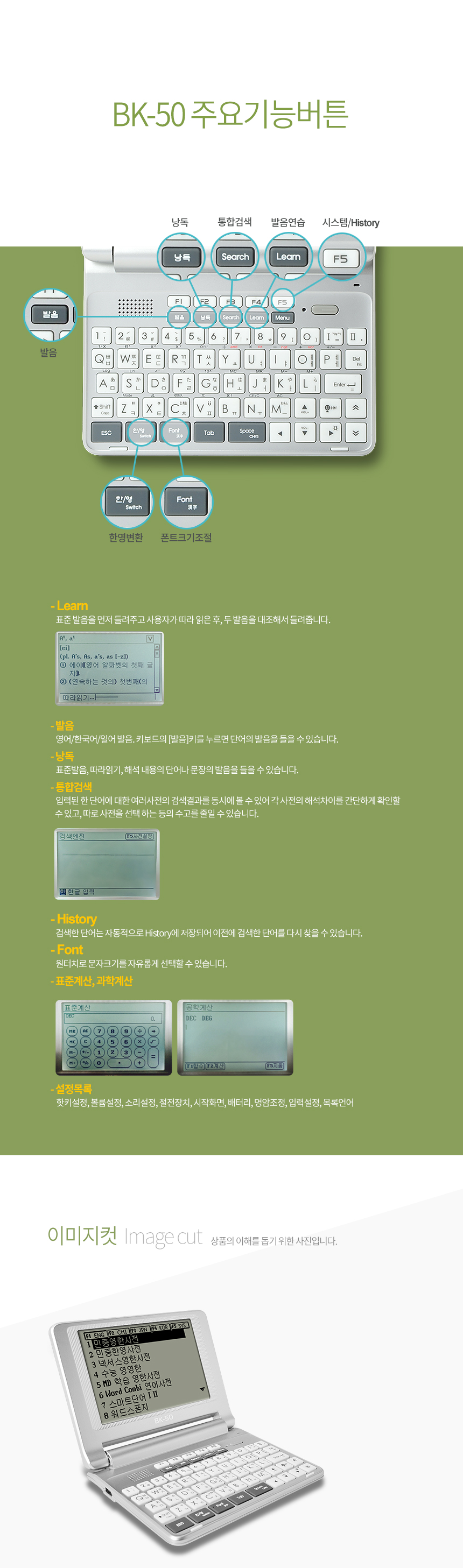
The BK-50 features a QWERTY keyboard for easy text input and dedicated function buttons for quick access to features.

- Tecles F1-F5: These keys often correspond to specific dictionary or application shortcuts displayed on the screen.
- Cerca: Initiates a dictionary search for the entered word.
- Aprèn: Accesses various learning modes and exercises.
- Menú: Opens the main menu or context-sensitive options.
- ESC: Torna a la pantalla anterior o cancel·la una operació.
- Introduïu: Confirms selections or inputs.
- Directional Pad/Touch Screen: Use either the physical directional pad or the touch screen for navigation.
4.2 Dictionary Usage
- From the main menu, select the desired dictionary (e.g., English, Chinese, Japanese, Korean).
- Type the word you wish to look up using the QWERTY keyboard.
- As you type, the device may display predictive text or a list of matching words.
- Press 'Enter' or select the word from the list to view its definition, pronunciation, and example sentences.
4.3 Funcions d'aprenentatge
The BK-50 includes features to aid in language learning:
- Word Combi: A feature for combining words or phrases.
- Smart Word: Intelligent word learning system.
- Memo/Notes: Save words or phrases for later review.
- Història: Review previously looked-up words.
- TXT File Suport: The device supports reading TXT files, allowing you to load and read e-books or study materials directly on the device.
4.4 Backlight Feature
The BK-50 is equipped with a backlight to improve screen visibility in low-light conditions. This feature can typically be toggled on or off via a dedicated button or through the system settings menu to conserve battery life.
4.5 Sortida d'àudio
The device includes a 3.5mm headphone jack, allowing you to connect headphones for private listening of pronunciations or audio content without disturbing others.
5. Manteniment
5.1 Neteja
- Feu servir un drap suau, sec i sense borrissol per netejar l'exterior del dispositiu.
- For the screen, use a screen-specific cleaning solution and a microfiber cloth. Do not spray liquid directly onto the screen.
- Eviteu utilitzar productes químics agressius, netejadors abrasius o dissolvents.
5.2 Emmagatzematge
- Guardeu el dispositiu en un lloc fresc i sec, allunyat de la llum solar directa i de temperatures extremes.
- Si l'emmagatzemeu durant un període prolongat, assegureu-vos que la bateria estigui parcialment carregada (al voltant del 50%) per allargar-ne la vida útil.
- Use the provided protective pouch to prevent scratches and minor impacts.
5.3 Cura de la bateria
- Eviteu esgotar completament la bateria amb freqüència.
- Do not expose the device to temperatures above 60°C (140°F) as this can damage the battery.
- Use only the original or certified compatible charging accessories.
6. Solució De Problemes
If you encounter issues with your BESTA Vesta BK-50, please refer to the following common solutions:
| Problema | Possible causa/solució |
|---|---|
| El dispositiu no s'encén |
|
| La pantalla no respon o s'ha bloquejat |
|
| No sound from speaker/headphones |
|
| Cannot find a word in the dictionary |
|
7. Especificacions
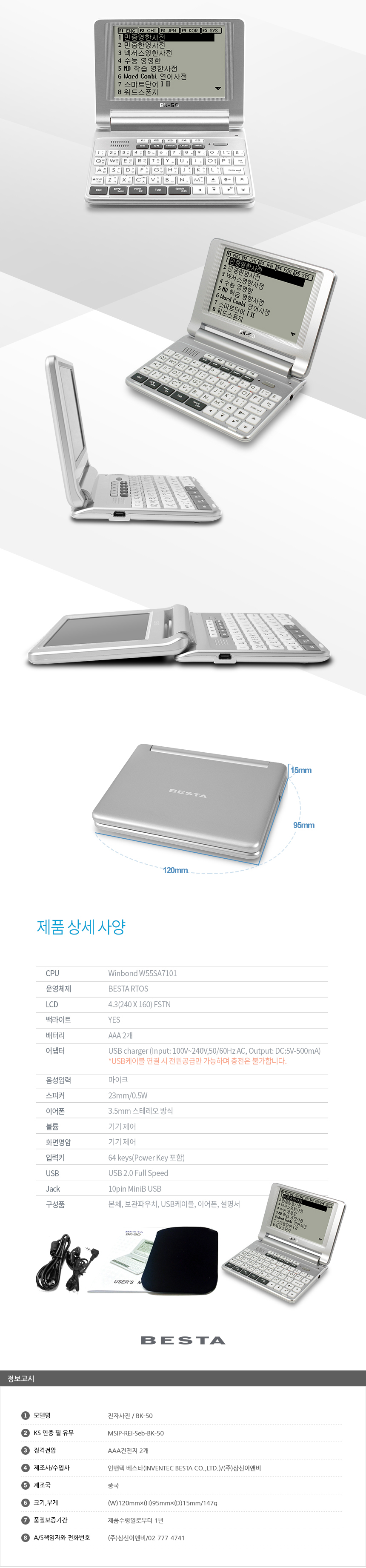
The following table outlines the key specifications of the BESTA Vesta BK-50:
| Característica | Detall |
|---|---|
| Model | BK-50 |
| Material del cos | Plàstic |
| Mida de la pantalla | 4.3 inches TFT LCD (480x272 resolution) |
| Pantalla tàctil | Sí |
| CPU | ARM11 720MHz |
| RAM | 128 MB |
| Emmagatzematge intern | 4 GB |
| Emmagatzematge ampliable | Ranura MicroSD (fins a 32 GB) |
| Interfície de producte | 3.5mm Headphone Jack, USB 2.0 |
| Tipus de suport | TXT (for e-books/documents) |
| Bateria | 1500 mAh |
| Sistema operatiu | Windows CE 6.0 |
| Altaveu | 1W |
| Dimensions (tancat) | Approx. 128mm (Width) x 20mm (Thickness) |
| Pes | Aprox. 150 g (0.33 lliures) |
8. Garantia i Suport
The BESTA Vesta BK-50 is backed by a manufacturer's warranty. For specific details regarding your warranty period and coverage, please refer to the documentation provided at the time of purchase or contact the seller directly.
8.1 Suport tècnic
For technical assistance, troubleshooting beyond this manual, or warranty claims, please contact the seller, Alphax Plusmile Store, through the platform where you made your purchase. They will be able to provide guidance or direct you to the appropriate service channels.
In some regions, a 1-month exchange policy for product defects may apply. Please retain your proof of purchase for any warranty or exchange claims.
9. Consells d'usuari
- Càrrega regular: To maintain optimal battery health, avoid letting the battery completely discharge too often. Charge it regularly, especially if you use it frequently.
- Protecció de pantalla: Although it has a touch screen, consider using a screen protector to prevent scratches and smudges, ensuring clear visibility.
- Utilize Learning Modes: Explore the various learning functions like "Word Combi" and "Smart Word" to maximize your language study efficiency. These tools are designed to reinforce vocabulary and grammar.
- Emmagatzematge extern: If you plan to load many TXT files or other media, consider using a MicroSD card to expand the device's storage capacity.
- Ús d'auriculars: For focused study or in noisy environments, use headphones with the 3.5mm jack to clearly hear pronunciations and audio content.


