1. Introducció
The OWON XSA1000P Series Spectrum Analyzer is a high-performance instrument designed for professionals in electronics and telecommunications. It offers advanced spectrum analysis and signal generation capabilities, making it an essential tool for various applications including research, development, and testing. This manual provides detailed instructions for the safe and efficient operation, setup, and maintenance of your device.
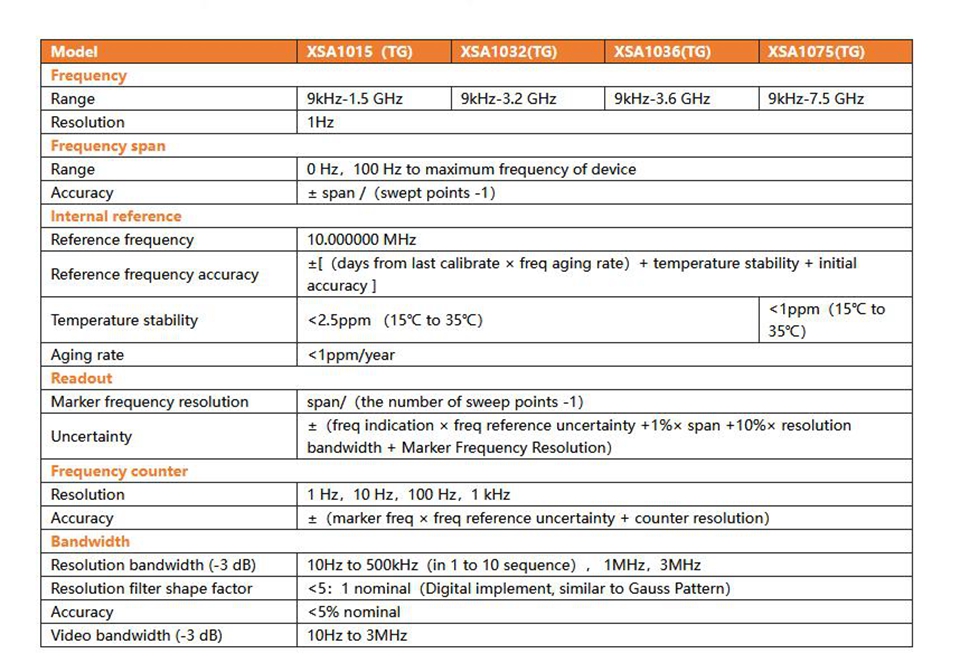
The XSA1000P series includes models XSA1015P-TG (9kHz-1.5GHz) and XSA1032P-TG (9kHz-3.2GHz), both equipped with a 10.4-inch TFT LCD touch screen and an integrated tracking generator.
2. Contingut del paquet
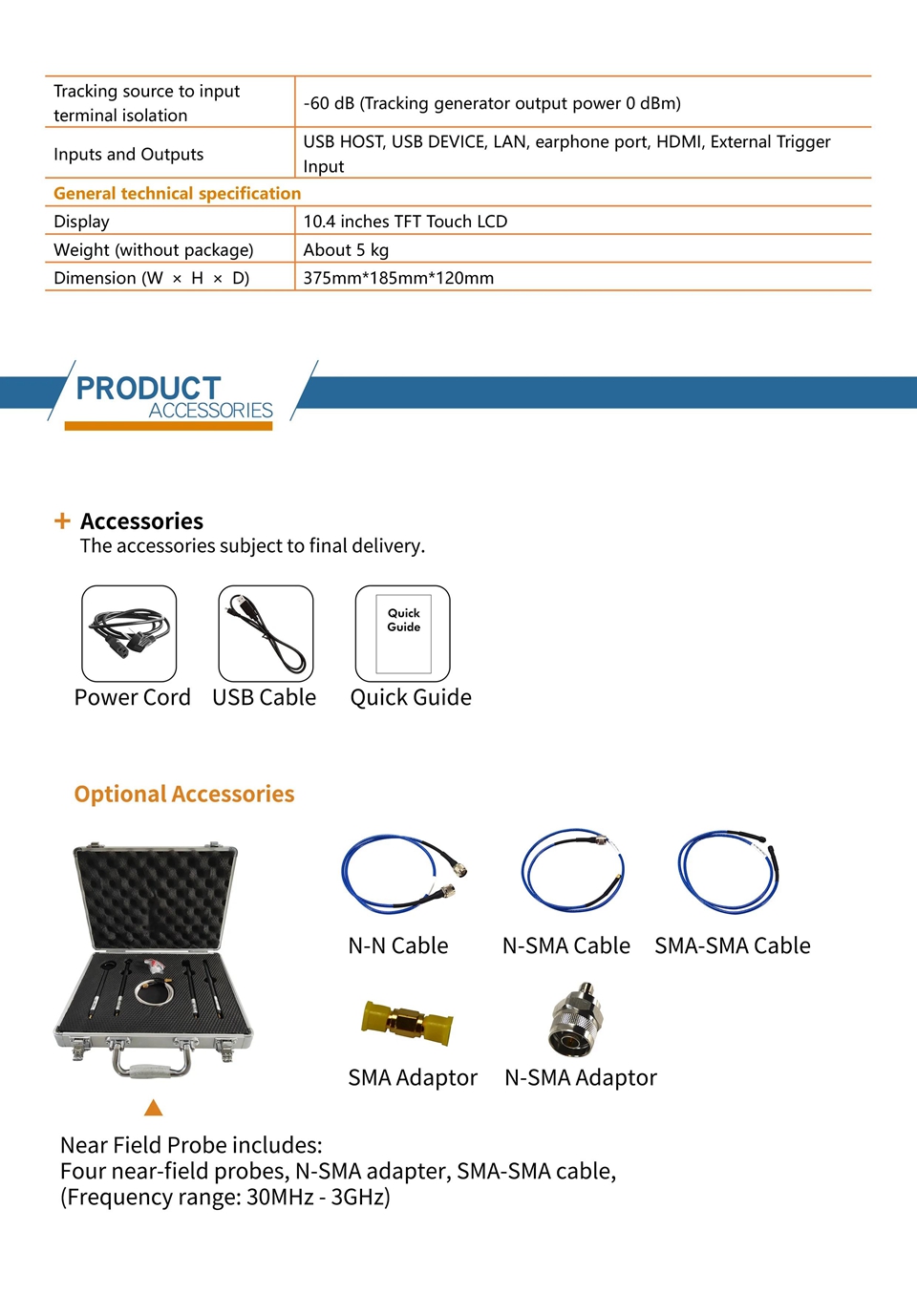
Upon receiving your OWON XSA1000P Spectrum Analyzer, please verify that all standard accessories are included and in good condition. The package typically contains:
- OWON XSA1000P Series Spectrum Analyzer (main unit)
- Cable d'alimentació
- Cable USB
- Guia ràpida
- Programari CD
Optional accessories may include various cables (N-N, N-SMA, SMA-SMA), SMA adaptors, N-SMA adaptors, and a near-field probe kit for EMI pre-compliance testing.
3. Característiques i aspectes destacats del producte
The OWON XSA1000P Series Spectrum Analyzer is equipped with a range of features designed for precision and ease of use:
- Ampli rang de freqüències: 9KHz to 3.2GHz (model dependent) for versatile signal analysis.
- Integrated Tracking Generator: Ensures accurate tracking and measurement of signals in higher frequency bands.
- Alta sensibilitat: Displayed Average Noise Level (DANL) of -163dBm.
- Excellent Phase Noise: -106dBc/Hz at 1GHz and 10kHz offset.
- High Resolution Bandwidth: 1Hz minimum resolution bandwidth (RBW) for distinguishing nearby signals.
- 10.4-inch Multi-Touch Screen: Provides a clear, detailed, and interactive visual representation of the spectrum.
- EMI Pre-Compliance Test Function: Equipped with EMI filter and quasi-peak detector (requires optional software).
- Múltiples interfícies: USB Host, USB Device, LAN, earphone interface, HDMI-compatible for flexible connectivity.
- Standard Pass/Fail Function: Quickly determine if test results meet specified criteria.
- Waterfall Plot Graphic: View the behavior of varying signal parameters over time.
- Extended Function Modes: Includes modulation signal quality analysis, audio demodulation, channel measurement, and frequency counter.

4. Configuració i instal·lació
Follow these steps to set up your OWON XSA1000P Spectrum Analyzer:
- Desembalatge: Carefully remove the spectrum analyzer and all accessories from the packaging. Retain the packaging for future transport or storage.
- Col·locació: Place the unit on a stable, flat surface with adequate ventilation. Ensure there is enough space around the unit for air circulation.
- Connexió d'alimentació: Connect the provided power cord to the AC power connector on the rear panel of the analyzer and then to a suitable power outlet (100V-240V 50/60Hz).
- Encesa inicial: Press the power key on the front panel to turn on the device. The system will boot up and display the main interface.
- Interface Connections (Optional):
- Amfitrió USB: Per connectar dispositius d'emmagatzematge USB o altres perifèrics.
- Dispositiu USB: For connecting to a PC for data transfer or remote control.
- LAN: Per a la connectivitat de xarxa.
- Interfície d'auriculars: Per a la sortida d'àudio.
- HDMI: Per connectar a una pantalla externa.
- RF Input Connector: Connect your signal source here. Max input +30dBm / 50VDC.
- Tracking Generator Output: Connect to the device under test for sweep measurements.
- Trigger Input Connector: For external trigger signals.
- Reference Clock In/Out: For external synchronization.

5. Instruccions de funcionament
The XSA1000P series features an intuitive interface with a touch screen, physical buttons, and a rotary knob for navigation and control.
5.1 Funcionament bàsic
- Encès/apagat: Use the power key on the front panel.
- Navegació: Use the touch screen, menu softkeys, function keys, rotary knob, and arrow keys to navigate menus and adjust parameters.
- Configuració de freqüència: Press the 'FREQ' button to access frequency settings. Use the numeric keypad or rotary knob to set start, stop, or center frequencies.
- Amplitude Setting: Premeu la tecla 'AMPTD' button to adjust reference level, attenuation, and other amplitude-related parameters.
- Ajust d'abast: Use the 'SPAN' button to set the frequency span for your measurement.
- Ample de banda (BW): Adjust Resolution Bandwidth (RBW) and Video Bandwidth (VBW) using the 'BW' button.
5.2 Funcions avançades
- Tracking Generator: Activate the tracking generator for swept measurements. Ensure the output is connected to your device under test.
- Captura ràpida: Utilize the quick capture function to rapidly analyze transient signals.

- EMI Pre-Compliance Test: If equipped with optional software, use the EMI test function to identify and resolve electromagnetic interference issues.

- Waterfall Plot: Use the waterfall plot graphic to visualize signal changes over time, particularly useful for intermittent signals.

- Modulation Analysis: Perform modulation signal quality analysis, audio demodulation, channel measurement, and frequency counting.

6. Manteniment
Proper maintenance ensures the longevity and accuracy of your spectrum analyzer:
- Neteja: Regularly clean the exterior of the unit with a soft, dry cloth. For the screen, use a specialized screen cleaner and a microfiber cloth. Avoid abrasive cleaners or solvents.
- Ventilació: Assegureu-vos que les obertures de ventilació estiguin lliures de pols i obstruccions per evitar el sobreescalfament.
- Emmagatzematge: When not in use for extended periods, store the analyzer in a cool, dry environment, preferably in its original packaging or a protective case.
- Calibració: For optimal performance, periodic calibration by qualified personnel is recommended.
7. Solució De Problemes
If you encounter issues with your spectrum analyzer, refer to the following common problems and solutions:
- Sense energia:
- Comproveu si el cable d'alimentació està connectat correctament tant a la unitat com a la presa de corrent.
- Comproveu que la presa de corrent funcioni.
- No es mostra cap senyal:
- Ensure the RF input connector is properly connected to the signal source.
- Check the signal source for proper operation.
- Comproveu la freqüència i amplitude settings on the analyzer are appropriate for the input signal.
- Check if the input attenuator is set too high.
- Lectures inestables:
- Ensure proper grounding of the unit and signal source.
- Check for external interference sources.
- Adjust RBW and VBW settings.
- La pantalla tàctil no respon:
- Reinicieu el dispositiu.
- Assegureu-vos que la pantalla estigui neta i lliure de residus.
Si el problema continua, poseu-vos en contacte amb el servei d'atenció al client per obtenir ajuda.
8. Especificacions
Detailed technical specifications for the OWON XSA1000P Series Spectrum Analyzer:
Especificacions tècniques generals
| Paràmetre | Especificació |
|---|---|
| Mostra | 10.4 inches TFT Touch LCD |
| Pes (sense paquet) | Uns 5 kg |
| Dimensió (W × H × D) | 375 mm × 185 mm × 120 mm (main device) |
| Temperatura de treball | 0 ~ 40 °C |
| Temperatura d'emmagatzematge | -20 °C a +60 °C |
| Poder | 100V–240V 50/60Hz |
| Bateria inclosa | Sí |
| Subministraments de bricolatge | Elèctric |
| Origen | Xina continental |
Frequency Specifications
| Paràmetre | XSA1015P(TG) | XSA1036P(TG) | XSA1075P(TG) |
|---|---|---|---|
| Interval de freqüència | 9 kHz-1.5 GHz | 9 kHz-3.6 GHz | 9 kHz-7.5 GHz |
| Resolució | 1 Hz | ||
| Frequency Span Range | 0 Hz, 100 Hz to maximum frequency of device | ||
| Frequency Span Accuracy | ± span / (swept points -1) | ||
| Freqüència de referència interna | 10 MHz | ||
| Taxa d'envelliment | <1ppm/year | ||
| Minimum Resolution Bandwidth | 1 Hz | ||
Amplitude Specifications
| Paràmetre | Especificació |
|---|---|
| Amplitude Measurement Range (XSA1015P) | DANL to +10 dBm, 100KHz to 10MHz, close the preampmés viu DANL to +20 dBm, 10MHz to max frequency, close the preampmés viu |
| Max Input DC Voltage | 50 VDC |
| Max Continuous Wave RF Power | +20 dBm (100 mW), attenuation = 40 dB |
| Max Damage Level | +30 dBm (1W) |
| Displayed Average Noise Level (DANL) | -163dBm (típic) |
| Soroll de fase | -106 dBc/Hz @ 10 kHz offset |
| Level Display Range | dBm, dBuW, dBpV, dBmV, dBuV, W, V |
| Nombre de traces | 8 |
| Detectors | Positive-peak, negative-peak, sample, normal, RMS, Average, quasi-peak (with EMI option) |


9. Consells d'usuari
- Optimize RBW: For distinguishing closely spaced signals, utilize the 1Hz minimum resolution bandwidth. This can significantly improve the clarity of your measurements.
- Utilize Touch Screen: The 10.4-inch multi-touch screen allows for quick adjustments and intuitive navigation. Don't hesitate to use touch gestures for zooming and panning.
- Pantalla externa: For collaborative work or detailed analysis, connect an external monitor via the HDMI port to view the spectrum on a larger screen.
- Registre de dades: Use the USB Host interface to connect a USB drive for saving measurement data and screenshots for later analysis or reporting.
10. Garantia i Suport
For warranty information, technical support, or service inquiries, please contact your authorized OWON distributor or the manufacturer directly. Keep your purchase receipt and product serial number handy when contacting support.
Refer to the official OWON weblloc web per obtenir els recursos de suport, les preguntes freqüents i la informació de contacte més actualitzats.


