1. Introducció
The FOSCAM BP4 is a 2K (4MP) wireless outdoor security camera designed for home surveillance. It features a built-in rechargeable battery and is powered by a high-efficiency solar panel, offering a truly wire-free installation. With advanced features like color night vision, PIR human detection, and sound and light alarms, the BP4 provides reliable and intelligent monitoring for your property. This manual will guide you through the setup, operation, and maintenance of your FOSCAM BP4 camera.
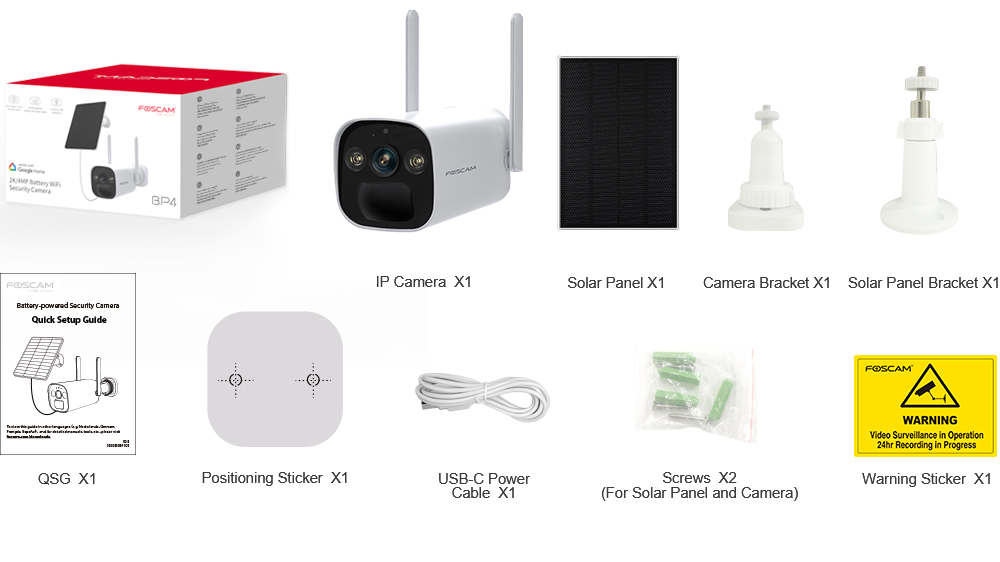
2. Contingut del paquet
Please check the package carefully to ensure all items are present and in good condition. If anything is missing or damaged, please contact FOSCAM support.
- IP Camera (BP4) x1
- Panell solar x1
- Suport de càmera x1
- Suport de panell solar x1
- Quick Setup Guide (QSG) x1
- Adhesiu de posicionament x1
- USB-C Power Cable x1
- Screws x2 (for Solar Panel and Camera)
- Adhesiu d'advertència x1
3. Característiques clau
- 2K (4MP) Quad HD Video: Captura imatges clares i detalladestage with a resolution of 2560 x 1440 pixels at 20 frames per second.
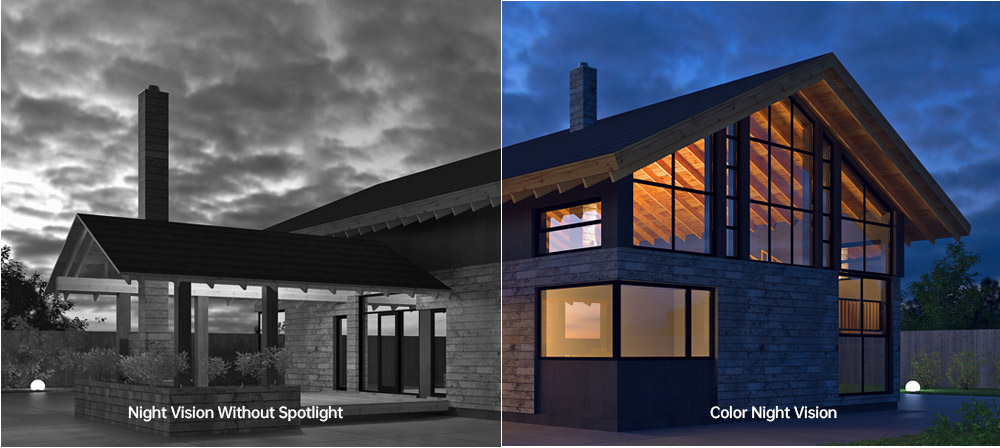
- Visió nocturna en color: Equipped with 2pcs Spotlight IR LED, providing a night vision range up to 10m (33ft) and supporting full-color images even in low-light conditions.
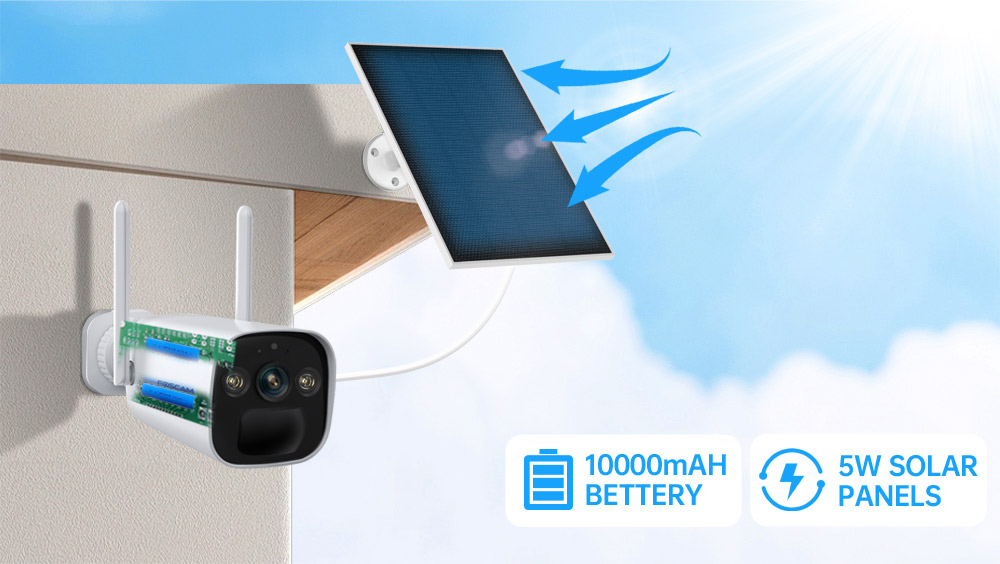
- Rechargeable Battery & Solar Panel: Features a 10000mAh rechargeable battery (4pcs 18650 battery included) and a 5W high-efficiency solar panel for continuous power, ensuring truly wire-free operation.
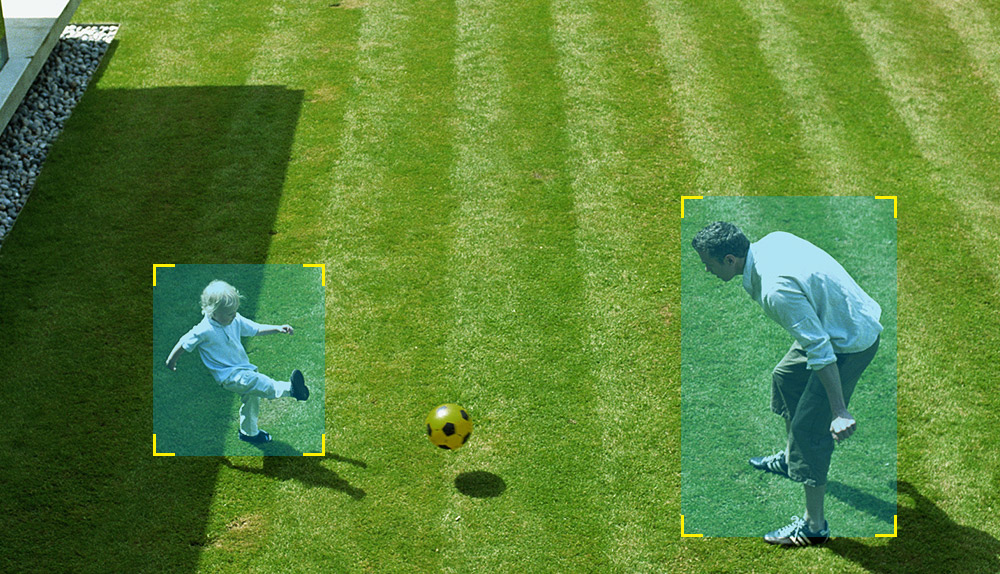
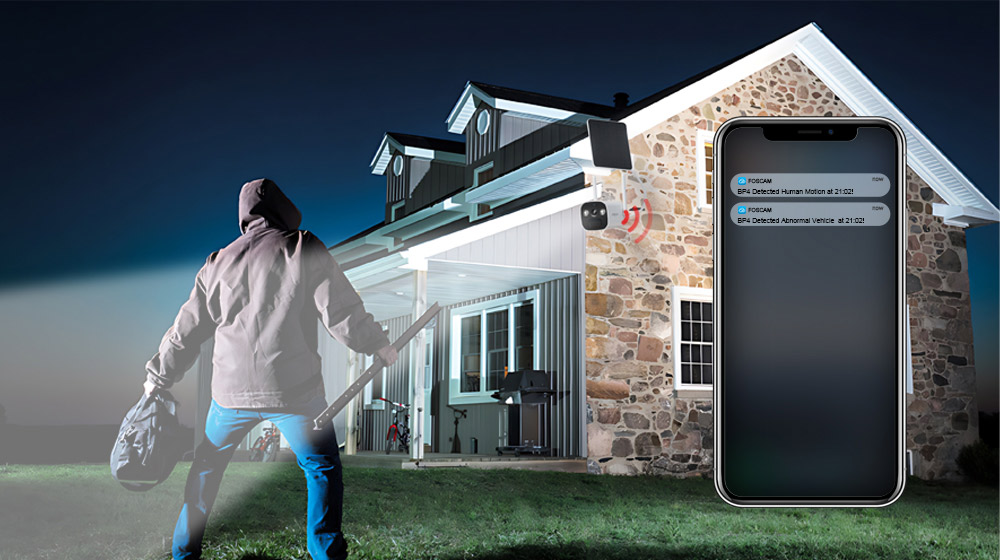
- Detecció PIR humana: Advanced Passive Infrared (PIR) sensor distinguishes human movement from other objects, reducing false alarms and sending accurate alerts.
- Alarma de so i llum: Triggers a spotlight and a siren (up to 110dB) upon detection of an intruder, acting as a deterrent. Can also be manually activated.
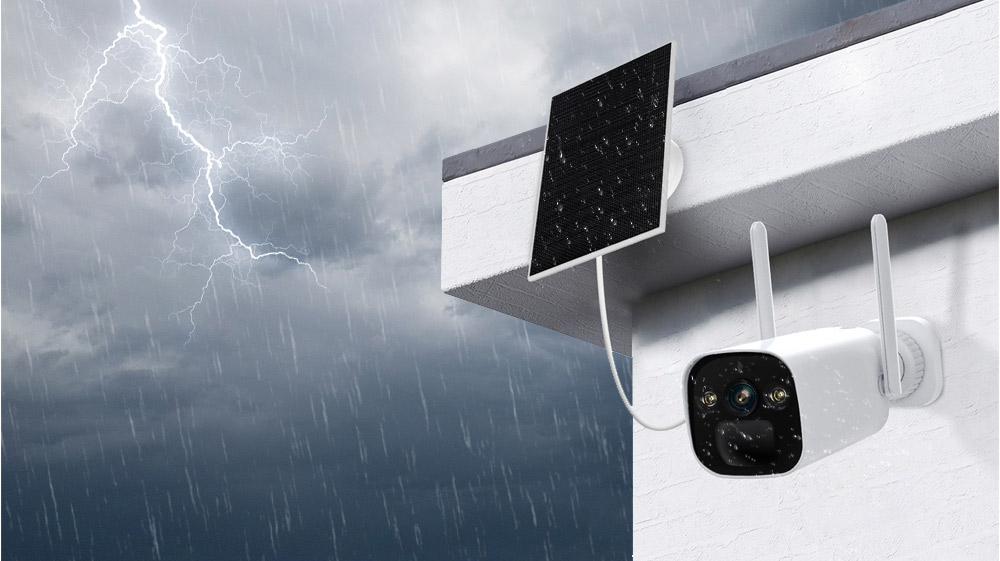
- IP66 Rated Weatherproof: Designed to withstand harsh outdoor weather conditions, operating reliably in temperatures from -20°C to 60°C (-4°F to 140°F).
- Àudio bidireccional: Built-in microphone and speaker allow for real-time communication with visitors or intruders.
- Integració de la llar intel·ligent: Supports integration with Alexa and Google Home for convenient voice control and smart home automation.
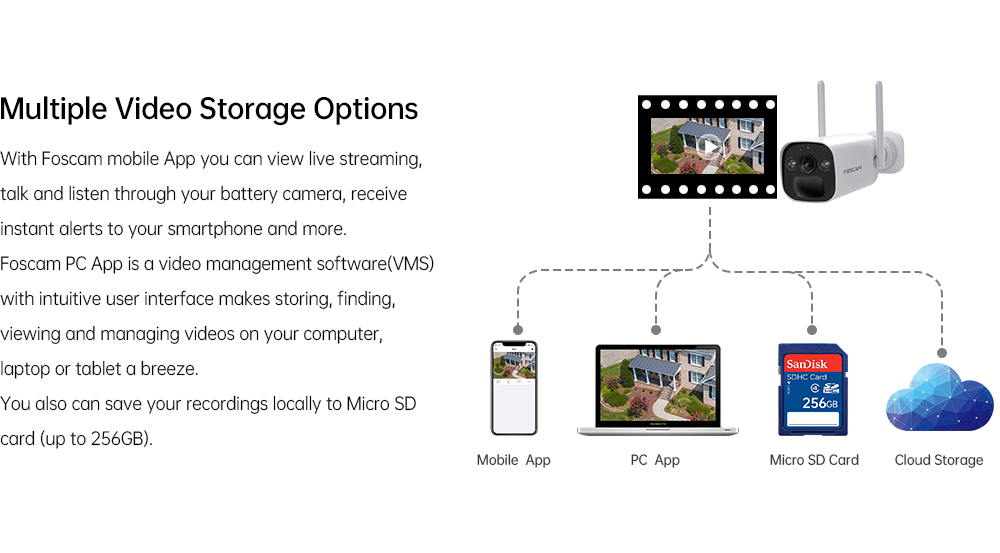
- Múltiples opcions d'emmagatzematge: Supports local storage via Micro SD Card (up to 256GB) and Foscam cloud storage for flexible video recording and backup.
- Compressió de vídeo H.264: Efficient video compression technology to save storage space and bandwidth.
- P2P Feature: Enables easy remote access to your camera feed from anywhere.
- Mobile App & VMS Compatibility: Compatible with the free Foscam iOS and Android APP, as well as Foscam Video Management Software (VMS) for Windows and macOS.

4. Guia de configuració
4.1 Instal·lació física
- Trieu una ubicació: Select an outdoor location that provides the desired viewangle d'ing i rep ample direct sunlight for the solar panel. Ensure the camera is within range of your 2.4GHz Wi-Fi network.
- Muntar el suport de la càmera: Use the positioning sticker to mark drill holes. Drill holes and insert wall plugs if necessary. Secure the camera bracket to the wall using the provided screws.
- Mount the Solar Panel Bracket: Similarly, choose a location for the solar panel that maximizes sun exposure. Mount the solar panel bracket using the provided screws.
- Attach Camera and Solar Panel: Attach the FOSCAM BP4 camera to the camera bracket and the solar panel to its bracket. Adjust their angles for optimal coverage and sun exposure.
- Connecteu el panell solar: Connect the USB-C cable from the solar panel to the USB-C port on the camera.
4.2 Instal·lació de l'aplicació i configuració inicial
- Download Foscam App: Cerca 'Foscam' in the App Store (iOS) or Google Play Store (Android) and download the official Foscam app.
- Crea un compte: Open the app and register for a new Foscam account if you don't have one.
- Afegeix una càmera: Tap the '+' icon in the app to add a new device. Follow the on-screen instructions to scan the QR code on your camera or manually enter its details.
- Connecta't a Wi-Fi: The app will guide you through connecting the camera to your 2.4GHz Wi-Fi network. Ensure your phone is connected to the same 2.4GHz network during this process.
- Configura la configuració: Once connected, you can name your camera, set a password, and configure initial settings like time zone and recording preferences.
5. Instruccions de funcionament
5.1 Viu View
Open the Foscam app and select your BP4 camera from the device list. You will see the live video feed. From here, you can:
- Take Snapshots: Captura imatges fixes del canal en directe.
- Record Manually: Start and stop video recording manually.
- Use Two-Way Audio: Tap the microphone icon to speak through the camera's speaker, and listen through your phone.
- Zoom digital: Pinch to zoom in on the live video feed.
5.2 Enregistrament i reproducció
The FOSCAM BP4 supports event-triggered recording (motion/human detection) and continuous recording (with cloud subscription or local storage). Recorded footage can be accessed via the app or Foscam VMS.
- Accés a les gravacions: In the app, navigate to the camera's settings or playback section to view vídeos emmagatzemats.
- Filter Events: Use filters to quickly find recordings based on date, time, or event type (e.g., human detection).
5.3 Configuració d'alarma
Configure the camera's detection and alarm features for optimal security.
- Detecció PIR humana: Enable or disable human detection. Adjust sensitivity levels and detection zones to minimize false alarms.
- Alarma de so i llum: Set the camera to automatically trigger its spotlight and siren when an intruder is detected. You can also manually activate these alarms from the app.
- Notificacions: Ensure push notifications are enabled in the Foscam app and your phone's settings to receive instant alerts.
6. Manteniment
- Càrrega de la bateria: The solar panel will continuously charge the internal battery. If the camera is in a shaded area or during prolonged cloudy weather, you may need to manually charge the battery using the USB-C power cable and a DC 5V/2A USB power adapter (not included).
- Neteja: Netegeu periòdicament la lent de la càmera i la superfície del panell solar amb un drap suau i sec.amp drap per garantir un rendiment òptim. Eviteu productes de neteja abrasius.
- Actualitzacions de firmware: FOSCAM regularly releases firmware updates to improve performance and add new features. Check the Foscam app for available updates and follow the instructions to install them.
- Micro SD Card Management: If using a Micro SD card, ensure it is formatted correctly (FAT32 recommended for cards over 32GB, check app for specific instructions). Regularly review i fer una còpia de seguretat dels aliments importantstage, and consider setting up automatic overwriting for continuous recording.
7. Solució De Problemes
7.1 La càmera no es connecta a la Wi-Fi
- Ensure your Wi-Fi network is 2.4GHz. The BP4 does not support 5GHz Wi-Fi.
- Check that the camera is within range of your Wi-Fi router.
- Verifiqueu que la contrasenya del Wi-Fi introduïda a l'aplicació sigui correcta.
- Restart your router and the camera, then try connecting again.
7.2 Mala qualitat de vídeo
- Comproveu la intensitat del senyal Wi-Fi. Un senyal feble pot afectar la qualitat del vídeo.
- Assegureu-vos que la lent de la càmera estigui neta i lliure d'obstruccions.
- Adjust the camera's position to avoid direct glare or strong backlighting.
7.3 Battery Not Charging / Draining Quickly
- Ensure the solar panel is receiving direct sunlight for several hours a day. Clear any obstructions.
- Comproveu la connexió entre el panell solar i la càmera.
- Extreme cold temperatures can affect battery performance.
- Freqüent en directe view access or excessive motion detections can drain the battery faster. Adjust detection sensitivity and recording schedules.
7.4 Falses alarmes
- Adjust the PIR detection sensitivity in the app.
- Define specific detection zones to exclude areas with frequent non-human movement (e.g., trees swaying, passing cars).
- Ensure the camera is not pointing directly at heat sources or reflective surfaces that could trigger the PIR sensor.
8. Especificacions

| Categoria | Item | Especificació |
|---|---|---|
| Protagonisme | Temperatura de color | 6500K |
| Sensor d'imatge | Tipus de sensor | Sensor CMOS de color d'alta definició |
| Resolució de visualització | 4.0 Megapixels (2560*1440) | |
| Min. Il·luminació | 0 Lux (amb il·luminador IR) | |
| Lent | Tipus de lent | f: 3.3 mm; F2.0 |
| Angle de view | Diagonal: 104°, Horitzontal: 89°, Vertical: 48° | |
| Vídeo | Compressió d'imatge | H.264 |
| Resolució | 2K (2560*1440) 20fps, VGA (640 x 360) | |
| Corrent | Doble flux | |
| Gira la imatge | Flip i mirall | |
| Zoom digital | Zoom digital de 20× | |
| Mode infraroig | Automatic / Color Night / Night Vision | |
| Visibilitat nocturna | With 2pcs Spotlight and IR LED, Night Vision Range up to 10m (33ft) | |
| Àudio | Entrada/sortida | Full Duplex two-way audio |
| Sirena | Supports maximum 110dB alarm siren | |
| Xarxa | Estàndard sense fils | IEEE802.11b/g/n |
| Seguretat sense fils | WPA, WPA2 | |
| Accés remot | P2P | |
| Protocol de xarxa | IP, TCP, UDP | |
| Requisits del sistema | Sistema operatiu | Microsoft Windows (Foscam VMS), Mac OS (Foscam VMS), Android (Foscam app), iOS (Foscam app) |
| Altres característiques | Detecció de distància PIR | Ajustable fins a 8 m (26.2 peus) |
| Angle de detecció PIR | 110 ° horitzontal | |
| Alarma intel·ligent | PIR Detection/Human Detection | |
| Emmagatzematge | Support max 256G Micro SD card, Foscam cloud storage | |
| Bloqueig de privadesa | Sí | |
| Assistent intel·ligent | Admet Alexa, Google Home | |
| Poder | Bateria | 10000mAh rechargeable battery (battery life varies based on settings, usage & temperature) |
| Solar | Placa solar de 5W | |
| Potència CC | DC 5V/2A USB power adapter (Not included) | |
| Física | Mida (LxWxH) | 67 mm * 67 mm * 203 mm |
| Pes net | 690 g | |
| Medi ambient | Impermeable | IP66 |
| Temperatura de funcionament | -20 °C ~ 60 °C (-4 °F ~ 140 °F) | |
| Humitat de funcionament | 10% ~ 80% sense condensació | |
| Temperatura d'emmagatzematge | -20 °C ~ 60 °C (-4 °F ~ 140 °F) | |
| Humitat d'emmagatzematge | 0% ~ 90% sense condensació | |
| Temperatura de càrrega de la bateria | 0 °C ~ 45 °C (32 °F ~ 113 °F) | |
| Certificació | Certificacions | FCC, CE, RoHS, WEEE, IP66 |
9. Consells d'usuari
- Col·locació òptima dels panells solars: For best battery performance, ensure the solar panel is installed in a location that receives at least 4-6 hours of direct sunlight daily. Avoid shaded areas.
- Intensitat del senyal Wi-Fi: Before final installation, use your smartphone to check the Wi-Fi signal strength at the camera's intended location to ensure a stable connection.
- Customize Detection Zones: To reduce unwanted notifications, utilize the Foscam app to draw specific detection zones, focusing on critical areas and excluding public pathways or moving foliage.
- Comprovacions regulars de l'aplicació: Periodically check the Foscam app for battery status, recording history, and any available firmware updates to keep your camera running smoothly.
10. Garantia i Suport
FOSCAM products come with a standard manufacturer's warranty. For detailed warranty information, technical support, or service inquiries, please visit the official FOSCAM weblloc web o contacteu directament amb el servei d'atenció al client. Conserveu el rebut de compra com a comprovant de compra per a reclamacions de garantia.


